
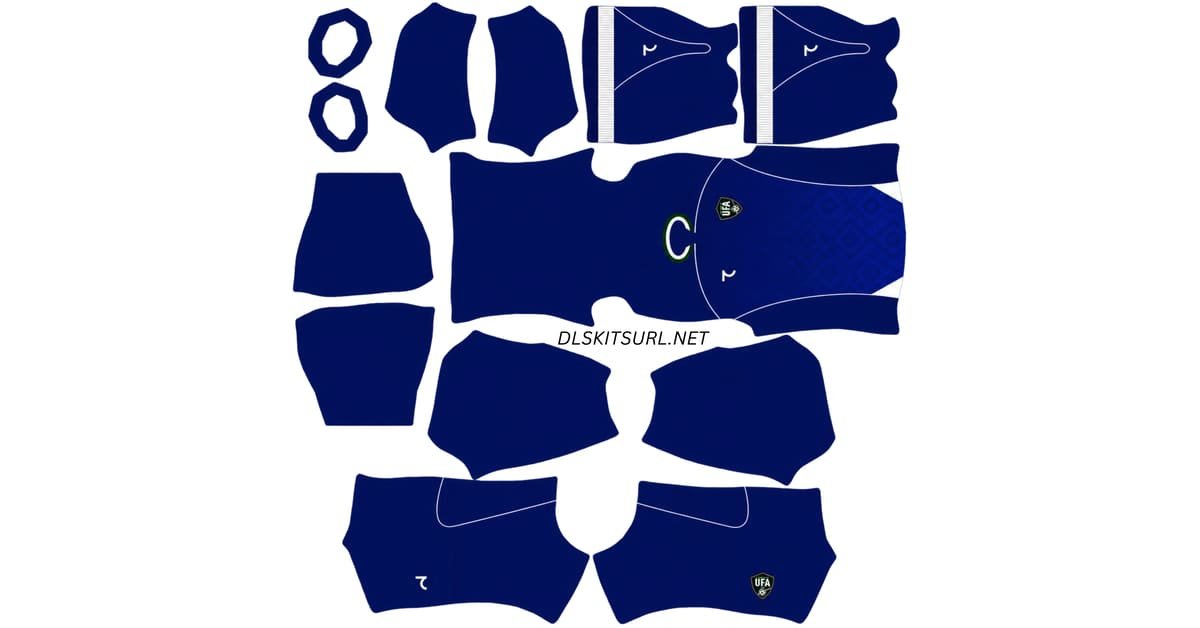
An Uzbekistan DLS kits URL is a direct link to a 512×512 PNG Uzbekistan shirt that you can paste into Dream League Soccer. Both kits are featured below, with each image loaded into the game before being added to this page.
Uzbekistan Logo
Official Logo 512×512 (2026/27)
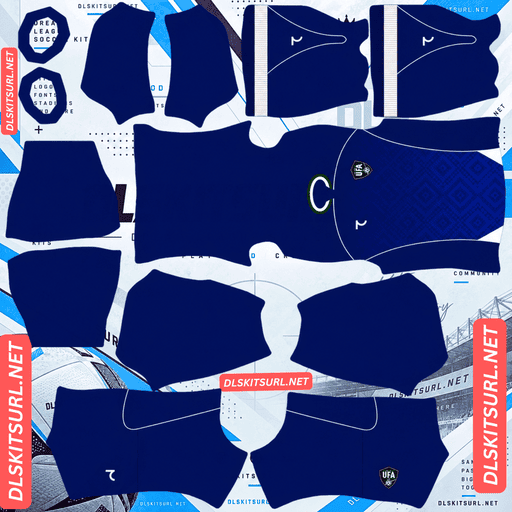
Uzbekistan Home Kit
Home Kit 512×512 (2026/27)
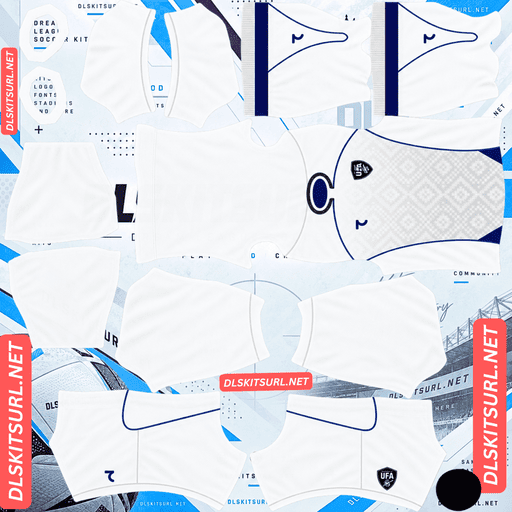
Uzbekistan Away Kit
Away Kit 512×512 (2026/27)
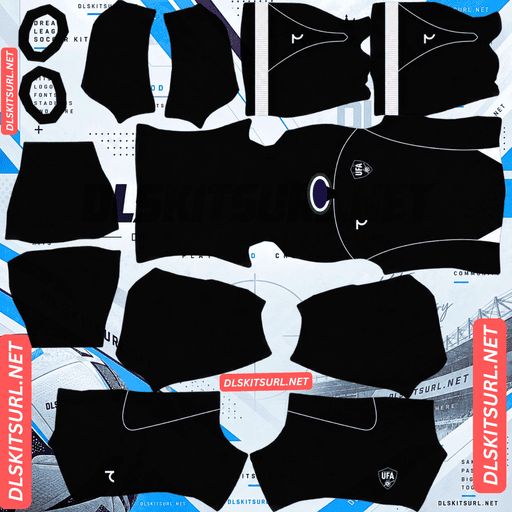
Uzbekistan Home GK Kit
Home GK Kit 512×512 (2026/27)
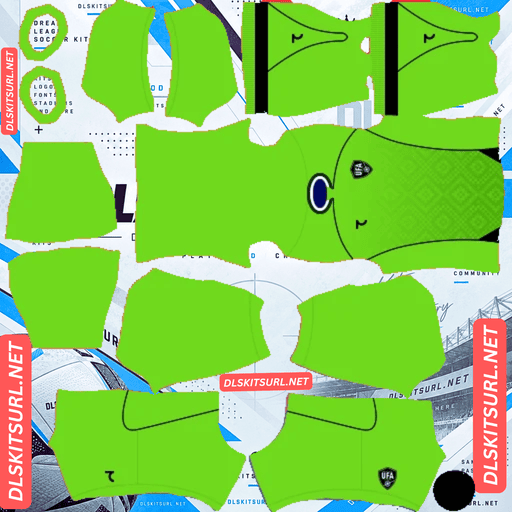
Uzbekistan Away GK Kit
Away GK Kit 512×512 (2026/27)
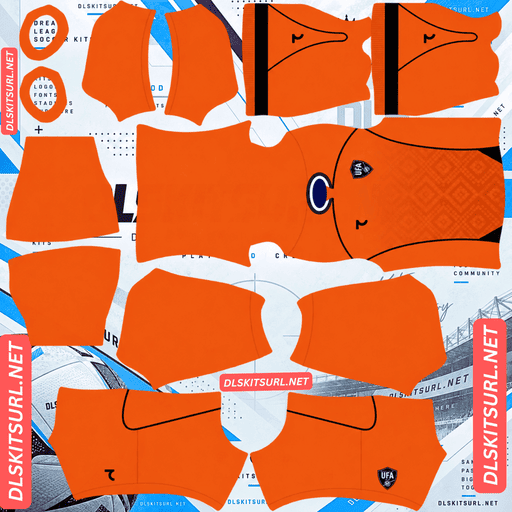
Uzbekistan Third GK Kit
Third GK Kit 512×512 (2026/27)
These are the shirts Uzbekistan wore at their first-ever FIFA World Cup, made by a local brand making its own debut as the national team’s supplier. They also feature an unusual typography detail that makes DLS’s built-in font a surprisingly suitable replacement.
The Font Is Borrowed from La Liga
On most kit pages, there is a familiar limitation: Dream League Soccer uses its own built-in font for squad names and numbers, so custom typography from the original shirt cannot be imported. This usually means losing lettering designed specifically for a particular team.
Uzbekistan are an unusual case.
For their 2026 World Cup shirts, the names and numbers use the official La Liga font from the 2017–18 season. It is not a typeface created specifically for Uzbekistan, but a Spanish league font that is several years old.
The federation also used the same typeface on its previous kits when Jako was the supplier.
Why the Game’s Own Font Is No Worse
Think about what happens when you import these shirts into DLS.
On many other kits, the game replaces lettering designed specifically for that shirt. With Uzbekistan, there is no unique national-team typeface to preserve. The game simply replaces a borrowed Spanish league font with its own built-in lettering.
The result is not necessarily a downgrade. A neutral font can look perfectly suitable on Uzbekistan’s first World Cup shirt, especially when the original typography was not designed specifically for the national team.
This is one kit where the usual warning about losing custom lettering matters much less. Choose a suitable number colour, and you can focus on the shirt itself.
The Uzbekistan 2026 Kits
The kits were released on 25 May 2026 by 7SABER, an Uzbek brand supplying the national team for the first time after the federation moved on from Jako.
The launch combined a local manufacturer, Uzbekistan’s first World Cup appearance, and a presentation film made with AI that showed the kit assembling itself from traditional ornament.
Home Kit — Blue with Architecture at the Hem
The Uzbekistan home kit uses the nation’s traditional blue as its base colour. White piping runs along the raglan sleeves, while a grey-trimmed round-neck collar completes the upper section.
Across the lower body, a subtle geometric mosaic pattern draws inspiration from Uzbekistan’s historic architecture, including the decorative tilework associated with Samarkand and Bukhara.
Blue shorts complete the home look.
Away Kit — The Same Shirt in Reverse
The away shirt uses a clean white base with the same template and design layout as the home kit.
Instead of white sleeve piping, the away version uses blue piping along its raglan-style sleeves. The geometric mosaic remains part of the design, with the main colours swapped.
The matching construction makes the home and away shirts easy to use as a coordinated pair in Dream League Soccer.
The Mosaic Has Two Things Working Against It
The architectural mosaic is the cultural centrepiece of the Uzbekistan shirts, but it is also one of the most difficult details to preserve in a DLS kit image.
The Pattern Is Subtle
The mosaic is a tonal geometric graphic rather than a bold, high-contrast print. Its appearance depends on small differences between neighbouring shades.
Those subtle details are often the first to disappear when an image is resized poorly or compressed too heavily.
If the pattern looks faded or almost invisible in your imported kit, inspect the original PNG at full size before deciding that the design itself is missing.
The Pattern Sits on the Lower Body
The larger challenge is its position.
The mosaic runs across the lower torso, close to the area where the shirt meets the shorts. Depending on the player model, camera angle, and pose, part of this section may sit behind or directly against the shorts.
Even a good-quality file may show the pattern more clearly in the kit menu or close-up views than during open play.
This does not automatically mean your file is faulty. The pattern was designed for a physical shirt, but DLS displays it on a small player model, with some of the lower section potentially obscured.
The Raglan Piping Is Your Quality Test
Because the mosaic can be difficult to judge, check the sleeve piping when evaluating an Uzbekistan DLS kit URL.
A raglan sleeve has a diagonal seam running from the armpit towards the collar, instead of a conventional seam that sits vertically at the shoulder. On the DLS kit template, the sleeve and body occupy separate areas, so the diagonal needs to line up correctly across the design.
7SABER highlights this line with contrasting piping:
Home kit: White piping on blue sleeves.
Away kit: Blue piping on white sleeves.
How to Check the Sleeve Alignment
Import the shirt and follow the piping from the armpit towards the collar.
A clean, continuous diagonal suggests that the template has been mapped correctly.
A broken or stepped line may indicate poor alignment.
A line that runs vertically instead of diagonally may indicate an inaccurate recreation.
Uzbekistan’s piping is relatively subtle, so inspect it closely rather than relying on a quick glance.
One Kit Can Tell You About the Other
Because the home and away shirts share the same template, the sleeve alignment on one can help you judge the other.
If the away kit has clean piping, the same creator may have handled the home template correctly too. If the diagonal is badly broken, check both files before importing them.
7SABER Is a Local Brand, Which Affects What You Will Find
Many large DLS kit libraries focus on major international manufacturers such as Nike, Adidas, and Puma. Their releases often receive widespread coverage, and kit creators can quickly turn the official designs into 512×512 templates.
7SABER is an Uzbek brand supplying the national team for the first time, so its designs may receive less international coverage than those from larger manufacturers.
Uzbekistan’s World Cup debut has brought additional attention to the team, but you may still find fewer kit files and greater variation in quality.
Check the Image Dimensions
Do not rely on a filename alone to determine whether a kit is ready for DLS.
On a computer, open the image in a new browser tab or inspect its properties. Confirm that it is actually 512×512 pixels and check that the sleeve piping and lower-body mosaic remain clear.
A file can have a convincing preview and still be unsuitable for import if its dimensions or image quality are wrong.
Set Your Uzbekistan Kit Number Colours
Dream League Soccer does not automatically take squad-number colours from the shirt artwork. Instead, it uses separate colour settings for the shirt numbers and shorts numbers.
For Uzbekistan, the colour choices are straightforward.
Home Kit Number Colour
The home shirt has a blue base and blue shorts, so white numbers are a strong choice. White matches the sleeve piping and provides clear contrast against the blue background.
Away Kit Number Colour
The away shirt has a white base, so blue numbers work well. They match the sleeve piping and remain visible against the light background.
Avoid white numbers on the away shirt, as they can disappear against the white fabric.
Remember to set the shirt-number and shorts-number colours separately.
Both Uzbekistan Kits Read Well on the Pitch
Dream League Soccer displays players at a relatively small size during matches. A kit’s visibility depends partly on how strongly its colours contrast with the green pitch.
Blue stands apart from the grass, while the white piping helps define the home shirt’s outline.
White is also easy to identify and gives the away kit a clean appearance. Both designs can remain visible during gameplay without requiring you to sacrifice the overall look of the original shirts.
Since the lower-body mosaic may be difficult to see during open play, the main blue and white colour schemes help distinguish the two kits.
How to Tell If an Uzbekistan Kit File Is Current
Use these four checks to identify the 2026 Uzbekistan designs.
7SABER branding, not Jako: The federation changed suppliers for this cycle, so a Jako logo indicates an earlier design.
Home kit: It should have a blue base, white raglan sleeve piping, and a grey-trimmed round-neck collar.
Away kit: It should have a white base with blue raglan sleeve piping, following the same template as the home shirt.
Both kits: Look for the geometric mosaic pattern across the lower body.
If several of these details are missing, you may be looking at an older shirt or an inaccurate recreation.
How to Use an Uzbekistan DLS Kits URL
Follow these steps to import your Uzbekistan kit into Dream League Soccer.
Copy the direct image URL using the button on the relevant kit card. Copying the browser address of the article may give you the webpage rather than the image.
Open Dream League Soccer and go to My Club.
Select Customise.
Open Kit, not Logo.
Choose the kit slot you want to replace.
Select Custom Kit.
Press and hold the URL field, then tap Paste.
Confirm the link. Some older versions may label this button Download.
Always check which slot is selected before importing, because that is the slot that will be replaced.
7SABER released home and away shirts, leaving the third slot available if your game version supports it. A Jako-era Uzbekistan qualifying shirt is one possible choice for that slot. Dream League Soccer can accept an older design as long as its image URL meets the game’s requirements.
The first custom kit may require a one-time gem unlock. Once the feature is unlocked, changing kits generally does not require another unlock.
Test the Uzbekistan Kit URL First
Before importing the shirt, open the link in your browser.
A working direct image URL should display the PNG on its own, without webpage headers, navigation, or buttons surrounding it. The address should normally end in .png.
If the link opens a webpage with an image preview, it may be a viewer page rather than a direct image URL. Dream League Soccer needs to retrieve the actual image file.
Check that the PNG is 512×512 pixels and inspect the sleeve piping, collar, and mosaic before importing it.
Why Uzbekistan Kit URLs Stop Working
Even a previously working kit URL can stop loading. This can be particularly inconvenient for teams with fewer copies of their kits hosted online.
Free Image Hosts Delete Files
Some free image hosts remove uploads that have not been accessed for a long time. The old URL may still look correct in your notes even though the image is no longer available.
Because Uzbekistan kit files may be less widely mirrored than those of major-brand teams, keeping a backup of your links is useful.
Hotlink Protection Blocks the Game
Some hosts block requests from external websites or apps. The image may open when you visit the URL directly in your browser, but the request from Dream League Soccer can be refused.
This is why a link that appears to work in a browser may fail during import.
The Preview and the Direct Link Are Different
Some websites display a thumbnail on their own page but provide a separate URL for the original image. If that external file is deleted or moved, the preview may still appear while the copied link no longer works.
For reliable importing, test the direct image URL before opening the game.
The UFA Badge
To add the Uzbekistan Football Association crest, return to the customisation menu and choose Logo instead of Kit.
The UFA badge features the national colours and a central emblem. At the small size used during a match, the main shape and colour blocking are likely to remain more recognisable than fine lettering.
Dream League Soccer crops badges into a circle, so use a file with enough clear space around the entire design. A crest cropped too tightly may lose details near its edges.
Any lettering around the badge may become less legible at match distance. This can happen because the game renders the logo at a small size, rather than because the original image is defective.
A genuine 512×512 image is a useful starting point for preserving the crest’s details.
Keep Your Uzbekistan Kits Safe
Custom kits and badges may be stored on your device rather than permanently linked to your account. Updating the game may preserve them, but reinstalling it or changing phones can mean importing everything again.
Before you begin, save these links in a notes app:
Uzbekistan home kit URL
Uzbekistan away kit URL
Uzbekistan badge URL
These are the shirts of Uzbekistan’s first World Cup, supplied by a brand making its own debut with the national team. Keeping the links safe makes it easier to restore the same look if you need to reinstall the game or change devices.
Frequently Asked Questions
What Is an Uzbekistan DLS Kits URL?
An Uzbekistan DLS kits URL is a direct link to a 512×512 PNG shirt that you can paste into Dream League Soccer’s kit screen. A working direct image link normally ends in .png.
What Font Do Uzbekistan’s 2026 Kits Use?
The names and numbers use the official La Liga font from the 2017–18 season. The federation also used the same typeface on its previous kits under supplier Jako.
Does It Matter That DLS Replaces the Font?
Less than it does on many other kits. Because the typeface was borrowed from a Spanish league rather than designed specifically for Uzbekistan, the game’s built-in font can serve as a reasonable alternative.
What Does the Uzbekistan 2026 Home Kit Look Like?
The home shirt has a blue base, white piping along the raglan sleeves, a grey-trimmed round-neck collar, and a subtle geometric mosaic across the lower body inspired by Uzbekistan’s historic architecture.
Why Can’t I See the Mosaic Pattern?
The pattern is subtle and tonal, so it can disappear in a low-quality image. It also sits across the lower torso, close to the shorts, where part of the design may be obscured on the player model.
How Do I Check the Quality of an Uzbekistan Kit File?
Follow the raglan piping from the armpit towards the collar. It should form a clean, continuous diagonal. Since the home and away kits share a template, checking one can help you judge the other.
Who Makes Uzbekistan’s Kits?
7SABER, an Uzbek brand supplying the national team for the first time after the federation moved on from Jako.
Was 2026 Uzbekistan’s First World Cup?
Yes. According to the supplied article information, Uzbekistan qualified for the FIFA World Cup for the first time in its history and were drawn in Group K.