
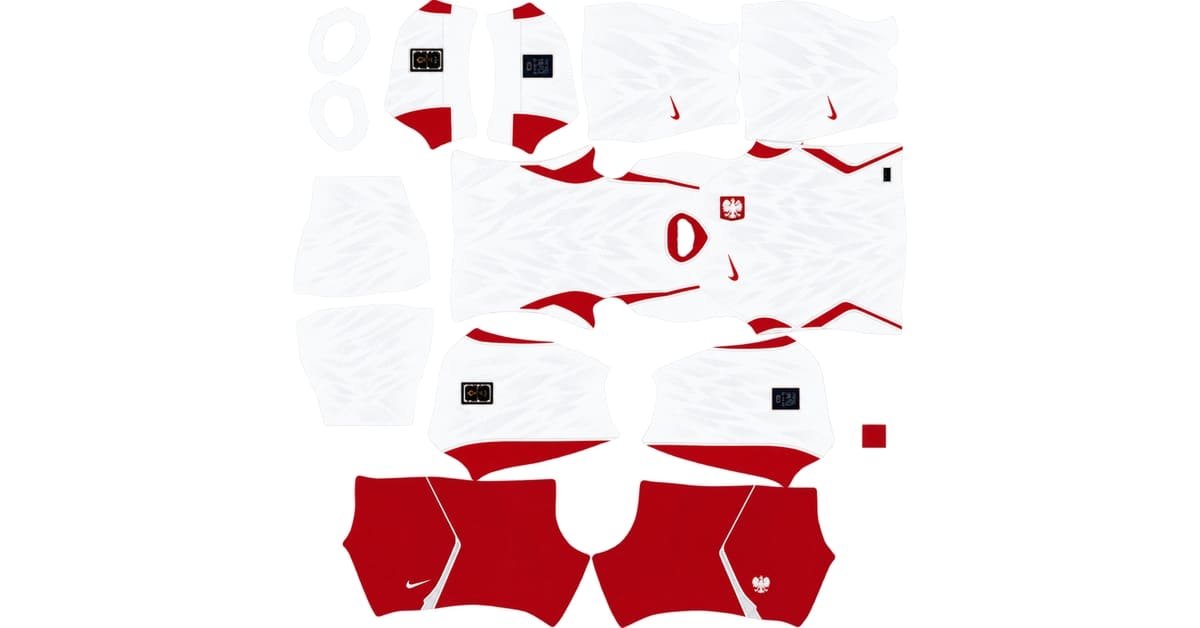
A Poland DLS kit URL is a direct link to a 512×512 PNG kit you can paste into Dream League Soccer. Use the cards below to copy the home or away image link.
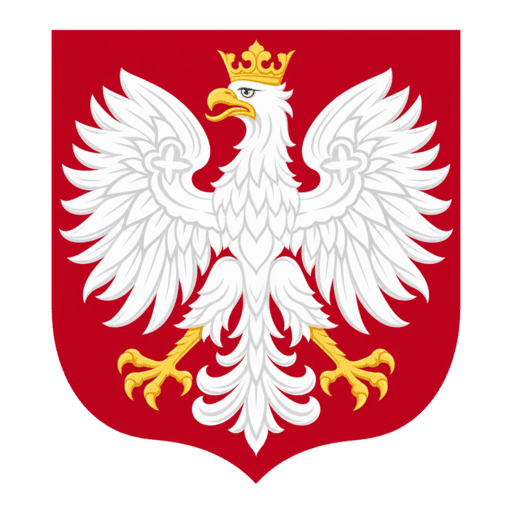
Poland logo
Official Logo 512×512 (2026/27)
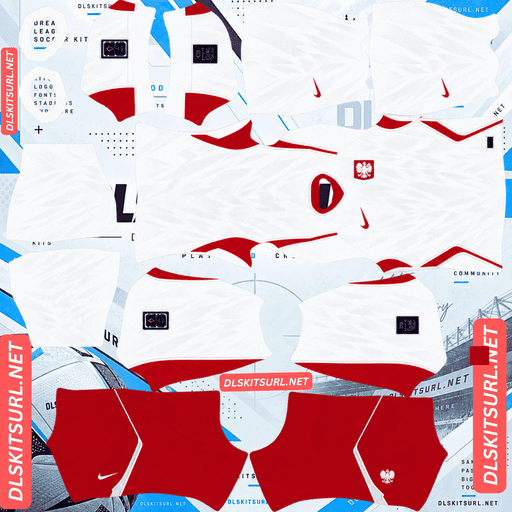
Poland Home Kit
Home Kit 512×512 (2026/27)
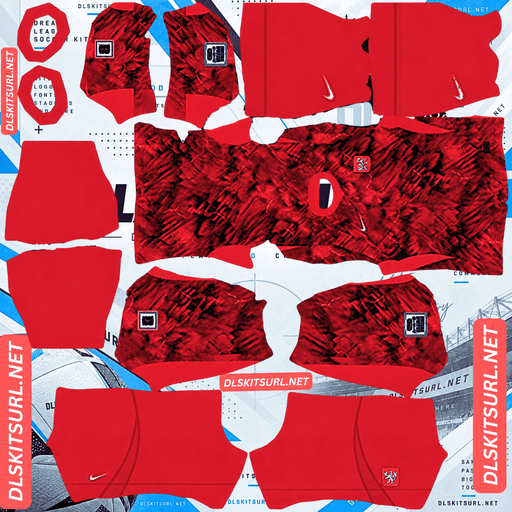
Poland Away Kit
Away Kit 512×512 (2026/27)
Nike’s 2026 Poland collection draws on a legend associated with the country’s white eagle. The most important detail on the home shirt is easy to miss in a DLS file: its eagle-inspired pattern sits on the sleeves, separate from the shirt body on the kit template.
Three brothers and a white eagle
The story of Lech, Czech and Rus tells of three brothers whose journeys led to the founding of different Slavic nations.
According to the legend, Lech chose a place to settle after seeing a white eagle against a red evening sky. The white eagle on a red background became an enduring symbol of Poland.
Nike used that imagery as inspiration for the 2026 collection. Instead of placing a large illustration of an eagle across the shirt, it turned elements of the bird’s feathers into a subtle, modern pattern. That detail helps connect the kit to the national emblem.
Poland’s 2026/27 kits
Poland’s Nike home and away shirts were released on 23 March 2026. Both use elements of Nike’s 2026 football shirt template, although their colours and surface patterns give them very different looks.
Home: white, red and patterned sleeves
The home shirt keeps Poland’s traditional white base. Red appears at the neckline, down the sides and in other supporting details.
Three features define the design.
The deep red V-neck collar adds a strong frame around the otherwise light shirt.
Bold, curved red side panels run down the body and give the shirt its recognisable 2026 shape.
The eagle-inspired pattern appears on the sleeves and shorts. It is a key detail to look for when choosing a DLS file.
Fine vertical ribbing also gives the white front and back panels some texture. Without it, the shirt can appear almost completely flat.
Check the position of the PZPN crest in your reference image, too. On this design it sits on the right side of the chest, shown as a white eagle on a red shield.
Away: crimson with marble-like veining
The away shirt moves from white to deep crimson. Lighter lines flow across its body, creating an all-over pattern that resembles marble veins.
It follows the same general Nike template as the home shirt. The shared shape makes the two designs feel like a pair, even though one relies on a bright white base and the other on a rich red pattern.
Poland away shirts often take the red from the national colours and make it the dominant shade. This version keeps that familiar approach while adding a more expressive surface graphic.
The sleeves are the quality test
Inspect the sleeves before importing a Poland home kit.
On a DLS template, the sleeves occupy different areas from the main shirt body. A kit maker has to put the correct design into those areas for it to appear on the player’s arms.
A plain sleeve might go unnoticed on another shirt. Here, the eagle-inspired detail is part of what distinguishes Poland’s 2026 home kit. A PNG with a white body and red collar but blank sleeves can import successfully while still missing a central part of the design.
Check the sleeve areas first. You should be able to see the feather-like pattern there. Inspect the shorts as well, since the design extends beyond the shirt body.
The body has a quieter detail
The home shirt’s vertical ribbing sits on a white base. Because the difference is largely in texture rather than a strong colour change, it can disappear when the image is reduced or blurred.
A carefully made file may show faint vertical detail across the front and back panels. A weaker file can make those areas look like featureless white blocks.
The sleeve pattern matters more to the shirt’s overall identity, but the ribbing provides a useful second check when comparing two PNGs.
Why the away kit is more forgiving
The away shirt’s marble-like lines do not need the same exact alignment as regular stripes.
A repeated stripe is easy to judge: if it ends at one panel edge and starts in the wrong place on the next, the break stands out. Irregular veining has no single repeating line that must continue perfectly across every template section.
That makes small changes at panel boundaries less noticeable. A similar advantage applies to other national kits with irregular marbled patterns, including Türkiye’s 2026 designs.
The away file still needs enough image quality to show the lighter veins. Heavy blur or compression can flatten the crimson shades into a nearly solid red shirt.
How to inspect a PNG
Start with the home kit’s sleeves and look for the eagle-inspired graphic. Then inspect the boundary where a red side panel meets the white shirt body.
The edge should look clean at the image’s actual 512×512 size. If the file was made by enlarging a much smaller image, that boundary may look soft across several pixels.
Set your number colours
The home and away shirts need different number colours. The white home shirt is the one most likely to reveal a mistake.
A DLS kit template includes separate small colour areas for shirt numbers and shorts numbers. Check each one rather than assuming the game will choose a colour from the shirt design.
Home: Use red numbers on the white shirt. Red matches the collar and side panels and remains easy to read. White numbers would disappear against the white body.
Away: Use white numbers against the deep crimson. They remain visible over both the dark base and much of the lighter veining.
Check the shirt and shorts number colours separately in the final player preview.
How to tell whether a Poland kit file is current
Use these four details to check a 2026 Poland PNG.
The home sleeves should have an eagle-inspired pattern. Plain white sleeves leave out one of the kit’s defining features.
The crest should be on the right side of the chest. Check its position against the shirt you are trying to reproduce.
The home shirt should have curved red side panels. They contribute to the shape and look of Nike’s 2026 design.
The away shirt should be deep crimson with visible marble-like veining. A flat red body misses the main feature of that kit.
The side you are building
Poland are known as the Biało-Czerwoni, meaning the White and Reds. The national side is governed by the Polish Football Association, or PZPN.
The team’s best men’s World Cup finishes came in 1974 and 1982, when Poland finished third on both occasions. Those teams remain a natural source of inspiration if you want a retro design for an additional DLS kit slot.
The 2026 shirts are intended for Poland’s international matches beyond their launch period, including fixtures in the subsequent national-team cycle. Check the match and competition schedule before describing a particular shirt as worn in a future qualifier.
How to use a Poland DLS kit URL
Use the Copy URL button on the relevant kit card. Copying the address from your browser’s top bar will normally give you this page’s URL, which is different from the PNG link the game needs.
In Dream League Soccer, open My Club and then Customise. Go to Kit, not Logo, and select the slot you want to replace before importing the image.
Tap the custom kit option, press and hold the URL field, choose Paste, and confirm. In some older versions, the import control is labelled Download.
The two current designs covered here are the home and away shirts. If your game offers another outfield slot, you could use a retro Poland design there. A kit based on the 1974 or 1982 side would make a fitting companion to the current collection, provided its PNG uses a compatible template and working direct URL.
Custom kit options may require an in-game unlock. Follow the price and instructions displayed in your version of DLS before importing; menu labels and unlock requirements can change between versions.
Test the link first
Open the copied URL in your browser before pasting it into DLS. It should display the image on its own, without an article, header or buttons surrounding it. A direct PNG address will often end in .png.
If the URL opens a webpage that contains a picture, you may have copied a viewer page rather than the image file. DLS needs to retrieve the image itself.
On a computer, right-click the picture and choose Open image in new tab. You can then inspect its direct address and check whether the file has the expected 512×512 dimensions.
Why Poland kit URLs stop working
An image host removes the upload. The page containing the link may still exist even when its kit PNG has been deleted.
The host blocks outside requests. You may be able to view an image in your browser while DLS is unable to retrieve it from the same address.
The page preview and copy button point to different files. A thumbnail may continue to display even though the URL supplied for import no longer works.
If a link fails, test the exact URL returned by the copy button. For kit cards you manage, make sure the visible preview and copied link resolve to the same intended PNG on the same server.
The PZPN badge
You can set Poland’s badge while you are in the customisation menu. Choose Logo instead of Kit and paste the direct badge-image URL.
The badge is a red shield carrying Poland’s white eagle, echoing the emblem behind the collection’s design.
Because the badge appears small in game, give the complete shield some clear space around its edges in the logo image. A file cropped tightly against the pointed bottom can make that part look cramped or cut off in a circular display.
The eagle’s small feather and crown details may soften when the badge appears beside the score. The overall white-eagle silhouette should still be recognisable at match size.
Keeping your Poland kits
Save the home URL, away URL and badge URL in a notes app before importing them. If you ever need to set up the team again after reinstalling the game or changing phones, you will have the links ready.
Whether imported customisations carry over depends on your game version and save setup. Keeping the URLs gives you a quick way to restore the designs if they do not appear.
FAQ
What is a Poland DLS kit URL?
It is a direct link to a Poland kit PNG that you paste into Dream League Soccer’s custom kit importer. Check that the link opens the image itself before using it.
What inspired Poland’s 2026 kits?
The designs draw on Poland’s founding legends and white-eagle imagery. The home shirt uses a subtle pattern inspired by eagle feathers.
What does the Poland 2026/27 home kit look like?
It has a white base, red V-neck collar, curved red side panels, and eagle-inspired detailing on the sleeves and shorts. Fine vertical texture appears on the shirt body.
What colour is the Poland away kit?
It is deep crimson with lighter, marble-like veining across the shirt.
Where is the crest on the Poland shirt?
On the 2026 home design described here, the PZPN crest appears on the right side of the chest as a white eagle on a red shield.
Why do my Poland sleeves look plain?
The sleeves have their own areas on the DLS kit template. If those areas are left plain in the PNG, the eagle-inspired sleeve pattern will not appear after import.
Why are the numbers invisible on my Poland home kit?
White numbers blend into the white shirt. Check the number-colour areas on the kit template and use a visible colour such as red.
Is the Poland away kit easier to import?
Its irregular marble-like pattern is more forgiving of small joins between template panels than straight stripes. The PNG still needs enough detail to keep the lighter veins visible.