
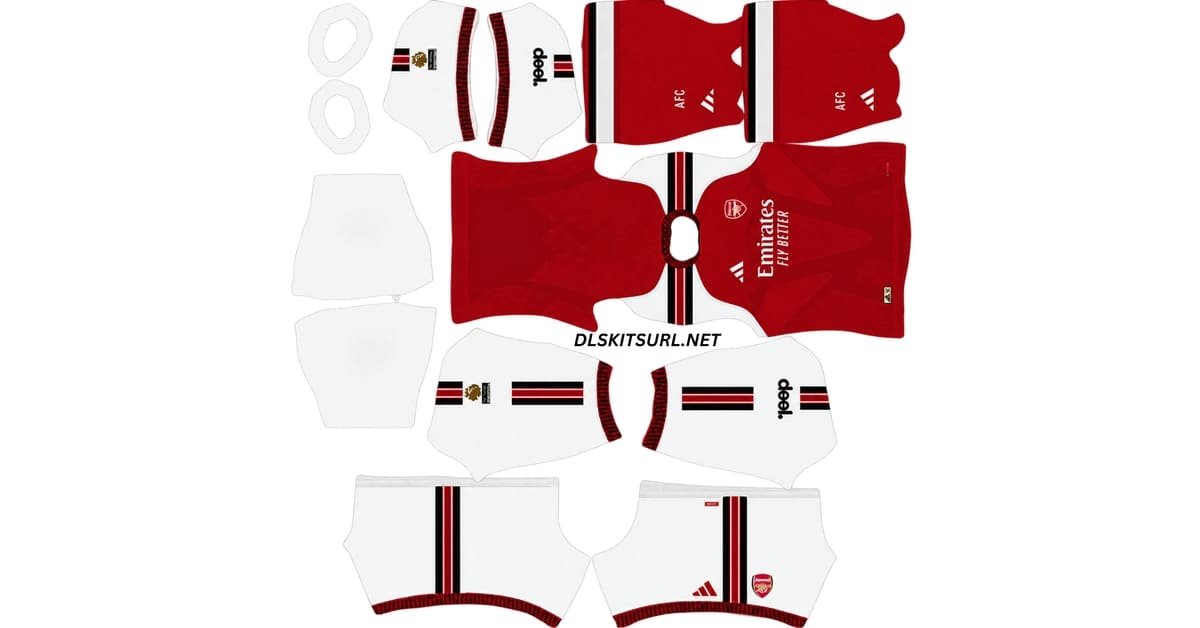
The Arsenal DLS Kit URL 512×512 collection for Dream League Soccer 2026/27 includes the current home, away, third and goalkeeper kits ready for custom kit import.
Arsenal Official Logo
Official Logo 512×512
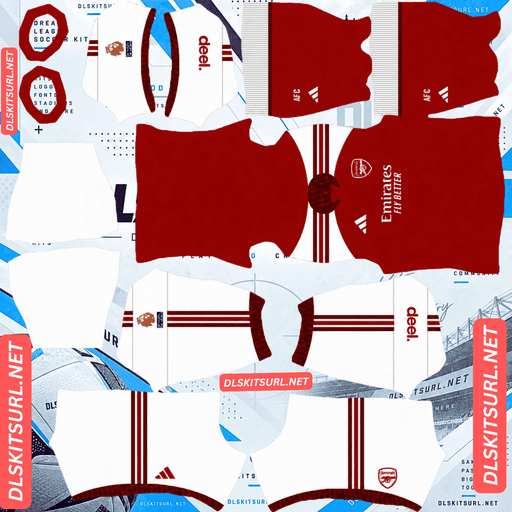
Arsenal Home Kit
Home Kit 512×512 (2026/27)
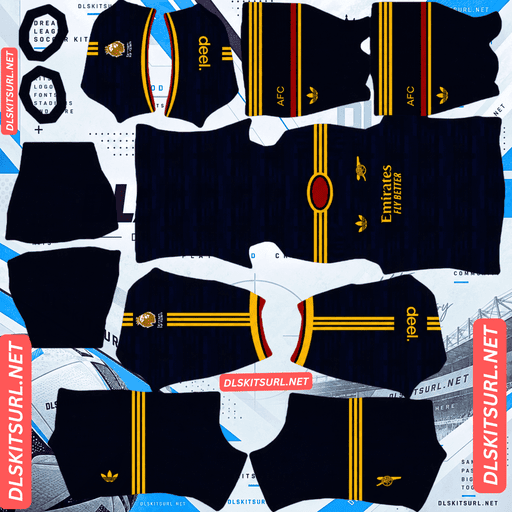
Arsenal Away Kit
Away Kit 512×512 (2026/27)
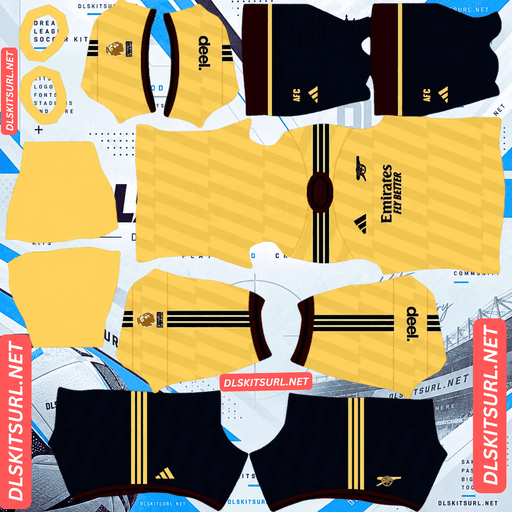
Arsenal Third Kit
Third Kit 512×512 (2026/27)
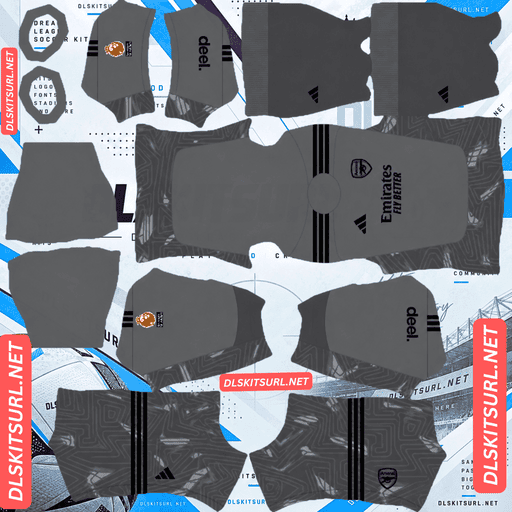
Arsenal Home GK Kit
Home GK Kit 512×512 (2026/27)
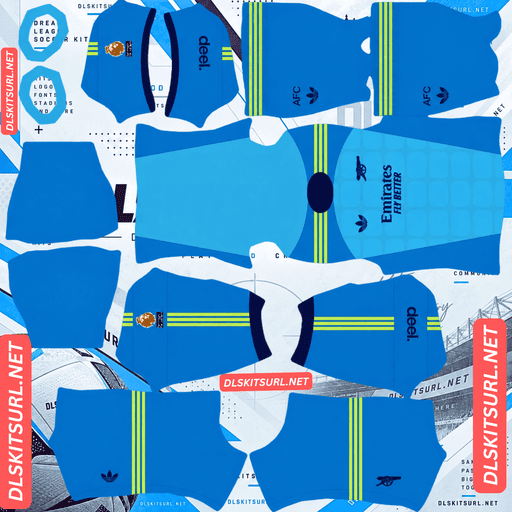
Arsenal Away GK Kit
Away GK Kit 512×512 (2026/27)
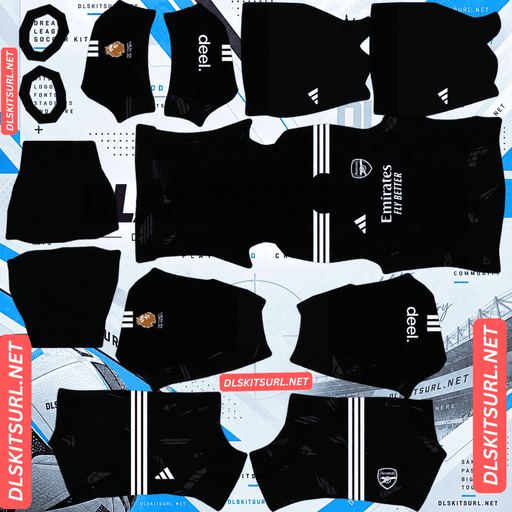
Arsenal Third GK Kit
Third GK Kit 512×512 (2026/27)
This season’s Arsenal collection stands out because Adidas has brought back two of the club’s most recognisable historical designs at the same time.
The away shirt reworks the famous Bruised Banana pattern from the early 1990s, while the third kit revives Arsenal’s lightning-bolt design from the mid-1990s. The home shirt takes a different route, marking twenty years at Emirates Stadium with details inspired by the ground itself.
That mix of old and new also makes Arsenal kits easy to misidentify. Several previous shirts use similar colours and graphics, so checking the crest, pattern and branding is important before importing a file into Dream League Soccer.
Arsenal 2026/27 Kits Bring Back Two Classics
Arsenal have two retro designs that supporters regularly associate with the club.
One is the Bruised Banana, first worn between 1991 and 1993.
The other is the lightning-bolt pattern associated with Arsenal’s mid-1990s away shirts.
Adidas has revisited both ideas before, but usually in separate seasons.
The lightning pattern returned on Arsenal’s 2021/22 third shirt and again on the 2024/25 away kit.
The Bruised Banana has also been referenced more than once.
What makes 2026/27 unusual is that both designs appear in the same collection.
The away kit uses the Bruised Banana idea, while the third shirt brings back the lightning motif.
Only the home kit is a completely new concept.
Arsenal Away Kit – The Bruised Banana Reversed
Arsenal’s 2026/27 away shirt was unveiled on 24 July 2026.
It takes the famous Bruised Banana design and reverses the original colour arrangement.
The classic 1991-93 shirt used a yellow base covered with navy zig-zag graphics.
The new version does the opposite.
A Collegiate Navy base carries the familiar angular design in yellow tones.
The pattern is immediately recognisable, but the darker background gives the shirt a noticeably different look from the original.
Arsenal Away Kit Details
The collar uses a Trefoil-style crew-neck design with red and yellow detailing.
Adidas also uses the classic Trefoil logo rather than the standard performance mark.
Navy shorts and socks continue the look, with matching red and yellow accents.
The launch campaign, titled “Every Shirt Has a Story,” featured Ian Wright alongside Declan Rice, Riccardo Calafiori, Chloe Kelly and Little Simz.
For Dream League Soccer players, the navy base is one of the easiest ways to identify this version.
How to Tell the New Bruised Banana From Older Versions
The quickest check is the main colour.
The 2026/27 away shirt is predominantly navy.
If the kit is mostly yellow with navy zig-zags, you are looking at the original Bruised Banana design or one of its earlier revivals.
This matters because retro Arsenal kits are widely shared in DLS communities.
A file can look authentic while still belonging to a completely different season.
The Adidas Trefoil gives you another useful clue when identifying the current version.
Arsenal Third Kit – The Lightning Pattern Returns
Arsenal’s third kit was released on 3 August 2026.
The shirt brings yellow back into the club’s kit collection while reviving another familiar graphic from Arsenal’s past.
The base is pale yellow, with navy used for the logos, trim and pattern.
Lightning bolts run across the body.
The motif originally appeared on Arsenal’s 1994/95 away shirt and has since been revisited several times.
The graphic also continues onto the shorts, which are available in navy as well as an alternative yellow version.
How to Identify the 2026/27 Arsenal Lightning Kit
One detail separates this shirt from earlier lightning-inspired Arsenal kits.
The chest carries only the minimalist cannon.
There is no circular shield and no ARSENAL lettering around the badge.
That makes the crest one of the most reliable ways to identify the 2026/27 version.
The lightning shirts from 2021/22 and 2024/25 used fuller crest treatments.
If your Arsenal third-kit file shows the lightning pattern with the standalone cannon, it matches the current design more closely.
Arsenal Home Kit – Twenty Years at Emirates Stadium
Arsenal’s 2026/27 home shirt is the only outfield kit in the collection designed as a new concept rather than a revival.
The shirt keeps the familiar Arsenal structure of a red body with white sleeves.
The difference is in the detailing.
Adidas uses two shades of red across the main body to give the shirt more depth.
A darker burgundy tone appears around the collar, sleeve cuffs and central Adidas stripe.
The most important reference, however, is built into the collar.
Emirates Stadium Inspiration on the Home Kit
The home shirt marks twenty years since Arsenal moved to Emirates Stadium.
Its bespoke crew-neck collar contains a wavy zig-zag pattern inspired by the sweeping rooflines of the stadium.
The same graphic continues onto the sleeve cuffs.
It is a fairly subtle reference, but it gives the shirt a direct connection with Arsenal’s current home ground.
White shorts with red detailing and red socks complete the full kit.
Why the Arsenal Home Collar Matters in DLS
The collar is particularly useful when checking the quality of an Arsenal DLS kit 512×512 file.
Dream League Soccer kit templates divide different parts of the shirt into separate zones.
The collar and cuffs do not occupy the same area of the PNG as the main body.
That means a creator can get the red shirt correct while still leaving the collar wrong.
If the home shirt shows the expected body design but has a plain collar or cuffs, the template may not have been prepared carefully.
The stadium-inspired wave should remain visible in those areas.
Which Arsenal Badge Should You Use in DLS?
Arsenal use more than one crest treatment across the 2026/27 collection.
Dream League Soccer normally uses a single team badge regardless of which kit your players are wearing, so you need to choose which identity you want to keep.
The home and away shirts use the fuller Arsenal crest treatment.
The third kit uses the standalone cannon.
If you mainly use the third shirt, the cannon-only logo gives the closest visual match.
Why the Standalone Arsenal Cannon Works Well in DLS
The standalone cannon also has a practical advantage.
Dream League Soccer displays team badges at a small size and may crop them into a circular area.
Detailed logos with lettering around the outside naturally lose clarity when reduced.
The simpler cannon contains no rim text, so there is much less detail to disappear.
For that reason, some players may prefer the cannon even when using the home or away kit.
It remains easy to recognise across different parts of the game.
How to Check If an Arsenal DLS Kit Is Current
Arsenal’s retro-inspired shirts make this season harder to identify than most.
Several older kits share similar colours and patterns.
A few details can help you tell whether a file belongs to 2026/27.
Check the Away Kit Colour
The current Bruised Banana-inspired away shirt should be navy rather than yellow.
A yellow base with navy zig-zags belongs to the original design or an earlier revival.
Look for the Adidas Trefoil
The 2026/27 away shirt uses the classic Adidas Trefoil.
If the file shows a different Adidas mark, check the season carefully.
Check the Third-Kit Crest
The current lightning shirt uses the standalone cannon.
A lightning Arsenal kit with a full circular crest is more likely to come from an earlier revival.
Check the Home Collar
The current home shirt should include the wavy Emirates-inspired pattern around the collar and cuffs.
A plain crew neck or V-neck suggests a different Arsenal season.
Which Arsenal Kit Is Hardest to Recreate in 512×512?
The three shirts do not create the same problems when converted into Dream League Soccer templates.
Each design has its own weakness.
Arsenal Home Kit – Subtle Texture
The home shirt is probably the most demanding in terms of resolution.
Its two-tone red body uses subtle shading rather than a bold graphic.
That detail can disappear quickly when somebody enlarges a small source image.
The file may still import properly, but the shirt can end up looking flat red.
A good-quality Arsenal home DLS kit 512×512 should preserve at least some of that tonal variation.
Arsenal Away Kit – Pattern Alignment
The away shirt creates a different problem.
Its angular Bruised Banana graphic crosses several parts of the Dream League Soccer template.
If the file was made using the wrong layout, the zig-zag can break or suddenly change direction where different parts of the player model meet.
That usually points to a template-alignment problem rather than poor resolution.
The pattern should continue naturally across the shirt.
Arsenal Third Kit – Lightning Detail
The third kit sits somewhere between the other two.
The lightning pattern has clearer shapes than the home shirt’s tonal shading, so it is easier to preserve.
At the same time, it is still subtle enough to lose definition when the source image is poor.
A strong 512×512 file should show the lightning graphics clearly without making them look jagged or heavily blurred.
How to Check Arsenal Kit Image Quality
A simple sharp-edge test can help before importing.
Open the file at full size and zoom in on the point where the white sleeve meets the red body of the home shirt.
That boundary should appear crisp.
If the transition is spread across several blurry pixels, the source image was probably enlarged from something smaller.
The same problem will usually affect the smaller textures and graphics elsewhere in the kit.
How to Use an Arsenal DLS Kit URL
Importing an Arsenal DLS kit URL into Dream League Soccer is straightforward.
First, copy the direct image link using the Copy URL button on the kit card.
Avoid simply copying the address from your browser bar unless it points directly to the PNG.
Open Dream League Soccer and go to My Club.
Choose Customise.
Some versions may show this as Customise Team.
Open the Kit section rather than Logo.
Select the kit slot you want to replace.
Then tap Custom Kit.
Older versions of Dream League Soccer may display the same option as Download.
Paste the direct image URL and confirm.
Repeat the process for each slot you want to customise.
Arsenal Goalkeeper Kit in Dream League Soccer
The goalkeeper kit uses a separate slot and should be imported in the same way as the outfield shirts.
Setting the goalkeeper design alongside the home, away and third kits gives your Arsenal team a more complete look.
If your page provides an Arsenal logo as well, save that separately and import it through the Logo section rather than the Kit menu.
Unlocking Custom Kits in Dream League Soccer
If you have never used a custom kit before, Dream League Soccer may require the custom kit feature to be unlocked first.
The source article describes this as a one-time in-game gem payment.
After the feature has been unlocked, you can continue changing kits without paying separately for every new import.
Check the Arsenal Kit URL in Your Browser First
Test the link before opening Dream League Soccer.
Paste the URL into your browser.
The kit image should appear on its own rather than inside a normal webpage.
If you see menus, headers, buttons or adverts around the image, you may have copied the page URL instead of the direct image address.
Dream League Soccer needs access to the image file itself.
A working direct kit URL will commonly point to a .png file.
On a computer, right-click the image and choose Open image in new tab.
This gives you a chance to inspect both the image quality and dimensions.
A standard custom DLS kit should use a 512×512 layout.
Why Arsenal DLS Kit URLs Stop Working
Even a correctly prepared Arsenal DLS kit URL can stop working over time.
In many cases, the problem comes from the image-hosting service rather than Dream League Soccer.
Free Image Hosts Delete Files
Many kit creators store their PNG files on free image-hosting websites.
Those services may eventually remove old or inactive uploads.
The webpage containing the kit can remain online even after the image itself disappears.
That leaves a link that looks valid but no longer returns the file.
Hotlink Protection Can Block Dream League Soccer
Some image hosts use hotlink protection.
This means the image can load when you open it directly in your browser but may be blocked when another application requests it.
Dream League Soccer therefore fails to import the kit even though the same URL appears to work normally in a browser.
If this happens, another direct image host is usually required.
The Preview and DLS URL May Be Different Files
Some websites display a kit preview from one server while the copy button points to another image host.
If the second file disappears, the visible preview can remain online.
Everything looks normal until you try to import the shirt.
Using the same hosted image for both the preview and the copied URL reduces this problem.
Save Your Arsenal DLS Kit URLs
Once you find Arsenal files that match the correct season and import properly, save the links somewhere outside Dream League Soccer.
A notes app is enough.
This is especially useful with Arsenal because several historical and modern kits use similar designs.
Finding the right Bruised Banana version or the correct lightning shirt can take longer than simply finding an Arsenal kit that loads.
If you reinstall Dream League Soccer or move to a different phone, you may need to import your custom kits again.
Saving your Arsenal DLS kit URL links, goalkeeper file and badge URL means you will not have to repeat that search later.
Arsenal DLS Kit URL FAQ
What Is an Arsenal DLS Kit URL?
An Arsenal DLS kit URL is a direct link to an Arsenal shirt image prepared for Dream League Soccer.
The standard custom kit layout uses a 512×512 PNG, which you paste into the game’s custom kit section.
What Colour Is the Arsenal Away Kit for 2026/27?
The Arsenal 2026/27 away kit uses a Collegiate Navy base.
It reverses the famous Bruised Banana design by placing the familiar angular pattern in yellow tones over the darker background.
The shirt also uses the Adidas Trefoil.
How Do I Tell the 2026/27 Arsenal Lightning Kit From Older Versions?
Check the badge.
The 2026/27 third kit uses the standalone minimalist cannon on the chest.
Earlier lightning-inspired shirts used fuller Arsenal crest treatments.
Which Arsenal Badge Should I Use in DLS?
The fuller Arsenal crest matches the home and away shirts.
The standalone cannon matches the third kit.
The cannon can also work well across every kit because its simpler design remains easier to recognise when Dream League Soccer displays the badge at a small size.
What Inspired the Arsenal Home Kit for 2026/27?
The home shirt marks twenty years at Emirates Stadium.
Its collar and sleeve cuffs contain a wavy zig-zag pattern inspired by the stadium’s rooflines, while two shades of red add texture across the main body.
Why Is My Arsenal Home Kit Flat Red?
The home shirt uses subtle two-tone red shading.
If the original image was too small or heavily compressed, those tonal differences can disappear when the file is enlarged.
A properly prepared 512×512 Arsenal DLS kit PNG should preserve more of the texture.
Why Does the Zig-Zag on My Arsenal Away Kit Look Broken?
The away kit’s graphic crosses different areas of the Dream League Soccer template.
If the PNG was built for the wrong layout, the zig-zag can split or change direction where the player-model sections meet.
That is a template-alignment problem rather than something you can fix inside the game.
Why Does an Arsenal Kit URL Work in My Browser but Not in DLS?
The image host may be using hotlink protection.
This can allow the kit to open normally in your browser while blocking Dream League Soccer from accessing the same file externally.
Another direct PNG URL hosted on a service that permits external requests is usually needed.
Do Arsenal Custom Kits Survive a Reinstall?
You may need to import your Arsenal custom kits again after reinstalling Dream League Soccer or changing devices.
Save your Arsenal DLS kit URL links, badge and goalkeeper file somewhere outside the game so they are easy to restore later.