
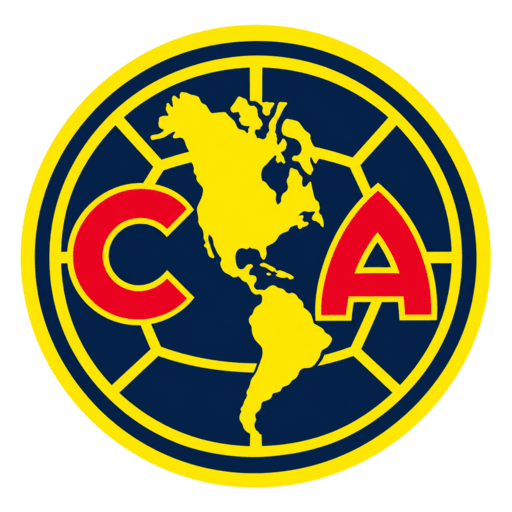
Club América logo
Official Logo 512×512 (2026/27)
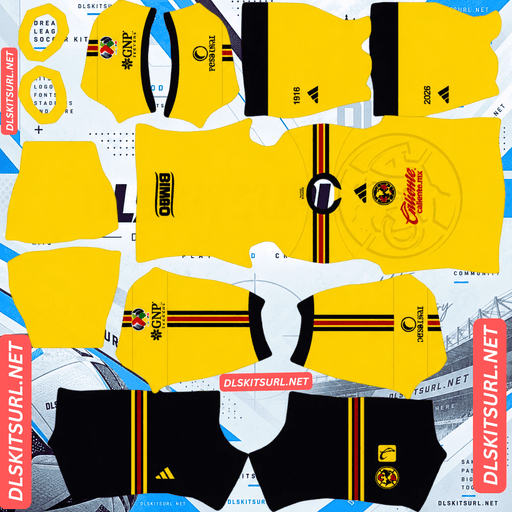
Club América Home Kit
Home Kit 512×512 (2026/27)
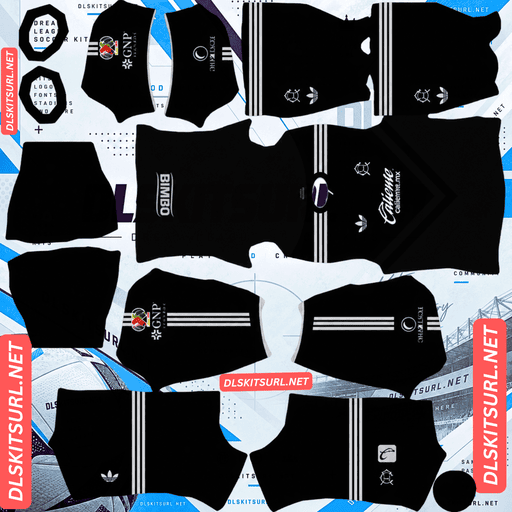
Club América Away Kit
Away Kit 512×512 (2026/27)
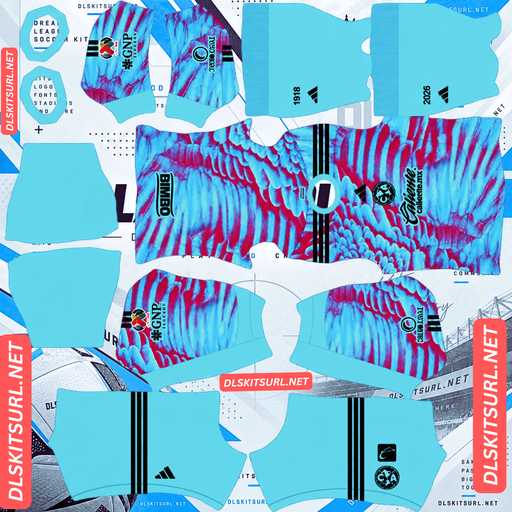
Club América Home GK Kit
Home GK Kit 512×512 (2026/27)
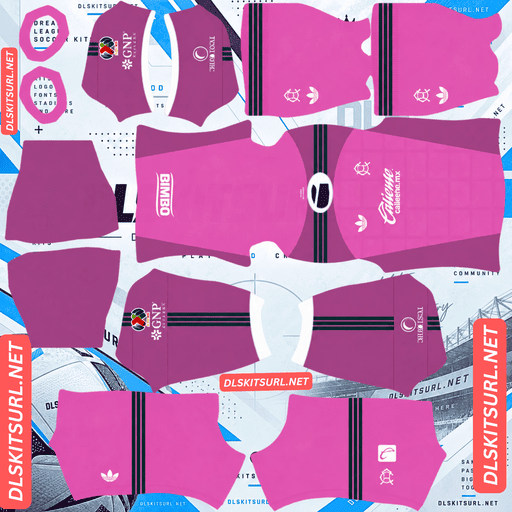
Club América Away GK Kit
Away GK Kit 512×512 (2026/27)
The Club América DLS Kits URL 512×512 collection for Dream League Soccer 2026/27 includes the current Las Águilas home, away and other available custom kit options ready for import.
This season is especially important for Club América because it marks the club’s 110th anniversary, and Adidas has used that history throughout the collection. The home shirt turns the modern crest into a large tonal background graphic, while the away kit goes in the opposite direction by bringing back the classic CA crest from the 1980s.
That creates an unusual issue in Dream League Soccer. The game only lets you use one team badge at a time, so the crest you choose may match one shirt perfectly and another less accurately.
Club América 110th Anniversary Kits 1916–2026
Club América were founded in 1916, making 2026 their 110th anniversary year.
Adidas has built the current kit collection around that milestone rather than treating it as a small detail. The home shirt carries the 1916–2026 anniversary reference directly, while several of the design choices look back at different periods in the club’s history.
The result is a collection where the badge itself becomes part of the design story.
Club América Home Kit 2026/27
The home shirt was released on 13 July 2026 and takes inspiration from Club América designs from the late 1990s.
The base uses the familiar yellow associated with Las Águilas, but the treatment is very different from a plain traditional home shirt.
Instead of using the club crest only as a small chest badge, Adidas turns it into a large 3D-effect embossed background graphic covering much of the shirt.
The crest therefore becomes part of the fabric pattern itself.
Navy shorts and navy-and-yellow socks complete the home set.
The Crest Becomes the Home Shirt Pattern
This detail matters when the kit is converted for Dream League Soccer.
DLS imports the team badge separately from the kit texture. That normally means a properly prepared custom kit should not include a second small crest printed in the normal chest position, because the game adds your selected logo there itself.
The Club América home shirt is different because its large crest is not functioning as the normal chest badge.
It is the background pattern of the shirt.
A correct DLS version should therefore preserve the large embossed crest across the body while leaving the standard badge position suitable for the separate Dream League Soccer logo.
That recreates the intended effect: the main club badge sits over a shirt already patterned with an enlarged version of the same crest.
Why a Printed Chest Badge Causes Problems
If the kit PNG also contains a small solid crest in the normal chest position, Dream League Soccer can place your imported club logo over or beside it.
The result is a doubled badge.
That usually means the file was prepared more like a flat football-shirt image than a proper DLS texture.
For the home kit, the large tonal crest pattern should remain, but the normal chest-badge position should be handled with the game’s separate logo system in mind.
Club América Away Kit 2026/27
The away shirt was also released on 13 July 2026, but visually it moves in a completely different direction.
Instead of yellow, the shirt uses a dark grey and black base with a pronounced chevron pattern across the front.
The darker colours give it a more understated, almost stealth-like appearance, while the branding reaches back into the club’s past.
The 1980s CA Crest Returns
The most distinctive detail on the away kit is the return of the classic CA crest from the 1980s.
Adidas pairs it with the retro Trefoil logo rather than the modern performance mark, reinforcing the older visual identity.
That makes the away shirt immediately different from the home kit.
The home is based around the current crest and anniversary treatment, while the away intentionally revives an older era.
Club América Third Kit 2026/27
The third shirt was still reported rather than officially confirmed in the source material.
Leaked information describes a predominantly Auburn Brown design, which would be an unusual choice for Club América and a colour not previously associated with the club’s traditional kit history.
The same reporting also suggests another distinctive crest treatment.
Until the club confirms the shirt officially, those details should be treated as provisional rather than final.
Club América Pre-Match Shirt 2026/27
The pre-match shirt is worth mentioning because it uses one of the strongest visual concepts in the wider collection.
It was unveiled alongside the home kit and uses a highly detailed feather graphic inspired by an eagle’s wings, directly referencing the club’s Las Águilas identity.
Unlike the home or away shirt, it is not intended as a regular competitive match jersey.
Dream League Soccer does not make that distinction, however. Any correctly prepared 512×512 kit texture can be used in a custom slot.
That makes the pre-match shirt an interesting option if you want a third design that looks different from the standard match kits.
Which Club América Badge Should You Use in DLS?
The 2026/27 collection creates a practical badge problem because the shirts use different crest treatments.
Dream League Soccer does not automatically change the team logo when you switch from one kit to another.
You choose one badge, and that badge stays in place.
Badge for the Home Kit
The current Club América crest is the most accurate choice for the home shirt.
The enlarged embossed pattern is built from that crest, and the modern badge is the version paired with the real home design.
Badge for the Away Kit
The away shirt is more accurately matched with the 1980s CA crest.
Using the modern badge with the retro shirt is still technically possible in DLS, but it mixes two different periods of Club América branding.
If the away kit is the shirt you use most often, the retro badge creates the closest visual match.
Badge for the Third Kit
The third kit’s final crest treatment was not confirmed in the source material.
Until the shirt is officially revealed, it is better not to treat any one badge pairing as definitive.
Which Club América Kit Looks Best in Dream League Soccer?
The home and away shirts place different demands on a 512×512 kit file.
The away kit depends more on strong structure and sharp alignment, while the home shirt relies heavily on subtle tonal detail.
Away Kit – Stronger at Match Distance
The dark grey and black away shirt uses a clearly defined chevron pattern.
Angular designs with hard edges generally remain easier to see when Dream League Soccer reduces the player during normal gameplay.
The main thing to check is alignment.
If the chevrons cross template boundaries incorrectly, they can break or shift where one panel meets another.
Look especially at the transition between the front section and the sleeves.
Home Kit – More Dependent on Resolution
The home shirt’s large crest pattern is tonal.
It is created using different shades of yellow rather than a strongly contrasting colour.
The fact that the graphic is large helps, but tonal patterns still lose detail more easily than hard-edged designs.
A good 512×512 file should allow you to recognise the shape of the oversized crest across the shirt.
A poor-quality version may look like a plain yellow kit because the embossed effect has disappeared.
What Happens to the 1916–2026 Text?
The anniversary inscription is much smaller than the background crest.
It should remain visible in the kit image and during closer views, but small text naturally becomes difficult to read once the player is shown at normal match distance.
That is expected.
The important visual feature during gameplay is the large embossed crest pattern rather than the anniversary lettering.
Quick Club América Kit Quality Check
Open the home kit at full size.
First, look at the body and check whether the enlarged crest shape is still visible in the yellow pattern.
Then inspect the normal chest area.
The shirt should not contain an unnecessary second solid crest that will conflict with the badge Dream League Soccer adds separately.
For the away shirt, check the chevrons and make sure the pattern stays clean and aligned.
Set the Club América Number Colours Correctly
Dream League Soccer reads squad-number colours from dedicated swatches on the kit template rather than choosing them automatically from the shirt.
That means each Club América design needs a number colour with enough contrast.
Home Kit Number Colours
The home shirt is yellow, while the shorts are navy.
For the shirt, navy numbers provide strong contrast.
For the navy shorts, white or yellow works better.
Using white numbers on a bright yellow shirt can reduce readability, so the shirt and shorts swatches should not simply be set to the same value without checking them.
Away Kit Number Colours
The away kit uses dark grey and black.
White is the clearest option because it stays visible against both shades.
Third Kit Number Colours
If the reported Auburn Brown design is confirmed, white or cream would provide a safer contrast than another brown or dark earth tone.
Set the shirt and shorts number swatches separately to make sure both remain readable.
How to Tell if a Club América DLS Kit Is Current
A few details make it easier to separate the 2026/27 designs from older América kits.
Look for Adidas Branding
The current kits use Adidas branding.
According to the supplied source, Club América moved from Nike for the 2025/26 season, so a shirt carrying the Nike Swoosh belongs to 2024/25 or earlier.
Check the Home Crest Pattern
The home kit should not be a completely plain yellow shirt.
A large embossed crest pattern should be visible across the body.
Check the Away Chevron Design
The away shirt should use a dark grey and black palette with a chevron pattern.
It should also feature the retro CA crest and Adidas Trefoil.
Look for the 1916–2026 Anniversary Detail
The home shirt includes the 1916–2026 inscription marking the club’s 110th anniversary.
Its presence is another useful way to distinguish the current design from an earlier Adidas home shirt.
How to Use a Club América DLS Kit URL
Importing a Club América DLS kit URL works like any other custom Dream League Soccer shirt.
Use the Copy URL button underneath the kit to copy the direct image address.
Open Dream League Soccer and go to My Club, then choose Customise.
Open the Kit section rather than Logo.
Select the home, away, third or goalkeeper slot you want to replace.
Tap Custom Kit, paste the direct URL and confirm.
Older versions may label this option Download.
Repeat the same process for each kit slot you want to change.
Unlocking Custom Kits in Dream League Soccer
According to the supplied setup, the first custom kit requires a one-time in-game gem unlock.
After the custom kit feature has been unlocked, you can change imported shirts without paying separately for every new design.
Using the Pre-Match Shirt as a Third Kit
If the official third kit is not yet available or you simply want something different, the eagle-feather pre-match shirt can be used as a custom third kit in Dream League Soccer.
The game only needs a compatible kit texture and direct image URL.
It does not require the shirt to have been used in an official competitive fixture.
Test the Club América Kit Link Before Importing
Open the image URL in your browser before pasting it into Dream League Soccer.
The kit should appear on its own without a webpage surrounding it.
If you see menus, text, buttons or advertisements around the image, you may have copied a webpage URL rather than the direct kit link.
A direct kit file commonly points to a .png image.
On desktop, opening the image in a new tab can also make it easier to check its dimensions and inspect the finer details before importing it.
Why Club América DLS Kit URLs Stop Working
Even a correctly prepared kit can stop working if the host changes or removes the image.
Free Image Hosts Delete Files
Free hosting services sometimes remove old or inactive uploads.
The original link can continue to look valid even though there is no longer an image available at the other end.
Hotlink Protection Can Block DLS
Some hosts allow images to load when opened directly through their own website but block requests coming from external applications.
That creates a confusing situation where the kit works in your browser but fails in Dream League Soccer.
If that happens, another image host is usually required.
Preview Images and Copy URLs Can Differ
Some kit pages display a preview from one server while the copy button points to an image hosted somewhere else.
If the external file disappears, the visible preview may continue working.
You only discover the problem when the game tries to import the copied URL.
According to the supplied page, the visible shirt and copied link are intended to use the same hosted file.
Club América Badge for Dream League Soccer
The team badge should be imported separately through the Logo section.
Club América’s crest works reasonably well at small sizes because its main shapes and colour separation remain clear without depending heavily on tiny outer text.
Still, the image should not be cropped too tightly.
Leave enough transparent space around the design so Dream League Soccer can resize it without cutting into important parts.
Current Crest or Retro CA Crest?
The correct choice depends on the kit you intend to use most often.
The modern crest is the natural pairing for the home shirt.
The retro CA crest is the better match for the away kit.
Since Dream League Soccer only allows one team badge at a time, there is no perfect way to reproduce both versions simultaneously.
Choose the one that fits your main shirt.
Keep Your Club América DLS Kit URLs Saved
Save the direct URLs for your kits and badge somewhere outside Dream League Soccer.
A notes app works well.
If you reinstall the game or move to another device, you may need to import the custom files again.
Keeping the Club América DLS kit URL links saved means you can restore the same home, away, goalkeeper and badge setup without searching for every file again.
Club América DLS Kit URL FAQ
What Is a Club América DLS Kit URL?
A Club América DLS kit URL is a direct link to a Las Águilas kit image prepared for Dream League Soccer.
The standard custom kit format uses a 512×512 PNG, which is pasted into the game’s custom kit section.
What Does the Club América Home Kit for 2026/27 Look Like?
The home shirt uses the club’s traditional yellow base with a large tonal, 3D-effect embossed crest forming a background pattern across the shirt.
It also includes the 1916–2026 anniversary reference, with navy shorts completing the set.
Why Does the Club América Away Kit Use a Different Crest?
The away shirt deliberately brings back the classic CA crest from the 1980s as part of its retro-inspired design.
It is paired with the Adidas Trefoil rather than the modern performance logo.
Which Club América Badge Should I Use in DLS?
Use the current crest if the home kit is your main shirt.
If you mainly use the away kit, the retro 1980s CA crest gives a more accurate match.
Dream League Soccer only allows one team badge at a time, so you need to choose between them.
Why Does My Club América Kit Show Two Badges?
Dream League Soccer adds your imported team logo separately from the kit image.
If the custom kit texture also includes a small solid crest in the normal chest position, both can appear at once.
A properly prepared home file should keep the large embossed crest pattern while avoiding an unnecessary duplicate chest badge.
Why Does My Club América Home Kit Look Plain Yellow?
The oversized crest pattern is tonal, using shades close to the yellow base.
If the source file is too small or heavily compressed, that low-contrast detail can disappear and leave the shirt looking flat.
Is There a Club América Third Kit for 2026/27?
The source material describes a reported Auburn Brown third kit, but it was not officially confirmed at the time of writing.
Until Club América releases it, those details should be treated as provisional.
Who Makes Club América’s Kits?
According to the supplied information, Adidas makes Club América’s current kits after replacing Nike from the 2025/26 season.
A shirt carrying the Nike Swoosh therefore belongs to an earlier season.
Why Is the Away Kit Easier to See in DLS?
The away shirt uses dark grey and black with a clearly defined chevron pattern.
Those hard-edged shapes usually remain more visible at match distance than the tonal embossed pattern used on the yellow home shirt.
Do Club América Custom Kits Survive a Reinstall?
You may need to import your custom kits and badge again after reinstalling Dream League Soccer or changing devices.
Saving the direct URLs outside the game makes restoring the same setup much easier.