
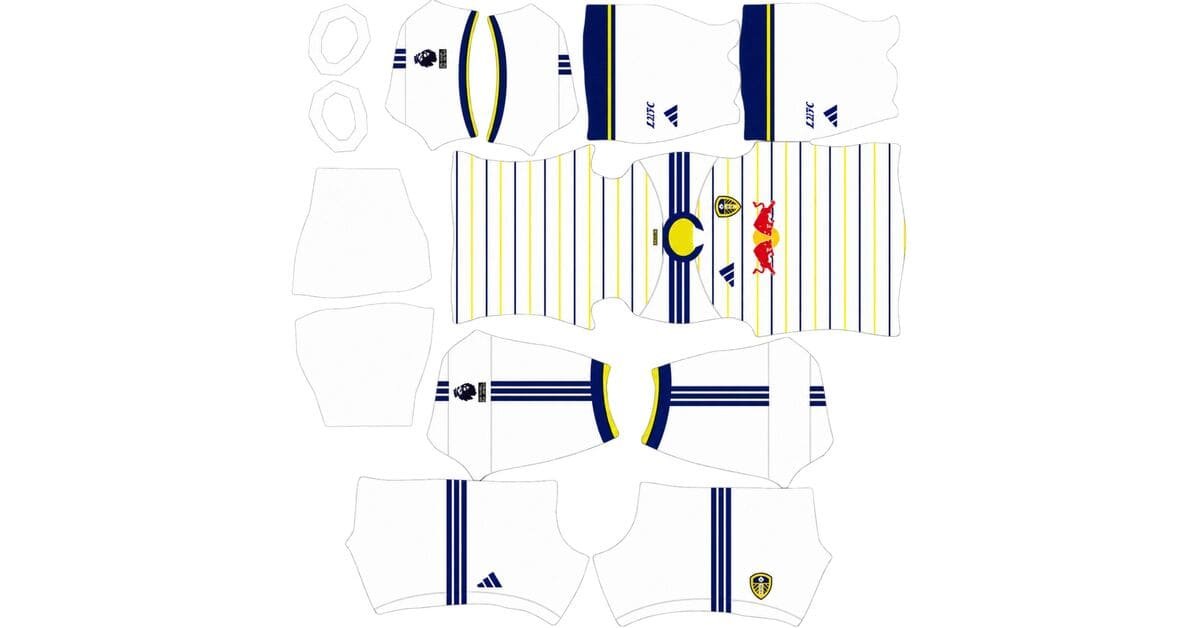
A Leeds United DLS kits URL is a direct link to a 512×512 PNG image of a Leeds United shirt that you can import into Dream League Soccer. All four kit slots are covered below, with the images prepared for use in the game.
Leeds United Logo
Official Logo 512×512
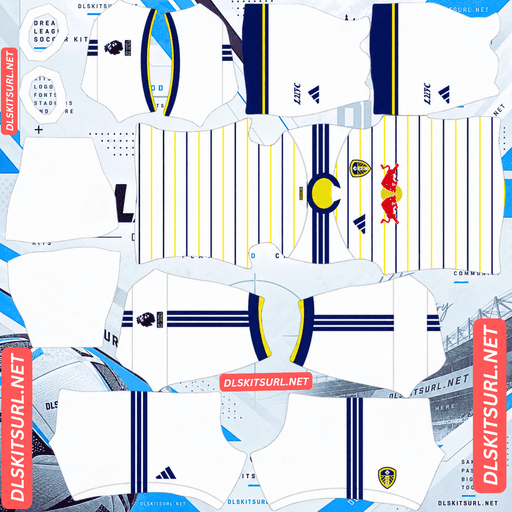
Leeds United Home Kit
Home Kit 512×512 (2026/27)
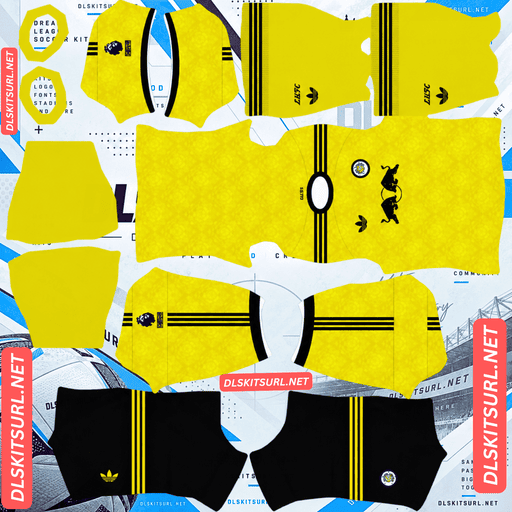
Leeds United Away Kit
Away Kit 512×512 (2026/27)
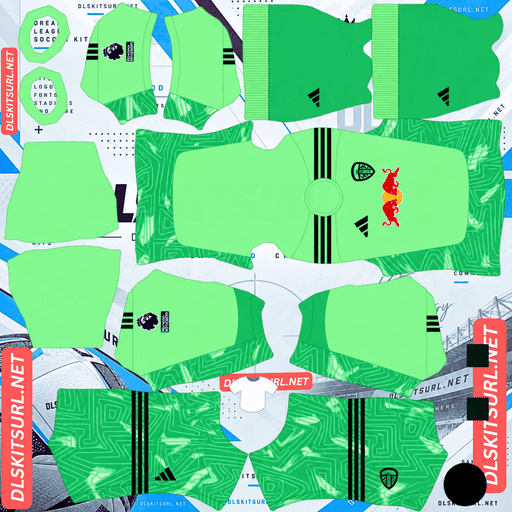
Leeds United GK Home Kit
GK Home Kit 512×512 (2026/27)
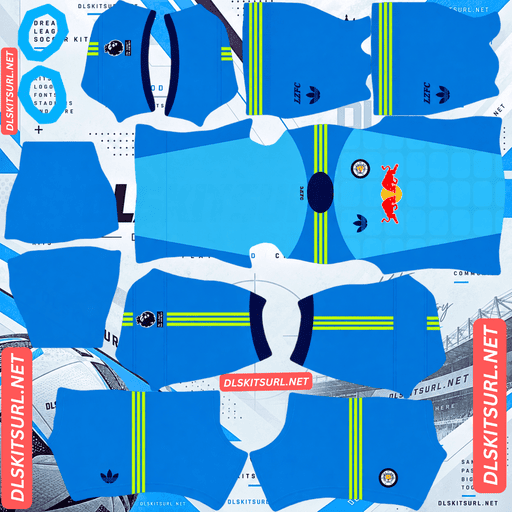
Leeds United GK Away Kit
GK Away Kit 512×512 (2026/27)
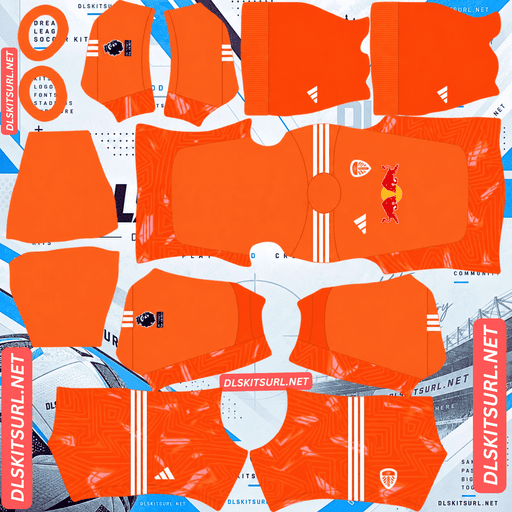
Leeds United GK Third Kit
GK Third Kit 512×512 (2026/27)
Leeds United’s 2026/27 kits celebrate the 400th anniversary of the Leeds Royal Charter, granted in 1626. It is a tribute to the city’s history rather than a club anniversary, giving this collection a distinctive theme.
The home shirt is particularly challenging to reproduce accurately. Its design combines two difficult features: thin horizontal pinstripes and a pattern that must stay sharp at the game’s 512×512 resolution.
Leeds United Home Kit 2026/27: Horizontal Pinstripes
Release date: 27 July 2026
The home kit features a white base with thin blue and yellow horizontal pinstripes. Blue Adidas shoulder stripes add contrast, while the V-neck collar and sleeve cuffs combine yellow and blue. White shorts and socks complete the traditional Leeds look.
The main challenge is preserving the pinstripes. Because they run horizontally across the shirt, they must remain consistent across the front, side seams, back and sleeves.
Why Horizontal Pinstripes Are So Difficult
Horizontal stripes are difficult to align. Each line needs to continue at the correct height across the front and back panels, around the side seams and toward the sleeves. Vertical stripes generally have a simpler alignment path down the body.
Thin pinstripes are difficult to preserve. At 512×512 resolution, a narrow line may occupy only one or two pixels. Compression can cause these lines to merge into a blurry wash or appear broken and uneven.
These problems are especially challenging when they occur together.
Vertical pinstripes, such as those on Bosnia, Brentford and Racing Santander shirts, are comparatively straightforward to align but can lose their definition at small sizes.
Horizontal hoops, such as those associated with Atlético, Genoa and Stuttgart’s chest band, require careful alignment but usually retain their shape because the bands are wider.
Horizontal pinstripes combine both difficulties, making the Leeds home shirt one of the more demanding designs to reproduce accurately.
How to Check the Home Kit Image
Start by checking the resolution and line definition. Open the image at full size and inspect the shirt body. Individual pinstripes should appear as distinct lines rather than blending into a soft, indistinct area.
Next, check the alignment. Look at the side seams, where the front panel meets the back, and around the shoulders. The lines should continue at consistent heights across the different sections of the shirt.
If the stripes already look blurred at full size, the file is unlikely to produce a convincing result in the game.
The Details That Survive Compression
Even when a file struggles to preserve the pinstripes, the solid-colour details are easier to reproduce. The yellow-and-blue V-neck collar, matching sleeve cuffs and blue Adidas shoulder stripes should remain clearly visible in a decent-quality image.
A weak file may still give you a clean white Leeds shirt with the correct trim, but it will lose the defining pinstripe design associated with the Royal Charter collection.
Leeds United Away Kit 2026/27: Yorkshire Roses and a Retro Badge
Release date: 4 June 2026
The away shirt features an EQT Yellow base with a tonal all-over pattern inspired by Yorkshire roses and decorative diamond shapes. A white-and-Night-Navy V-neck collar and matching cuff trim add contrast, while navy Adidas shoulder stripes complete the design.
The Adidas Trefoil appears on the right chest, reinforcing the shirt’s retro-inspired appearance. Yellow socks with navy stripes and LUFC lettering complete the kit.
One of the most distinctive features is the retro Leeds United badge, which uses an older version of the club crest rather than the current design. This detail works particularly well with the vintage styling of the shirt.
Leeds United Third Kit 2026/27: Carbon and Silver
Release date: 21 August 2026
The third kit introduces a carbon-grey base with striking silver details. Its all-over graphic draws inspiration from Leeds’ architecture, industrial heritage and the character of the city.
Silver Adidas three-stripes run across the shoulders, complemented by a monochrome Leeds United crest. Matching carbon shorts and socks complete the look.
The club’s third shirt is described as only the second grey kit in its history, making it a distinctive addition to the 2026/27 collection.
Three Kits, Three Crest Styles
Dream League Soccer provides a single badge slot, so your imported crest will not automatically change when you switch between kits.
Here is how the three shirts are styled:
Home kit: The current Leeds United crest.
Away kit: A retro badge that complements the Adidas Trefoil and vintage-inspired design.
Third kit: A monochrome crest that suits the carbon-and-silver colour scheme.
Choose the badge that best matches the shirt you use most often. The retro crest is a particularly strong match for the away kit, while the monochrome version complements the third shirt.
Remember that DLS does not offer a setting to assign a different badge to each kit.
Which Leeds United Kit Looks Best in DLS?
Away Kit: The Most Forgiving Design
The away shirt’s Yorkshire rose and diamond graphics use tonal shades of yellow. This means the pattern can become less visible if the image is compressed or lacks detail.
Fortunately, the design does not rely entirely on the pattern. The EQT Yellow base, navy shoulder stripes and navy-and-white trim provide strong visual definition.
Even if some of the tonal graphics fade, the shirt should remain recognisable as the Leeds United away kit.
Third Kit: Check the Silver Details
The third shirt’s architectural pattern uses subtle tonal graphics on a carbon-grey background. Because both the base and pattern are dark, the graphic may be difficult to distinguish in a low-quality file.
The silver detailing is the most useful indicator of image quality. Metallic silver relies on highlights, shadows and gradients to create a reflective appearance. When an image is compressed into too few pixels, these details can flatten into ordinary grey.
If the Adidas stripes and crest look like plain grey shapes rather than metallic silver, the file may not preserve the design properly. The subtle architectural pattern is likely to be even less visible.
Home Kit: The Most Difficult to Reproduce
The home shirt presents the greatest challenge because it combines thin horizontal lines with demanding alignment requirements.
Look for two things: distinct pinstripes at full resolution and consistent lines across the shirt panels. If both are correct, the kit is much more likely to retain its intended appearance in Dream League Soccer.
Best Number Colours for Leeds United DLS Kits
Dream League Soccer does not automatically take squad-number colours from the kit image. Instead, it uses the number-colour swatches included in the kit template.
Set the shirt-number and shorts-number colours separately for each kit.
Home kit: Navy
The white shirt and white shorts need a dark number colour. Navy complements the blue shoulder stripes and collar while keeping the numbers readable against the white background.
Away kit: Navy
Navy works well against the EQT Yellow base and matches the shoulder stripes and trim. White numbers offer weaker contrast, so navy is the safer choice.
Third kit: White or silver
White provides strong visibility against the carbon-grey background, particularly during matches when players appear small on screen. Silver better matches the shirt’s detailing, but it may look flat if the game renders the colour without the gradients needed for a metallic effect.
For the clearest result, use white for both the shirt and shorts numbers. If you prefer the silver aesthetic, check its visibility in an actual match.
All Three Leeds Kits Are Easy to Identify on the Pitch
Dream League Soccer displays players at relatively small sizes, so colour contrast plays an important role in making your team easy to follow.
White home kit: The white base is easy to distinguish from the grass, while the blue and yellow trim gives the shirt extra definition.
EQT Yellow away kit: Yellow stands out strongly against a green pitch, making this the most visually prominent option of the three.
Carbon third kit: The dark base creates a distinctive appearance, while the silver shoulder stripes provide a bright contrasting detail.
Each kit has a different visual identity, allowing you to choose between a traditional white home strip, a bright yellow away shirt and a darker third kit.
How to Identify the Correct Leeds United 2026/27 Kit
Before importing a file, check these four design details.
Home kit: A white shirt with thin blue and yellow horizontal pinstripes. The stripes should run across the body, not vertically.
Away kit: An EQT Yellow base with a tonal Yorkshire rose and diamond pattern, a retro crest and the Adidas Trefoil on the right chest.
Third kit: A carbon-grey shirt with silver detailing and an architectural graphic inspired by Leeds.
Sponsor: The front of all three shirts should feature Red Bull branding, coloured to suit each shirt’s palette.
These details can help you distinguish the intended 2026/27 designs from older Leeds United kits.
How to Import a Leeds United DLS Kits URL
Follow these steps to import a custom Leeds United kit into Dream League Soccer.
Choose the kit you want and use the Copy URL button on its card. Copying directly from the browser’s address bar may give you the webpage URL instead of the image link.
Open Dream League Soccer and go to My Club.
Select Customise, then open the Kit section rather than Logo.
Choose the kit slot you want to replace: home, away, third or goalkeeper.
Tap Custom Kit, press and hold the URL field, and select Paste.
Tap Confirm to import the image. Some older versions may label the button Download.
Your three outfield slots are for the home, away and third kits, leaving the fourth slot for the goalkeeper.
The first custom kit may require a one-time gem unlock. Once the custom-kit feature has been unlocked, changing the imported designs does not require another unlock.
Test the Leeds Kit URL Before Importing
It is worth checking the link in your browser before opening Dream League Soccer.
A direct image URL should open the shirt image on its own, without a surrounding webpage, navigation menu or collection of buttons. The address should end in .png.
If the link opens a page containing an image preview and other website elements, it may be a viewer page rather than a direct image URL. Dream League Soccer needs an accessible image file, not a regular webpage.
On a computer, you can right-click the image and open it in a new tab. Where available, check the image dimensions to confirm that the file is 512×512 pixels.
Why Leeds United DLS Kit URLs Sometimes Stop Working
A kit link can stop working for several reasons, even if it originally opened correctly.
Free image hosts may delete files. Some services remove inactive uploads after a period of time. An old URL may remain on a website even after the image itself has disappeared.
Hotlink protection may block the game. Some hosts allow images to load when viewed directly in a browser but reject requests made by an external application. This can cause a link to work when you click it but fail when you paste it into DLS.
The preview image and the imported file may be different. Some websites display a thumbnail hosted on their own server but provide a separate URL for the full-size image. If the external file becomes unavailable, the preview may still appear on the webpage.
For the most reliable import, use a direct PNG link that opens independently and points to the actual kit image.
Leeds United Badge for Dream League Soccer
You can import the Leeds United badge during the same session, but choose Logo instead of Kit in the Customise menu.
The current Leeds crest uses a shield design with the club’s initials in white and blue. Dream League Soccer crops imported badges into a circular display, so a shield-shaped design can lose some space around its edges.
For the best result, choose an image with enough clear space around the complete crest rather than one cropped tightly to the artwork.
Small lettering may appear less sharp when displayed beside the score during a match. This can be caused by the game’s small display size rather than a problem with the original image.
For the 2026/27 collection, the three crest styles to consider are the current badge for the home kit, the retro version for the away kit and the monochrome treatment for the carbon third kit.
How to Keep Your Leeds United DLS Kits
Custom kits are generally stored locally on your device rather than being permanently attached to your game account. Updating the game may preserve them, but reinstalling the game or moving to a new phone can remove custom kits and badges.
This is especially worth considering with the Leeds home shirt, because its thin horizontal pinstripes make a good-quality version harder to find.
Before importing your designs, save the URLs for all four kit slots and your preferred badge in a notes app or another safe location. If you ever need to reinstall the game, you will have the links ready to use again.
FAQ
What is a Leeds United DLS kits URL?
A Leeds United DLS kits URL is a direct link to a PNG image of a Leeds United shirt that can be imported into Dream League Soccer. A direct image link commonly ends in .png, and the kit image is designed for the game’s 512×512 format.
What do Leeds United’s 2026/27 kits celebrate?
The three kits celebrate the 400th anniversary of the Leeds Royal Charter, granted in 1626. The collection pays tribute to the city’s history rather than a club anniversary.
Why do the pinstripes on my Leeds home kit look wrong?
The home shirt combines thin horizontal pinstripes with demanding alignment requirements. Each stripe needs to line up across the front, side seams, back and sleeves. At 512×512 resolution, narrow lines can also blur or merge during compression.
What is the pattern on the Leeds United away kit?
The away shirt features a tonal all-over pattern inspired by Yorkshire roses and decorative diamond shapes. It has an EQT Yellow base, navy-and-white trim, navy Adidas shoulder stripes and the Adidas Trefoil on the right chest.
Which Leeds United badge should I use in DLS?
Dream League Soccer provides one badge slot, so the crest will not change automatically when you switch kits. The current crest suits the home shirt, the retro badge complements the away kit and the monochrome version matches the carbon third kit.
What is the Leeds United third kit for 2026/27?
The third kit features a carbon-grey base, silver Adidas detailing and an all-over graphic inspired by Leeds’ architecture and industrial heritage. It is described as only the second grey kit in the club’s history.
Why does the silver on my Leeds third kit look flat grey?
Silver needs highlights, shadows and gradients to look metallic. When an image is compressed or lacks enough detail, those effects can disappear, leaving the silver areas looking like flat grey shapes.
What number colour works best on the Leeds United home kit?
Navy is a strong choice because it contrasts with the white shirt and shorts while matching the blue shoulder stripes and collar. Set the shirt-number and shorts-number colours separately in the kit template.