
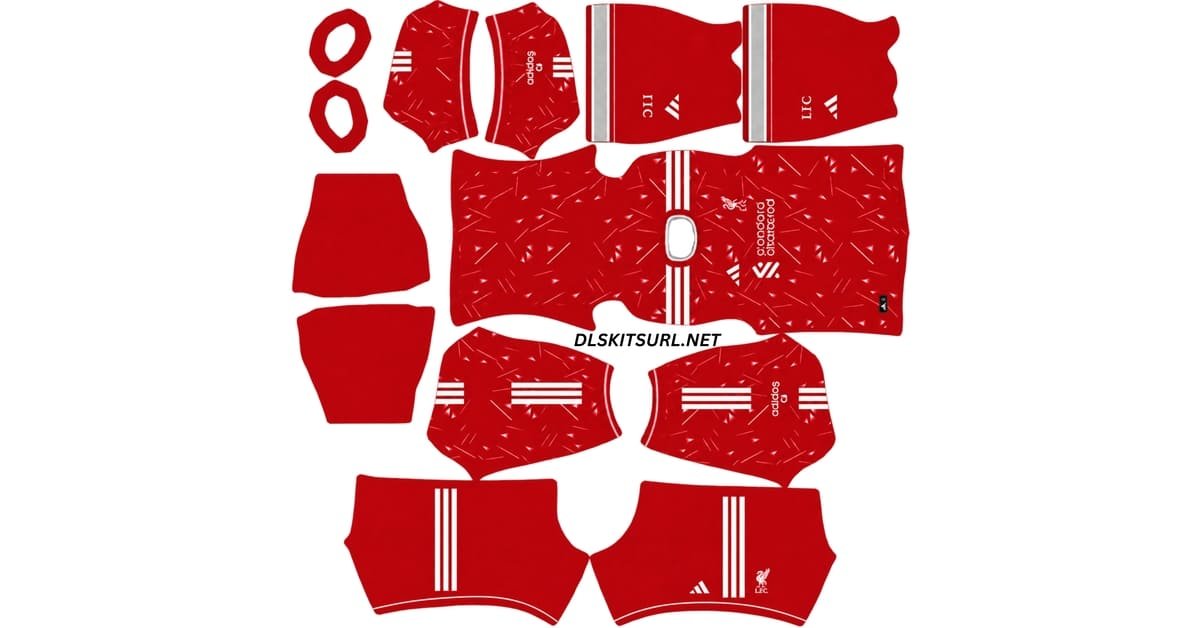
The Liverpool DLS Kit URL 512×512 collection for Dream League Soccer 2026/27 includes the home, away, third and goalkeeper kits ready for custom kit import.
There is a common theme running through Liverpool’s three outfield shirts this season: Anfield.
Liverpool Official Logo
Official Logo 512×512
Liverpool Logo url
Official Logo 512×512 (2026/27)
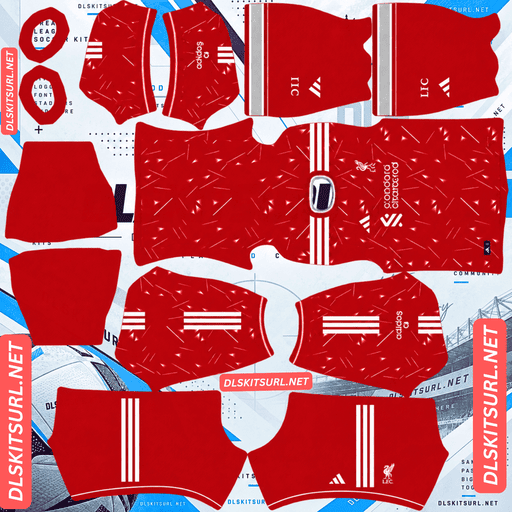
Liverpool Home Kit
Home Kit 512×512 (2026/27)
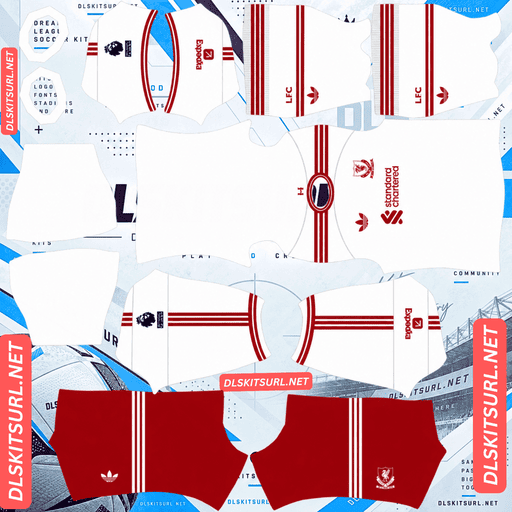
Liverpool Away Kit
Away Kit 512×512 (2026/27)
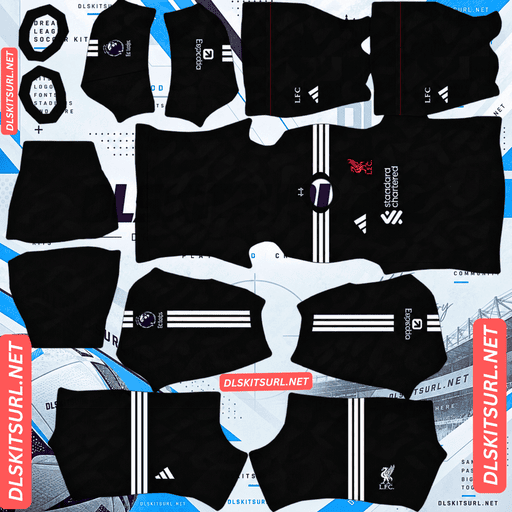
Liverpool Third Kit
Third Kit 512×512 (2026/27)
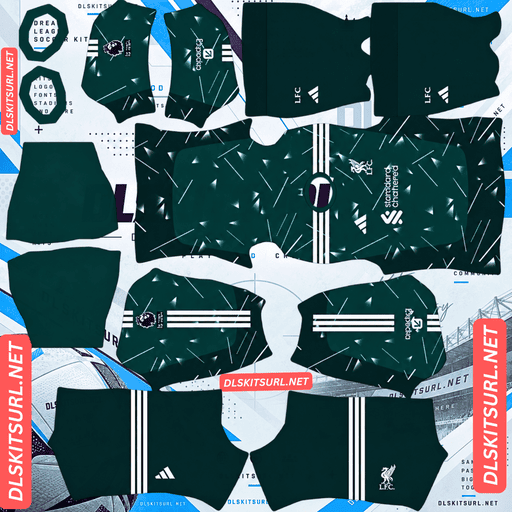
Liverpool Home GK Kit
GK Kit 512×512 (2026/27)
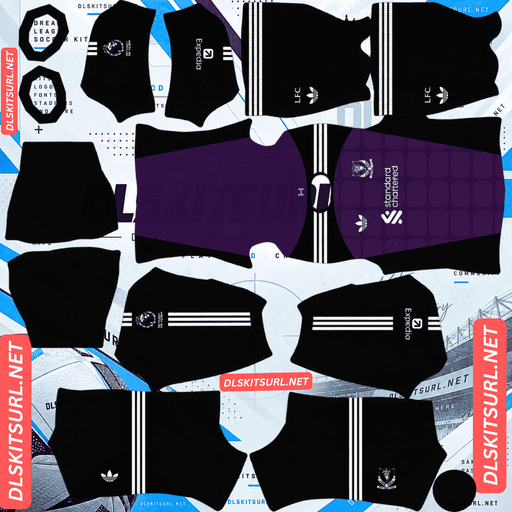
Liverpool Away GK Kit
GK Kit 512×512 (2026/27)
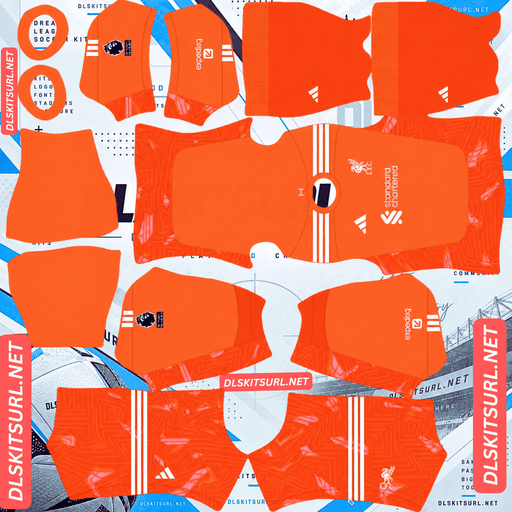
Liverpool Third GK Kit
Third GK Kit 512×512 (2026/27)
The home kit reaches back to a title-winning shirt worn at the ground in 1989/90. The away design uses details inspired by historic Anfield match tickets, while the third shirt turns to the Kop and the atmosphere of European nights.
Those references are worked into the shirts through patterns and textures rather than large graphics. That makes the quality of the PNG especially important in Dream League Soccer, where a poor 512×512 file can lose the details that define the real kits.
Liverpool Home Kit – Inspired by 1989/90
Liverpool’s 2026/27 home kit was released on 19 May 2026 and takes inspiration from Adidas’s own archive.
The reference is the Liverpool home shirt worn between 1989 and 1991.
That kit is closely connected with the 1989/90 season, when Kenny Dalglish’s Liverpool won the English league title.
The new shirt brings back one of the most recognisable features of that era: the geometric pattern running through the red body.
It gives the current kit a retro connection without simply reproducing the old shirt.
For Dream League Soccer players, this pattern is also one of the easiest ways to check whether a Liverpool DLS kit URL represents the correct season.
How to Identify the Liverpool Home Kit
The current home shirt should not look like a completely flat red jersey.
Its geometric pattern should remain visible across the body.
If a Liverpool home kit PNG appears plain red with almost no texture, it may belong to another season or may have been created from a low-quality source image.
The pattern is an important part of the 2026/27 design.
A properly prepared Liverpool DLS kit 512×512 PNG should preserve enough of that detail for it to remain visible once the shirt is rendered inside the game.
Liverpool Away Kit – Inspired by Anfield Match Tickets
Liverpool officially unveiled the 2026/27 away kit on 29 July 2026.
The shirt uses a clean white base with red and grey detailing, taking visual cues from Liverpool away kits of the mid-1980s.
Red shorts and white socks complete the full strip.
The most interesting detail, however, is worked directly into the fabric.
The pattern is based on historic Anfield match tickets.
Archival ticket graphics were used to create a subtle engineered texture that pays tribute to generations of Liverpool supporters who have passed through the Anfield turnstiles.
It is not designed to look like a large printed graphic.
Instead, the ticket references sit within the material itself, giving the shirt a more understated appearance.
Adidas Trefoil and Heritage Liver Bird
The away kit also brings back two important retro details.
Adidas uses the classic Trefoil logo rather than its standard performance mark.
Liverpool also use a heritage Liver bird on the shirt instead of the modern badge treatment associated with the other kits.
Together, those details strengthen the connection with Liverpool shirts from earlier Adidas eras.
They are also useful when checking a Liverpool away DLS kit 512×512.
A current away file should show the Trefoil and heritage-style Liver bird along with the white, red and grey colour scheme.
How Liverpool Revealed the Away Kit
Liverpool gave the away shirt an unusual introduction.
Supporter and DJ Calvin Harris displayed the new kit during his headline set at Ushuaïa Ibiza on the day of its launch.
It was a different approach from the usual stadium or studio kit reveal and helped give the retro-inspired shirt a more distinctive launch.
Liverpool Third Kit – Inspired by the Kop
Liverpool’s 2026/27 third kit arrived on 27 August 2026 as part of the “Feel the Anfield Effect” campaign.
The shirt uses a black base with an irregular maroon geometric pattern spreading across the front, shoulders and sleeves.
That pattern is designed to represent the collective energy of Liverpool supporters.
The shapes can be read as abstract flags moving through the crowd, linking the shirt directly with the Kop and the atmosphere of European nights at Anfield.
The rest of the design stays relatively understated.
The Adidas branding, Liver bird, Standard Chartered sponsor and Expedia sleeve branding are finished in matte silver.
The back of the shirt is kept much cleaner, while black shorts and socks complete the strip.
Why the Liverpool Third Kit Needs a Good 512×512 File
The third shirt is probably the most difficult Liverpool design to reproduce accurately in Dream League Soccer.
The problem is contrast.
Dark maroon patterning sits over a black background.
Because those colours are intentionally close to each other, the design depends on small differences in shade.
A poor-quality or enlarged PNG can remove those differences almost completely.
The shirt may still import correctly, but once it appears on a DLS player, it can look like a plain black jersey.
A genuine high-quality Liverpool third kit 512×512 PNG gives the maroon pattern a much better chance of remaining visible.
Why Liverpool DLS Kits Are Difficult to Get Right
Liverpool’s 2026/27 collection presents an unusual problem for DLS kit creators.
All three outfield shirts rely heavily on texture rather than bold colour changes.
The home shirt uses geometric patterning.
The away shirt contains the woven match-ticket design.
The third kit uses dark maroon graphics over black.
None of those details is particularly loud.
That works well on a real football shirt, where fabric texture and subtle colour differences can be seen up close.
A 512×512 game texture has much less room to preserve them.
The situation becomes worse when someone takes a small image and enlarges it to 512×512.
The dimensions may technically be correct, but the original detail is already gone.
That is why some Liverpool DLS kits import without errors yet look much plainer than the real shirts.
Which Liverpool Kit Is Hardest to Render?
Of the three, the third kit is the most demanding.
Its maroon-on-black pattern has very little contrast, so poor image quality can make the detail disappear completely.
The away kit comes next.
Its Anfield ticket design is woven and tonal rather than strongly printed, so it also loses detail quickly when the source image is small.
The home kit is the most forgiving.
Its geometric pattern contains stronger shapes and clearer edges, allowing it to survive resizing better than the other two.
Even so, a clean source image will always give better results.
How to Check Liverpool DLS Kit Image Quality
One simple test can help you identify an enlarged image.
Open the PNG at full size and zoom in on a sharp boundary.
The point where the collar trim meets the body is a good example.
The line should appear reasonably crisp.
If it spreads into a soft blur across several pixels, the image may have been enlarged from a lower-resolution source.
When those sharp boundaries are already blurry, subtle shirt patterns usually suffer even more.
Which Liverpool Badge Should You Use in DLS?
Liverpool use different badge treatments across the 2026/27 kit collection.
Dream League Soccer, however, normally uses the same team logo regardless of which shirt your players are wearing.
That means you need to choose the badge that best suits your setup.
The current Liverpool crest matches the home and third shirts.
The heritage Liver bird is used on the away kit alongside the Adidas Trefoil.
If the away shirt is your main kit, the heritage version provides the closest visual match.
Why the Heritage Liver Bird Can Work Better in DLS
There is also a practical reason to consider the heritage Liver bird.
Dream League Soccer displays club badges at a small size during matches and may crop them into a circular area.
Detailed logos naturally lose some clarity when reduced.
A simpler standalone Liver bird contains fewer small elements, so it can remain easier to recognise beside the score.
Whichever version you choose, use a high-quality badge PNG with some clear space around the artwork.
That gives the game more room to resize the logo without cutting into important details.
How to Check If a Liverpool DLS Kit Is Current
Liverpool kits from different seasons can look similar when displayed as small 512×512 templates.
A few details make the current designs easier to identify.
Check the Home Shirt Pattern
The current home shirt should contain visible geometric patterning.
A completely flat red design does not capture the main feature of the 2026/27 shirt.
Check the Away Kit Colours
The away kit should be predominantly white with red and grey detailing.
It should not use the sea-green colour associated with the previous campaign.
Look for the Adidas Trefoil
The 2026/27 away shirt uses the classic Adidas Trefoil.
If the file has the normal performance logo instead, check whether you have the correct kit.
Make Sure the Third Kit Is Included
Liverpool’s third shirt was released on 27 August 2026.
A kit page showing only the home and away shirts may simply not have been updated since earlier in the summer.
A complete current Liverpool DLS kit set should include the third design as well.
How to Use a Liverpool DLS Kit URL
Importing a Liverpool DLS kit URL into Dream League Soccer only takes a few steps.
First, copy the direct image link using the Copy URL button on the kit card.
Do not automatically copy the address from your browser bar, as that can give you the webpage rather than the actual PNG file.
Open Dream League Soccer and go to My Club.
Choose Customise.
Some versions may call this Customise Team.
Open the Kit section rather than Logo.
Select the slot you want to replace.
Then tap Custom Kit.
Older versions of Dream League Soccer may show the option as Download.
Paste the URL into the field and confirm.
Repeat the same process for each kit you want to install.
Liverpool Goalkeeper Kit in Dream League Soccer
Do not forget the goalkeeper slot.
Liverpool’s away goalkeeper kit this season uses a black and purple colour combination with white detailing.
Leaving the default goalkeeper shirt in place can make an otherwise complete Liverpool setup look unfinished.
Adding the goalkeeper PNG alongside the home, away and third shirts gives you a more complete Liverpool DLS kit 2026/27 collection.
Unlocking Custom Kits in Dream League Soccer
If you have never imported a custom kit before, Dream League Soccer may require you to unlock the feature first.
The source article describes this as a one-time in-game gem payment.
Once the custom kit feature has been unlocked, you can continue importing different designs without paying separately for each shirt.
Check the Liverpool Kit URL in Your Browser First
Test the URL before pasting it into Dream League Soccer.
Open the link in your browser.
The kit image should appear by itself rather than inside a normal webpage.
If you see navigation menus, adverts, headers or buttons around the image, you probably have the page URL rather than the direct image address.
Dream League Soccer needs access to the actual kit file.
A direct kit link will commonly point to a .png image.
On desktop, you can right-click the kit and choose Open image in new tab.
This also gives you a chance to check the dimensions before importing.
For this type of custom kit, the file should use a 512×512 layout.
Why Liverpool DLS Kit URLs Stop Working
Even a good Liverpool DLS kit URL can eventually stop working.
In many cases, the problem is not the kit or Dream League Soccer. It is the image host.
Free Image Hosts Delete Files
Many kit creators upload PNG files to free image-hosting services.
Those services may remove old or inactive uploads after a period of time.
The page containing the kit may still exist, but the image behind the URL has disappeared.
When that happens, the link may look correct while returning nothing.
Hotlink Protection Can Block DLS
Some image hosts use hotlink protection to prevent other websites or applications from loading their files directly.
That can create a confusing situation.
The Liverpool kit opens normally when you tap the URL in your browser, but Dream League Soccer refuses to import it.
The link itself may be correct.
The host is simply blocking the game’s external request.
In that situation, you need another direct PNG URL hosted somewhere that allows external access.
The Preview and Kit URL Can Be Different Files
Some DLS websites display a preview image from their own server but provide a Copy URL button that points to another image host.
If the external file disappears, the preview may continue working perfectly.
You only discover the problem when you try to import the shirt.
Using the same hosted file for both the visible preview and copied link reduces that problem.
Save Your Liverpool DLS Kit URLs
Once you find Liverpool kits that import properly and preserve the shirt patterns, save the URLs somewhere outside Dream League Soccer.
A notes app is enough.
This is especially useful with Liverpool’s 2026/27 collection because finding a file that simply loads is easier than finding one that also keeps the geometric home pattern, woven away details and maroon third-kit graphics.
If you reinstall Dream League Soccer or move to another device, you may need to import your custom kits again.
The same can apply to the club badge.
Saving your Liverpool DLS kit URL links now means you will not need to search for the same high-quality files again later.
Liverpool DLS Kit URL FAQ
What Is a Liverpool DLS Kit URL?
A Liverpool DLS kit URL is a direct image link to a Liverpool shirt prepared for Dream League Soccer.
The standard custom kit layout uses a 512×512 PNG, which you paste into the game’s custom kit section.
What Inspired the Liverpool Home Kit?
Liverpool’s 2026/27 home kit takes inspiration from the Adidas shirt worn between 1989 and 1991.
That design was worn during Liverpool’s 1989/90 title-winning season under Kenny Dalglish.
The modern shirt brings back its distinctive geometric pattern.
What Is the Pattern on the Liverpool Away Shirt?
The Liverpool away shirt contains a woven pattern based on historic Anfield match tickets.
Archival graphic elements from the tickets are worked into the material as a tribute to generations of supporters who have passed through Anfield.
The shirt also uses the Adidas Trefoil and heritage Liver bird.
What Does the Liverpool Third Kit Look Like?
The Liverpool third shirt uses a black base with an irregular maroon geometric pattern across the front, shoulders and sleeves.
The design references the Kop and the energy of European nights at Anfield.
Matte silver logos and branding complete the shirt.
Why Do My Liverpool DLS Kits Look Plain?
Liverpool’s current shirts rely heavily on subtle patterns and texture.
A low-resolution or enlarged image can remove those details while still importing successfully.
The third kit is particularly vulnerable because the maroon pattern sits over a black background.
Using a properly prepared 512×512 Liverpool DLS kit PNG should preserve more of the original design.
Which Liverpool Badge Should I Use in DLS?
The current badge treatment matches Liverpool’s home and third kits.
The heritage Liver bird matches the retro-inspired away shirt.
The standalone Liver bird can also remain easier to recognise when Dream League Soccer displays the team logo at a small size.
How Do I Know If a Liverpool Kit File Is Current?
Check several details.
The home shirt should have visible geometric patterning.
The away shirt should be white with red and grey details and should use the Adidas Trefoil.
A complete current set should also include the black and maroon third shirt released on 27 August 2026.
Why Does a Liverpool Kit URL Work in My Browser but Not in DLS?
The image host may be using hotlink protection.
This allows the PNG to open normally in your browser while preventing Dream League Soccer from accessing the same image through an external request.
If that happens, another direct image host is usually required.
Do Liverpool Custom Kits Survive a Reinstall?
You may need to import your Liverpool custom kits again after reinstalling Dream League Soccer or changing devices.
Save the Liverpool DLS kit URL links somewhere outside the game so the home, away, third, goalkeeper and badge files are easy to restore.