
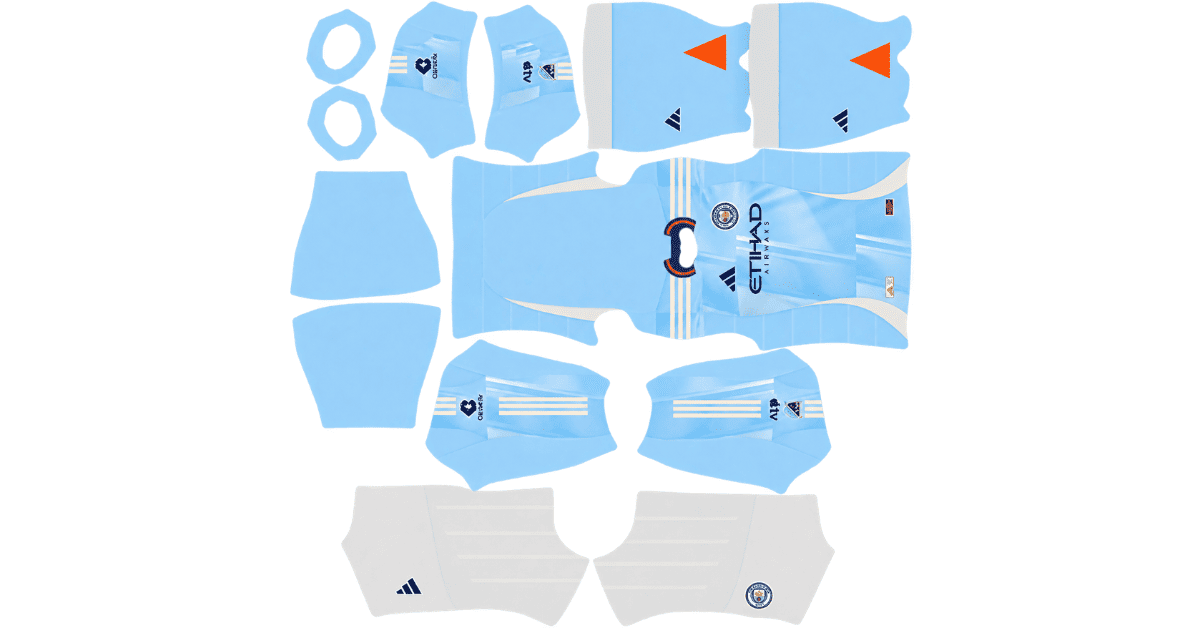
Looking for an NYCFC DLS kits URL to update your Dream League Soccer team? This page features direct links to 512×512 PNG kits for New York City FC, ready to import into the game. All four kit slots are listed below, and each image has been loaded into the game before being added to this page.
New York City FC Logo
Official Logo 512×512 (2026/27)
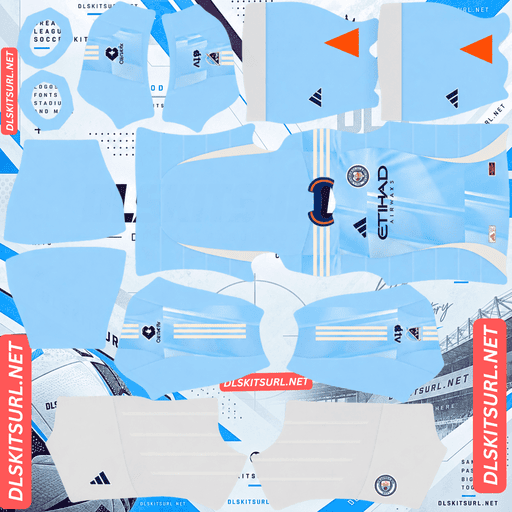
New York City FC Home Kit
Home Kit 512×512 (2026/27)
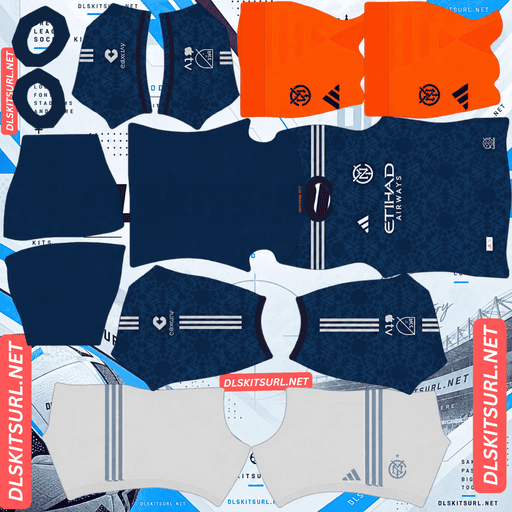
New York City FC Away Kit
Away Kit 512×512 (2026/27)
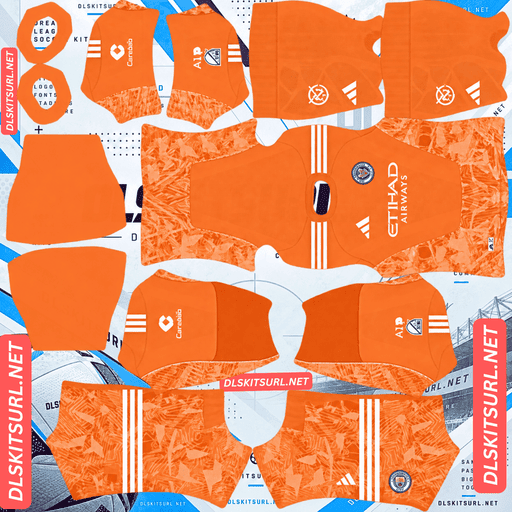
New York City FC GK Home Kit
GK Home Kit 512×512 (2026/27)
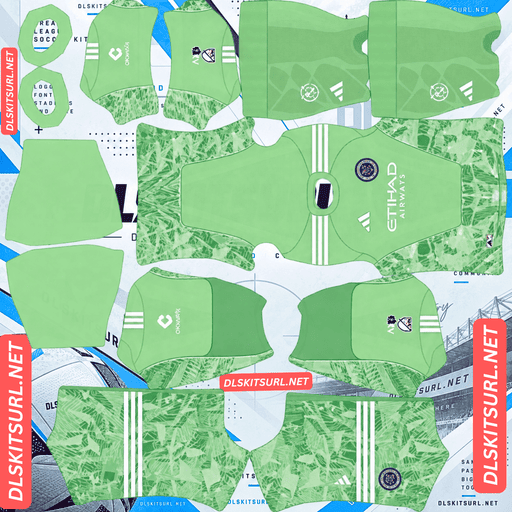
New York City FC GK Away Kit
GK Away Kit 512×512 (2026/27)
There are two important changes to know about for 2026. NYCFC has introduced a new away shirt, and its refreshed club crest has finally appeared on the team’s kits. The shirt is easy enough to identify, but choosing the correct badge file requires a little more attention.
NYCFC’s Club Crest Changed for 2026
Before choosing a kit, it is worth checking which version of the NYCFC badge you have. The club revealed an updated crest in September 2024, but the new design did not immediately appear on the players’ shirts.
The 2025 home kit still featured the previous badge. The refreshed crest made its debut on the club’s 2026 kits, creating a difference between older badge downloads and the version used on the latest shirts.
How to Choose the Correct NYCFC Badge
Dream League Soccer displays one club crest regardless of which kit your team wears. That means your badge needs to match the version you want to use, even if you switch between home and away shirts.
Here is a simple way to identify the available versions:
2024 and earlier: These files generally feature the older NYCFC crest.
2025-labelled files: These may still show the old badge because it remained on the club’s shirts during that season.
2026-labelled files: These should feature the refreshed crest, provided the file is correctly labelled.
Always compare the actual artwork instead of relying entirely on the filename. NYCFC is a good example of why the release year matters when choosing a badge, not just when selecting a kit.
NYCFC 2026 Away Kit — The All Nations Design
Released in February 2026, the All Nations Kit celebrates New York City’s cultural diversity and the many communities that make up the city. Its launch also looks ahead to the World Cup arriving in the New York area.
The shirt uses a deep navy colour officially called Legend Ink, with symmetrical geometric graphics across the front. The pattern draws inspiration from the New York City flag and represents the idea of different cultures coming together.
Another source of inspiration is the steel Unisphere sculpture in Flushing Meadows. Metallic details on the shirt echo the sculpture’s appearance, giving the overall design a more distinctive finish.
The result is a darker away kit than some of NYCFC’s recent alternatives. Its colour scheme has also drawn comparisons to the navy Gotham Kit worn by the club in 2020 and 2021.
Why the Metallic Logos Look Different in DLS
The original All Nations shirt uses metallic-looking logos, but those finishes cannot be reproduced exactly in a standard flat kit image.
Metal normally gets its reflective appearance from a combination of bright highlights, mid-tones and dark shadows. These small changes in brightness create the impression that a surface is reflecting light.
A 512×512 PNG can preserve the colours and shapes in the design, but Dream League Soccer does not recreate the way light moves across a metallic surface. The logos may therefore look like flat silver or grey graphics rather than polished metal.
This is a limitation of the image format and the game’s rendering, not necessarily a problem with your download. Similar differences can occur with gold details on Sevilla, Udinese, Brest and Águilas Doradas kits, as well as silver elements on Leverkusen’s European shirt and Sport Recife’s Pink October design.
The Geometric Pattern Should Remain Sharp
The good news is that the All Nations shirt has another design feature that translates much better into DLS: its geometric pattern.
The graphics are sublimated into the fabric, meaning the design is printed into the material rather than created through raised or woven textures. A flat image can reproduce printed shapes directly.
The pattern is also symmetrical and geometric, with defined edges that are easier to preserve than subtle changes in fabric tone.
When checking a kit image, look for clearly separated geometric shapes across the navy background. If the pattern appears blurred or merges into a single dark texture, try a higher-quality file.
Check How the Pattern Continues Onto the Sleeves
One detail that separates a carefully prepared DLS kit from a poorly aligned one is the transition between the body and the sleeves.
The All Nations pattern extends across both areas, so the design needs to be positioned correctly on the kit template.
Follow the graphics from the main body towards the sleeves. If the shapes continue naturally across the intended boundaries, the image has been assembled more carefully. If the pattern suddenly jumps, restarts or becomes visibly misaligned, the template may need adjustment.
NYCFC 2026 Home Kit — The Excelsior Kit
While the All Nations design brought a new look to the away shirt, NYCFC’s home kit carried over from the previous season.
Known as The Excelsior Kit, the home shirt features NYCFC’s familiar sky-blue colour with a pattern inspired by the glass surfaces of New York City’s skyscrapers.
Adidas generally introduces one new kit per MLS club each year, allowing the other design to remain in use. For NYCFC, the new 2026 release was the away shirt, so The Excelsior continued into the 2026 season.
Is the 2025 NYCFC Home Kit Still Current?
Yes. If a 2025-labelled file matches The Excelsior design, it can still be the correct home kit for 2026.
This is worth remembering when searching for DLS downloads. An older filename does not automatically mean that the design is outdated, especially in MLS, where clubs commonly carry one kit into the following season.
There is one NYCFC-specific detail to watch for: the original 2025 home shirt featured the previous crest. The refreshed badge appeared on the team’s kits in 2026.
If you are particular about matching the real shirt, check the crest included in the PNG. Your imported DLS badge is handled separately, but it may not completely hide the original badge printed on the shirt.
Other MLS teams, including Austin FC, Charlotte FC, Colorado Rapids, Atlanta United, FC Cincinnati, CF Montréal and the New York Red Bulls, also carry kit designs across seasons.
Which NYCFC DLS Kit Looks Best in the Game?
Both kits have their strengths, but they offer different looks on the pitch.
Kit
Design
Main Advantage
Home — The Excelsior
Sky blue with a skyscraper-glass-inspired pattern
Bright appearance and good pitch visibility
Away — All Nations
Navy with symmetrical geometric graphics
Distinctive pattern and darker overall style
The home shirt is a good choice if you prefer NYCFC’s traditional sky-blue look. The All Nations away kit is more suitable if you want something darker and more detailed, with geometric graphics that make it stand out from a plain navy shirt.
How Visible Are NYCFC Kits During Matches?
Kit colour can make a difference in Dream League Soccer because players appear relatively small when the camera is pulled back.
Sky Blue Home Kit Visibility
The Excelsior home shirt is the easier of the two to follow during matches. Its pale, bright blue colour contrasts well with the green pitch, helping you recognise players during quick passing moves.
It offers a similar visibility advantage to the Carolina-blue colours used by Charlotte FC. Both shades stand out clearly against the playing surface.
Navy Away Kit Visibility
The All Nations away shirt also separates from the green pitch, but its darker colour creates a different appearance.
From a distance, the navy shirt can look like a deeper, more solid shape. The geometric pattern gives it additional detail, which is why retaining the pattern’s clarity matters when selecting a PNG.
If visibility is your priority, the sky-blue home kit is the more practical choice. If you prefer the navy design, choosing a file with a sharp pattern will help preserve its appearance.
Best Number Colours for NYCFC Home and Away Kits
Dream League Soccer uses separate colour swatches to control shirt and shorts numbers. These settings are independent of the imported kit image, so you should adjust them after importing your design.
Number Colours for The Excelsior Home Kit
Navy or orange numbers are suitable choices for the sky-blue home shirt.
Navy provides a darker contrast against the pale background, while orange adds a brighter accent that works with NYCFC’s colour scheme. White is less suitable because it can blend into the lighter parts of the shirt.
Number Colours for the All Nations Away Kit
White numbers are the best option for the navy away shirt. They provide clear contrast and remain easier to read when players are viewed from a distance.
Avoid trying to imitate the shirt’s metallic logos with a special-looking number colour. DLS displays numbers as flat colours, so a straightforward white swatch is more effective.
Remember to adjust the shirt and shorts number colours separately to keep the entire kit consistent.
How to Check Whether an NYCFC DLS Kit Is Current
Before importing a file, check a few important details to make sure it matches the design you want.
Look for Adidas branding. Adidas supplies the kits for all MLS clubs, including NYCFC.
Check the away shirt’s colours. The 2026 All Nations design uses a navy base with symmetrical geometric graphics. The 2024 away shirt, by comparison, was black with sky-blue and orange details.
Confirm the home design. A 2025-labelled home kit is still suitable if it matches The Excelsior design.
Inspect the club crest. The refreshed badge appeared on the kits in 2026, so older shirts and badge files may show the previous version.
These checks are more reliable than judging a file by its title alone. A download can have an outdated filename, an incorrect season label or a crest that does not match the latest shirt.
How to Use an NYCFC DLS Kits URL
Once you have found the correct kit, importing it into Dream League Soccer only takes a few steps.
Step 1 — Copy the Direct Kit Link
Use the copy button on the kit card to get the image URL. Avoid copying the address of the webpage itself, because that may lead to a page containing the shirt rather than the PNG file.
Step 2 — Open the Customisation Menu
Launch Dream League Soccer and go to My Club → Customise → Kit.
Make sure you select Kit rather than Logo. The Kit menu handles your team’s shirts, while the Logo menu is used for the club badge.
Step 3 — Select the Slot You Want to Replace
Choose the home, away or third-kit slot before pasting the URL. The game applies the imported image to the slot you currently have selected, so double-check it before continuing.
Step 4 — Paste the URL and Confirm
Press and hold the URL field, tap Paste, and confirm the import. Depending on your game version, the final button may be labelled Download instead.
Wait for the image to load, then check the shirt in the game to make sure the colours and pattern look right.
Step 5 — Make Use of the Third Kit Slot
Since the club has home and away designs, the third outfield-kit slot is available for another compatible design if your version of DLS supports the standard three-slot setup.
NYCFC’s 2023 mosaic home shirt is a good option for anyone who wants a previous-season design. Its pattern was inspired by the ceramic artwork found in New York City’s subway stations.
You can use an older kit or a different design as long as the image URL works and the file is compatible with the game’s custom-kit importer.
The first custom-kit import requires a one-time gem unlock. After that feature has been unlocked, changing your kits generally costs nothing.
Test Your NYCFC Kit URL Before Importing
Always open the copied URL in your browser before using it in Dream League Soccer.
A proper direct image link should display the shirt on its own, without a surrounding webpage, navigation bar or collection of buttons. The address should normally end in .png.
If the link opens a page with an image preview, look for the direct image URL instead. A webpage address is not the same as a link to the actual PNG file.
Testing the URL first helps you catch broken links and unsuitable image pages before attempting to import the kit.
Why Do NYCFC DLS Kit URLs Stop Working?
A kit URL can become unusable for several reasons, even when the page where you originally found it still exists.
The Image Has Been Removed From Its Host
Free image-hosting websites sometimes delete files after long periods of inactivity or when their storage policies change.
The link may still look normal, but opening it could produce a missing-image error. In that situation, the original uploader may need to restore the file or provide a replacement URL.
The Image Host Blocks External Requests
Some hosts use hotlink protection to prevent other websites or applications from loading their images directly.
This can cause a kit to display correctly when opened in a browser but fail when Dream League Soccer attempts to retrieve it. The game is making a separate request to the image host, which may be blocked.
If you encounter this problem, try a direct PNG link from a host that allows external image requests.
The Preview and the Actual Download Use Different Files
Some kit websites display a preview stored on their own server but link to an image hosted somewhere else. The preview may continue to work even after the original download file has disappeared.
That is why it is important to test the exact URL you plan to import rather than relying only on the preview image.
The kit cards on this page are intended to provide direct links to the corresponding PNG files, allowing you to check the image before opening the game.
NYCFC Logo URL for Dream League Soccer
Your club badge is imported separately from your kit. To change it, return to My Club → Customise, then select Logo instead of Kit.
NYCFC’s crest is circular and built around the club’s NYC monogram, using sky blue, navy and orange. Its simple, recognisable design makes it suitable for the small badge display used in Dream League Soccer.
Choose the Correct Crest and Avoid Cropping Problems
Before importing a badge, confirm whether the file contains the older crest or the refreshed version used on the 2026 kits.
Dream League Soccer crops imported logos into a circle. NYCFC’s circular crest is well suited to that format, but it is still worth choosing an image with enough clear space around the artwork.
A file cropped too tightly can lose parts of its outer design. Keeping a small margin around the badge helps the entire crest remain visible after the game applies its circular crop.
How to Keep Your NYCFC Kits and Badge Safe
Custom kits and logos are generally saved on your device rather than permanently linked to your game account. Updates may leave them untouched, but reinstalling the game or moving to another phone can mean importing them again.
To avoid losing your setup, save your kit URLs somewhere safe before making changes.
Give each link a clear label, such as 2026 Home — The Excelsior, 2026 Away — All Nations, Third Kit and Goalkeeper Kit. Keep the badge URL in the same note and specify whether it uses the older or refreshed NYCFC crest.
This small step makes it much easier to restore your preferred designs if you need to reinstall Dream League Soccer or change devices.
Frequently Asked Questions About NYCFC DLS Kits
What Is an NYCFC DLS Kits URL?
An NYCFC DLS kits URL is a direct link to a New York City FC shirt image that can be imported into Dream League Soccer. A compatible 512×512 PNG is a commonly used format for custom kits.
What Is the All Nations Kit?
The All Nations Kit is NYCFC’s 2026 away shirt. It features a deep navy base with symmetrical geometric graphics inspired by the New York City flag and the city’s cultural diversity, with metallic details influenced by the Unisphere sculpture.
Will the Metallic Logos Look Like Real Metal in DLS?
No. The reflective appearance of metallic finishes depends on gradients and changes in lighting. In a flat kit image, these details may appear as solid silver or grey rather than realistic metal.
Does the All Nations Geometric Pattern Show Up Clearly?
The pattern should reproduce well because it uses sublimated graphics with defined geometric shapes. A good-quality 512×512 image can preserve these details better than subtle woven textures or complicated fabric effects.
Did NYCFC Change Its Club Crest?
Yes. NYCFC revealed a refreshed crest in September 2024, but it did not appear on the team’s shirts until 2026. As a result, some 2025-labelled badge files still feature the previous design.
Is the 2025 NYCFC Home Kit Still Current?
Yes. The Excelsior home design carried over into 2026 while NYCFC introduced the All Nations away shirt. Check the image and crest to make sure the file matches the version you want.
Which NYCFC Kit Is Easier to See During a Match?
The sky-blue home kit is generally easier to follow because its bright colour contrasts well with the green pitch. The navy away kit has a darker appearance, although its geometric pattern adds visual detail.
What Number Colour Should I Use on the NYCFC Away Kit?
White is the recommended choice for the All Nations away kit. It contrasts strongly with the navy background and keeps squad numbers easy to read during matches.
Can I Use an Older NYCFC Kit in the Third Slot?
Yes. You can use a compatible older design, such as the 2023 mosaic home shirt, provided the image is available through a working direct URL and your game supports the standard third-kit slot.
Why Does My NYCFC Kit URL Work in a Browser but Fail in DLS?
The image host may block external requests, the URL may point to a webpage instead of a direct PNG, or the image may have been removed. Test the exact link and use a host that allows Dream League Soccer to access the file.