
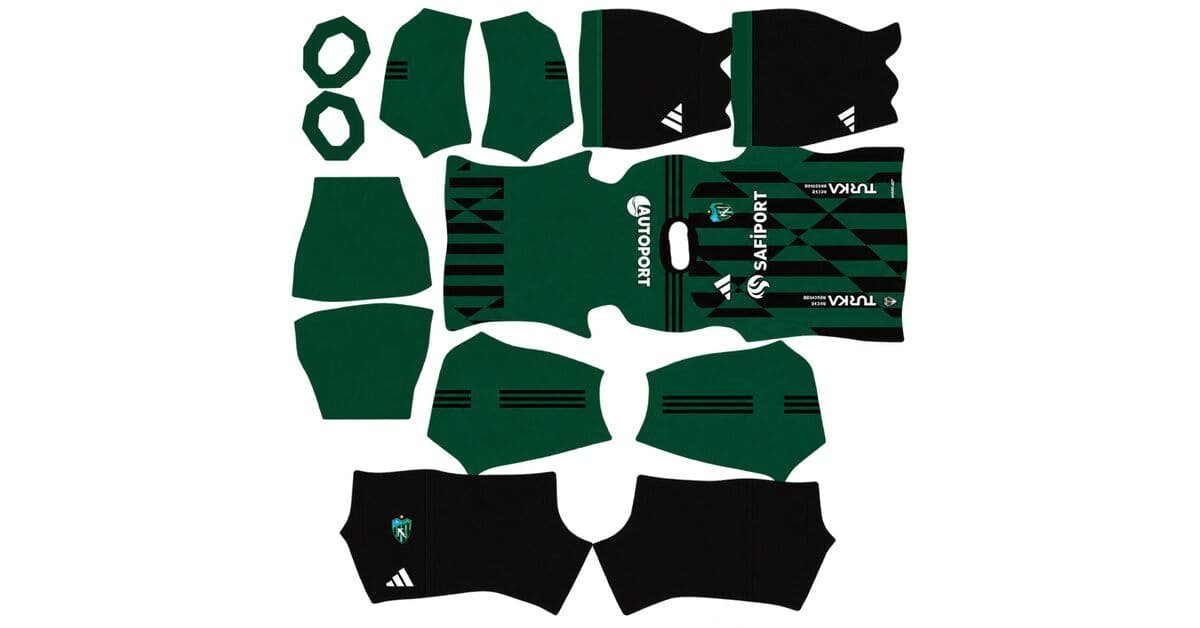
A Kocaelispor DLS kits URL is a direct link to a 512×512 PNG Kocaelispor shirt that you can import into Dream League Soccer. All four kit slots are listed below, and each image has been loaded into the game before being added to this page.
Kocaelispor Logo
Official Logo 512×512 (2026/27)
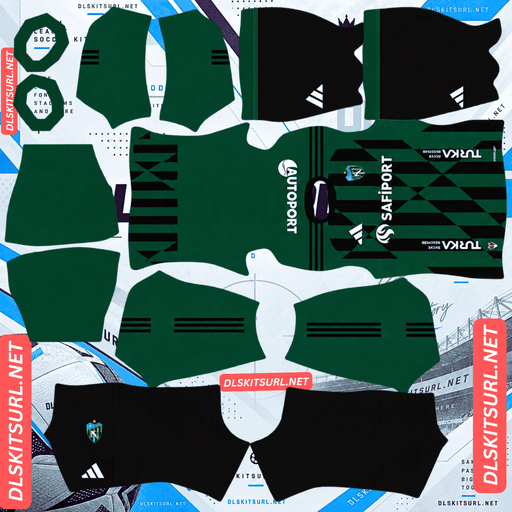
Kocaelispor Home Kit
Home Kit 512×512 (2026/27)
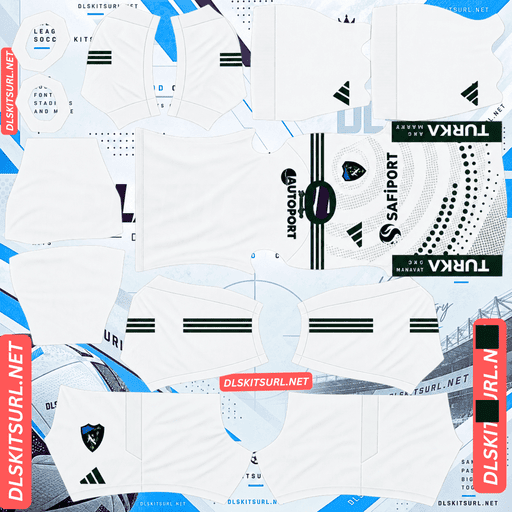
Kocaelispor Away Kit
Away Kit 512×512 (2026/27)
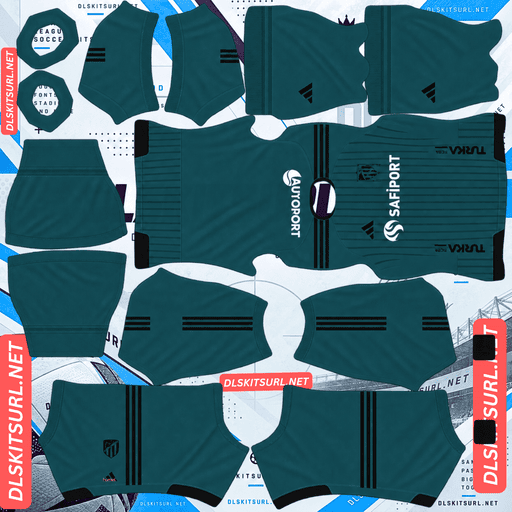
Kocaelispor Third Kit
Third Kit 512×512 (2026/27)
Kocaelispor are known for their green and black colours. While this combination reflects the club’s identity, it creates a visibility challenge in Dream League Soccer. Understanding how these colours appear on the pitch can help you choose the right kits and make your team easier to follow during matches.
Why green and black are difficult to follow in DLS
Dream League Soccer displays players at a relatively small size during matches. How easily you can track your team depends partly on how different its shirt colours are from the green pitch.
Green naturally sits close to the colour of the grass. This creates the same visibility challenge faced by clubs such as Nottingham Forest, Diriyah, Young Africans and Pakistan when they wear green-based kits.
Black creates a different problem. It is one of the darkest colours available, so although it can separate from the grass, it does not add brightness to the player’s overall silhouette.
Why green and black are harder to distinguish than green alone
Many green-shirted clubs use a second colour that helps their players stand out. Kocaelispor’s black combination does not provide the same advantage.
Juventude: White stripes break up the green and create brighter areas.
Çaykur Rizespor: Blue stripes introduce a colour that contrasts more clearly with green.
Young Africans: Yellow provides a bright contrast against both the pitch and the green shirt.
Kocaelispor: Black adds darkness rather than brightness, leaving no prominent light-coloured element.
Black does not rescue green; it makes the overall design darker. At match distance, a green-and-black shirt can appear as one dark shape, with less internal contrast to catch your eye.
How to make Kocaelispor easier to see during matches
There are three practical ways to improve visibility when using Kocaelispor in Dream League Soccer.
Choose white numbers. This is the most effective adjustment you can make without changing the kit itself. White numbers stand out against both green and black, giving the upper back a bright detail that remains easier to recognise at a distance.
Consider a lighter alternative kit. Kocaelispor’s 2025/26 third kit used gold and black. Gold sits further from the colour of the pitch, making it a useful example of a brighter alternative. If your available kit collection includes a light-coloured design, consider using it as your main strip when visibility is the priority.
Pay attention to the shorts and socks. Dream League Soccer imports the complete strip from one image, so a dark shirt combined with white shorts can give the player model a brighter lower half. This can make a more noticeable difference during matches than small details on the shirt.
Kocaelispor DLS kits for 2026/27
Kocaelispor continue their existing partnership with Adidas, with SafiPort appearing as the shirt sponsor.
The 2026/27 collection includes home, away and third kits, combining the club’s traditional colours with alternative designs. The shirts use current Adidas teamwear templates rather than heavily textured or individually constructed designs.
Why Adidas teamwear templates work well at 512×512
Kocaelispor are the third Süper Lig club this season featured with a full collection built around a manufacturer’s catalogue designs, alongside Çaykur Rizespor with Adidas Tiro and Gençlerbirliği with Nike teamwear.
This approach has an advantage when importing kits into Dream League Soccer. Stock templates generally rely on clean shapes, stripes, colour blocks and trim. They do not depend on complicated woven textures, embossed details, gradients or subtle tonal patterns to complete the design.
As a result, there is less fine detail to lose when the shirt is displayed at 512×512 pixels. Simple template designs tend to reproduce cleanly in the game, provided the source image itself is clear.
Why the template cannot confirm a club’s identity
The downside is that the shirt shape alone does not tell you which club the kit belongs to.
Thousands of teams use the same Adidas catalogue templates in different colour combinations. A green-and-black Adidas shirt could plausibly belong to many clubs, and recolouring a standard template can produce an image that looks convincing without necessarily being an accurate Kocaelispor kit.
When checking a file, focus on the green-and-black colours, SafiPort sponsor and Kocaelispor crest rather than relying on the template’s shape.
Watch out for gold Kocaelispor kits from previous seasons
Kocaelispor’s 2025/26 third kit featured gold and black. Older images of this design may still appear in kit collections, so it is worth checking the season before importing one.
A gold shirt is a useful clue that a file belongs to the previous campaign rather than the current 2026/27 collection.
There is also a limitation with how gold appears in Dream League Soccer. Realistic metallic gold relies on gradients, including highlights, mid-tones and shadows that make the surface look reflective. A flat 512×512 image cannot reproduce that effect as convincingly, so the gold may look more like dull yellow or brownish yellow than polished metal.
The shirt can still be useful if you want a brighter colour against the pitch, but its appearance in the game may differ from the original design.
Other clubs, including Udinese, Sevilla, Amed SK and Atlético Mineiro, face the same difficulty when their gold kit details are reduced to a flat image.
Which number colours work best on Kocaelispor kits?
Dream League Soccer uses two small colour swatches in the kit template to determine number colours. One controls the shirt numbers, while the other controls the shorts numbers. These settings are separate from the colours in your imported image.
For Kocaelispor, choosing the right number colour is particularly important because the dark kit needs a bright detail to improve visibility.
Green shirt: Use white numbers to create a clear contrast.
Black shirt: Use white numbers for the same reason.
Gold or another light-coloured alternative: Use black numbers to maintain contrast while complementing the club’s palette.
White is the strongest general choice for Kocaelispor’s traditional green-and-black combination because it remains visible against both colours.
Remember to adjust the shirt and shorts number swatches independently. If your shirt and shorts use different colours, choose a number colour that remains legible on each garment.
What to check in a Kocaelispor DLS kit file
Since the designs rely mainly on colour blocking rather than complicated patterns, checking the basic details is the best way to assess image quality.
Green-and-black boundaries: The edges where the two colours meet should be sharp rather than blurred or smeared.
Collar and cuff trim: Small details around the neckline and sleeves should have clean edges.
SafiPort sponsor and club crest: Both should be recognisable rather than appearing soft or pixelated.
These details should remain clear in a good-quality kit image.
You should also confirm the image’s actual dimensions. On a computer, right-click the image and open it in a new tab or check its properties to see the size. A filename that claims to contain a 512×512 image does not prove that the file has those dimensions.
How to identify a current Kocaelispor kit
If you are unsure whether a file belongs to the 2026/27 season, check four details before importing it.
Adidas branding: The shirt should carry Adidas branding.
SafiPort sponsor: Check for SafiPort on the chest.
Current template: The design should use a current Adidas teamwear template rather than an older shirt shape.
Correct colour combination: Green and black should remain the core colours of the traditional design.
Also watch for the gold-and-black third kit from 2025/26. That design belongs to the previous campaign and should not be mistaken for a current-season shirt.
How to use a Kocaelispor DLS kits URL
Importing a Kocaelispor kit is simple once you have the correct direct image link.
Copy the URL using the button on the relevant kit card. Do not copy the browser’s address bar, which usually points to the webpage rather than the image.
Open Dream League Soccer and select My Club.
Tap Customise, then open Kit. The Logo section is separate and is used for importing the club badge.
Choose the kit slot you want to replace before pasting the URL.
Press and hold the URL field, select Paste, and then tap Confirm. Some older game versions may use the label Download instead.
Your three outfield shirts can occupy the home, away and third slots, leaving the goalkeeper slot available for a separate design.
For Kocaelispor, it is worth choosing the goalkeeper kit deliberately rather than keeping the default. A bright goalkeeper shirt can help you distinguish the keeper from the other players when the outfield team is wearing dark green and black.
The first custom kit requires a one-time gem unlock. After that, changing kits does not cost additional gems, so you can switch to a lighter alternative during the season without paying again.
Test your Kocaelispor kit link before importing it
Before opening the game, test the URL in your browser.
A working direct link should display the kit image by itself, without a webpage surrounding it. The address should end in .png.
If the link opens a page containing the image alongside headings, buttons or other content, it is probably a viewer page rather than a direct image URL. Dream League Soccer needs access to the actual PNG file.
Testing the link first helps you identify a broken or unsuitable URL before attempting to import it.
Why do Kocaelispor DLS kit URLs stop working?
There are three common reasons a kit URL may stop working. Smaller Süper Lig clubs can be particularly affected when fewer people maintain their image uploads.
Free image hosts delete files
Free image-hosting services sometimes remove uploaded files or delete images that are no longer maintained. Kocaelispor kits may be harder to find replacements for than those of Istanbul giants such as Galatasaray and Fenerbahçe.
The URL may still look valid even when the image has disappeared from the server.
Hotlink protection blocks direct requests
Some image hosts prevent external apps from loading their files directly. This restriction is known as hotlink protection.
As a result, a kit image might open successfully in your browser but fail when you paste the same link into Dream League Soccer. The browser can display the image, while the game’s request is refused by the hosting server.
The preview and the actual image use different links
Some websites display a thumbnail stored on their own server but provide a separate URL for the full image. If the full image disappears, the preview may continue to work even though the download link is broken.
For this collection, the displayed shirt and the copied URL refer to the same file on the same server, helping avoid this issue.
How to add the Kocaelispor badge in DLS
You can import the Kocaelispor crest from the same customisation area, but choose Logo instead of Kit.
The badge is especially useful for identifying Kocaelispor because Adidas catalogue templates are shared by many clubs, while the team’s dark colours can make its shirt silhouette less distinctive during matches. The crest provides a recognisable club identifier beside the score.
Dream League Soccer crops imported badges into a circle. Choose an image with enough clear space around the complete design so that the edges of the crest are not cut off.
Turkish lettering may appear softer at the small size used by the game. This can be a result of the badge being displayed at a reduced size rather than a problem with the source file. The green-and-black design remains an important part of the club’s visual identity.
How to keep your Kocaelispor kits
Custom kits are stored on your device rather than permanently attached to your account. They will usually remain after a standard game update, but reinstalling Dream League Soccer or switching to a new phone may mean importing them again. Your custom badge may need to be restored too.
Older gold-and-black kits can also be confused with current-season designs, while Adidas templates alone are not enough to confirm a shirt’s identity.
To make restoring your team easier, save all four kit URLs and your badge link in a notes app before importing anything. You can then reuse the links if your custom kits disappear or you change devices.
Frequently Asked Questions
What is a Kocaelispor DLS kits URL?
A Kocaelispor DLS kits URL is a direct link to a 512×512 PNG shirt that you can paste into Dream League Soccer’s kit customisation screen. A working direct image link ends in .png.
Why are Kocaelispor difficult to follow during a match?
Kocaelispor’s green shirts sit close to the colour of the pitch, while black adds darkness rather than brightness. Unlike green kits paired with white, yellow or blue, the green-and-black combination has no prominent bright element to help the player silhouette stand out.
How can I make Kocaelispor easier to see in DLS?
Use white numbers on the green-and-black kit, consider a lighter alternative shirt if one is available, and check whether the shorts and socks provide additional brightness. These adjustments can make your players easier to identify during matches.
Who makes Kocaelispor’s kits for 2026/27?
Adidas makes Kocaelispor’s kits, continuing an existing partnership, with SafiPort as the shirt sponsor. The 2026/27 collection uses current Adidas teamwear templates.
Are stock Adidas templates good for Dream League Soccer?
They are generally good for image rendering because their clean shapes and colour blocks reproduce well at 512×512. However, the templates are shared by many clubs, so the shirt shape alone cannot confirm that a file belongs to Kocaelispor.
Is the gold Kocaelispor shirt current?
No. The gold-and-black third kit belongs to the 2025/26 season. Its metallic appearance may also be difficult to reproduce in Dream League Soccer because a flat image cannot capture the gradients and reflections that make gold look like metal.
What number colour should I use on a Kocaelispor kit?
White numbers are the best choice for both green and black shirts because they contrast clearly with both colours. For a gold or other light-coloured alternative, black numbers can provide better visibility. Set the shirt and shorts number colours separately.
How do I know whether a kit file is really Kocaelispor?
Check the green-and-black colours, Adidas branding, SafiPort sponsor and club crest. Since many clubs use the same Adidas templates, these identifying details are more useful than the shirt’s overall shape.