
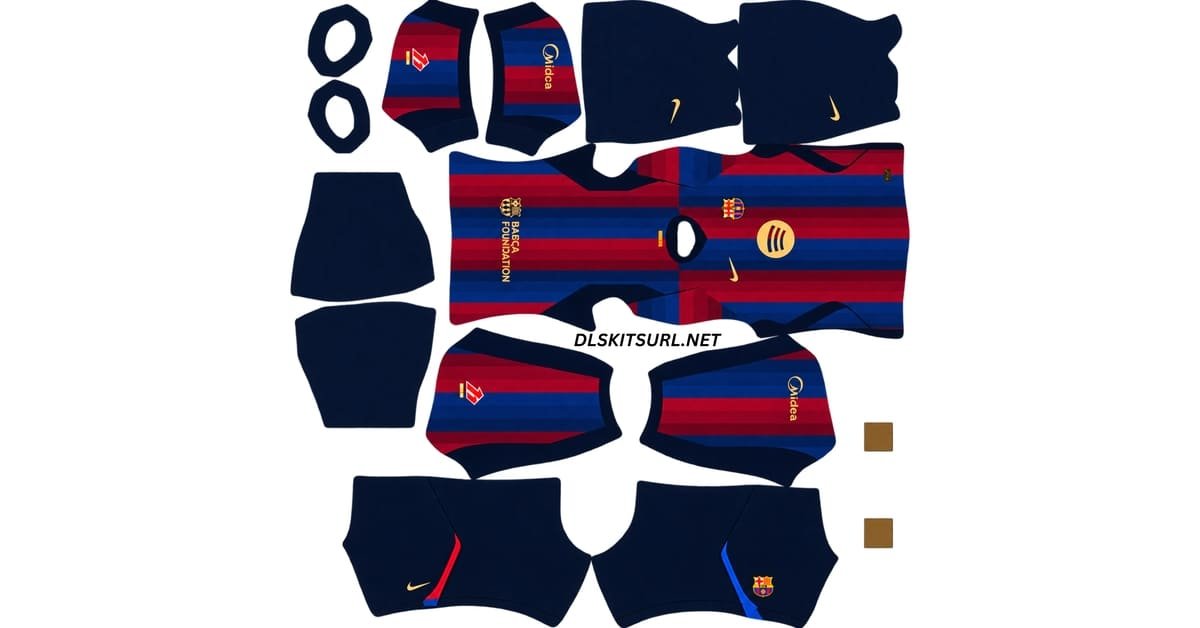
The Barcelona DLS Kit URL 512×512 collection for Dream League Soccer 2026/27 includes the current home, away, third and goalkeeper kits ready for custom import.
Barcelona Official Logo
Official Logo 512×512
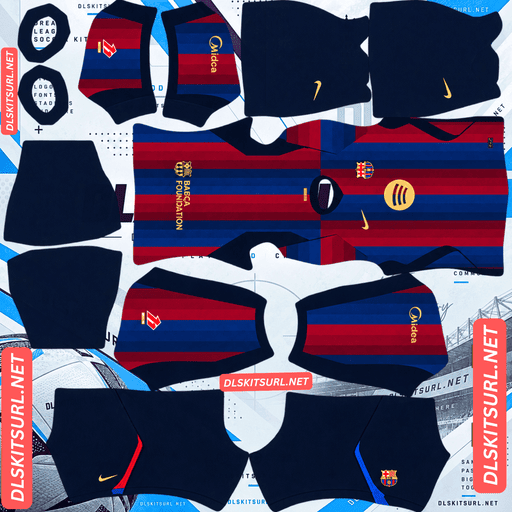
Barcelona Home Kit
Home Kit 512×512
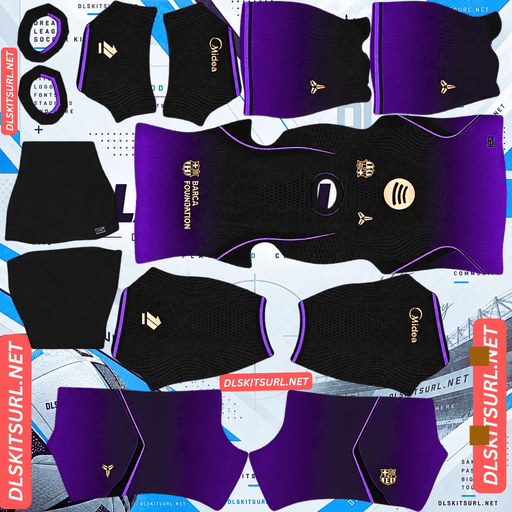
Barcelona Away Kit
Away Kit 512×512 (2026/27)
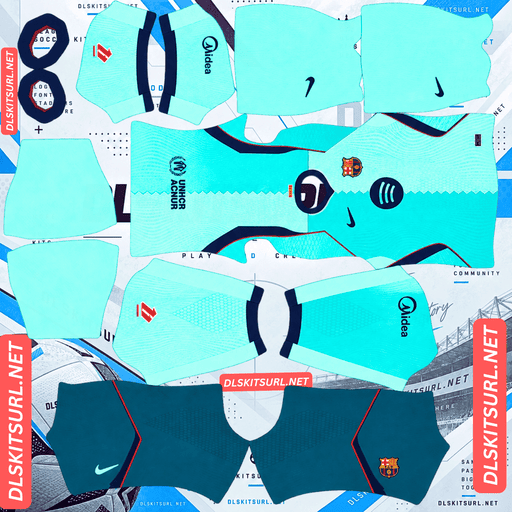
Barcelona Third Kit
Third Kit 512×512 (2026/27)
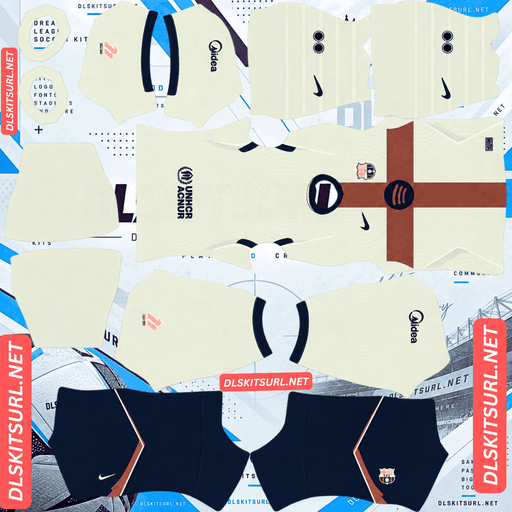
Barcelona 4th Kit
4th Kit 512×512 (2026/27)
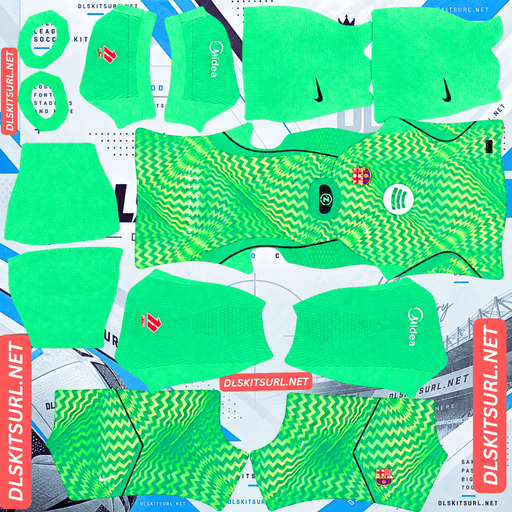
Barcelona Home GK Kit
Home GK Kit 512×512 (2026/27)
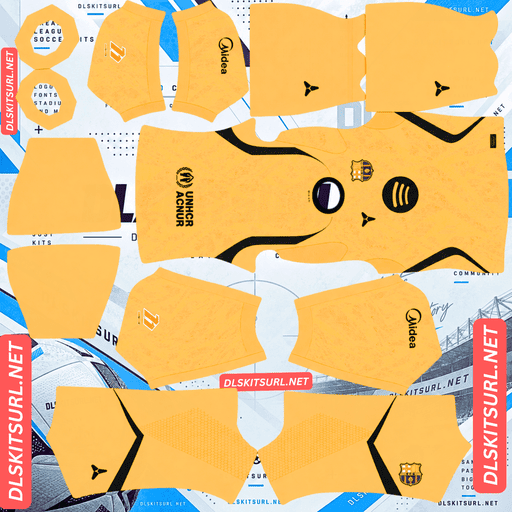
Barcelona Third GK Kit
Third GK Kit 512×512 (2026/27)
Barcelona’s three outfield shirts take inspiration from very different places this season. The home kit looks to the renovated Spotify Camp Nou, the away shirt draws from basketball culture through the Black Mamba collaboration, and the third kit reaches back to a 1990s design.
That variety also makes file quality important.
The home and away shirts rely heavily on gradients, while the third kit uses a central zigzag that needs to line up correctly on the Dream League Soccer template. A PNG can technically measure 512×512 and still lose those details if it was enlarged from a smaller source.
Barcelona Home Kit 2026/27 – Inspired by Spotify Camp Nou
Barcelona’s 2026/27 home kit was launched on 1 July 2026.
The design takes inspiration from the renovated Spotify Camp Nou, particularly the panels used across the rebuilt stadium façade.
Nike translated that architectural idea into the club’s traditional blaugrana stripes.
Instead of using the narrower striping seen on some recent Barcelona shirts, the 2026/27 design uses four wide vertical stripes.
That layout also references the Barcelona home shirt from 2006/07.
The difference is in the colour treatment.
Rather than using one simple red and one simple blue, Nike works several shades into the stripes.
Six Shades in the Barcelona Home Shirt
The red side of the design uses Deep Garnet, Noble Red and Cardinal Red.
The blue sections use Game Royal, Loyal Blue and Blue Void.
Those shades blend through the stripes instead of appearing as completely flat blocks of colour.
Blackened Blue is used around the cuffs, while the collar has a semi-hexagonal shape.
Both the Nike Swoosh and Spotify sponsor appear in gold.
Blackened Blue shorts and socks complete the kit.
How to Identify the Current Barcelona Home Kit
The easiest check is the number of stripes.
The 2026/27 home shirt uses four wide stripes.
If you find a Barcelona DLS kit with six or eight narrow stripes, it belongs to another season.
The colour transitions provide a second check.
The red and blue areas should show subtle changes in shade rather than looking like four completely flat blocks.
For a current Barcelona DLS kit 512×512, both details should be visible.
Why the Barcelona Home Gradient Matters in DLS
The home kit’s colour treatment can be difficult to preserve in a small image.
A gradient needs enough pixels to show the subtle shades between one colour value and the next.
When a low-resolution source is enlarged to 512×512, those intermediate tones can disappear.
The result still looks like a Barcelona shirt because the familiar red and blue stripes remain.
What disappears is the detail that makes the 2026/27 version different.
Instead of six tonal shades blending through four stripes, the shirt can look like simple red and blue blocks.
That is why checking the gradient before importing is worthwhile.
Barcelona Away Kit 2026/27 – Black Mamba Collaboration
Barcelona’s 2026/27 away shirt was released on 24 July 2026.
The design is part of a two-season collaboration with the Black Mamba brand, running across 2025/26 and 2026/27 as a tribute to Kobe Bryant.
Instead of using a traditional Barcelona colour combination, the shirt moves from black into purple.
The purple is Field Purple, a shade closely associated with the Los Angeles Lakers.
Metallic gold and iridescent details complete the look.
This makes the away kit one of the easiest current Barcelona shirts to identify from colour alone.
Barcelona Away Kit Details
The shirt includes an iridescent Mamba logo along with the Black Mamba-inspired colour treatment.
Inside the collar is the phrase:
“Leave the game better than you found it.”
The black-to-purple fade is the main feature of the shirt.
It is not simply a black top with purple trim.
The colours gradually transition across the design, and that effect needs to remain visible in a good-quality DLS kit file.
How to Identify the Current Barcelona Away Kit
The 2026/27 away shirt should be black fading into purple.
If the Barcelona away kit you find is orange, yellow or a traditional blaugrana combination, it comes from another season.
The unusual black and Field Purple palette makes the current design fairly easy to date.
That is useful when searching through older Barcelona DLS kit pages, where several seasons can appear together.
Why the Barcelona Away Fade Needs Good Resolution
The away kit creates an even greater challenge than the home shirt.
A smooth black-to-purple fade contains many small changes in colour.
When a source image does not have enough resolution, the software has fewer intermediate values available.
Instead of a smooth transition, the fade begins to break into visible steps.
This is known as colour banding.
On a poor Barcelona away DLS kit 512×512, the shirt may look like one black section and one purple section with an obvious line between them.
A better-quality image should show a much smoother transition.
Barcelona Third Kit 2026/27 – Inspired by 1996/97
Barcelona’s third kit became available on 12 August 2026.
The shirt reaches back to the club’s 1996/97 Kappa away design for inspiration.
A light mint base officially called Green Frost is combined with a darker Dusty Cactus section.
A sharp vertical zigzag runs down the body and separates the two shades.
The result is very different from Barcelona’s usual striped identity.
A tonal geometric jacquard pattern also appears across the front, sleeves and back.
Barcelona Third Kit Details
Loyal Blue appears on the collar and sleeve cuffs.
Gym Red is used for smaller accents, including the Nike Swoosh and details around the shoulder and side seams.
The Nike Swoosh sits on the right side of the chest, with the full-colour Barcelona crest on the opposite side.
The Spotify sponsor appears centrally in Loyal Blue.
The combination of mint shades, the vertical zigzag and the retro reference makes the third kit easy to distinguish from Barcelona’s other current shirts.
Why the Barcelona Third Kit Tests Template Alignment
The third shirt creates a different problem from the gradients on the home and away kits.
Its central zigzag needs to line up correctly.
On a Dream League Soccer kit template, the front of the shirt is built from mapped image zones.
Anything running directly down the centre is very sensitive to template accuracy.
If the PNG was created using a different DLS layout, the zigzag can shift sideways, break where panels meet or appear uneven on the player model.
That problem cannot be fixed through an in-game setting.
The file itself needs to use the correct template.
How to Check the Barcelona Third Kit Alignment
Look at the vertical zigzag after importing the shirt.
It should run cleanly down the body without suddenly shifting away from the centre.
If it looks offset, split or bent where different areas meet, the kit may have been designed for another version of the template.
Also check the tonal jacquard pattern.
A good-quality image should preserve at least some of the fine geometric texture rather than reducing the shirt to two plain green sections.
What the Three Barcelona Kits Tell You About File Quality
Each Barcelona shirt exposes a different problem.
The home kit tests tonal detail because its four stripes contain several shades rather than flat red and blue.
The away kit tests gradient quality because the transition from black to purple needs enough resolution to remain smooth.
The third kit tests template alignment because its vertical zigzag depends on the centre of the shirt lining up correctly.
A file can import successfully and still fail one of those tests.
That is why checking the design itself is more useful than relying only on the dimensions written in the filename.
How to Check Barcelona DLS Kit Image Quality
Open the image at full size before importing it.
Zoom in on a sharp boundary, such as where the collar trim meets the shirt body.
The edge should look reasonably crisp.
If it spreads into a soft blur across several pixels, the file may have been enlarged from a smaller source.
The same image will usually struggle even more with gradients, jacquard textures and fine template details.
A genuine high-quality Barcelona DLS kit 512×512 PNG should preserve both sharp edges and subtle colour changes reasonably well.
Four Checks for a Current Barcelona DLS Kit
Barcelona kits from previous seasons are still widely shared online, so a few simple checks can help you avoid importing the wrong one.
Count the Home Stripes
The current home shirt uses four wide vertical stripes.
A design with several narrow stripes belongs to another Barcelona season.
Check the Home Gradient
The red and blue sections should contain noticeable shifts in shade.
If they are completely flat, the source image may have lost the tonal detail.
Check the Away Kit Colours
The current away shirt should move from black into purple.
An orange Barcelona away shirt belongs to the previous campaign.
Check the Third Kit Zigzag
The 2026/27 third shirt should use a mint-green base split by a strong vertical zigzag.
A completely different colour or layout belongs to an older season.
Barcelona Goalkeeper Kit 2026/27
Barcelona’s goalkeeper kit uses a bright green colour scheme.
It also includes a zigzag pattern, visually linking it with the design language of the third shirt.
Dream League Soccer treats the goalkeeper as a separate kit slot.
That means setting the three outfield shirts without changing the goalkeeper leaves one default design in an otherwise complete custom setup.
Importing all four kits in the same session gives the team a more consistent appearance.
How to Use a Barcelona DLS Kit URL
Importing a Barcelona DLS kit URL into Dream League Soccer only takes a few steps.
First, copy the direct image link using the Copy URL button on the kit card.
Avoid simply copying the normal browser address unless you know it points directly to the image.
Open Dream League Soccer and go to My Club.
Choose Customise.
Some versions may display this as Customise Team.
Open the Kit section rather than Logo.
Select the slot you want to replace.
Tap Custom Kit.
Older versions of Dream League Soccer may show this option as Download.
Paste the direct image URL and confirm.
Repeat the same process for the home, away, third and goalkeeper slots.
Unlocking Custom Kits in Dream League Soccer
If you have never used a custom kit before, Dream League Soccer may require the feature to be unlocked first.
The source material describes this as a one-time in-game gem payment.
Once the feature has been unlocked, you can continue importing different kits without paying separately for each new shirt.
Check the Barcelona Kit URL in Your Browser First
Test the URL before pasting it into Dream League Soccer.
Open the link in your normal browser.
The kit image should appear by itself rather than inside a webpage.
If you see menus, adverts, headers or buttons surrounding the image, you probably have the page URL rather than the direct kit address.
Dream League Soccer needs access to the actual image file.
A direct link commonly points to a .png image.
On desktop, right-click the kit and choose Open image in new tab.
This also gives you a chance to inspect the image dimensions.
A standard custom DLS kit should use a 512×512 layout.
Why Barcelona DLS Kit URLs Stop Working
Barcelona kits are among the most widely shared Dream League Soccer files.
That also means there are many older links still circulating.
A Barcelona DLS kit URL can stop working for several reasons.
Free Image Hosts Delete Files
Many kit creators use free image-hosting services.
Those platforms may eventually delete old or inactive uploads.
The page containing the kit can remain online even after the PNG itself has disappeared.
The result is a link that looks valid but no longer loads the image.
Hotlink Protection Can Block DLS
Some image hosts use hotlink protection.
This allows an image to open when you visit it directly but prevents another app from requesting the same file.
That is why a Barcelona kit URL can work perfectly in your browser and then fail inside Dream League Soccer.
The problem may be the image host rather than your game.
In that situation, another direct PNG URL is required.
The Preview and Kit URL May Be Different Files
Some websites display the kit preview from one server but provide a Copy URL button that points somewhere else.
If that second file is removed, the visible preview can continue working normally.
You only discover the problem when you try to import the shirt.
Using the same hosted file for both the visible preview and copied DLS link makes this less likely.
Which Barcelona Badge Should You Use in DLS?
Barcelona’s crest should be imported separately through the Logo section of Dream League Soccer.
The shape of the badge creates one practical issue.
Barcelona’s crest narrows to a point at the bottom.
Dream League Soccer may display team badges inside a circular crop, and a circle removes the most space around the top and bottom edges.
That makes the lower point of the shield particularly vulnerable.
How to Stop the Barcelona Badge Being Cut Off
Use a badge PNG with some transparent padding around the entire crest.
If the artwork is trimmed tightly to the edges of the image, the bottom of the shield can be clipped once Dream League Soccer scales it.
Leaving clear space around the logo gives the game more room to resize it.
The small FCB lettering in the centre may still become difficult to read in the match display.
That is normal when the badge is reduced to a very small size and does not necessarily mean the original file is poor quality.
Save Your Barcelona DLS Kit URLs
Once you find Barcelona kit files that preserve the gradients and template details properly, save the links somewhere outside Dream League Soccer.
A notes app is enough.
This is especially useful with Barcelona because there are many old kits and reused colour combinations online.
Finding a file that simply loads is easy.
Finding one that preserves the home stripe shading, the away fade and the third-kit zigzag can take longer.
If you reinstall Dream League Soccer or move to another device, you may need to import your custom kits again.
Saving your Barcelona DLS kit URL links, goalkeeper kit and badge URL now means you will not have to repeat the search later.
Barcelona DLS Kit URL FAQ
What Is a Barcelona DLS Kit URL?
A Barcelona DLS kit URL is a direct link to a Barcelona shirt image prepared for Dream League Soccer.
The standard custom kit format uses a 512×512 PNG, which you paste into the game’s custom kit section.
What Inspired the Barcelona Home Kit for 2026/27?
The design takes inspiration from the façade panels of the renovated Spotify Camp Nou.
Nike translated that idea into four wide stripes built from several tonal shades, while also referencing Barcelona’s 2006/07 home shirt.
Why Is the Barcelona Away Kit Black and Purple?
The 2026/27 away shirt is part of the Black Mamba collaboration created in tribute to Kobe Bryant.
It uses a black-to-purple fade with Field Purple, a shade associated with the Los Angeles Lakers, along with metallic and iridescent details.
What Is the Barcelona Third Kit for 2026/27?
The third shirt uses a mint Green Frost base combined with darker Dusty Cactus tones.
A vertical zigzag separates the two sections, while the overall design references Barcelona’s 1996/97 Kappa away shirt.
It became available on 12 August 2026.
How Do I Know If a Barcelona DLS Kit Is Current?
Start with the home shirt.
It should have four wide stripes rather than several narrow ones.
The away shirt should fade from black into purple, and the third kit should use a mint-green design divided by a central zigzag.
Why Does My Barcelona Home Kit Have Flat Stripes?
The home design uses several shades of red and blue inside the four main stripes.
If the source file was too small or heavily compressed, those colour transitions can disappear.
A higher-quality Barcelona DLS kit 512×512 PNG should preserve the gradient more clearly.
Why Does My Barcelona Away Kit Look Like Two Blocks of Colour?
The black-to-purple transition is a smooth gradient.
When an undersized source image is enlarged, the intermediate shades can be lost and the fade breaks into visible steps.
A better-quality file should produce a smoother transition.
Why Is the Zigzag on My Barcelona Third Kit Misaligned?
The zigzag runs close to the centre of the shirt, so it depends on correct Dream League Soccer template alignment.
If the image was created for another layout, the design can shift or break where different template areas meet.
Why Is My Barcelona Badge Cut Off at the Bottom?
Barcelona’s crest narrows to a point at the bottom, while Dream League Soccer may display badges inside a circular crop.
A tightly trimmed PNG can therefore lose part of the shield.
Use a badge file with transparent padding around the full design.
Do Barcelona Custom Kits Survive a Reinstall?
You may need to import your custom Barcelona kits again after reinstalling Dream League Soccer or changing devices.
Save your Barcelona DLS kit URL links, goalkeeper file and badge URL somewhere outside the game so they are easy to restore later.