
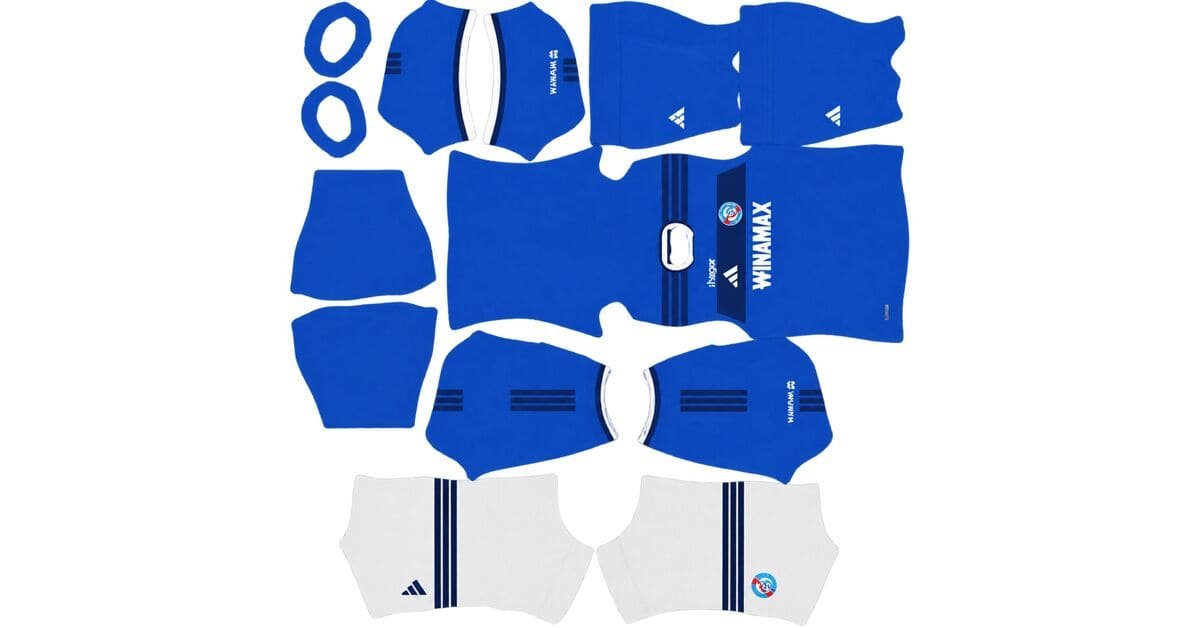
An RC Strasbourg DLS kits URL is a direct link to a 512×512 PNG shirt that you can paste into Dream League Soccer. All four kit slots are included below, and each file was loaded into the game before being added to this page.
RC Strasbourg Logo
Official Logo 512×512 (2026/27)
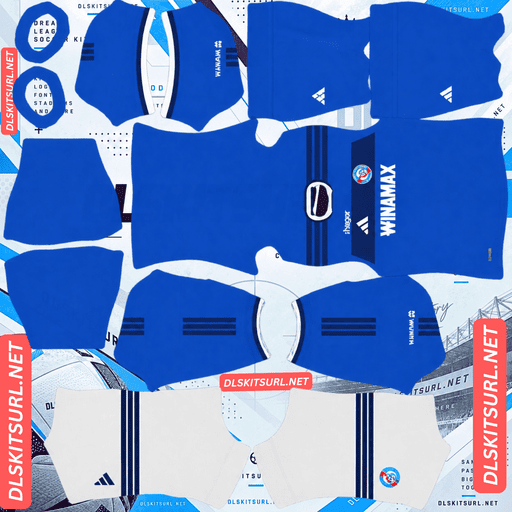
RC Strasbourg Home Kit
Home Kit 512×512 (2026/27)
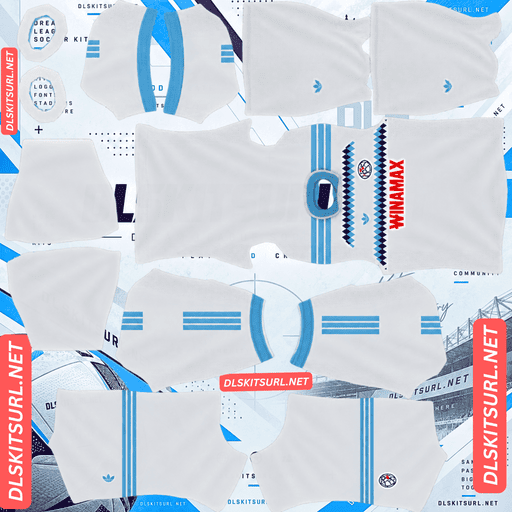
RC Strasbourg Away Kit
Away Kit 512×512 (2026/27)
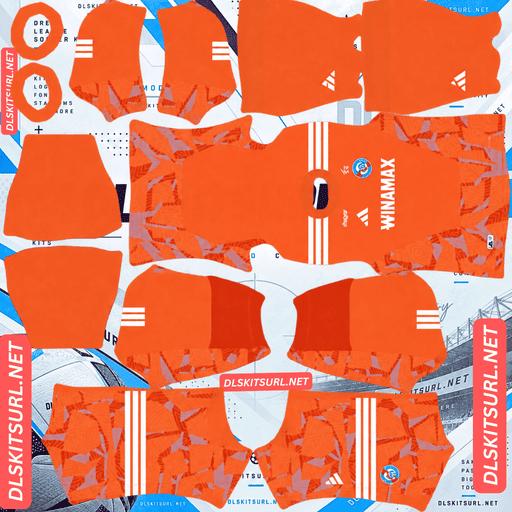
RC Strasbourg GK Home Kit
GK Home Kit 512×512 (2026/27)
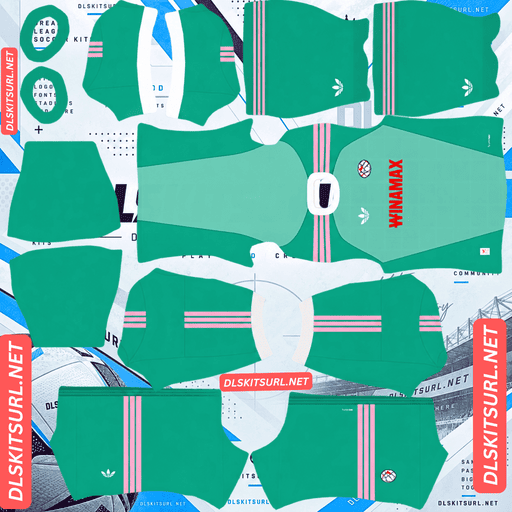
RC Strasbourg GK Away Kit
GK Away Kit 512×512 (2026/27)
The 2026/27 campaign marks Strasbourg’s 120th anniversary season, and Adidas has celebrated it with three shirts featuring three different crests. The third kit also introduces one of the trickiest colour combinations to reproduce clearly: navy blue and black.
Can You Tell Navy from Black?
That is the challenge of Strasbourg’s third kit, and a poor-quality file can make the answer impossible.
Released on 20 August 2026, the third shirt takes inspiration from the club’s 1946–47 campaign. It features navy blue and black vertical stripes, a black polo collar with navy trim, and white Adidas Three Stripes across the shoulders.
Why the Colours Are Hard to Separate
Striped shirts are usually relatively easy to reproduce in a DLS kit template. The vertical bands need to line up in one main direction, and their width makes the pattern easier to preserve.
Strasbourg’s third kit has a different problem: contrast.
Navy blue and black are both extremely dark, making them harder to distinguish than most colour combinations. They sit closer together visually than Scotland’s purple and scarlet, Sevilla’s salmon and lilac, or Al-Fateh’s blue and green.
When an image is compressed, nearby colour values can become less distinct. With two shades this dark, even a small loss of detail can make a noticeable difference.
The stripes might not disappear completely, but they can blend together, leaving what looks like a plain, very dark shirt with white shoulder stripes.
How to Check the Third Kit
Open the third-kit image at full size and look directly at the chest.
You should see two distinct shades alternating across the body.
If the front looks like one uniform dark colour, the file is not preserving enough contrast.
The white Adidas Three Stripes provide a second quality check. They stand out clearly against both dark shades, so sharp edges around the shoulder stripes can help confirm that the image retains good detail, even when the body pattern is difficult to distinguish.
Three Kits, Three Different Crests
Adidas has given each Strasbourg shirt a different badge. That creates an important choice in Dream League Soccer, where your team uses just one imported crest regardless of which kit it wears.
Kit
Crest
Home
Contemporary circular crest
Away
The club’s very first crest
Third
Historic 1945–1950 diamond crest
Dream League Soccer displays one crest across all your kits, so the badge you choose should match the shirt you use most often.
Choose the modern circular crest if the home kit is your main strip.
Choose the diamond crest if you mainly use the retro third kit. A contemporary badge can feel out of place on a shirt inspired by the 1946–47 era.
Choose the original crest if the white away kit is your favourite.
Portugal, Newcastle, Bournemouth and Hull City are also using multiple crests this season. Strasbourg stand out for carrying the idea across all three shirts.
The RC Strasbourg 2026/27 Kits
The 2026/27 Strasbourg collection is made by Adidas, with Winamax as the shirt sponsor. The designs celebrate the club’s 120th season since its founding in 1906.
Home Kit — A Tribute to the Earliest Known Shirt
The home kit was released on 23 July 2026.
Royal blue covers the body, sleeves and back, while a thick, darker blue horizontal panel crosses the upper chest. This band recreates a defining feature of Racing’s earliest known jersey.
White details provide contrast through the Adidas logo, V-neck collar piping and sleeve cuffs. Darker blue panels extend across the shoulders, with matching bands around the sleeve ends.
The club crest sits on the left side of the chest panel, opposite the Adidas logo, with the Winamax sponsor below.
On the upper back, beneath the collar, the shirt carries the inscription “Nous ne sommes pas onze mais des milliers”, meaning “We are not eleven, but thousands.” The anniversary years appear inside the collar, while the socks feature 1906 on the shin.
White shorts and blue socks complete the home look.
Away Kit — 1990s Diamonds and the Original Crest
The away kit was released on 30 July 2026.
It uses a clean white base, finished with a light blue polo collar and matching sleeve cuffs. The retro design draws inspiration from 1990s diamond graphics and features the club’s very first crest.
The white background and light blue details also make this the simplest of Strasbourg’s three outfield shirts to reproduce clearly in Dream League Soccer.
Why the Home Kit’s Chest Band Needs Care
Horizontal Alignment Across the Shirt
A horizontal band creates a different challenge from a vertical stripe. It needs to line up across the front, continue around both sides towards the back, and meet the sleeves at the correct height.
The check: follow the darker blue chest panel towards the side of the shirt. It should continue at a consistent height where the front meets the back.
If the band jumps up or down at the seams, the kit image has not been mapped properly to the template.
Stuttgart’s Brustring, Le Mans’ away band and Flamengo’s white kit present similar alignment challenges this season.
The Imported Badge Can Overlap the Chest Design
Adidas places the club crest and Adidas logo directly on the darker blue chest panel, with the sponsor underneath.
Dream League Soccer places your imported badge in a fixed position on the shirt, regardless of the design beneath it. On Strasbourg’s home kit, that position can fall on or close to the darker band, near the printed crest.
Before importing the home kit, open the file at full size and inspect the chest area. This helps you see where the imported badge may overlap the original design.
Which Kit Details Will Not Transfer to DLS?
Three details are difficult or impossible to reproduce properly in the game’s kit template.
The inscription on the upper back
The phrase “Nous ne sommes pas onze mais des milliers” appears beneath the collar. Unfortunately, this is also the area Dream League Soccer uses for squad numbers. Depending on the template, your number may cover the inscription, overlap it or replace the space where it would otherwise appear.
The anniversary years inside the collar
These details are printed on the inside of the collar. Since the DLS kit template does not map interior surfaces, this part of the original shirt cannot be transferred through a standard kit image.
The 1906 marking on the socks
The year appears in small lettering on the shin area of the socks. At that size, four digits are unlikely to remain clear in the game.
What Happens to the Third Kit’s Patterned Sponsor Logos?
The third kit deserves a separate mention because Adidas used a bespoke pattern within its sponsor logos rather than relying on a simple, flat colour.
It is an unusual design detail and was widely admired when the shirt launched.
However, patterns inside small logos need enough pixels to remain visible. In a 512×512 kit image, the sponsor occupies a relatively small area. Fine details within the logo can flatten into a single colour when scaled or rendered in the game.
You should still see the sponsor logos, but the intricate pattern inside them is unlikely to survive clearly.
Which Strasbourg Kit Works Best in Dream League Soccer?
Kit
Main risk
Verdict
Home
Horizontal band alignment and badge overlap
Check the seams and chest
Away
Diamond graphics against a white base
Most forgiving of the three
Third
Navy and black blending together
Needs a high-quality file
The away kit is the safest choice for image quality. Its white base, light blue polo collar and simple construction provide clear contrast. The diamond graphics also rely on defined shapes rather than subtle differences between dark shades.
The home kit can work very well too, provided its horizontal band lines up properly. The third kit needs the most attention because its two main colours are so similar in brightness.
What Number Colours Work on Strasbourg’s Kits?
Dream League Soccer uses separate colour swatches in the kit template to control shirt and shorts numbers. These colours are not automatically taken from your imported PNG.
Home: Use white shirt numbers against the royal blue upper back.
Away: Use light blue or navy numbers. White numbers would disappear against the white shirt.
Third: Use white numbers, which offer the clearest contrast against both navy and black stripes.
Remember to set the shirt and shorts colours separately. Strasbourg’s home kit combines a blue shirt with white shorts, so one colour setting will not necessarily suit both.
How Visible Are Strasbourg’s Kits During a Match?
The home and away kits should be easy to distinguish on the pitch. The third kit is the weakest of the three for visibility because its main colours are both very dark.
Dream League Soccer renders players at a relatively small size during matches, so visibility depends partly on how clearly a shirt contrasts with the grass and surrounding players.
Home kit: Royal blue stands apart from the green pitch. The darker chest panel and white trim also help define the shirt’s shape.
Away kit: White is easy to distinguish against the grass, while the light blue collar adds a clear secondary detail.
Third kit: Navy and black stripes are difficult to separate at match distance. Players may appear as dark silhouettes with little visible detail inside the shirt. If the stripes have already blended together in the imported file, the pattern can become almost impossible to recognise.
The white Adidas Three Stripes across the shoulders provide the main bright contrast, making them particularly important to the third kit’s appearance.
How to Check Whether an RC Strasbourg Kit File Is Current
Use these four details to distinguish the 2026/27 shirts from older designs:
Adidas branding and Winamax sponsorship should be present.
Home: Look for the royal blue base and darker blue horizontal chest panel. It should not use the previous season’s design.
Away: Check for the white base, light blue collar and cuffs, and the club’s original crest.
Third: Look for navy and black vertical stripes with the historic diamond crest, rather than the contemporary circular badge.
These visual checks help you confirm that you have the intended 2026/27 designs before importing them into the game.
How to Use an RC Strasbourg DLS Kits URL
Follow these steps to import a Strasbourg kit into Dream League Soccer.
Copy the direct image link using the button on the relevant kit card. Avoid copying the browser’s address bar when it contains the article URL instead of the PNG.
Open Dream League Soccer and go to My Club.
Select Customise, then open Kit. Do not choose Logo, because badges are managed separately.
Select the kit slot you want to replace before pasting the link.
Press and hold the URL field, tap Paste, then select Confirm. Some older versions may label the button Download.
Repeat the process for the other kits you want to use.
Your three outfield kits occupy the home, away and third slots, leaving the fourth slot for the goalkeeper. Check all four on the team screen rather than leaving the goalkeeper in the default design.
The first custom kit requires a one-time gem unlock. Once that feature is unlocked, changing your kits does not cost additional gems.
Test the Kit URL Before Importing It
Open the copied link in your browser before launching the game’s kit importer.
A working direct image link should display the shirt on its own, with the address ending in .png. If the link opens a webpage with buttons, menus or other content around the image, it is a viewer page rather than a direct image URL, and Dream League Soccer may not be able to read it.
On a computer, you can right-click the image and open it in a new tab to inspect the image dimensions reported by your browser.
This step is especially useful for Strasbourg’s third kit. The navy and black stripes need enough image detail to remain visibly separate, so check the file before importing it.
Why Do Strasbourg Kit URLs Stop Working?
A kit link can stop working for several reasons, even if it worked when you first saved it.
Free image hosts delete files
Some image hosts remove uploads that have not been accessed for a long time. The old link may remain on a website even after the image itself has disappeared.
Hotlink protection blocks the game
Some hosts restrict requests that do not originate from their own website. This can make a link open normally in your browser but fail when Dream League Soccer tries to load it.
The preview and the direct link point to different files
A website may display a thumbnail hosted on one server while its copy button provides a URL pointing somewhere else. If that separate file disappears, the preview can still look fine even though the copied link no longer works.
For the most reliable result, the image displayed on the kit card and the URL copied by its button should point to the same PNG file.
Choosing the Right RC Strasbourg Badge
Import the Strasbourg crest separately, using the same general menu as the kit importer but selecting Logo instead of Kit.
The contemporary Strasbourg crest is circular, which suits Dream League Soccer’s circular badge display. Since the badge is already round, the game’s circular crop should remove little or none of the design.
The 1945–1950 diamond crest needs more care. Its top and bottom points can be cut off when a square image is cropped into a circle. Choose a badge file with enough clear space around the entire diamond so the design has room to fit.
Lettering may also look softer when the game displays the badge at a small size beside the score. This can happen because of the game’s rendering and display size, rather than because the original image is defective.
How to Keep Your Strasbourg Kits
Custom kits are stored on your device rather than automatically tied to your account. Game updates usually leave them in place, but reinstalling the game or switching phones can mean setting everything up again. Your imported badge may need to be restored too.
Strasbourg takes a little more preparation than most clubs because the collection uses three different crests, and the third kit needs a particularly good image to preserve its stripes.
Before importing anything, save all your kit URLs and badge links in a notes app. That way, you can restore the home, away, third and goalkeeper kits without having to find every image again.
Frequently Asked Questions
What is an RC Strasbourg DLS kits URL?
An RC Strasbourg DLS kits URL is a direct link to a 512×512 PNG shirt that you can import into Dream League Soccer through the kit screen. A working direct image link typically ends in .png.
Why do the stripes on my Strasbourg third kit look like one colour?
The third kit combines navy blue and black, two very dark shades that are difficult to distinguish when image detail is lost. Compression or low-quality image processing can make the colours blend together, leaving the shirt looking almost entirely dark.
How many crests do Strasbourg use in 2026/27?
The collection uses three different crests: the contemporary circular badge on the home kit, the club’s first crest on the away kit, and the historic 1945–1950 diamond crest on the third kit.
Which Strasbourg badge should I use in DLS?
Dream League Soccer uses one imported crest across all your kits. Choose the modern circular crest if you mainly use the home shirt, or the historic diamond crest if the retro third kit is your preferred design. The original crest is the natural match for the away kit.
What inspired the Strasbourg 2026/27 home kit?
The home shirt takes inspiration from the club’s earliest known jersey. Its defining feature is a thick, darker blue horizontal panel across the upper chest, celebrating Racing’s 120th season since its founding in 1906.
Will the patterned sponsor logos on the third kit show up?
The sponsor logos should remain visible, but their intricate internal patterns may not. At 512×512, the logos occupy a small part of the image, so fine pattern details can become indistinguishable from the surrounding colour.
What is written on the back of the Strasbourg home kit?
The upper back carries the phrase “Nous ne sommes pas onze mais des milliers,” which means “We are not eleven, but thousands.” It appears beneath the collar, close to the area Dream League Soccer uses for squad numbers, so it may be covered or obscured in the game.
Which Strasbourg kit is easiest to follow during a match?
The home kit offers good visibility because its royal blue colour stands apart from the green pitch, with white trim helping define the shirt. The away kit is also easy to distinguish. The navy and black third kit is the hardest to read at match distance because its main colours have very little contrast.