
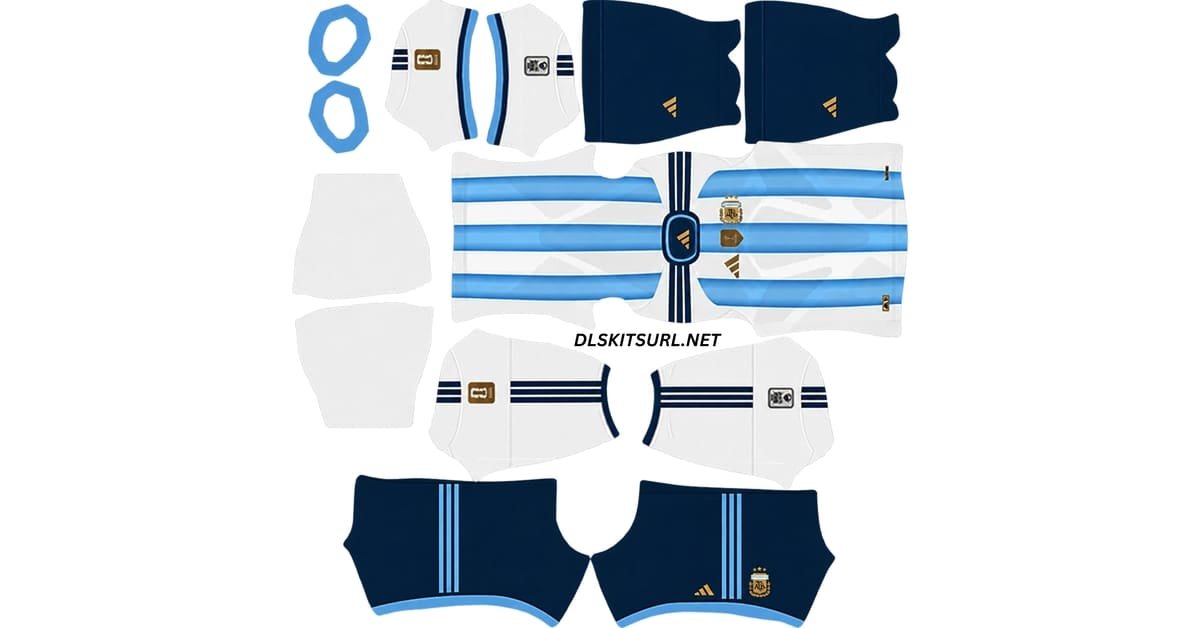
The Argentina DLS Kit URL 512×512 collection for Dream League Soccer 2026/27 includes the current home, away and goalkeeper designs prepared for custom kit import.
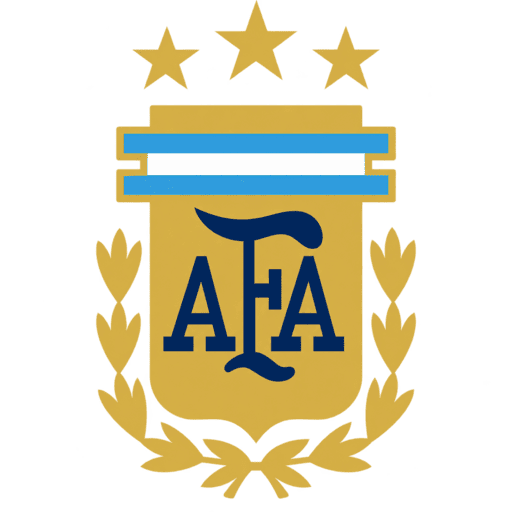
Argentina Official Logo
Official Logo 512×512
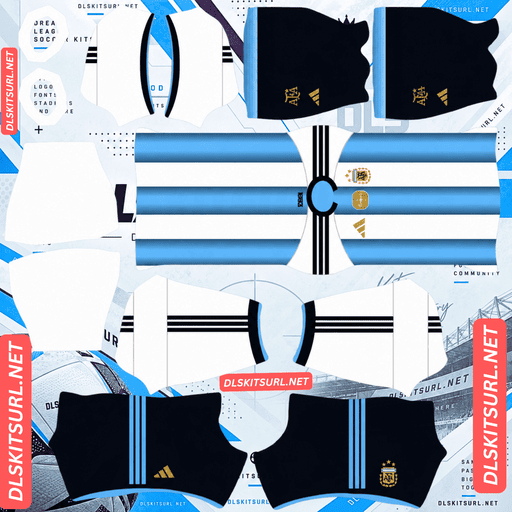
Argentina Home Kit
Home Kit 512×512 (2026/27)
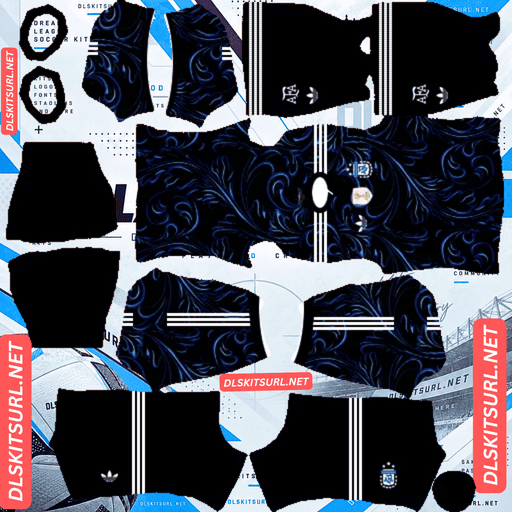
Argentina Away Kit
Away Kit 512×512 (2026/27)
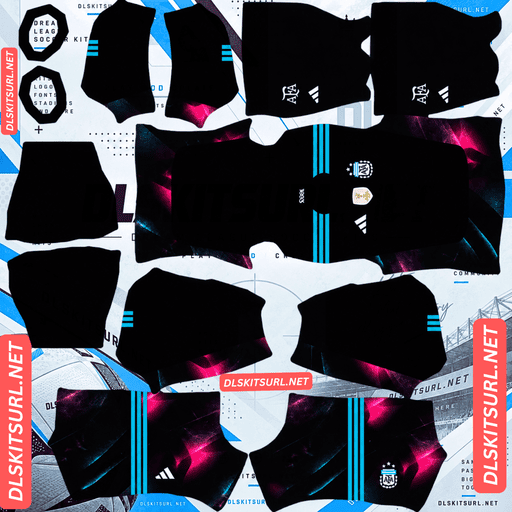
Argentina Home GK Kit
Home GK Kit 512×512 (2026/27)
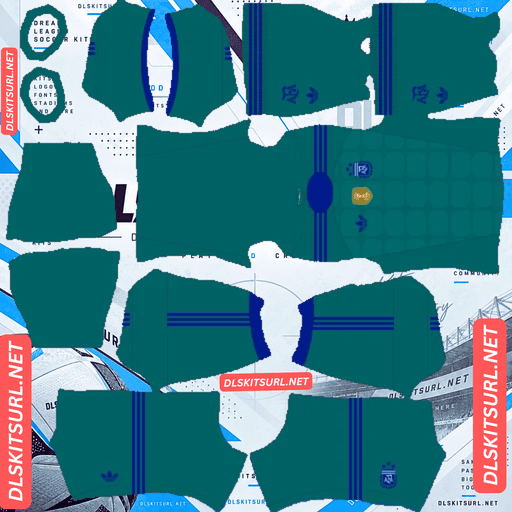
Argentina Away GK Kit
GK Kit 512×512 (2026/27)
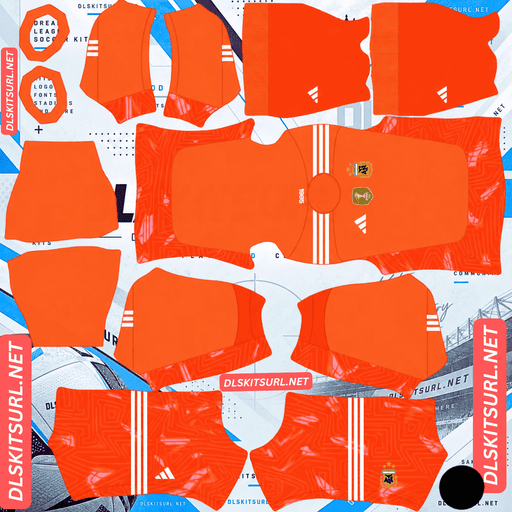
Argentina Third GK Kit
Third GK Kit 512×512 (2026/27)
Argentina’s latest shirts carry more detail than their familiar colours suggest. The home kit keeps the traditional sky blue and white stripes but works references to the country’s three World Cup-winning shirts into the design. The away kit takes a completely different direction, using a black base and a pattern inspired by Fileteado Porteño, the decorative art style associated with Buenos Aires.
Those details also make file quality important. A kit can technically measure 512×512 and still lose the gradient, fine linework or badge details if it was enlarged from a smaller image.
Argentina Home Kit and the Three World Cups
At first glance, Argentina’s home shirt looks exactly as you would expect.
It uses the traditional sky blue and white vertical stripes, with navy detailing and gold branding.
Look more closely at the blue stripes, however, and there is more going on.
Each sky blue stripe uses a three-tone colour transition rather than a single flat shade.
Those three tones reference the blue shades used on Argentina’s World Cup-winning shirts from 1978, 1986, and 2022.
In other words, Adidas has worked three different periods of Argentina’s football history into the same modern design.
It is a subtle detail, but it gives the shirt more meaning than a standard striped template.
Argentina Home Kit Details
Navy detailing runs across the shoulders and continues around the collar and sleeve cuffs.
The Adidas branding and AFA crest appear in gold, giving the shirt a more premium look against the traditional white and sky blue base.
The shorts are navy with light blue detailing, while the crest again appears in gold.
There is also a bespoke sign-off inside the back collar.
For Dream League Soccer players, though, the most important part of the shirt is still the blue stripe gradient.
That is the detail most likely to disappear in a poor-quality Argentina DLS kit 512×512 file.
Why Argentina’s Blue Stripes Are Hard to Recreate in 512×512
Gradients are difficult to preserve when an image is small.
A smooth colour transition needs enough pixels to show all the shades between the lightest and darkest points.
If a gradient stretches across an entire shirt, there is usually enough room for that transition.
Argentina’s design is different.
The colour change sits inside each narrow vertical blue stripe.
That means the gradient has far fewer pixels available.
When somebody creates the kit from a small source image and then enlarges it to 512×512, the subtle shades can disappear.
Instead of a smooth transition, the stripe may become two or three obvious blocks of blue.
That does not mean the original shirt design is wrong.
It means the file has lost the detail.
How to Check the Argentina Home Kit Gradient
There is an easy way to test the file before importing it.
Open the PNG at full size and look closely at one sky blue stripe from top to bottom.
You should see a gradual change in colour.
If there is a clear hard line where one shade suddenly becomes another, the file probably came from a lower-resolution source.
Dream League Soccer will usually make this even more noticeable once the image is wrapped around the player model.
A smoother gradient is therefore a good sign that you are using a better-quality Argentina DLS kit URL.
Argentina Away Kit – Black with Buenos Aires Inspiration
Argentina’s 2026 away kit takes a much less traditional approach.
Released on 20 March 2026, the shirt uses black as its main colour.
According to the source article, it was first worn in a friendly against Mauritania.
The black base is combined with white branding and sky blue details.
What makes the design stand out is the pattern running across the shirt.
It is inspired by Fileteado Porteño, a decorative art style closely linked with Buenos Aires.
What Is Fileteado Porteño?
Fileteado Porteño developed in Buenos Aires during the late nineteenth century.
It became known for decorative work on carts and delivery vehicles, using curved lines, spiral shapes, ornate lettering, symmetry, and strong visual detail.
The style eventually became an important part of Buenos Aires cultural identity.
In 2015, UNESCO recognised Fileteado as Intangible Cultural Heritage.
Using it on Argentina’s away shirt therefore gives the kit a direct connection to Buenos Aires rather than simply adding a random graphic pattern.
For Argentina supporters, that makes the away shirt one of the more culturally distinctive designs in the current collection.
Why the Argentina Away Kit Needs a Good-Quality PNG
The Fileteado pattern contains thin, curved lines.
Those are exactly the types of details that disappear quickly when image resolution drops.
On a good Argentina away DLS kit 512×512, you should be able to see the swirling shapes clearly.
On a poor file, much of the pattern can disappear.
The result is a shirt that looks almost completely black with only a faint texture across the surface.
The kit may still import successfully, but it will not resemble the real design as closely.
When checking an Argentina away kit, zoom in on the pattern before copying the URL.
If you can clearly make out the curved linework, that is a good sign.
Adidas Trefoil on the Argentina Away Kit
The away shirt also uses the classic Adidas Trefoil logo rather than the normal performance mark.
This follows the design approach used across Adidas’s 2026 national-team away collection.
It is another small detail worth checking when comparing Argentina kit files.
If the shirt is supposed to represent the current away design, the branding should match the official version.
What Happened to Argentina’s World Champions Badge?
Argentina earned the right to wear the gold FIFA World Champions badge after winning the 2022 World Cup.
That badge appeared in the middle of the chest and was included on Argentina’s 2026 home kit.
Argentina wore it through qualifying and during the 2026 World Cup.
After the 2026 final, however, the situation changed.
According to the source article, Spain defeated Argentina 1-0 after extra time on 19 July 2026.
That meant Argentina were no longer the reigning world champions.
As a result, the Champions badge moved with the title.
This explains why you may find two different Argentina home kit files online.
Should Your Argentina DLS Kit Have the Champions Badge?
Both versions can make sense, depending on what you are trying to recreate.
If you want the Argentina team that played during the 2026 World Cup, including the side that reached the final, use the shirt with the World Champions badge.
That is the version they actually wore during that period.
If you want Argentina’s post-tournament look, choose the version without the badge.
The important thing is understanding the time period represented by the file.
A badged shirt is not automatically outdated or incorrect. It simply represents Argentina before the 2026 title changed hands.
Argentina Still Have Three Stars
Argentina’s crest still carries three stars.
Those stars represent the country’s World Cup victories in:
1978, 1986, and 2022.
Reaching the 2026 final did not add another star.
That means any four-star Argentina shirt is unofficial.
Some fan-made designs appeared around the tournament in anticipation of another World Cup win, but they do not represent the official post-tournament crest.
When choosing an Argentina DLS kit URL, check the star count before importing.
The correct number is three.
How to Check an Argentina DLS Kit Before Importing
A few quick checks can tell you whether a file is accurate and whether the image quality is good enough.
Check One Blue Stripe
Look at one blue stripe from top to bottom.
The colour should change gradually.
If it suddenly switches between obvious shades, the gradient has probably been damaged by resizing or compression.
Check the Fileteado Pattern
On the away kit, look closely at the swirling linework.
You should still be able to make out the decorative shapes.
If the shirt appears almost completely black, the source image may not contain enough detail.
Check the Champions Badge
The central World Champions badge tells you which period the home kit represents.
A shirt with the badge matches Argentina’s reigning-champion period.
A shirt without it represents the post-2026 World Cup version.
Neither is automatically wrong.
Count the Stars
There should be three stars above the AFA crest.
A four-star design is fan-made.
Inspect Sharp Edges
For a general quality test, zoom in on an area such as the line where the navy shoulder section meets the striped body.
That boundary should look relatively sharp.
If the edge is heavily blurred across several pixels, the image was probably enlarged from a smaller source.
How to Use an Argentina DLS Kit URL
Importing an Argentina DLS kit URL into Dream League Soccer is straightforward.
First, copy the direct kit link using the Copy URL button on the kit card.
Avoid simply copying the address from your browser’s main address bar, as that may give you the webpage rather than the image itself.
Open Dream League Soccer and go to My Club.
Choose Customise.
Some versions of the game may show this as Customise Team.
Open the Kit section rather than Logo.
Select the kit slot you want to change.
This could be the home, away, third, or goalkeeper slot.
Tap Custom Kit.
Older versions of Dream League Soccer may show the option as Download.
Paste the direct image URL and confirm.
Repeat the process for the other kit slots you want to customise.
Unlocking Custom Kits in Dream League Soccer
If you have never used a custom kit before, you may first need to unlock the feature.
Dream League Soccer can require an in-game gem payment to unlock custom kits.
According to the source article, this is a one-time unlock rather than a separate charge for every kit you import.
Once the feature is available, you can replace your Argentina kits whenever you want.
Check the Argentina Kit URL in Your Browser First
It is a good idea to test the link before opening Dream League Soccer.
Paste the URL into your browser.
The kit image should open by itself rather than inside a normal webpage.
You should not see navigation menus, adverts, buttons, or other website elements surrounding the shirt.
Dream League Soccer needs the direct image rather than the page containing it.
The link will commonly point to a .png file.
On a computer, you can right-click the kit and choose Open image in new tab.
This also gives you a chance to inspect the dimensions.
A standard custom DLS kit should use a 512×512 layout.
Checking the image first can save you from repeatedly trying to import a broken or incorrect URL.
Why Argentina DLS Kit URLs Stop Working
Argentina kits are extremely popular, so there are many different versions hosted across the internet.
That also means a lot of links eventually stop working.
There are several common reasons.
Free Image Hosts Delete Old Files
Many DLS kit creators use free image-hosting websites.
Those services may remove old or inactive files after some time.
When that happens, the article containing the link may still exist even though the original PNG is gone.
The URL looks normal, but there is no working image behind it.
Hotlink Protection Blocks the Game
Another common problem is hotlink protection.
Some image hosts allow you to open an image directly in your browser but prevent other applications from accessing the same file.
This creates a situation where the kit works perfectly in Chrome or another browser but fails when pasted into Dream League Soccer.
If that happens, the problem is usually the image host rather than your DLS settings.
You will need another direct link hosted somewhere that allows external access.
The Preview and Kit URL May Be Different Files
Some websites display the kit preview from one server while their Copy button points to another image host.
If the external image disappears, the preview can still look completely normal.
You only discover the problem when Dream League Soccer tries to import the kit.
For more reliable results, the displayed kit and copied URL should ideally point to the same working file.
Which Argentina Badge Should You Use in DLS?
The AFA badge can be imported separately from the shirts.
Go to the same Dream League Soccer customisation menu, but choose Logo instead of Kit.
Argentina’s crest presents one particular problem in DLS.
The three stars sit above the main badge.
Dream League Soccer may crop logos into a circular area when displaying them in different parts of the game.
If the PNG is cut too tightly around the crest, the stars can end up extremely close to the edge or may be partially cropped.
The easiest solution is to use an Argentina logo image with some transparent space around the entire badge.
That gives Dream League Soccer more room to resize the crest without cutting off the stars.
Save Your Argentina DLS Kit URLs
Once you find Argentina kits that look good and import correctly, save the URLs somewhere outside the game.
A notes app is enough.
This is particularly useful with Argentina because there are so many versions of the kits online.
Some have the Champions badge, some do not.
Some preserve the stripe gradient properly, while others flatten the blue tones.
The same applies to the away kit, where lower-quality images can lose much of the Fileteado pattern.
If you reinstall Dream League Soccer or move to another phone, you may need to import your custom kits again.
Saving your Argentina DLS kit URL links prevents you from having to find the same high-quality files all over again.
Argentina DLS Kit URL FAQ
What Is an Argentina DLS Kit URL?
An Argentina DLS kit URL is a direct image link to an Argentina shirt prepared for Dream League Soccer.
The standard custom kit layout uses a 512×512 PNG, which you paste into the game’s custom kit section.
What Is Hidden in the Argentina Home Shirt Stripes?
Each sky blue stripe uses a three-tone colour fade.
The shades are inspired by Argentina’s three World Cup-winning shirts from 1978, 1986, and 2022.
This puts a reference to all three World Cup victories inside the modern home design.
Why Do My Argentina Shirt Stripes Look Flat?
The gradient sits inside a relatively narrow stripe.
If the source image is too small or heavily compressed, there may not be enough image detail to preserve the smooth colour transition.
The result is usually two or three obvious blocks of blue instead of a gradual fade.
A better-quality 512×512 Argentina DLS kit PNG should preserve the gradient more clearly.
What Is the Pattern on the Argentina Away Kit?
The pattern is inspired by Fileteado Porteño, a traditional decorative art style from Buenos Aires.
It uses curved lines, spirals, symmetry, and ornate visual details.
The design has strong cultural links with the city and was recognised by UNESCO as Intangible Cultural Heritage in 2015.
Should My Argentina Shirt Have the World Champions Badge?
It depends on the period you are recreating.
If you want Argentina as they appeared between their 2022 World Cup victory and the 2026 final, the Champions badge is appropriate.
If you want the post-2026 tournament version, use the shirt without it.
How Many Stars Does Argentina Have?
Argentina have three stars above the AFA crest.
They represent the country’s World Cup titles in 1978, 1986, and 2022.
Reaching the 2026 final did not add another star, so four-star Argentina shirts are unofficial designs.
Why Are the Stars Cut Off on My Argentina DLS Logo?
The stars sit above the main AFA crest.
Dream League Soccer may crop team logos into a circular area, so a tightly cropped PNG can lose part of the stars.
Use a badge file with transparent space around the complete design.
Why Does an Argentina Kit URL Work in My Browser but Not in DLS?
The image host may be using hotlink protection.
This allows the PNG to load when you visit it directly but prevents Dream League Soccer from requesting the same file externally.
If that happens, try another direct PNG URL hosted on a service that allows external access.
Do Argentina Custom Kits Survive a Reinstall?
You may need to import the kits again after reinstalling Dream League Soccer or moving to another device.
Saving your Argentina DLS kit URL links in a notes app or another safe place makes restoring the home, away, goalkeeper, and badge files much easier.