
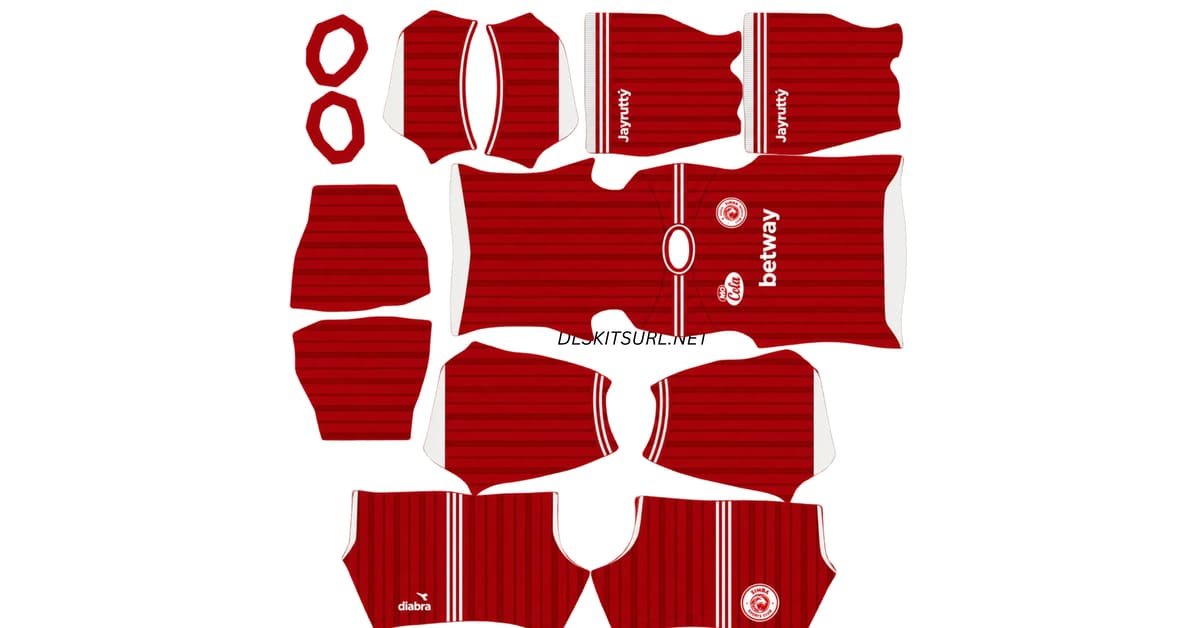
The Simba SC DLS Kits URL 512×512 collection features the club’s 2026/27 home, away, third and goalkeeper kit options for Dream League Soccer. This season marks an important milestone for the Tanzanian club, also known as Wekundu wa Msimbazi, as Diadora has introduced three different outfield designs to celebrate Simba’s 90th anniversary.
Simba SC Logo
Official Logo 512×512 (2026/27)
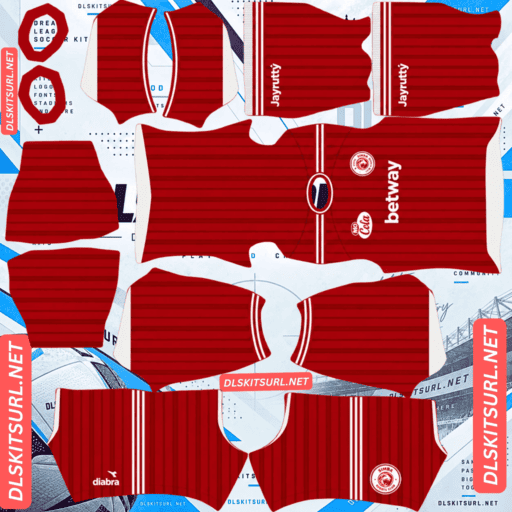
Simba SC Home Kit
Home Kit 512×512 (2026/27)
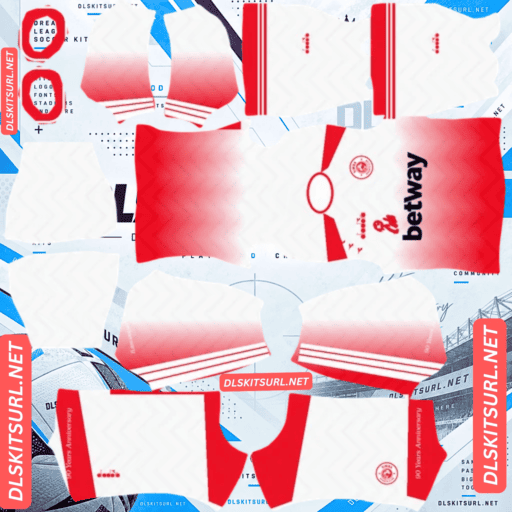
Simba SC Away Kit
Away GK Kit 512×512 (2026/27)
Unlike collections that use one pattern across three different colour combinations, Simba’s anniversary shirts have separate visual identities. The home kit features darker red vertical stripes, the away shirt transitions from white to red, and the blue third kit uses a subtle zigzag pattern. Each design creates a different challenge when converted into the standard 512×512 PNG format used by Dream League Soccer.
Simba SC 90th Anniversary Kits for 2026/27
Simba SC officially unveiled its three anniversary shirts on 1 August 2026 at the Ngorongoro Conservation Area in Tanzania’s Arusha Region. The location gave the launch a distinctive national setting, as Ngorongoro is also recognised as a UNESCO World Heritage Site.
Diadora designed the collection to mark 90 years of Simba SC, giving each shirt an individual appearance rather than simply changing the colours of one shared design. The anniversary is also acknowledged through a special “90 Years Anniversary” message placed on the sleeve of the white away jersey.
For Dream League Soccer players, this collection offers three noticeably different styles. However, certain details from the physical jerseys will be easier to reproduce than others because the game’s small texture format cannot preserve every fine element equally.
Will the 90 Years Anniversary Sleeve Detail Appear in DLS?
The anniversary inscription is positioned on the sleeve of the white away shirt. Although a properly prepared 512×512 template can include this lettering, it will be difficult to read during normal gameplay because sleeves occupy relatively small areas of the player’s model.
You may notice the message when viewing the kit at full size or during closer camera angles, but it is unlikely to remain legible while players are moving around the pitch. This is a normal limitation of small texture details rather than necessarily a fault with the kit image.
Simba SC Home Kit 2026/27
The Simba SC home kit keeps the club’s traditional red identity while introducing darker red vertical stripes across the shirt. White accents appear around the sleeves, the familiar Simba crest sits on the chest, and matching red shorts complete the main design.
The important detail is the contrast between the two red shades. The stripes are tonal, meaning they use a darker version of the base colour rather than a completely different colour. They are also relatively fine, making them more demanding to reproduce in a small image than thick, high-contrast stripes.
A good DLS file should preserve the vertical pattern without making the shirt look overly dark or completely plain. If the imported jersey appears as one solid red surface with white sleeve detailing, the subtle stripe texture may have been lost during image preparation.
Why the Home Kit Can Look Plain Red in DLS
Fine tonal stripes are particularly sensitive to resizing and compression because they depend on two things at once: enough pixels to retain their width and enough colour information to distinguish them from the surrounding fabric.
When an image is enlarged from a smaller original, those narrow differences often disappear. The final file may still report 512×512 dimensions, but that does not guarantee that the original texture has survived.
For the Simba home kit, inspect the red body carefully before importing it. The darker vertical lines should remain visible when the PNG is opened at full size.
Simba SC Away Kit 2026/27
The Simba SC away kit uses a white base that gradually fades into red towards the bottom of the shirt. This gradient gives the design a different appearance from the traditional red home kit while maintaining a clear connection to the club’s primary colour.
The white jersey also carries the special 90 Years Anniversary message on its sleeve, making it an important part of the commemorative collection. Its main visual feature, however, is the smooth transition between white and red across the body.
In Dream League Soccer, the quality of this transition is the easiest way to judge whether the away kit file has been prepared properly.
Why the White-to-Red Gradient Can Look Broken
A gradient is created through a gradual sequence of slightly different shades. For the Simba away kit, those intermediate colours are essential because they allow the white upper section to move smoothly towards red without creating an obvious dividing line.
If the source image is too small or exported with poor colour handling, the transition can develop visible bands. Instead of a gradual fade, the shirt may display several separate colour steps or even appear divided into two solid blocks.
A properly prepared file should show a continuous white-to-red transition. Open the PNG at full size and inspect the middle of the shirt before copying its URL into Dream League Soccer.
Simba SC Third Kit 2026/27
The third shirt introduces a bold blue colour scheme with a darker blue zigzag pattern running through the fabric. Matching blue shorts complete the design, giving Simba a third option that looks considerably different from the red home and white-to-red away kits.
Like the home shirt, the third kit uses a tonal pattern rather than a strongly contrasting print. However, its angular zigzag arrangement also creates an additional challenge because the pattern must remain correctly positioned as the flat image wraps around the player’s body.
A weak source can lose the darker blue texture completely, leaving what looks like a plain blue uniform. Incorrect template alignment can cause another problem, with the zigzag suddenly changing position or direction between different parts of the kit.
Why the Zigzag Pattern Needs Correct Alignment
Dream League Soccer divides a kit texture into separate areas for the main shirt body, sleeves, shorts and other garment sections. When a design continues across these boundaries, the artwork needs to be positioned carefully so the pattern looks natural on the player.
The third kit’s zigzag is especially sensitive to this because it uses angular lines. If those lines do not meet correctly, the pattern can appear broken around the shoulders or sleeves.
Check the third kit both as a flat PNG and after importing it. The first view helps you judge the image quality, while the player model shows whether the artwork has been aligned correctly.
How to Check the Quality of Simba SC DLS Kits
Each anniversary shirt has a different feature worth examining before you import it. These checks are useful because an image can have the correct 512×512 dimensions without necessarily preserving the original design.
For the home kit, look for the darker red vertical stripes. They should remain visible instead of blending completely into the red background. For the away kit, inspect the white-to-red transition and make sure it appears smooth rather than divided into obvious colour bands. On the third kit, check that the darker blue zigzag is visible and continues naturally across the relevant template areas.
You should also inspect sharp boundaries, such as the white sleeve accent against the red body on the home shirt. If that edge looks unusually blurry, the source may have been enlarged from a smaller image.
Best Number Colours for Simba SC DLS Kits
Dream League Soccer uses separate colour information on the kit template to determine squad-number colours. The game does not automatically select a contrasting shade from the visible shirt design, so incorrect number settings can make players look unnumbered even when the rest of the kit imports successfully.
For the red home kit, white is the clearest option for both the shirt and matching red shorts. It provides strong contrast against the main colour and connects naturally with the existing white sleeve accents.
The away kit needs more attention because its background changes from white at the top to red at the bottom. Since the squad number sits on the upper back, where the shirt is predominantly white, red or navy works better than white. If the shorts are red, white can be used for those numbers.
For the blue third kit, white provides the clearest contrast against the darker background. Always check the shirt and shorts number swatches separately before finalising any custom kit.
Finding Good Simba SC Kit Files in 512×512
Finding a properly prepared Simba SC kit can require more care than downloading shirts from the most widely covered European football leagues. Many popular football-kit databases focus heavily on Nike, Adidas and Puma releases, while fewer international sources carry detailed images of Diadora’s designs for the Tanzanian Premier League.
That makes it important to inspect the actual image rather than relying only on a filename claiming that a kit is 512×512. Check the dimensions, examine the sharpness of the artwork and compare the main design with the correct season.
For the 2026/27 home shirt, the vertical stripes are an especially useful identifier. Simba’s previous 2025/26 home design used a more complex geometric pattern in varying red shades, so a file covered in geometry rather than vertical lines may belong to the earlier season.
How to Tell if a Simba SC DLS Kit Is Current
The 2026/27 Simba collection has several distinguishing features that make identifying the correct files relatively straightforward. The home kit should have darker red vertical stripes and white sleeve accents, while the away should show a visible white-to-red gradient. The third shirt uses a blue base with a subtle zigzag pattern.
Another important detail is the manufacturer. Diadora produces the current anniversary collection, having replaced Sandaland in 2025. Earlier kits may carry Sandaland, Vunjabei or Uhlsport branding, so the manufacturer logo is another useful clue when identifying older files.
Checking the design and branding together is more reliable than trusting a season number written in the image filename.
How to Use a Simba SC DLS Kits URL
To import a Simba SC DLS Kits URL, copy the direct image address using the Copy URL button underneath the kit. Avoid copying the normal website address from your browser because Dream League Soccer needs the actual image file rather than the webpage displaying it.
Open Dream League Soccer and go to My Club, then select Customise. Enter the Kit section rather than Logo and choose the slot you want to replace. Tap Custom Kit, paste the copied image URL and confirm the import. Some older versions of the game may display this option as Download.
The home, away, third and goalkeeper kits are imported separately. Completing all four slots gives your Simba team a coordinated appearance instead of leaving a default goalkeeper shirt alongside the custom anniversary designs.
Unlocking Custom Kits in Dream League Soccer
Dream League Soccer may require a one-time in-game gem unlock before the custom kit feature becomes available. Once unlocked, the feature allows you to replace your existing custom designs without purchasing a separate unlock for every new kit.
If you update one of your Simba files later, you can use the same import process to replace the previous version.
Test the Simba SC Kit URL Before Importing
Open the image URL in your browser before pasting it into Dream League Soccer. The kit should appear as an individual image rather than inside a webpage with navigation menus, advertisements, download buttons or other surrounding content.
A direct DLS kit URL commonly points to a .png file. Checking the image first also gives you an opportunity to inspect the dimensions and important design features, particularly the tonal home stripes, smooth away gradient and blue third-kit pattern.
A link that opens correctly in the browser has passed an important initial check, although the hosting service must also allow Dream League Soccer to retrieve the file externally.
Why Simba SC DLS Kit URLs Stop Working
A properly designed kit may eventually stop importing because the image needs to remain available on its hosting server. Some free image services remove inactive uploads, which leaves behind URLs that appear normal but no longer return the original PNG file.
Hotlink protection can also prevent Dream League Soccer from accessing an image. Certain hosts allow pictures to load when opened directly in a browser but reject requests from external applications. This explains why a URL may work when clicked yet fail during the in-game import process.
Another problem occurs when a website uses one image for its preview and a different hosted file for the Copy URL button. If the external upload disappears, the preview may continue looking normal even though the actual import link has stopped working. Using the same hosted image for both reduces this problem.
Simba SC Badge for Dream League Soccer
The Simba SC crest should be imported separately through the Logo section. The word Simba means lion in Swahili, and the club badge carries that animal as one of its defining elements.
A lion silhouette works reasonably well at small sizes because its overall shape is easier to recognise than very fine lettering or decorative detail. The club’s red identity also helps the badge remain familiar when it appears beside the score or in the team menu.
Use a clear badge file with enough transparent space around the entire design. Dream League Soccer displays imported logos in a confined area, so an image cropped too tightly may lose important details around the outside.
Why the Simba Badge Needs a Good Source Image
The most important part of the Simba crest at match distance is the overall lion shape and its primary colour arrangement. Smaller lettering and fine decorative elements will naturally soften when the image is reduced.
That does not necessarily indicate that the source file is broken. However, beginning with a properly sized, clean PNG helps preserve the recognisable parts of the crest better than enlarging a small or blurry original.
Keep Your Simba SC DLS Kit URLs Saved
Save the direct links for the home, away, third, goalkeeper and club badge somewhere outside Dream League Soccer. A simple notes app works well and allows you to keep the entire anniversary collection together.
If you reinstall the game or switch devices, you may need to import your custom images again. Keeping every Simba SC DLS Kits URL saved is particularly useful when high-quality files are less widely available and difficult to find again later.
Simba SC DLS Kits URL FAQ
What Is a Simba SC DLS Kits URL?
A Simba SC DLS Kits URL is a direct image link to a custom Simba SC shirt prepared for Dream League Soccer. The standard kit format uses a 512×512 PNG that can be imported through the game’s Kit section.
What Are Simba SC’s 2026/27 Kits?
Simba’s 2026/27 collection includes a red home shirt with darker red vertical stripes and white sleeve detailing, a white away shirt that fades into red towards the bottom, and a blue third kit with a subtle zigzag pattern. Diadora unveiled all three shirts on 1 August 2026.
What Is the Simba SC 90 Years Anniversary Message?
The 90 Years Anniversary message appears on the sleeve of the white away shirt to commemorate the club’s 90th anniversary. It may be visible in a detailed kit preview, but the lettering becomes difficult to read during normal gameplay because sleeves occupy a small area on the player model.
Why Does My Simba Away Kit Look Like Two Blocks of Colour?
The file may be suffering from colour banding. The away shirt uses a gradual white-to-red fade, and poor resizing or compression can remove intermediate shades, turning the smooth gradient into visible colour steps.
Why Does My Simba Home Kit Look Plain Red?
The home shirt’s vertical stripes are fine and use a darker shade of the same red base. If the source image is too small or heavily compressed, the tonal difference can disappear, leaving what looks like a plain red jersey.
Why Does the Simba Third Kit Pattern Look Broken?
The blue third shirt uses an angular zigzag pattern that needs to align across different sections of the DLS template. Incorrect positioning can make the graphic appear broken or shifted after import.
Who Makes Simba SC’s 2026/27 Kits?
Diadora manufactures Simba SC’s 2026/27 anniversary collection. The supplied kit history identifies Sandaland as the previous supplier from 2023 to 2025, with Vunjabei and Uhlsport appearing earlier.
Where Were the Simba SC Anniversary Kits Launched?
The 2026/27 shirts were unveiled on 1 August 2026 at the Ngorongoro Conservation Area in Tanzania’s Arusha Region. The launch formed part of the club’s 90th-anniversary celebrations.
What Number Colour Works Best on the Simba Home Kit?
White is the clearest option for the red home shirt and matching red shorts. It also matches the white accents already used around the sleeves.
What Number Colour Should I Use on the Simba Away Kit?
Red or navy works well on the predominantly white upper-back area where the squad number appears. If the shorts are red, white provides better contrast for the shorts number.
Why Does My Simba SC Kit URL Work in a Browser but Not in DLS?
The hosting service may be using hotlink protection, which can block external applications from downloading the image. Make sure the URL points directly to a publicly accessible PNG and that the host permits outside requests.
Should I Save My Simba SC DLS Kit URLs?
Yes. Saving the direct kit and badge links outside Dream League Soccer makes it easier to restore your anniversary collection after reinstalling the game or moving to another device.