
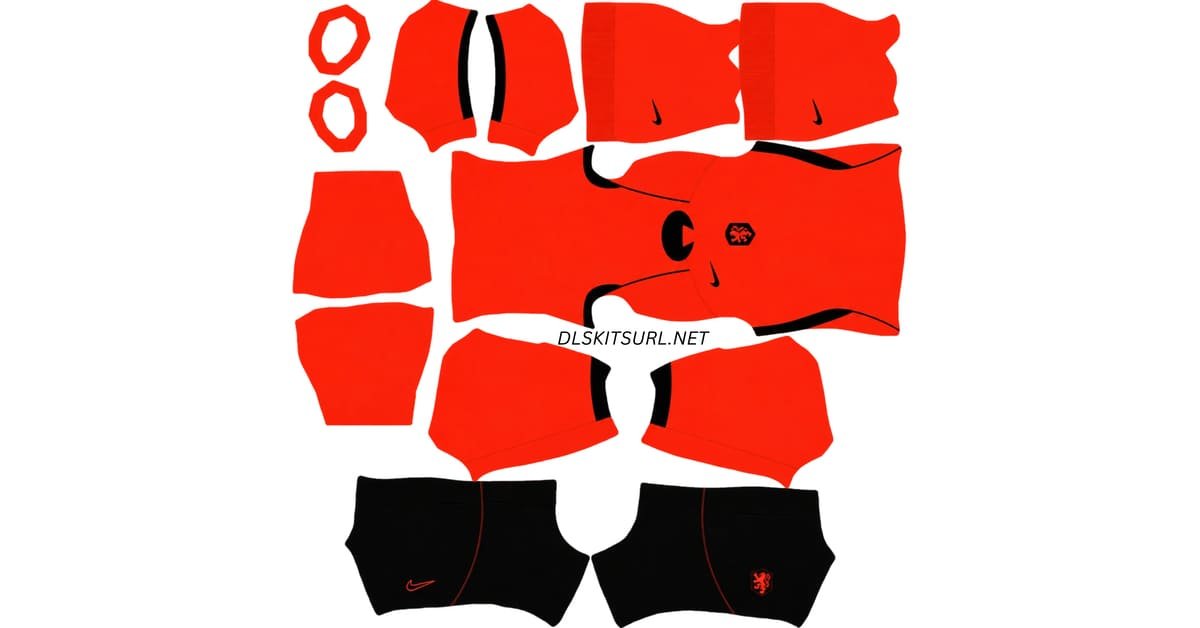
A Netherlands DLS kits URL is a direct link to a 512×512 PNG image of an Oranje shirt that you can import into Dream League Soccer. Both kits are included below, with designs prepared for use in the game.
Netherlands Logo
Official Logo 512×512 (2026/27)
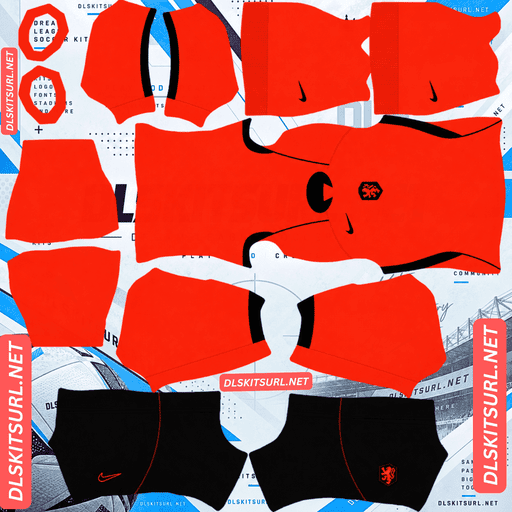
Netherlands Home Kit
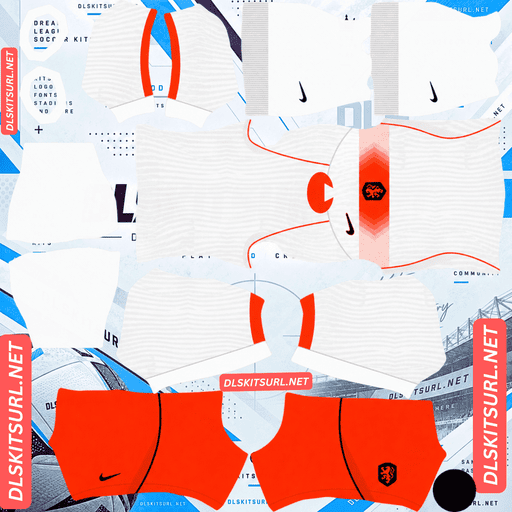
Netherlands Away Kit
Away Kit 512×512 (2026/27)
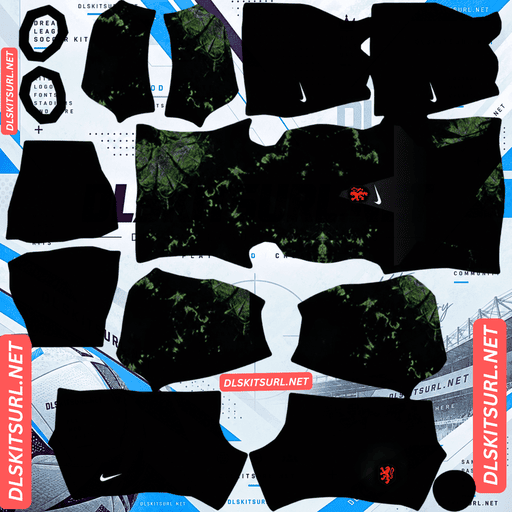
Netherlands Home GK Kit
Home GK Kit 512×512 (2026/27)
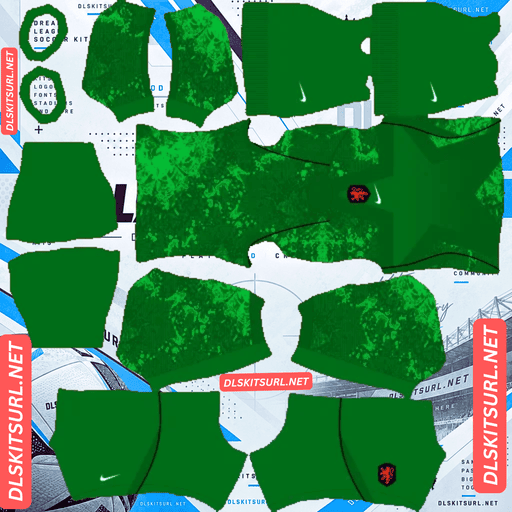
Netherlands Away GK Kit
Away GK Kit 512×512 (2026/27)
Nike described the Netherlands home shirt as being “designed to be seen from a distance.” That description is especially fitting for Dream League Soccer, where players appear small on screen. The vivid orange colour makes this one of the most recognisable kits to use during a match.
Built for Distance: Why the Home Kit Works So Well in DLS
The Netherlands home kit reimagines Oranje through amplification rather than reinvention, using Nike’s own description of the design approach. The result is a vibrant expression of Dutch orange, officially known as Hyper Crimson, combined with black accents, black shorts and black socks.
Both the home and away kits debuted during the Netherlands’ March 2026 friendlies against Norway and Ecuador.
Why Visibility Matters in Dream League Soccer
Dream League Soccer renders players at a relatively small size, so a kit’s main colour plays a major role in making your team easy to follow.
Orange sits opposite green on the traditional colour wheel, creating a strong visual contrast with the pitch. This is one reason orange kits, including those associated with Ivory Coast, Hull City and Tigres, can stand out so clearly in the game.
The Netherlands’ Hyper Crimson takes that effect further with a highly saturated orange shade. Black shorts and socks provide a dark foundation that makes the overall player silhouette easy to recognise.
Nike designed the shirt to make an impression from a distance, and that design philosophy translates particularly well to a mobile football game.
If you want a Netherlands kit that remains visually striking without relying on intricate patterns, the home shirt is an excellent option.
The Lenticular Crest: A Detail DLS Cannot Reproduce
One of the most unusual features of both Netherlands shirts is the lenticular Royal Netherlands Football Association (KNVB) crest.
A lenticular badge changes its appearance depending on the viewing angle, creating a sense of movement and depth as the player moves. The home shirt places the crest in its usual position, while the away shirt features an oversized version centred on the chest.
Why the Effect Disappears in DLS
A lenticular finish relies on a physical surface, changing light and movement between the viewer and the object. A standard 512×512 kit image cannot reproduce that effect.
When you import a custom kit, the game wraps a flat image around a three-dimensional player model. The crest therefore retains one fixed appearance rather than changing as the player moves.
Other national-team kits have used physical effects that face similar limitations, including lenticular crests, UV-reactive logos and pearlescent finishes. These features depend on the properties of real materials, which a conventional image file cannot fully reproduce.
The Away Shirt Has an Additional Badge Problem
Dream League Soccer places your imported team badge at a fixed position on the player’s chest. That position does not automatically move to match the oversized, centred crest on the Netherlands away shirt.
If the imported away-kit image already contains the large printed crest, the game may display two badges: the oversized one in the centre and the smaller game-applied badge in its usual position.
This can make the chest look crowded.
Before importing the away shirt, open the image at full size and inspect the chest area. Check whether the oversized crest is already included in the design and decide whether the additional in-game badge will look acceptable.
Similar issues can occur with kits featuring oversized central graphics or large printed emblems.
Netherlands Away Kit 2026/27: A Gradient Band on White
Release date: 23 March 2026
The Netherlands away kit revives the team’s historic all-white look, marking its first white away shirt since 2015.
The design features a clean white base crossed by a horizontal band made from a vivid gradient of orange tones. Nike drew inspiration from the concept of microscopic gradients, connecting the design with Dutch experimentation and precision.
Clean lines and geometric balance keep the shirt relatively minimal, while the oversized, centred crest gives it a distinctive appearance.
Why the Horizontal Gradient Is Difficult to Reproduce
The away shirt combines two features that are challenging to preserve in a 512×512 kit image: a horizontal band and a smooth colour gradient.
Horizontal bands are difficult to align. The band must continue at the same height across the front and back panels, around both side seams and into the relevant sleeve areas. Any mismatch can make the pattern appear broken.
Gradients are difficult to preserve. A smooth gradient consists of many slightly different colour values. If the image is undersized or heavily compressed, those subtle transitions may be lost, leaving visible steps or blocks of flat colour.
A solid horizontal band, such as Stuttgart’s Brustring, has alignment challenges but is comparatively easy to preserve. The Netherlands away shirt combines that alignment challenge with the additional difficulty of maintaining a smooth fade.
How to Check the Away Kit Image
Start by inspecting the orange band at full size.
A good-quality file should show a gradual, continuous transition between orange shades. If the gradient appears as separate blocks or distinct stripes of flat colour, the image may not preserve the design well enough.
Next, inspect the shirt’s side seams. The band should continue around the body at a consistent height without an obvious break between the front and back panels.
If the gradient is already visibly stepped in the original image, importing it into Dream League Soccer is unlikely to improve the result.
The Home Kit Is More Forgiving
The home shirt is easier to reproduce accurately because its design relies on bold colour blocking rather than delicate patterns.
Its Hyper Crimson base and black accents do not depend on a tonal graphic or a gradient to create the main visual effect. The orange itself is the defining feature.
The most useful detail to inspect is the boundary between the black and orange areas. If those edges look crisp rather than blurry, the file is likely to reproduce the basic design well.
A decent-quality image should produce a recognisable Netherlands home kit, while the away shirt requires more careful attention to its gradient and badge placement.
Why “Oranje” Will Not Appear in Your Imported Kit
The Netherlands home shirt carries the word “Oranje” on the inside of the collar, referencing the team’s familiar nickname.
Unfortunately, the interior of the collar is not a surface mapped by the Dream League Soccer kit template. Text printed in that area cannot appear in the imported design.
This is a limitation shared by custom kits from many manufacturers. Interior-collar messages, mottos and other hidden details cannot be reproduced when the relevant surface is not included in the template.
The word may be missing from your DLS version, but the shirt’s orange colour and black accents still give it the unmistakable identity of Oranje.
Best Number Colours for Netherlands DLS Kits
Dream League Soccer does not automatically copy squad-number colours from the imported shirt image. Instead, it reads the colours from two swatches in the kit template: one for shirt numbers and one for shorts numbers.
Set them separately for each kit.
Home kit: Black or white
The Hyper Crimson shirt works well with black numbers, which match the shirt’s accents and provide clear contrast against the orange background. White is another suitable option.
For the black shorts, orange or white numbers can provide a clear contrast. Check both swatches separately to ensure that the numbers remain readable.
Away kit: Orange or black
The white shirt provides a neutral background, making orange or black numbers suitable choices. Orange maintains the Netherlands identity, while black offers a strong contrast.
Avoid white numbers on the white shirt because they will be difficult to see during a match.
Build the Netherlands Group F in Dream League Soccer
The Netherlands were drawn in Group F, alongside Japan, Tunisia and Sweden.
If you are recreating the group in Dream League Soccer, you can combine the Netherlands kits with the corresponding national-team designs to create a consistent tournament setup.
With all four teams represented, you can give your custom tournament a more complete World Cup feel.
How to Identify the Correct Netherlands 2026/27 Kits
Check these four details before importing a kit.
Home colour: Hyper Crimson, a highly saturated orange, with black accents, black shorts and black socks.
Away design: A white shirt featuring a horizontal gradient band made from orange tones.
Away crest: An oversized crest centred on the chest, rather than the usual badge placement.
Branding: Nike logos on both kits.
These details help distinguish the intended 2026/27 designs from older Netherlands shirts and generic orange or white alternatives.
How to Use a Netherlands DLS Kits URL
Follow these steps to import a Netherlands kit into Dream League Soccer.
Find the kit you want and click its Copy URL button. This helps you copy the direct image link instead of the webpage address.
Open Dream League Soccer and go to My Club.
Select Customise, then open the Kit section rather than Logo.
Choose the slot you want to replace before pasting the URL.
Tap Custom Kit, press and hold the URL field, and select Paste.
Tap Confirm to import the design. Some older versions may display Download instead.
Since this collection includes the home and away kits, the third slot remains available for another design.
The 1988 Netherlands shirt is a popular historical option to consider. The team won the European Championship that year, and its classic kit remains one of the most recognisable designs in Dutch football history.
Dream League Soccer can use a compatible custom kit from an older season as long as the image URL works and the file meets the game’s requirements.
The first custom kit may require a one-time gem unlock. Once the feature is unlocked, you can change your kit designs without purchasing another unlock each time.
Test the Netherlands Kit URL Before Importing
Before opening the game, test the copied URL in your browser.
A direct image URL should display the kit image on its own, without website headers, navigation menus or buttons around it. The address should end in .png.
If the link opens a webpage with an image preview, you may have copied the viewer page rather than the direct image file. Dream League Soccer needs access to the image itself.
On a computer, right-click the image and open it in a new tab. Where available, check the reported image dimensions to confirm that the file is 512×512 pixels.
Why Netherlands DLS Kit URLs Stop Working
A kit link may stop working for several reasons, even if it originally opened correctly.
Free image hosts may delete files. Some services remove inactive uploads after months or years. The original webpage may remain available even when the image itself has been deleted.
Hotlink protection may block external requests. Some hosts allow images to load in a browser but prevent external applications from requesting them. As a result, a link may open when clicked but fail when pasted into Dream League Soccer.
The preview and the direct image may be different files. A website can display a thumbnail hosted on its own server while linking to an image stored elsewhere. If the external image becomes unavailable, the preview may still appear on the webpage.
For the best chance of a successful import, use a direct PNG link that opens independently and points to the actual kit image.
The Netherlands KNVB Badge
To import your Netherlands badge, open My Club → Customise and choose Logo rather than Kit.
The KNVB crest features a lion, a bold design that remains recognisable when displayed at a small size beside the match score.
Dream League Soccer crops imported badges into a circular display area. Choose an image with enough space around the complete crest rather than one cropped tightly to its edges.
The lion should remain recognisable, although small details may become less sharp when reduced to the size used in the game.
Remember that an imported badge will remain a flat image. It cannot reproduce the lenticular effect of the physical crest, and the away shirt’s oversized central design may already contain a printed version of the badge.
How to Keep Your Netherlands DLS Kits
Custom kits are generally stored on your device rather than permanently attached to your game account. Updating the game may preserve your designs, but reinstalling it or changing phones can remove your imported kits and badge.
Before importing your Netherlands shirts, save both kit URLs and your preferred badge link in a notes app or another safe place.
Keeping these links together makes it easier to restore your team if you reinstall the game or move to a new device.
FAQ
What is a Netherlands DLS kits URL?
A Netherlands DLS kits URL is a direct link to a 512×512 PNG image of an Oranje shirt that you can import into Dream League Soccer. A working direct image link commonly ends in .png.
What colour is the Netherlands 2026/27 home kit?
The home kit uses Hyper Crimson, a highly saturated orange, with black accents, black shorts and black socks. Nike described the design as being made to stand out from a distance.
Why is the Netherlands home kit good for DLS?
The bright orange colour contrasts strongly with the green pitch, helping players remain easy to identify when rendered at a small size. The design also relies on bold colour blocking rather than intricate patterns that might disappear during compression.
What is the lenticular crest on the Netherlands kits?
The lenticular KNVB crest changes its appearance depending on the viewing angle, creating a sense of movement and depth. Dream League Soccer cannot reproduce the effect because a standard kit image remains visually fixed.
Why does my Netherlands away kit show two badges?
The away shirt features an oversized crest centred on the chest, while Dream League Soccer places your imported team badge at its usual fixed position. If the kit image already includes the large crest, both badges may appear.
Why does the orange band on my Netherlands away kit look stepped?
The band uses a gradient that needs enough image detail to preserve smooth transitions between orange shades. A smaller or over-compressed file may lose those subtle differences, leaving visible blocks of flat colour.
What is written inside the Netherlands home collar?
The word “Oranje,” the familiar nickname of the Netherlands national team. Because the inside of the collar is not mapped by the DLS kit template, the text cannot be reproduced in the imported image.
Which group were the Netherlands in at the 2026 World Cup?
The Netherlands were drawn in Group F alongside Japan, Tunisia and Sweden.