
Looking for a Chivas DLS kits URL for Dream League Soccer 2026/27? This guide covers four Chivas de Guadalajara shirts associated with 2026, including the current Nike home and away kits and two commemorative Puma designs. Each kit can be prepared as a 512×512 PNG for custom import into the game.
Chiva de Guadalajara Logo
Official Logo 512×512
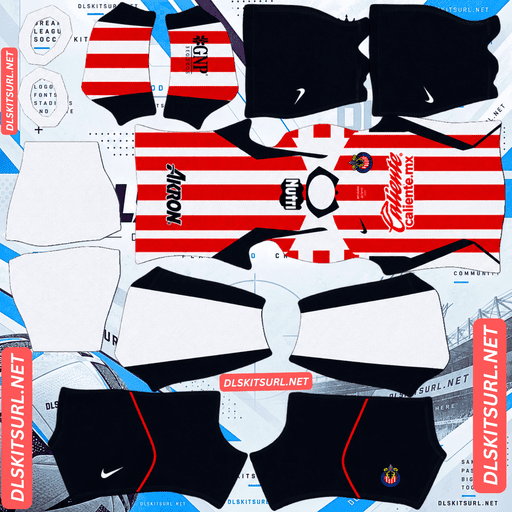
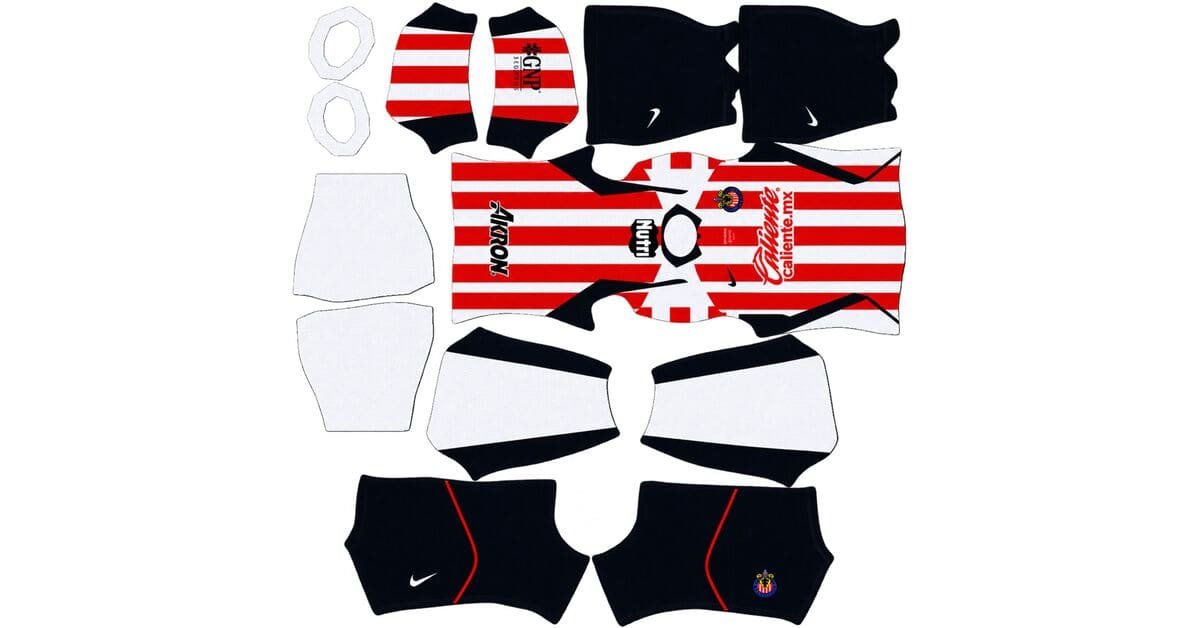
Chivas de Guadalajara Home Kit
Home Kit 512×512 (2026/27)
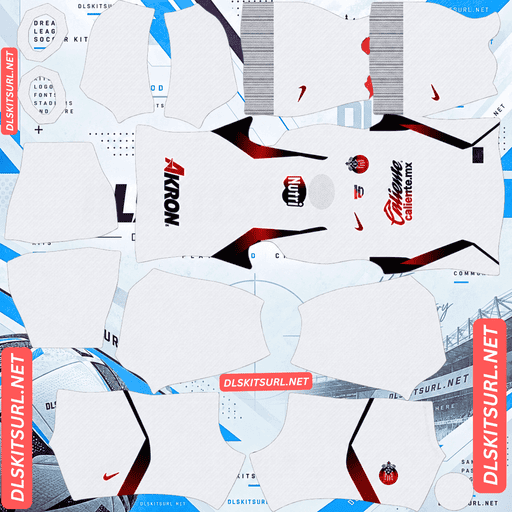
Chivas de Guadalajara Away Kit
Away Kit 512×512 (2026/27)
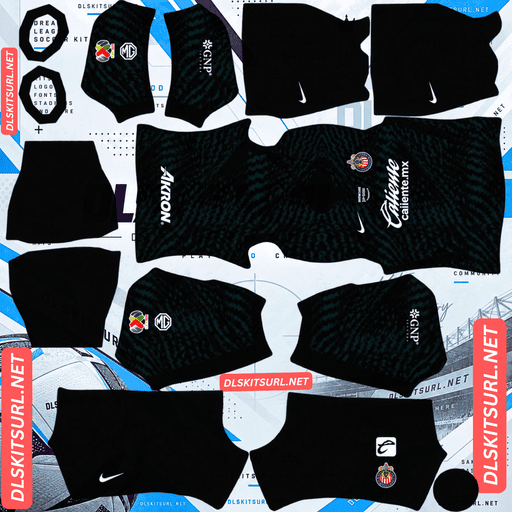
Chivas de Guadalajara GK Home Kit
GK Home Kit 512×512 (2026/27)
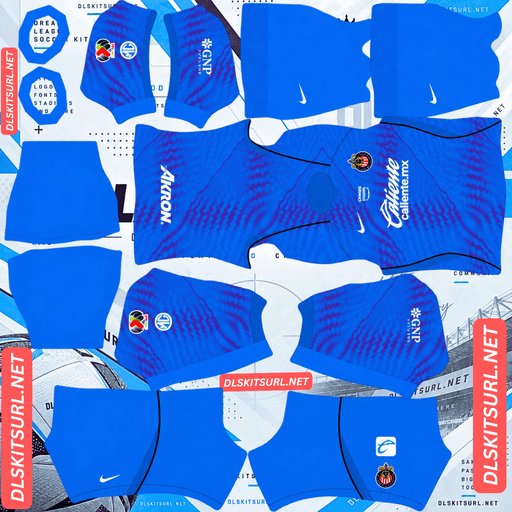
Chivas de Guadalajara GK Away Kit
Away GK Kit 512×512 (2026/27)
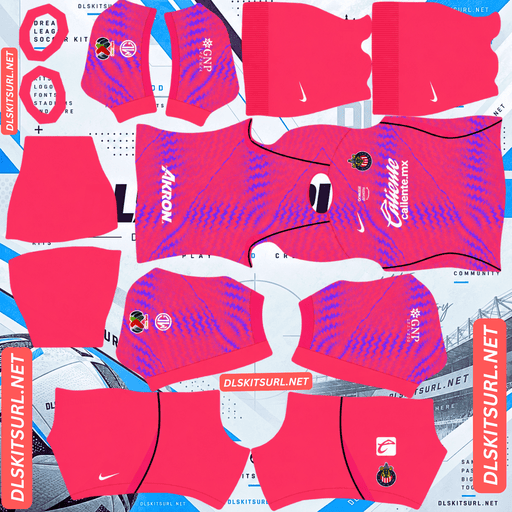
Chivas de Guadalajara GK Third Kit
GK Third Kit 512×512 (2026/27)
Chivas have an unusual kit situation this season. The club ended its long partnership with Puma and moved to Nike in the middle of 2026. That means a shirt labelled “2026 Chivas” is not necessarily the current design. Some belong to the first half of the year, while others represent the newer Nike collection.
Use the kit cards below to copy the direct image URLs. Before importing, check the manufacturer logo, shirt design, and badge placement so you know exactly which version you are adding to your team.
Nike Replaced Puma in 2026
Chivas ended its ten-year partnership with Puma and began working with Nike from the Apertura 2026 tournament. The change created two distinct groups of shirts within the same calendar year.
Puma supplied the club’s kits during the first half of 2026, including the Clausura third kit and the 120th-anniversary shirt. Nike took over for the current collection released in July.
The Quickest Way to Identify Your Chivas Kit
Look at the manufacturer logo before checking anything else.
Nike swoosh: The current home and away designs released in July 2026.
Puma cat: Earlier 2026 designs, including the anniversary shirt and Clausura third kit.
Both manufacturers produced Chivas shirts associated with 2026. The important distinction is whether you want the current Nike collection or one of the Puma commemorative designs.
The Four Chivas Shirts of 2026
The supplied collection contains four designs, each with its own colours and details. Understanding the differences makes it easier to choose the right kit for Dream League Soccer.
Nike Home Kit: Red and White Stripes
The Nike home shirt keeps Chivas’s traditional red-and-white vertical stripes, paired with a navy button-up collar and navy side panels.
The chest features the Chivas crest alongside the Amazon Prime, Caliente.mx, and Nike logos. The overall design has a retro feel without abandoning the club’s familiar identity.
For DLS players, this is the most straightforward shirt in the collection. The stripes are relatively wide, the colour contrast is strong, and the vertical pattern is easier to align than complicated hoops or diagonal designs.
The small collar buttons and the navy side panels are the details that need the closest inspection in a 512×512 image.
Nike Away Kit: White With Gradient Logos
The Nike away shirt uses a white base, but its defining feature is the gradient treatment on the logos. Their colours transition from red to blue rather than remaining a single shade.
This is an unusual detail because the gradient appears inside relatively small elements. At 512×512 resolution, a poorly prepared image may struggle to preserve the transition smoothly.
Look closely at the chest logos before importing the shirt. A good file should show a gradual change from red to blue, while a weaker version may display a blurry purple tone or an abrupt split between the two colours.
The shirt itself should remain predominantly white. The gradient belongs to the logos, not the entire shirt.
Puma 120th Anniversary Kit: The Original Club Unión Crest
Released in May 2026 according to the supplied draft, this shirt commemorates Chivas’s founding in 1906.
Unlike the traditional striped home design, the anniversary shirt uses a predominantly white base, with the white area taking priority over the red stripes. Its most distinctive feature is a large vintage Club Unión crest positioned in the centre of the chest. Club Unión was the club’s original name.
A gold commemorative patch completes the historical design, connecting the shirt to the period from 1906 to 2026.
This is the most historically distinctive shirt in the collection, but its centrally positioned vintage crest creates a particular issue when you import it into Dream League Soccer.
Puma Third Kit: Royal Blue and Gold
Released in January 2026 for the Clausura tournament, the Puma third kit takes a different approach to Chivas’s familiar red and white.
It features a royal-blue base with vertical stripes incorporating the club’s monogram. The pattern gradually fades towards the hem, while gold details highlight the crest, sponsors, and trim.
A commemorative badge on the collar marks the club’s 120th anniversary.
The blue-and-gold combination makes the shirt stand out from the other three designs. However, the fading monogram pattern and metallic-looking gold details require a sharper image to look convincing at game resolution.
The Chivas Anniversary Shirt Has a Badge Problem
If you plan to use the Puma anniversary shirt as your main kit, pay attention to the crest before importing it.
Dream League Soccer adds your imported club logo separately from the kit artwork. The badge appears in a fixed chest position rather than automatically replacing a crest already printed on the shirt.
The anniversary shirt has a large vintage Club Unión crest in the centre of the chest. Your imported modern Chivas badge may therefore appear in a different position, leaving two separate emblems visible on the same shirt.
The result can look crowded because the two crests represent different eras of the club.
Which Badge Should You Use?
If historical accuracy is your priority, pair the anniversary shirt with the vintage Club Unión crest rather than the modern Chivas badge.
This keeps the shirt and emblem consistent with the club’s original identity. However, check how the badge appears in the game, because the imported logo may still be placed separately from the large crest already printed on the shirt.
If you want a cleaner appearance, inspect the kit file to see whether it includes the central vintage crest or uses a simplified chest design.
Why the Gradient Logos on the Nike Away Kit Matter
The Nike away shirt’s red-to-blue logo gradient is one of the most demanding details in this collection.
A gradient uses many intermediate shades to create a smooth transition between colours. The challenge is that a logo occupies only a small part of a 512×512 shirt image, leaving fewer pixels available to reproduce those shades.
A poor-quality file may produce one of two results: the gradient becomes a flat, blurry purple-like colour, or the red and blue meet in a hard line without a smooth transition.
A better file preserves a gradual shift between the two colours, allowing the logos to remain recognisable.
When checking the away kit, zoom in on the logos rather than judging the image only from a small preview. The shirt can look correct overall while these tiny details have already lost their definition.
Why the Chivas Home Kit Is Easy to Recreate in DLS
The Nike home shirt is one of the more manageable designs in this collection because its red-and-white vertical stripes work well with a standard kit template.
Strong colour contrast: Red and white remain distinct at small sizes, helping the shirt look clear during matches.
Wide stripes: The pattern has enough space to remain visible at 512×512 resolution, unlike very fine pinstripes that can blur together.
Simple vertical alignment: Vertical stripes mainly need to line up along the centre of the shirt. Horizontal hoops require alignment across more seams and sections of the template.
The details to inspect are the navy side panels and the button-up collar. The side panels need to follow the template’s body and side sections correctly, while the small collar buttons may become difficult to distinguish after the image is reduced.
Check the Puma Third Kit’s Fade and Gold Details
The third kit is more demanding because its monogram stripes fade towards the hem. If the gradient is poorly reproduced, the fade can break into visible bands instead of appearing gradual.
The gold detailing presents another challenge. Gold needs highlights, shadows, and tonal variation to look metallic. When these details lose definition, the colour can flatten into dull brown.
If the gold looks brown and the monogram fade appears stepped, the file may not have enough detail to reproduce the design convincingly.
Best Number Colours for Chivas DLS Kits
Dream League Soccer controls squad number colours separately from the kit image. You need to configure the shirt and shorts number swatches individually.
Nike home: Choose navy. Red and white stripes make either club colour disappear against part of the shirt, while navy connects with the collar and side panels and remains distinct from both stripes.
Nike away: Choose red or blue. Both colours work with the gradient logos and stand out against the white base. Avoid white numbers on the white shirt.
Puma anniversary: Choose red to connect with the traditional stripes, or gold to match the commemorative patch. Red is generally the safer option for legibility because small gold numbers may lose definition.
Puma third: Choose white for the clearest contrast against the royal-blue base. Gold is an alternative if you prefer a coordinated look, but white will usually be easier to read at match distance.
Remember to set the shirt and shorts number colours separately.
Can You See All Four Chivas Kits Clearly During Matches?
All four designs have colours that can remain distinct against the green pitch in Dream League Soccer.
The red-and-white Nike home shirt offers strong contrast and is easy to recognise when players are moving. The white Nike away kit also stands out clearly, although its gradient logos may be less noticeable at a distance.
The royal-blue Puma third kit provides a solid contrast with the grass, while the predominantly white anniversary shirt remains visible because of its light base.
The main difference is not visibility but detail. The home kit relies on clear stripes, while the away and third kits depend more on small gradients and decorative elements that may become less visible during gameplay.
How to Identify the Correct Chivas Kit File
Use these four checks to identify each design before importing it:
Nike home: Red-and-white vertical stripes, a navy button-up collar, and navy side panels.
Nike away: A predominantly white shirt with logos that transition from red to blue.
Puma anniversary: A mostly white shirt with a large vintage Club Unión crest in the centre and a gold commemorative patch.
Puma third: A royal-blue shirt with fading monogram stripes and gold detailing.
The manufacturer logo is the quickest clue, but the colour scheme and chest details help confirm which shirt you have.
How to Import a Chivas DLS Kits URL
Once you have a working 512×512 PNG link, you can add the shirt through Dream League Soccer’s custom-kit menu.
Copy the direct image URL using the button on the relevant kit card.
Open Dream League Soccer and select My Club.
Tap Customise, then open Kit, not Logo.
Select the slot you want to replace: home, away, third, or goalkeeper.
Choose Custom Kit. Older versions may label the option Download.
Press and hold the URL field, select Paste, and confirm the import.
Check the shirt on your players to make sure the design and colours appear correctly.
With four Chivas shirts available, you have more flexibility than usual. You can use the Nike home and away kits in their regular slots and place one of the Puma commemorative designs in the third slot.
The supplied draft also describes three Nike goalkeeper designs for the season. If compatible files are available, choose your preferred one for the goalkeeper slot.
The game may require a one-time gem unlock before the first custom-kit import. Check the prompts in your own version of DLS because game menus and requirements can change.
Test Your Chivas Kit URL Before Importing
Open the link in a browser before using it in Dream League Soccer.
A working direct link should display the image itself, without a webpage, navigation menu, or collection of buttons surrounding it. The URL may end in .png, but what matters is that it loads the actual image rather than a preview page.
On a computer, open the image in a new tab and check its dimensions. The target size for this collection is 512×512 pixels.
Before importing, inspect the following details:
The Nike home shirt’s red-and-white stripes and navy collar.
The away shirt’s red-to-blue gradient logos.
The anniversary shirt’s central Club Unión crest.
The third kit’s royal-blue base and gold details.
The overall sharpness of the artwork.
A browser preview does not guarantee that the game will accept the link. If the image loads in your browser but fails in DLS, the host may restrict external requests or the URL may not point directly to the original PNG.
Why Chivas DLS Kit URLs Stop Working
A custom kit URL may stop working even when the image looked fine when you first saved it.
The image has been deleted. Free image hosts sometimes remove older or unused uploads. The URL may remain in your notes even after the file is gone.
Hotlink protection blocks external requests. Some image hosts allow direct viewing in a browser but prevent other applications from loading their files. This can make a URL work when clicked manually but fail during a DLS import.
The link points to a preview instead of the original image. A webpage can continue showing a thumbnail even after the direct image file becomes unavailable.
The wrong link was copied. Copy the URL from the kit card and make sure it opens the image directly, rather than a webpage containing the kit.
For the most reliable result, use a publicly accessible PNG hosted somewhere that permits external access.
Add the Chivas Badge in Dream League Soccer
The Chivas crest is imported separately from the kit.
Go to My Club → Customise → Logo and paste the direct URL for a compatible badge image.
Dream League Soccer may crop the badge into a circle, so choose a file with enough space around the artwork. A tightly cropped crest can lose its edges or lettering when displayed in the game.
The modern Chivas badge uses red and white with lettering, but small text may be difficult to read at match distance. A clear overall shape and recognisable colour arrangement matter more than tiny lettering.
If you are using the 120th-anniversary shirt, consider pairing it with the vintage Club Unión crest. The modern crest may still be appropriate for your regular Nike home and away kits.
Save Your Chivas DLS Kits for Later
Custom kits and badges may be stored on your device rather than permanently linked to your account. An update may preserve them, but reinstalling the game or switching phones can mean importing them again.
Save all your kit URLs in a notes app before starting. Label each one clearly as Nike home, Nike away, Puma anniversary, Puma third, goalkeeper, or badge.
This is particularly useful for Chivas because the 2026 collection includes two manufacturers and multiple designs from different parts of the year. Keeping the links organised makes it easier to restore the exact combination you want.
Rank Math FAQ: Chivas DLS Kits URL
What is a Chivas DLS kits URL?
A Chivas DLS kits URL is a direct link to a 512×512 PNG Chivas de Guadalajara shirt that can be imported into Dream League Soccer through the custom-kit menu.
Who makes Chivas kits for 2026/27?
According to the supplied draft, Nike took over from Puma starting with the Apertura 2026 tournament. The Nike home and away shirts represent the newer collection, while the Puma designs belong to the earlier part of 2026.
What does the Chivas 2026/27 home kit look like?
The Nike home kit features traditional red-and-white vertical stripes, a navy button-up collar, and navy side panels. The supplied draft gives its release date as 16 July 2026.
What is the Chivas 120th-anniversary shirt?
It is a Puma design described in the supplied draft as a predominantly white shirt with a large vintage Club Unión crest in the centre and a gold commemorative patch marking the period from 1906 to 2026.
Which badge should I use with the Chivas anniversary shirt?
The vintage Club Unión crest is the historically consistent option. The modern badge can look out of place beside a shirt commemorating the club’s original identity, especially because DLS places the imported logo separately from the central crest.
Why do the logos on my Chivas away kit look blurry?
The Nike away shirt uses logos with a red-to-blue gradient. If the PNG has insufficient detail, the gradient may turn into a blurry colour or a hard split rather than a smooth transition.
What number colour works best on the Chivas home kit?
Navy is the recommended choice because it matches the collar and side panels while remaining distinct from the red-and-white stripes.
Which Chivas kit is easiest to recreate in DLS?
The Nike home kit is relatively easy because its wide vertical stripes have strong contrast and require less complicated alignment than horizontal hoops or detailed gradients.
How do I fix a Chivas DLS kits URL that will not load?
Check that the URL opens the original PNG directly, that the file is still available, and that the host allows external access. If it opens a webpage or a restricted preview, try a compatible direct image link.