
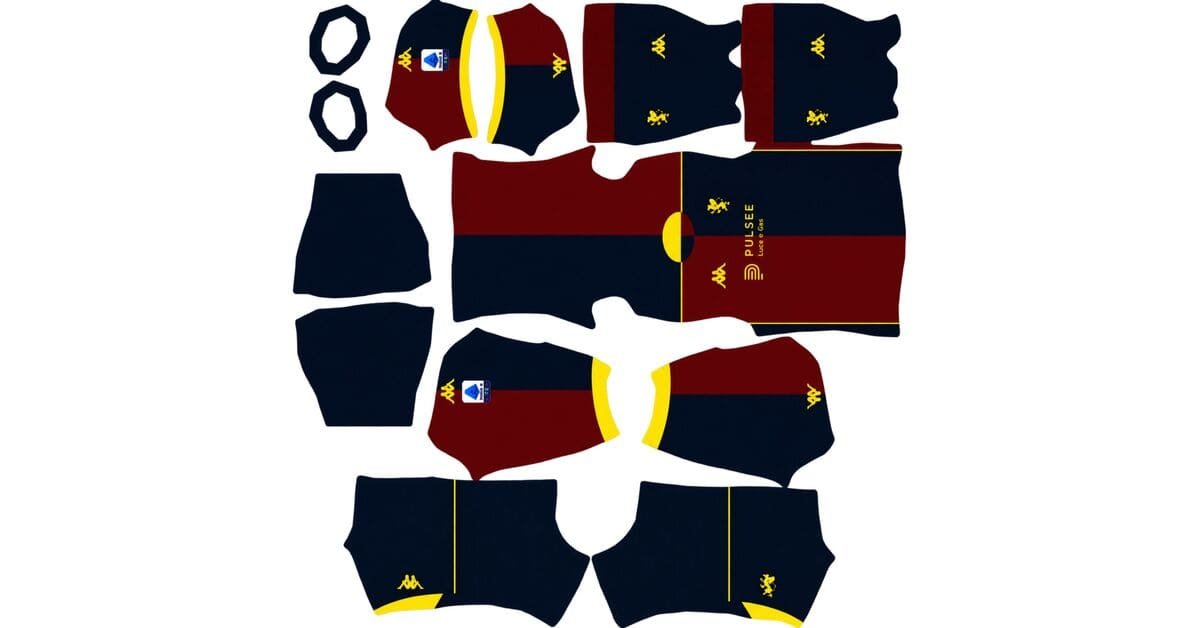
Looking for a Genoa DLS kits URL for Dream League Soccer 2026/27? Here you can find custom Genoa CFC kits in 512×512 PNG format, ready to import into the game. The collection covers the home, away, and third shirts, with goalkeeper options available separately.
Genoa CFC Logo
Official Logo 512×512
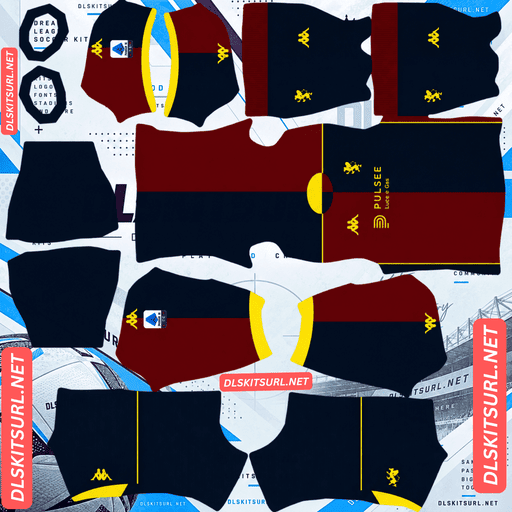
Genoa CFC Home Kit
Home Kit 512×512 (2026/27)
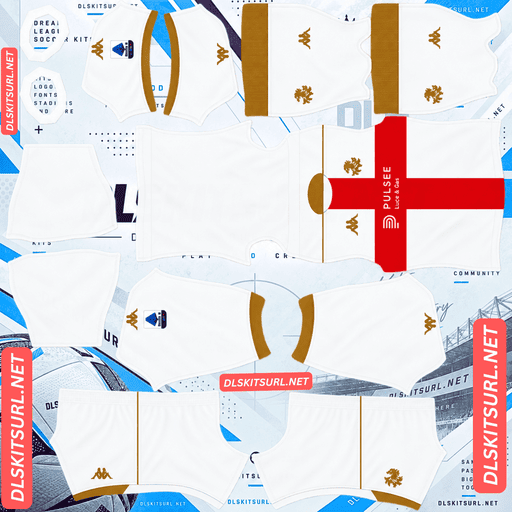
Genoa CFC Away Kit
Away Kit 512×512 (2026/27)
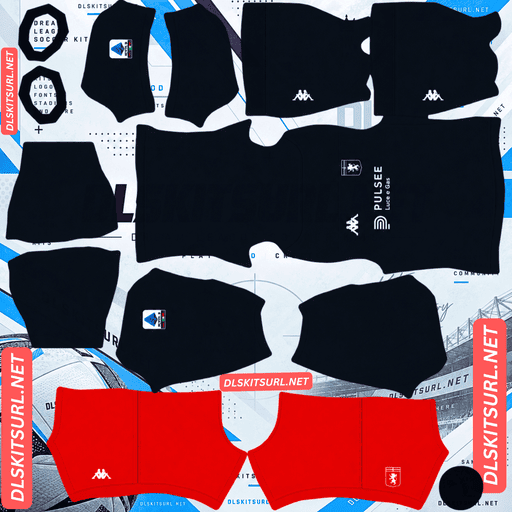
Genoa CFC Third Kit
Third Kit 512×512 (2026/27)
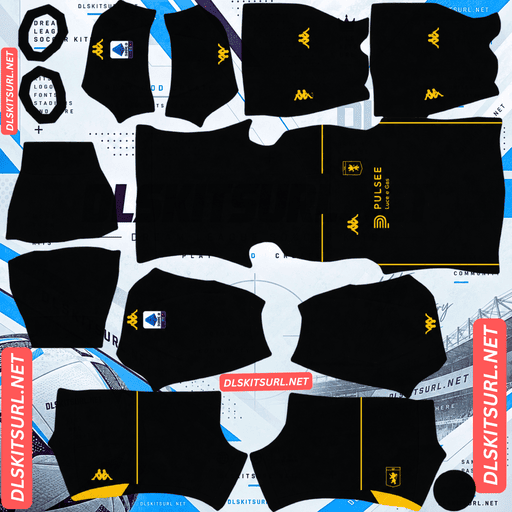
Genoa CFC GK Home Kit
GK Home Kit 512×512 (2026/27)
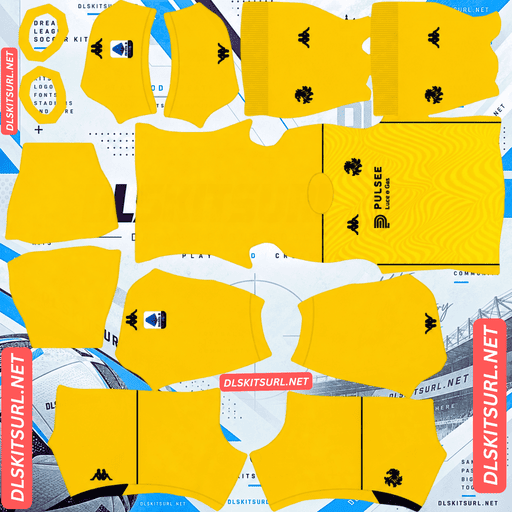
Genoa CFC GK Away Kit
GK Away Kit 512×512 (2026/27)
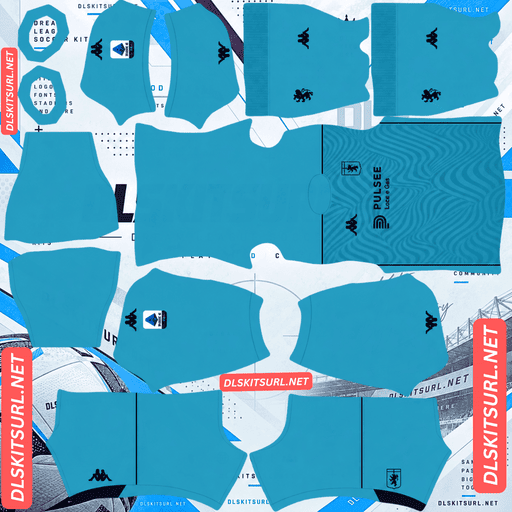
Genoa CFC GK Third Kit
GK Third Kit 512×512 (2026/27)
Genoa have a special place in Italian football history. Founded in 1893 by British expatriates, the club still carries its original English name, Genoa Cricket and Football Club. This season’s collection celebrates that heritage through traditional colours, maritime-inspired details, and a third shirt featuring a Union Jack on the upper back.
Use the copy URL buttons below to get the direct image links. Each kit file should be tested in Dream League Soccer before publishing to make sure the design, colours, and pattern alignment appear correctly in the game.
The English club in Serie A
Genoa’s history helps explain why this collection stands out from many other Serie A kits.
The club was founded in 1893 by British expatriates, initially as a cricket and athletics club before football became its main focus. Its English name has remained part of its identity, making Genoa Cricket and Football Club distinctive among Italian top-flight teams.
The 2026/27 third kit celebrates the club’s 133rd anniversary, paying tribute to its British founders and Genoa’s long connection with the sea. These historical references give the collection more meaning than a simple change of colours or patterns.
Genoa DLS Kits 2026/27
All three outfield kits are made by Kappa. Each has a different design, so you can choose a traditional home strip, a natural-toned away shirt, or a more detailed third kit.
Home Kit: The Classic Half-and-Half Design
Released on 14 July 2026, Genoa’s home shirt brings back the club’s unmistakable half-and-half colour scheme.
One side is vibrant red, while the other is deep navy blue, with a clean vertical division running down the middle. The design is finished with a retro-inspired polo collar featuring jacquard detailing in the club’s colours. Matching sleeve cuffs complete the shirt, while navy shorts and socks provide a traditional finish.
The overall look draws inspiration from Genoa shirts of the 1990s. For DLS players, the home kit is also the most straightforward design in the collection because its central colour split is relatively easy to reproduce on a 512×512 template.
The main detail to check is the collar. Its small woven-style pattern may not remain clearly visible after the design is reduced to the game’s kit dimensions.
Away Kit: Beige Natural Instead of White
Released on 31 July 2026, the away kit takes inspiration from Genoa’s earliest history.
Kappa lists the colourway as Beige Natural, combined with Red Blaze and Blue Majolica. Instead of using a plain white base, the shirt has a natural cream or beige appearance. A split-colour V-neck collar adds contrast, with red on the right side and navy on the left. Gradient details give the shirt additional depth.
If your Genoa away kit looks beige rather than bright white, that does not automatically mean the image is incorrect. The natural tone is part of the intended design.
When choosing a DLS file, check that the beige base remains distinct from the red and navy collar. Gradient transitions should also appear reasonably smooth rather than breaking into obvious blocks of colour.
Third Kit: Red and Navy Hoops With Gold Details
Released on 7 September 2026, the third kit is the most detailed shirt in the collection.
Bold horizontal hoops alternate between dark red and deep navy blue, creating a nautical appearance that reflects Genoa’s maritime heritage. Gold accents highlight the Griffin emblem, Kappa branding, and sponsor details.
The standout feature is the Union Jack printed on the upper back, a tribute to the club’s English origins. Kappa introduced the shirt through its No Panic campaign, built around the relationship between Genoa, the city, and the sea.
This is the kit that needs the closest inspection before importing it into Dream League Soccer. Horizontal hoops, small gold graphics, and the flag on the back all need enough detail to survive the move into the game’s template.
The Union Jack and your DLS squad number
The Union Jack creates a practical issue for Dream League Soccer players.
The flag sits on the upper back of the real shirt, which is also where DLS places the squad number. Depending on how the custom kit file was designed, the number may cover the flag, overlap it, or appear on a version of the shirt that does not include the flag at all.
None of these outcomes necessarily means the game is broken. A real football shirt can be designed with a flag on the back because the player’s number is printed over it. In DLS, the number is generated separately by the game, so the result depends on how the kit texture and number placement interact.
For the third kit, choose a high-contrast number colour, preferably white. This helps the number remain readable against both the red and navy hoops.
If preserving the Union Jack is important to you, inspect the back of the image before importing it. A front-only preview will not tell you whether the flag has been included.
Which Genoa kit is easiest to use in DLS?
The home, away, and third kits each present a different challenge when recreated at 512×512 resolution.
Home Kit: The Simplest Colour Alignment
The home shirt uses a vertical half-and-half split. The red and navy sections meet along the centre of the body, giving the template one main dividing line to reproduce.
Compared with horizontal hoops or complex diagonal patterns, this is relatively easy to align. The strong contrast between the two colours also makes misplaced sections easy to notice.
The collar is the more delicate part. Its jacquard texture contains fine details that may become indistinct when reduced to the game’s resolution. The overall polo-collar shape and its colours should remain more noticeable than the tiny woven pattern.
Third Kit: The Most Demanding Pattern
Horizontal hoops require more careful alignment than the home kit’s central split.
Each band should continue across the front and back, around the sides, and towards the sleeves. If the hoops shift at the seams or stop awkwardly where the sleeves begin, the file may have been created for a different kit template.
Gold details are another quality check. Metallic gold relies on highlights, shadows, and gradients to create its appearance. If those details lose their tonal variation, the Griffin and Kappa logos may look flat or brown rather than golden.
Choose a file in which the hoops remain consistent and the gold accents are still recognisable at full image size.
Away Kit: Check the Gradient
The away shirt’s gradient details need enough resolution to transition smoothly between shades.
When an image is compressed or poorly recreated, a gradient can turn into visible bands instead of a gradual colour change. Open the PNG at full size and inspect the transition areas before importing it.
The beige base should also look intentional rather than washed out. A natural cream tone is different from a faded or low-quality image.
Best Number Colours for Genoa DLS Kits
Dream League Soccer handles shirt and shorts numbers separately from the kit artwork. Your number colours therefore need to be chosen in the game’s kit settings rather than relying on the PNG alone.
Home kit: Choose white for both shirt and shorts numbers where available. Red disappears against the red half, and navy disappears against the navy half. White offers the most consistent contrast across both sections.
Away kit: Use navy or red for the numbers. Both colours connect with the split collar and stand out against the beige base. Avoid pale colours that blend into the shirt.
Third kit: Choose white. It contrasts with the red and navy hoops and is generally the clearest choice for a shirt that also contains gold details and an upper-back flag.
Check the shirt and shorts number swatches separately. A number that looks clear on the body may be harder to read against the shorts, depending on the colours you select.
Are Genoa kits easy to see during a match?
A kit can look accurate in the customisation menu but become harder to distinguish when players appear smaller on the pitch.
Genoa’s red and navy home colours provide strong separation from the green grass. Their contrast also helps the players remain visually distinct during fast movement.
The third kit benefits from the same red-and-navy combination, although the horizontal hoops and gold details can become less visible at a distance.
The beige away kit has a more neutral appearance, but its light base still contrasts reasonably well with the pitch. It offers a different visual style without requiring you to sacrifice the club’s traditional colours entirely.
For the best in-game result, check the kits during an actual match rather than judging them only from the preview screen.
How to identify the correct Genoa 2026/27 kits
Before copying a Genoa DLS kits URL, check these four design features:
Home: A red-and-navy vertical half-and-half shirt with a retro-inspired polo collar.
Away: A beige or natural-coloured shirt with a split red-and-navy V-neck collar.
Third: Horizontal red and navy hoops, gold accents, and a Union Jack on the upper back.
Branding: Kappa branding across the collection.
These details can help you distinguish the 2026/27 designs from older Genoa kits. If the colours, collar, or pattern are noticeably different, check the image before using it.
How to import a Genoa DLS kits URL
Importing a custom Genoa kit is straightforward once you have a direct PNG link.
Copy the kit URL using the button provided with the relevant kit card.
Open Dream League Soccer and go to My Club.
Select Customise, then open the Kit section.
Choose the correct slot: home, away, third, or goalkeeper.
Select Custom Kit. Depending on the game version, the option may be labelled Download.
Tap and hold the URL field, select Paste, and confirm the import.
Return to the kit screen and check the result on your players.
Be careful when selecting the slot. The game replaces the kit associated with the selected option, so importing a home shirt into the away slot can overwrite the wrong design.
The three outfield slots cover home, away, and third kits, leaving the goalkeeper slot available for a separate design. Kappa produced two goalkeeper designs for this collection, according to the supplied source, so you can choose between them if both files are available.
The game may require a one-time gem unlock before your first custom-kit import. Costs and menu labels can vary between versions, so check the instructions displayed in your own game.
Test your Genoa kit URL before importing
Always open the link in a browser before pasting it into DLS.
A suitable link should display the PNG image directly, without a surrounding webpage, menu, or collection of buttons. A URL ending in .png can be a useful clue, but the real test is whether it loads the actual image file.
On a computer, open the image at full size and check the dimensions if your browser provides that information. The target format for this collection is 512×512 pixels.
Before importing, inspect the details that matter most:
The home shirt’s central red-and-navy split.
The away shirt’s beige base and split collar.
The third shirt’s horizontal hoops and gold accents.
The upper-back Union Jack, if included in the file.
The overall sharpness of the crest and Kappa branding.
A clear image preview does not guarantee that the game will accept the URL, so testing the link and checking the imported result are both worthwhile.
Why a Genoa DLS kits URL might not work
If a kit refuses to load, the problem may be with the image host rather than the shirt design.
The image has been removed. Free image hosts sometimes delete older or unused uploads. A saved URL may still look normal even though the file is no longer available.
Hotlink protection blocks the game. Some hosts allow images to open in a browser but prevent external applications from loading them. This can cause a link to work when you open it manually and fail when you paste it into DLS.
The link points to a preview instead of the original image. A kit webpage may display a working thumbnail while the direct image URL points to another location. If that file is missing or restricted, the import will fail.
The URL was copied incorrectly. Make sure you copy the complete link from the kit card, without accidentally leaving out part of the address.
If a link keeps failing, test it in a private browser window or try another reliable image host. The kit image should be publicly accessible and compatible with the game’s import system.
Add the Genoa badge in Dream League Soccer
The kit and club badge are imported through separate sections of the customisation menu.
Open My Club → Customise → Logo to import the Genoa crest. Do not use the Kit section for the badge.
Genoa’s emblem features the Griffin, a mythical creature closely associated with the city. Its distinctive shape makes the crest recognisable, but the image needs enough surrounding space to display properly.
Dream League Soccer may crop the imported badge into a circular shape. Choose an image that leaves space around the Griffin, shield, and lower point of the design. A file cropped too tightly can lose important details at the edges.
If you are using the third kit, a gold Griffin design can complement its gold accents. However, small gold details may lose their depth when displayed at badge size, so prioritise a clear outline over complicated shading.
Keep your Genoa DLS kits saved
Custom kits and badges may be stored locally on your device rather than being permanently linked to your account. A game update may leave them intact, but reinstalling the game or moving to another phone can mean importing them again.
Before setting up your collection, save the direct URLs in a notes app or another place you can access later. Keep the home, away, third, goalkeeper, and badge links clearly labelled.
That way, if a design disappears, you can find the original file quickly—provided the image host still keeps it online.
Rank Math FAQ — Genoa DLS Kits URL
What is a Genoa DLS kits URL?
A Genoa DLS kits URL is a direct link to a custom Genoa CFC shirt image that can be imported into Dream League Soccer. For this collection, the target image format is a 512×512 PNG.
Why does the Genoa third kit have a Union Jack?
The supplied article describes the Union Jack as a tribute to Genoa’s English origins. The club was founded in 1893 by British expatriates, and the 2026/27 third kit marks its 133rd anniversary.
What does the Genoa 2026/27 home kit look like?
The home shirt features a traditional vertical half-and-half design, with vibrant red on one side and deep navy on the other. It also has a retro-inspired polo collar with jacquard detailing, paired with navy shorts and socks.
Is the Genoa away kit supposed to look beige?
Yes. The supplied kit details identify the away colourway as Beige Natural, rather than bright white. Its design also includes a split red-and-navy V-neck collar and gradient detailing.
Why are the hoops on my Genoa third kit misaligned?
Horizontal hoops must line up across the front, back, sides, and sleeves. If the bands shift at the seams, the image may have been created using a different kit template or may not have been aligned carefully.
What is the best number colour for the Genoa home kit in DLS?
White is the recommended choice because it contrasts with both the red and navy halves of the shirt. Set the shirt and shorts number colours separately.
Why does the gold on my Genoa third kit look brown?
Gold depends on highlights, shadows, and tonal variation to look metallic. If the image is poorly compressed or lacks sufficient detail, the gold can appear flat or brown.
Which Genoa kit is easiest to import into DLS?
The home kit is generally the simplest design to reproduce because its vertical half-and-half split has one main central alignment point. The third kit is more demanding because its horizontal hoops need to line up across several parts of the shirt.
How do I fix a Genoa DLS kit URL that will not load?
Check that the URL opens the PNG image directly, that the file is still online, and that the image host permits external access. If the link points to a webpage or a restricted preview, use a direct, publicly accessible image URL instead.
Can I use a Genoa goalkeeper kit in Dream League Soccer?
Yes, if you have a compatible custom goalkeeper kit image and an available goalkeeper slot. Select the goalkeeper slot before importing so you do not replace one of your outfield kits.