
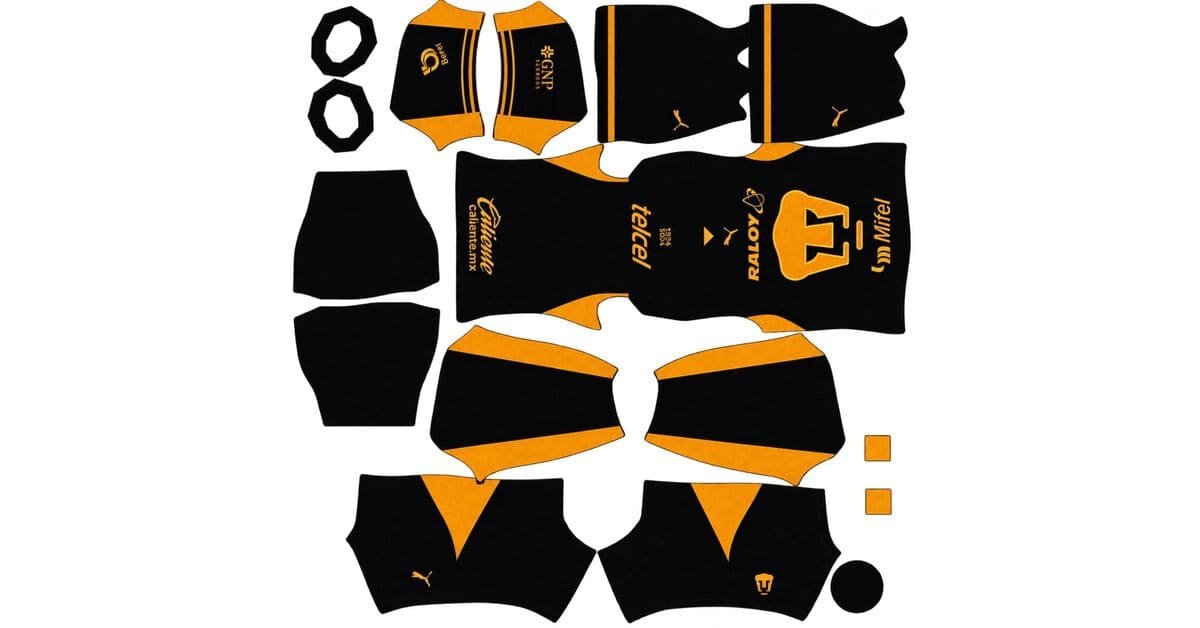
A Pumas DLS kits URL is a direct link to a 512×512 PNG Pumas UNAM shirt that you can import into Dream League Soccer. Below, you’ll find all four kit slots, each with a copy URL button to make importing your favourite design easier.

Pumas Logo
Official Logo 512×512 (2026/27)
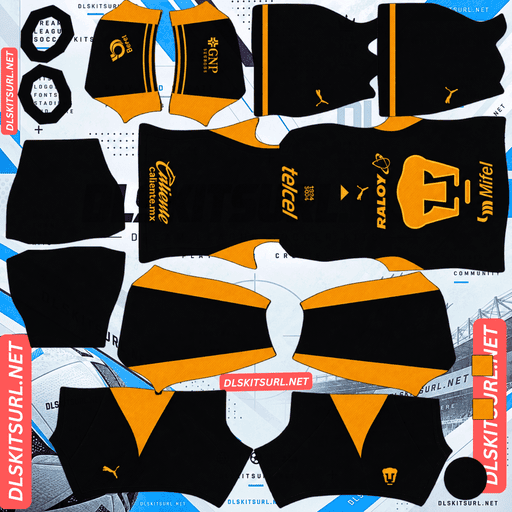
Pumas Home Kit
Home Kit 512×512 (2026/27)
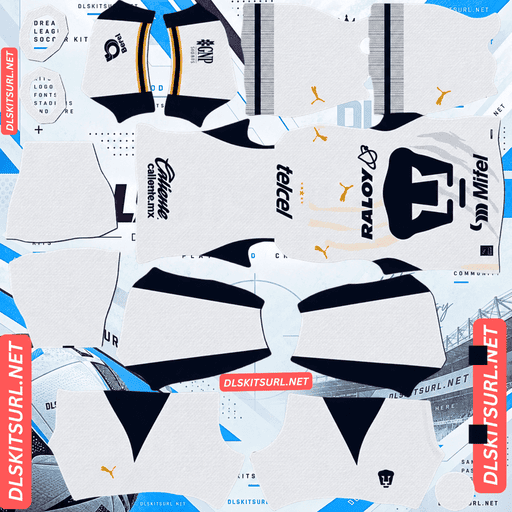
Pumas Away Kit
Away Kit 512×512 (2026/27)
The biggest change for 2026/27 is the arrival of Puma as Pumas UNAM’s new kit supplier, replacing Nike. The name change is almost too perfect, but the more important detail is the design itself: both the home and away shirts feature an enormous puma head across the front. That creates a few unusual considerations when importing the kits into DLS, particularly if you want to add the club badge.
The Giant Puma Head and Your Custom Badge
Both the home and away shirts are built around the same defining feature: a large, stylised puma head positioned front and centre on the torso.
The home shirt features a solid gold puma head against deep navy blue. On the away shirt, the puma head appears in navy against a white background, dominating the front of the design.
Why the Large Puma Head Can Clash With Your Badge
Dream League Soccer places your imported club logo on the chest in a fixed position, overlaying the kit image underneath. A conventional kit design usually leaves enough room for the badge to sit neatly on the shirt.
The Pumas 2026/27 home and away shirts do not follow that convention. Their oversized puma heads occupy the centre of the chest rather than appearing as small crests over the heart.
Depending on the kit file and how you customise it, you may encounter one of three outcomes.
Your badge overlaps the puma head. This is the most likely result, and it can look cluttered because the imported badge may feature another puma head.
The kit artwork leaves the chest clear. In that case, the large printed puma head may have been cropped or shifted, compromising the original design.
You leave the badge slot empty. This is an unusual but reasonable option for Pumas. The shirt already displays the club’s symbol prominently, so a second logo may be unnecessary.
Before importing a badge, open the kit PNG at full size and inspect the chest area. Club León’s lion and Algeria’s centred crest create similar challenges, but Pumas takes the idea much further with its oversized central graphic.
Pumas UNAM DLS Kits for 2026/27
The home and away kits were released on 3 July 2026, marking the switch from Nike to Puma. The third-kit details described below are based on an early October leak and remain subject to official confirmation.
Home Kit: Deep Navy and Gold
The Pumas home kit introduces a significant change from the club’s more traditional home-shirt colours.
It features a deep navy blue base, rich gold accents and a gold polo collar, with a large, solid gold puma head printed across the front. Traditionally, Pumas home shirts have used a white or gold base, with navy appearing more prominently on the shorts and socks.
For 2026/27, navy becomes the main shirt colour, giving the design a noticeably different appearance while retaining the club’s iconic puma symbol.
When choosing a DLS home kit, look for a deep, consistent navy background and a clearly defined gold puma head. The gold polo collar is another important detail to check, especially if you want the imported image to retain the shirt’s original character.
Away Kit: White With Diagonal Claw-Scratch Graphics
The away shirt uses a predominantly white base, with an oversized navy puma head covering the torso. Diagonal gold and navy claw-scratch textures add movement across the white fabric.
The design has received a mixed response, with supporter ratings placing it among the less popular Liga MX releases of the season. That reaction does not determine the quality of a DLS texture, but it provides some context if the shirt has attracted less attention than the home kit.
For the game, the main challenge is preserving the diagonal claw-scratch graphics. A low-resolution or heavily compressed file can blur these thin marks, leaving the shirt looking much plainer than the original design.
Check the white background, navy puma head and diagonal gold-and-navy details before importing the kit.
Third Kit: Inspired by the 1968 Olympic Cauldron
The Pumas third kit was leaked in early October 2026 and has not yet been officially released. Its design details should therefore be treated as provisional rather than confirmed.
The leaked shirt features a dark anthracite and black base with shimmering gold accents and a flame graphic inspired by the Olympic cauldron at the Estadio Olímpico Universitario.
The stadium is Pumas’ home ground and was the principal venue of the 1968 Mexico City Olympics. The cauldron remains associated with the stadium, giving the design a direct connection to the club’s home rather than a generic Olympic theme.
The leaked details also include an oversized gold-outlined puma crest and a custom 1968 cauldron graphic on the upper back.
If the final shirt retains these features, it will offer a distinctive alternative to the navy-and-gold home kit and the white away shirt. Until an official release, however, treat available third-kit PNGs as unofficial representations of the leaked design.
The Cauldron Graphic Shares Space With Your Squad Numbers
One detail deserves special attention if the leaked third-kit design is confirmed.
Dream League Soccer places squad numbers on the upper back of the shirt. The Olympic cauldron graphic is also positioned in that area, so the two elements may overlap when the shirt is imported.
This is not necessarily a flaw in the kit file. Real football shirts are designed with player numbers printed over the artwork, while DLS applies its own number placement to the imported texture.
The result depends on the final image and the game’s rendering. The number may cover part of the cauldron, overlap the graphic awkwardly or appear over an area where the artwork has been adjusted.
Choose a strong, high-contrast number colour so your player numbers remain readable regardless of the graphic behind them.
Similar layout challenges occur with Qatar’s Arabic script, Monaco’s stadium arches, Genoa’s Union Jack and Augsburg’s lettering, where shirt artwork shares space with the number area.
Gold Is the Best Quality Test Across All Three Kits
Gold appears throughout the Pumas collection, making it a useful colour to inspect when comparing kit files.
Gold looks metallic because of its tonal transitions: highlights, midtones and shadows work together to suggest a reflective surface. When an image is resized poorly or compressed too heavily, those transitions disappear and the gold can flatten into a dull brown or mustard shade.
Home Kit: Inspect the Gold Polo Collar
The large gold puma head is a relatively forgiving feature because it covers a substantial area of the shirt. Even a moderately sized image can preserve its basic silhouette.
The narrower gold polo collar is a better quality test. Its edges should remain clean, with the gold clearly separated from the navy fabric.
Away Kit: Check the Thin Claw-Scratch Graphics
The away shirt uses thin diagonal gold marks alongside navy graphics. These are smaller details than the puma head and can disappear more easily when the file is compressed or enlarged.
Look closely at the gold scratches. They should remain visible as distinct marks rather than blending into the white background.
Third Kit: Expect Limitations With the Shimmering Finish
The leaked third kit is described as having shimmering gold accents. A metallic shimmer depends on how light interacts with the physical fabric, so a flat PNG cannot reproduce every aspect of the real shirt.
At best, the image can preserve the gold colour and any highlights or shading included in the artwork. Expecting the imported kit to reproduce the full reflective effect of the physical material would be unrealistic.
Why Diagonal Alignment Matters on the Away Shirt
The away shirt has another technical challenge: its claw-scratch graphics run diagonally across the fabric.
Those lines need to align correctly where the front and back sections meet on the kit template. Matching both the position and the angle across a panel boundary is more difficult than aligning a simple horizontal or vertical stripe.
Inspect the side of the shirt where the front meets the back. If a scratch continues at a consistent angle across the seam, the artwork has been aligned carefully. Broken or abruptly changing lines can indicate a poorly assembled texture.
Set the Correct Number Colours
Dream League Soccer does not automatically select your squad-number colours based on the imported shirt. Instead, the kit template provides separate colour swatches for shirt numbers and shorts numbers.
Here are the recommended options for each Pumas kit.
Home Kit Number Colours
The home shirt has a deep navy base. Gold or white numbers both work well.
Gold matches the oversized puma head and polo collar, giving the kit a coordinated appearance. White can offer stronger readability during matches, particularly when players are viewed from a distance.
Away Kit Number Colours
The away shirt is predominantly white, with a navy puma head and gold-and-navy claw scratches. Navy numbers are the natural choice because they match the main graphic and provide clear contrast against the white fabric.
Avoid white shirt numbers on the white background, as they can become almost invisible during gameplay.
Third Kit Number Colours
The leaked third kit uses anthracite and black, with gold accents. Gold or white numbers should provide contrast, with white a sensible choice if readability is the priority.
The cauldron graphic on the upper back may affect how clearly the number stands out, so inspect the final result in a match rather than judging it from the kit preview alone.
Remember to set the shirt-number and shorts-number swatches separately.
All Three Kits Stand Out on the Pitch
Kit visibility matters in Dream League Soccer because players appear relatively small during matches. Colours that contrast clearly with the grass make it easier to follow your team.
The Pumas collection offers a useful contrast between all three designs.
Home: Deep navy stands apart from the green pitch, while the large gold puma head provides a bright and recognisable focal point.
Away: White is easy to distinguish from the grass, and the oversized navy graphic adds contrast across the torso.
Third: Anthracite and black create a dark silhouette against the pitch, while gold details add visual separation.
Each kit has a distinct colour identity. The home and away shirts are especially easy to recognise at match distance because of their contrasting backgrounds and oversized puma graphics.
How to Identify a Current Pumas DLS Kit
Before importing a Pumas kit, check these four details to avoid using an outdated design.
Puma branding instead of a Nike swoosh. Puma replaced Nike as the kit supplier for 2026/27. A Nike-branded shirt belongs to 2025/26 or an earlier season.
A navy home shirt. The 2026/27 home design uses deep navy rather than the white or gold base traditionally associated with Pumas.
A white away shirt with claw-scratch graphics. Look for diagonal gold and navy details across the predominantly white design.
An oversized puma head on both shirts. The large central graphic is one of the defining features of the new home and away kits.
The third kit requires extra caution because its design was leaked rather than officially released at the time described here. Its details may change before the final shirt becomes available.
How to Use a Pumas DLS Kits URL
Importing a Pumas UNAM kit follows the same process as importing other custom shirts into Dream League Soccer.
Copy the URL using the Copy URL button on the relevant kit card. Copying your browser’s page address may give you the webpage instead of the image.
Open Dream League Soccer and tap My Club.
Select Customise, then open the Kit section rather than Logo.
Choose the kit slot you want to replace.
Tap Custom Kit, press and hold the URL field, then select Paste.
Tap Confirm to import the shirt. Older versions of the game may label this option Download.
With the third kit not yet officially released, you can use the home, away and goalkeeper kits to fill three slots. Puma produced three goalkeeper designs for the season, giving you several options for completing your Pumas collection.
The first custom-kit import requires a one-time gem unlock. Once that initial unlock is complete, changing your imported kits does not require another gem payment.
Test the Pumas Kit URL Before Importing
Open the copied URL in your browser before entering the game.
A direct image link should display the shirt by itself, without a webpage, navigation menu or surrounding buttons. Ideally, the URL should end in .png.
If the link opens a page with a kit preview and other website elements, it may be a viewer page rather than a direct image file. Dream League Soccer needs to retrieve the actual PNG.
On a computer, right-click the image and open it in a new tab. Check the dimensions reported by your browser where possible, and make sure the file is appropriate for the intended 512×512 kit template.
Why Pumas DLS Kit URLs Stop Working
Even a kit link that worked previously can stop importing. Three common issues can explain the problem.
Free Image Hosts Delete Files
Some free image-hosting services remove uploads after extended inactivity or when their retention policies change. A webpage may still display its old preview even though the original image is no longer available.
If your Pumas kit stops loading, open the direct URL in a browser first. This helps establish whether the image itself is still accessible.
Hotlink Protection Blocks External Requests
Some image hosts prevent other applications from accessing their files directly. A browser may display the image when you visit the URL, but Dream League Soccer’s request may be blocked because it comes from outside the host’s website.
This can make a link appear functional in a browser while failing during import.
The Preview and the Direct Link Point to Different Files
A kit page may display a thumbnail stored on one server while its copy button points to an image hosted elsewhere. If the external image disappears, the preview can remain visible while the import link fails.
Always test the direct URL rather than relying only on the preview. Confirm that the link opens the actual shirt image before using it in the game.
The Pumas UNAM Badge
To import the Pumas crest, return to the customisation menu and choose Logo instead of Kit.
Pumas UNAM has a distinctive badge built around a stylised puma head in gold and navy. Its bold silhouette and limited colour palette make it well suited to Dream League Soccer, where small logos can lose fine details.
The game crops imported badges into a circular area, so choose an image with enough clear space around the design. A file trimmed too closely to the artwork may lose part of the crest during cropping.
There is also one unusual consideration for the 2026/27 shirts: you may not need to import the badge at all.
Both the home and away kits already feature an oversized puma head across the chest. Adding another puma logo in the game’s fixed badge position can create an awkward overlap. Leaving the logo slot empty is therefore a reasonable alternative if you prefer the shirt’s printed graphic to remain unobstructed.
Save Your Pumas Kits for Later
Custom kits are stored on your device rather than permanently attached to your account. Game updates may preserve them, but reinstalling the game or changing phones can mean importing the shirts and badge again.
Before customising your team, save all four kit URLs in a notes app. Keeping the links together makes it easier to restore your home, away, third and goalkeeper designs if you ever need to reinstall them.
Because the leaked third kit has not yet been officially released, save its URL separately and check that the image still matches the final design if an official version becomes available.
FAQ
What is a Pumas DLS kits URL?
A Pumas DLS kits URL is a direct link to a 512×512 PNG Pumas UNAM shirt that you paste into Dream League Soccer’s custom-kit screen. A direct image URL should open the PNG itself rather than a webpage containing a preview.
Who makes Pumas UNAM’s kits for 2026/27?
Puma replaced Nike as Pumas UNAM’s kit supplier for the 2026/27 season. A Pumas shirt carrying a Nike swoosh belongs to 2025/26 or an earlier campaign.
What does the Pumas 2026/27 home kit look like?
The home kit features a deep navy blue base, rich gold accents, a gold polo collar and an oversized solid gold puma head across the front. It differs from the white or gold base traditionally associated with Pumas home shirts.
Why does my badge overlap the puma head?
Dream League Soccer places your imported logo on the chest in a fixed position, while the Pumas home and away shirts already feature a large puma head in that area. Leaving the badge slot empty can be a cleaner option because the shirt already displays the club’s symbol prominently.
What inspired the Pumas third kit?
The leaked third kit takes inspiration from the Olympic cauldron at Estadio Olímpico Universitario, Pumas’ home ground and the principal venue of the 1968 Mexico City Olympics. The reported design uses an anthracite and black base with gold accents and a flame graphic.
Why does the gold on my Pumas kit look brown?
Gold relies on highlights, midtones and shadows to create a metallic appearance. Poor resizing or heavy compression can remove those tonal transitions, making the gold look flat or brown.
Why do the claw scratches on my Pumas away kit look broken?
The claw-scratch graphics run diagonally across the shirt and must align correctly where the kit template’s panels meet. Poorly aligned artwork can make the lines appear broken or change their angle at the seams.
Is the Pumas third kit officially available?
The third kit described here was leaked in early October 2026 and had not yet been officially released at that point. Its colours, graphics and final details should be treated as provisional until the club confirms the design.