
The Chelsea DLS Kits URL 512×512 collection includes the current home, away, third and goalkeeper kits ready for use in Dream League Soccer.
Chelsea Official Logo
Official Logo 512×512
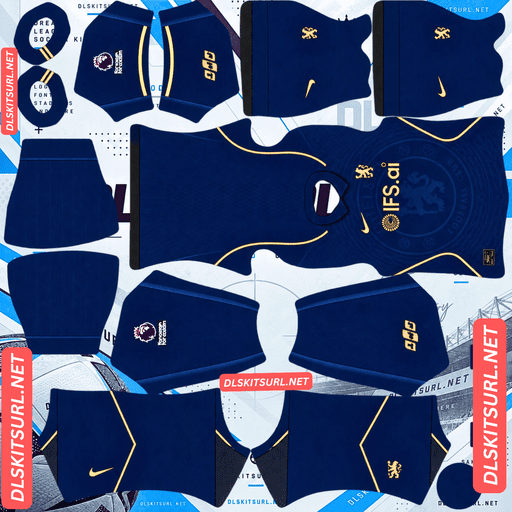
Chelsea Home Kit
Home Kit 512×512 (2026/27)
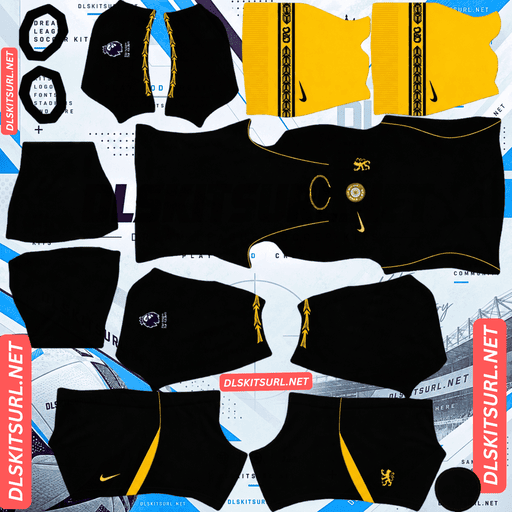
Chelsea Away Kit
Away Kit 512×512 (2026/27)
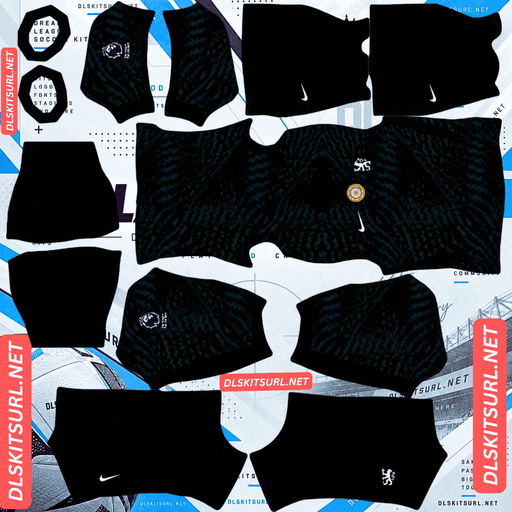
Chelsea Home GK Kit
GK Kit 512×512 (2026/27)
Gold is the detail connecting Chelsea’s 2026/27 collection. It appears around the home shirt, returns through the branding on the black away kit and continues in smaller details across the wider set. According to the supplied kit information, this is the first time gold has featured on a Chelsea home shirt in roughly three decades.
That also makes image quality unusually important. Metallic gold is much harder to reproduce in a small 512×512 texture than a simple flat colour such as blue or black. A good file keeps the highlights and shadows that make the trim look metallic; a poor one turns the same areas into flat yellow or muddy brown.
Why Gold Is Difficult to Reproduce in a DLS Kit
Gold does not behave like an ordinary flat colour.
A normal blue section can remain recognisable even after some detail is lost because the basic colour stays the same. Metallic gold depends on several closely spaced shades working together. A highlight creates the shine, a middle tone gives the base colour, and darker areas create depth.
Remove those small transitions and the metallic appearance disappears.
That is especially important on a 512×512 Dream League Soccer template because collar trim, logos and sleeve details may only occupy a small number of pixels.
How to Check the Gold Before Importing
Open the Chelsea kit image at full size and inspect one of the gold areas.
Good gold should still contain visible light and dark variation rather than appearing as one completely flat shade.
If it looks metallic, the file has preserved the effect reasonably well.
If it looks like mustard yellow or dull brown, the image may have been compressed too heavily or enlarged from a weaker source.
Chelsea’s current collection makes this check particularly useful because gold appears across all three main shirts.
Chelsea Home Kit 2026/27
The Chelsea home shirt uses a Bright Blue base with Midwest Gold trim.
Nike’s theme for the design is described as Chelsea’s “Italian Renaissance,” referencing the club’s transformative period during the 1990s.
One of the most noticeable structural details is the button-down collar, which is unusual on a modern football shirt.
The rampant lion is also worked into the fabric itself rather than simply appearing as a separate bold graphic. The design uses an interwoven effect across the front, with lion-claw references forming part of the visual identity.
Why the Home Kit Is Harder to Reproduce
The blue base itself is easy.
The difficult part is the interwoven lion.
Because the lion is built into the texture rather than printed as a strong contrasting shape, it depends on subtle changes in the fabric. Those tonal differences can disappear quickly from an undersized or over-compressed image.
A weak file can therefore turn the shirt into what looks like a fairly plain blue kit with gold trim.
A better-quality Chelsea DLS kit 512×512 PNG should preserve enough of the woven lion effect to make the idea visible when the image is viewed up close.
Chelsea Away Kit 2026/27
The away shirt was released on 21 July 2026 and takes a much simpler approach.
The base is completely black.
There is no large background graphic, no tonal torso pattern and no complicated texture competing for attention across the main body.
Instead, almost all of the character sits around the edges.
Midwest Gold logos stand out against the black base, while engineered ribbing appears around the shoulders. A laurel wreath motif runs around the collar and sleeve cuffs, creating a visual link with the home shirt.
Why the Chelsea Away Kit Works So Well in DLS
The away kit has a major advantage over most modern football shirts: there is very little subtle detail to lose.
A solid black torso remains black whether the image is perfect or merely acceptable.
There is no low-contrast pattern that can suddenly disappear and change the character of the shirt.
The main quality check is still the gold.
If the logos and trim retain their metallic appearance, the rest of the kit is comparatively straightforward.
That makes the away shirt the easiest Chelsea design in this collection to reproduce accurately in Dream League Soccer.
Chelsea Third Kit 2026/27
The third shirt was released in September 2026 and completes the main outfield set.
It uses a white base, described in the supplied information as Chelsea’s first pure white third shirt in close to a decade.
Narrow red vertical pinstripes run across the front and back, while a tonal geometric shadow pattern is embossed into the fabric.
Rush Blue appears around the neckline and sleeve cuffs, and the Nike Swoosh uses blue with a red outline.
The broader design references Chelsea’s 1993 away shirt along with other away and third kits from the 1980s and 1990s.
Why the Chelsea Third Kit Is the Hardest File
The third kit combines two details that are difficult to preserve at 512×512.
The first is the narrow red pinstriping.
Very thin lines can become only one or two pixels wide on the finished template, making them sensitive to resizing and compression.
The second is the embossed geometric shadow pattern.
Embossing depends on subtle texture rather than strong colour contrast, which means it is easy to lose once the kit is reduced.
A weak file can leave you with what looks like a mostly plain white shirt.
A better version should keep the pinstripes clean and allow at least some of the tonal pattern to remain visible at close range.
Two Official Versions of the Chelsea Third Kit
There are two legitimate versions of the third shirt, so the presence or absence of one chest detail does not automatically make a file wrong.
The match version includes the FIFA World Champions badge, positioned centrally on the chest.
The stadium version does not include it.
Both are official.
If you want your Dream League Soccer setup to reproduce the match version, choose the file with the central badge. If you prefer the cleaner retail look, the version without it is also correct.
How to Tell the Two Third Kits Apart
Look at the centre of the chest.
If the World Champions badge appears between the other main chest elements, you have the match version.
If the centre is clear, you have the stadium version.
This is worth checking before downloading because many kit files may show one version without explaining which one it represents.
Which Chelsea Kit Looks Best in Dream League Soccer?
The three shirts behave quite differently when converted into a small game texture.
Away Kit – Most Reliable
The black away shirt is the easiest to reproduce because the torso does not depend on a hidden pattern.
Its identity comes from the black base, metallic gold branding and laurel detailing.
Even if very small details soften, the overall design remains intact.
Home Kit – Moderate Difficulty
The home shirt depends more heavily on its fabric texture.
Bright Blue and gold remain easy to identify, but the interwoven lion can disappear if the image lacks enough detail.
That means two home files can have the same colours while looking noticeably different in quality.
Third Kit – Most Demanding
The third shirt combines thin lines and low-contrast texture.
Its red pinstripes need to remain separate rather than blurring together, while the embossed background should not disappear completely.
Those two requirements make it the most demanding Chelsea kit in the collection.
Quick Chelsea Kit Quality Check
Start with the gold on whichever shirt you are checking.
If it still looks metallic, move to the kit-specific detail.
On the home shirt, check whether you can see the woven lion texture.
On the third, inspect the red pinstripes. They should appear as separate narrow lines rather than a pinkish or red wash across the white base.
Those quick checks reveal most common quality problems.
Set the Chelsea Number Colours Correctly
Dream League Soccer does not automatically choose squad-number colours based on the visible shirt.
The kit template contains separate colour swatches for shirt and shorts numbers.
Those need enough contrast with the kit underneath.
Chelsea Home Kit Number Colour
The home shirt uses Bright Blue.
White gives the strongest readability at normal match distance.
Gold can also match the design, but metallic-looking shades are less reliable when reduced to very small numbers.
If visibility matters most, white is the safer option.
Chelsea Away Kit Number Colour
The away shirt is black.
White or gold can both work, but white provides the strongest contrast.
Gold gives a more coordinated appearance if the colour is bright enough to remain readable.
Chelsea Third Kit Number Colour
The third shirt is predominantly white.
That means white squad numbers can disappear.
Blue or red provides a much better contrast and also matches colours already present in the design.
How to Tell if a Chelsea DLS Kit Is Current
A few details make it easy to separate the 2026/27 shirts from recent Chelsea seasons.
Check the Home Kit for Gold
The return of gold is one of the defining features of the current home shirt.
A blue Chelsea home kit using only white trim belongs to another season.
Look for the Button-Down Collar
The current home shirt uses a button-down collar.
That gives you another quick check when comparing files that otherwise use similar Chelsea blue colours.
The Away Kit Should Be Plain Black
The away shirt should have a solid black body with gold branding and laurel detailing around the edges.
If the torso contains a large pattern, you are probably looking at another season.
The Third Kit Should Be White With Red Pinstripes
The current third kit uses a white base with narrow red vertical lines.
Older yellow, pale blue or differently coloured Chelsea third kits belong to previous campaigns.
How to Use a Chelsea DLS Kits URL
- Importing a Chelsea DLS Kits URL works the same way as any other custom Dream League Soccer shirt.
- Use the Copy URL button underneath the kit to copy the direct image address.
- Open Dream League Soccer and go to My Club, then choose Customise.
- Open the Kit section rather than Logo.
- Select the home, away, third or goalkeeper slot you want to replace.
- Tap Custom Kit, paste the direct image URL and confirm.
- Older versions may show Download instead of Custom Kit.
- Repeat the same process for the remaining slots.
Complete All Four Kit Slots
Chelsea have three main outfield shirts, which fit naturally into the home, away and third slots.
That leaves the goalkeeper slot.
Because all four designs appear together in the team setup, adding a custom goalkeeper kit gives the collection a much more complete appearance than leaving the default DLS shirt in place.
Unlocking Custom Kits in Dream League Soccer
According to the supplied guide, the first custom kit requires a one-time in-game gem unlock.
After that feature has been unlocked, you can continue replacing custom kits without paying separately for every shirt.
Test the Chelsea Kit Link Before Importing
Open the URL in your browser first.
The kit image should appear on its own rather than inside a webpage with menus, buttons or advertisements around it.
A direct DLS kit link commonly points to a .png image.
On a computer, opening the image in a separate tab can also make it easier to check its dimensions and inspect the gold, pinstripes and other small details before importing.
Why Chelsea DLS Kit URLs Stop Working
Even a good kit file can eventually stop loading if something changes on the server hosting it.
Free Image Hosts Delete Files
Free image-hosting services may remove inactive or older uploads.
The original URL can continue to look valid even though the image behind it has disappeared.
Hotlink Protection Can Block Dream League Soccer
Some servers allow an image to open normally in your browser while preventing another app from requesting the same file.
That creates a situation where the URL looks fine when clicked but fails after being pasted into Dream League Soccer.
The file normally needs to be hosted somewhere that permits direct external access.
Preview and Copy URLs Can Be Different
Some websites display their kit preview from one location while the Copy URL button points to another server.
If the second image disappears, the preview may continue working normally.
According to the supplied page, the Chelsea preview and copied kit link are intended to use the same hosted image.
The Chelsea Badge in Dream League Soccer
Set the Chelsea crest separately through the Logo section.
The badge is already circular, which works well with a game interface that displays club logos in a round area. There is less risk of losing important outer corners compared with tall shield-shaped badges.
The more difficult part is the detail inside the crest.
Chelsea’s rampant lion and staff contain much finer shapes than the overall blue circle. Those small elements naturally become softer when the game reduces the logo beside the score.
That does not necessarily mean the original file is poor quality.
Match the Chelsea Crest to the Kit
The supplied kit information notes that Chelsea use different crest treatments across the current collection.
If you are trying to reproduce one particular shirt accurately, it is worth choosing the badge version that matches that kit rather than automatically using the same standard crest for everything.
For a general Dream League Soccer setup, however, the regular Chelsea badge remains the simplest choice.
Keep Your Chelsea DLS Kit URLs Saved
Save your home, away, third, goalkeeper and badge links somewhere outside Dream League Soccer.
A notes app is enough.
If you reinstall the game or move to another device, you may need to import the custom files again.
Saving every Chelsea DLS Kits URL beforehand makes restoring the team much faster than searching for the same files again later.
Chelsea DLS Kits URL FAQ
What Is a Chelsea DLS Kits URL?
A Chelsea DLS Kits URL is a direct link to a Chelsea kit image prepared for Dream League Soccer.
The standard custom kit format uses a 512×512 PNG that you paste into the game’s custom kit section.
Why Does the Gold on My Chelsea Kit Look Brown?
Metallic gold depends on several shades working together to create highlights and shadows.
When a source image is too small or heavily compressed, those subtle transitions disappear and the gold can become flat yellow or dull brown.
What Does the Chelsea 2026/27 Home Kit Look Like?
The home shirt uses a Bright Blue base with Midwest Gold detailing and a button-down collar.
A rampant lion design is interwoven into the front of the fabric rather than appearing only as a large printed graphic.
Why Is the Chelsea Away Kit Plain Black?
The 2026/27 away shirt deliberately uses a clean solid-black torso without a large background pattern.
Its main detail comes from gold branding, engineered shoulder ribbing and the laurel motif around the collar and cuffs.
Does the Chelsea Third Kit Have the World Champions Badge?
The match version does.
The stadium version does not.
Both are official, so choose the version that matches the look you want in Dream League Soccer.
Which Chelsea Kit Is Easiest to Reproduce in DLS?
The away shirt is the most straightforward because its torso is solid black and does not depend on a subtle background texture.
The main quality concern is preserving the metallic look of the gold details.
Why Does My Chelsea Home Kit Look Plain Blue?
The lion is interwoven into the fabric as a textural effect.
A low-resolution or heavily compressed file can lose that detail while keeping the blue base and gold trim.
Why Does My Chelsea Third Kit Look Plain White?
The third shirt depends on narrow red pinstripes and an embossed tonal pattern.
Both details are easy to lose if the source file has been enlarged or compressed too heavily.
Why Are the Numbers Invisible on My Chelsea Third Kit?
Dream League Soccer gets the squad-number colour from dedicated swatches on the kit template.
Because the third shirt is white, use a contrasting colour such as blue or red instead of white.
Should I Save My Chelsea Kit URLs?
Yes.
Keeping the direct kit and badge links outside the game makes it much easier to restore your Chelsea setup after reinstalling Dream League Soccer or changing devices.