
A DLS kit template is the blank 512×512 layout used to create custom shirts for Dream League Soccer. It shows where the front and back of the shirt, sleeves, shorts, socks and collar sit inside the image so that your design appears in the correct place once the game wraps it around the player model.
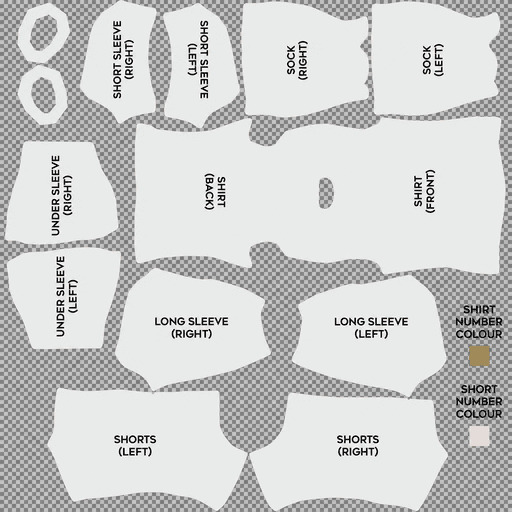
DLS Kit Template
Template With Complete Detail
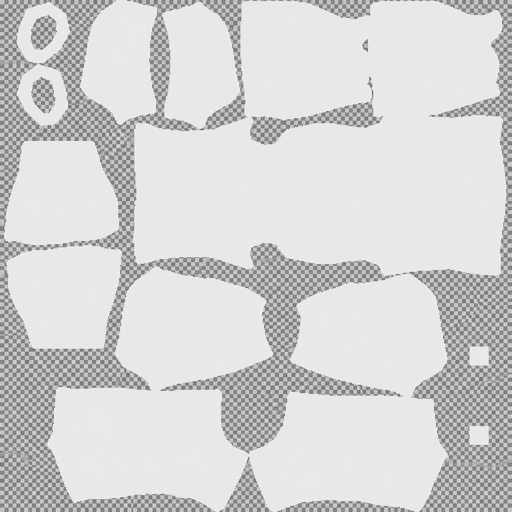
DLS Kit Template White
Transparent 512×512
Using the correct template matters more than simply making an image that looks like a football shirt. Dream League Soccer reads different areas of the PNG as different parts of the uniform, so artwork placed in the wrong section can end up on a sleeve, across a shoulder or split between two parts of the player.
The template above gives you the layout needed to start designing. It also includes two small colour swatches that are easy to overlook but control the colour of the shirt and shorts numbers in the game.
What Is a DLS Kit Template?
Dream League Soccer does not treat a custom kit file as a normal picture of a shirt. The 512×512 PNG works as a texture map.
The game reads specific areas of the image and wraps them around matching parts of the 3D player model. The main body area becomes the shirt, the sleeve sections wrap around the arms, the shorts panels cover the legs and the sock areas are applied to the lower legs.
Anything placed outside the areas used by the template does not become part of the visible uniform.
That is why taking a photograph of a real football shirt, cropping it into a square and importing it will not produce a usable DLS kit. Every colour, logo, stripe and pattern needs to be positioned where the game expects it.
The template is essentially a map showing where those positions are.
Parts of a DLS Kit Template
A complete Dream League Soccer kit template contains the main shirt body along with separate sections for sleeves, shorts, socks and collar details.
The garment sections control the visible design, while the two small number areas act differently. They are colour swatches rather than clothing panels.
Ignoring one of the visible kit areas can leave part of the uniform looking incomplete or inconsistent with the rest of your design.
The Shirt Front and Back Use One Joined Shape
One of the most useful things to understand about the DLS kit template is that the front and back of the shirt are not simply two unrelated rectangles.
They form one continuous body shape with the collar opening between them. On the layout described here, the back sits on the left side and the front sits on the right.
That affects how patterns and graphics behave once the file is imported.
Patterns Can Wrap Around the Body
Because the front and back belong to the same continuous shirt section, certain patterns can flow from one side to the other.
A gradient, set of stripes or wave pattern can therefore continue around the body if it is aligned correctly on the template.
This can produce a cleaner result than designs that suddenly stop at the side of the shirt.
Keep Logos and Faces Away From the Join
The area near the collar opening and centre of the joined section does not always behave like the flat middle of the chest.
Artwork placed too close to this area can wrap towards the shoulders instead of appearing exactly where you intended.
If you are adding a club crest, sponsor, slogan, meme face or other important graphic, keep it comfortably inside the front section rather than pushing it towards the collar or panel boundary.
What Are the Two Colour Squares on a DLS Kit Template?
Two of the smallest elements on the template are also among the easiest to misunderstand.
The shirt number colour and shorts number colour squares are not visible garment pieces. They work as colour swatches.
Dream League Soccer reads the colour inside these areas and uses it when displaying player numbers on the shirt and shorts.
That means the colour you choose here directly affects whether the squad numbers can actually be seen.
Why DLS Shirt Numbers Become Invisible
A common mistake is leaving a dark number swatch on a dark kit.
For example, if you design a black shirt and the shirt-number square is also black, the number can appear black on the back of the kit. The number is technically there, but it blends into the shirt.
The opposite can happen with a white kit and a white number swatch.
The simplest rule is to choose a strong contrast.
Use a light number colour on a dark shirt and a dark number colour on a light shirt.
Check the shirt and shorts separately because they may use different base colours. White numbers may work perfectly on a black shirt but disappear if the shorts are white.
Short Sleeves, Long Sleeves and Under Sleeves
The sleeve areas on a DLS template are separate from each other, so one sleeve design does not automatically cover every version.
Short Sleeves
The short-sleeve sections control the visible outer part of the arms when players wear a standard short-sleeved shirt.
This is where you can continue shoulder stripes, sleeve sponsors, patterns or trim from the main shirt design.
Long Sleeves
Long sleeves use separate areas on the template.
If you only design the short-sleeve pieces, players wearing long sleeves may not match the rest of the kit properly.
A practical shortcut is to copy the basic short-sleeve design onto the long-sleeve area and adjust it to fit. It may not be as detailed as designing both from scratch, but it keeps the overall colour scheme consistent.
Under Sleeves
Under-sleeve sections cover the underside of the arms.
These areas are not as visible during normal gameplay because they generally face downward or inward. They can become noticeable in close-ups, replays and celebrations.
For most designs, simply filling the under sleeves with the main shirt colour is enough.
Socks and Collar Rings on the Template
The sock sections work in the same basic way as the other garment panels.
Whatever you place inside those shapes wraps around the lower legs of the player. Simple designs normally work best because fine details on socks are difficult to see during normal gameplay.
A solid base colour with one or two stripes near the top is usually enough.
The two collar rings control the area around the player’s neck. Matching them to the collar colour used on the shirt helps create a cleaner transition between the body and neckline.
Leaving them in a completely different colour can make the collar look unfinished once the kit is imported.
How to Design a DLS Kit Template
You do not need expensive software to make a Dream League Soccer kit.
Any image editor that supports layers can work. Photopea can be used directly in a browser and has tools similar to Photoshop. GIMP is another option on desktop, while mobile editors such as PixelLab and ibisPaint can also handle basic DLS kit designs.
The important part is working with the template rather than drawing blindly.
Keep the Template on the Top Layer
Open the template and place it above your design layers.
Reduce its opacity so you can see both the guide and the artwork underneath.
This makes it much easier to see where one panel ends and another begins while you are working.
Once the kit is complete, hide the template guide before exporting the final PNG.
Fill the Main Colours First
Start by applying your base colour across all the garment sections.
Make sure the shirt, short sleeves, long sleeves, under sleeves, shorts and socks all have the colours you want before adding logos or complicated graphics.
Working this way prevents you from finishing the front of the shirt and then realising the remaining sections were forgotten.
Work Panel by Panel
Treat each template section as a separate part of the uniform.
Add the shirt design first, then sleeves, shorts, socks and collar areas.
If a stripe or graphic is supposed to continue across two different sections, check both sides carefully so the design meets properly when wrapped onto the player.
Keep Important Artwork Inside One Panel
Large logos, faces and slogans should remain inside the panel where you want them to appear.
If a face extends from the shirt front into a sleeve area, the game will not display it as one continuous image. Part of the artwork may appear on the arm instead.
This is especially noticeable on funny or meme kits where the main character covers a large part of the chest.
Design for the Match Camera
A 512×512 template can show a surprising amount of detail when viewed on your screen, but players become much smaller during an actual match.
Large shapes, clear stripes and strong colour contrast survive that reduction well.
Tiny writing, thin outlines and very subtle patterns are much harder to see.
Before spending a lot of time on fine detail, ask whether it will still be visible when the player occupies only a small part of the screen.
Set the Number Colours Before Exporting
The number swatches are easy to forget because they do not look like part of the kit itself.
Before exporting your finished design, check both the shirt-number and shorts-number colours.
Make sure each one contrasts with the surface on which the number will appear.
This simple step can save you from importing an otherwise finished kit and discovering that the player numbers have disappeared into the background.
DLS Kit Template Export Settings
The final image needs to be exported correctly if you want Dream League Soccer to read it properly.
Use 512×512 Pixels
The final custom kit should be 512 pixels wide and 512 pixels high.
Do not export it as 500×500, 520×520 or another near-square size.
The template is built specifically around the 512×512 layout.
Export as PNG
Use PNG format for the final file.
PNG preserves clean edges and supports transparency, which is useful for keeping unused parts of the template empty rather than filling them with an unwanted background.
Keep the File Size Reasonable
The source guidance recommends keeping the file below 1 MB.
Dream League Soccer needs to retrieve the image when you import the URL, so unnecessarily large files can create problems on slower connections.
Avoid excessive compression as well, because that can blur fine patterns and text.
Should You Design at 512×512 or Larger?
You can design directly at 512×512, but working at a larger size can make detailed artwork easier to create.
For example, you can build the kit at 1024×1024 and then export the finished design down to 512×512.
Working larger gives you more room for curves, shapes and fine adjustments. When the final image is reduced correctly, edges can appear cleaner than artwork drawn at a very small scale from the beginning.
The file you actually import should still be exported at 512×512.
Common DLS Kit Template Problems
Many custom-kit problems come from alignment rather than from Dream League Soccer itself.
The Kit Looks Shifted on the Player
If logos, stripes or other details appear in completely different positions after importing, the design may have been created on a different template layout.
Dream League Soccer layouts can vary between versions, so a much older template may not match the layout expected by a newer version of the game.
The solution is to move the design onto the correct template rather than repeatedly editing the same misaligned file.
Stripes Break Between Panels
Any pattern that crosses from one separate template area into another needs to line up on both sides.
For example, a stripe running from the shirt onto a sleeve must be positioned carefully on the shirt panel and the sleeve panel.
Otherwise, the line can suddenly jump once the texture wraps around the player.
The joined front-and-back body section behaves differently because it is already one continuous shape.
Horizontal Hoops Do Not Line Up
Horizontal hoops are among the more difficult patterns to build correctly.
Each band needs to meet at the right height around the shirt body, then continue consistently across other relevant sections such as sleeves and shorts.
A small vertical alignment error is immediately obvious because one side of the stripe appears higher than the other.
Vertical stripes are generally easier because they involve fewer horizontal joins.
Shirt Numbers Cannot Be Seen
If the player numbers appear missing, check the two number-colour swatches before changing the rest of the design.
The number may simply be the same colour as the shirt or shorts.
Changing the swatch to a contrasting colour can fix the problem without redesigning the uniform.
The Entire Kit Looks Blurry
A kit can technically be 512×512 and still look poor if the original artwork was created at a much smaller size and enlarged.
Scaling a low-resolution design up to 512×512 does not restore the detail that was missing in the source.
Whenever possible, work at the final size or larger and export down.
How to Import a Finished DLS Kit
Once the design is complete, export it as a 512×512 PNG and upload it somewhere that provides a direct image URL.
Open the image link in your browser first. The PNG should appear on its own rather than inside a webpage with menus, buttons or advertisements.
Then open Dream League Soccer and go to My Club.
Choose Customise or Customise Team, depending on the version you are using.
Open the Kit section and select the slot you want to replace.
Tap Custom Kit or Download on versions that use the older wording.
Paste the direct image URL and confirm the import.
Check the kit on the player model once it loads. Look at the chest, shoulders, sleeves, shorts and number colours before considering the design finished.
Unlocking Custom Kits in Dream League Soccer
Before importing your first custom kit, Dream League Soccer may require the custom kit feature to be unlocked with an in-game gem payment.
According to the setup described here, this is a one-time unlock rather than a separate payment for every kit you import.
Once the feature is available, you can replace your custom designs whenever you want.
DLS Kit Template FAQ
What Is a DLS Kit Template?
A DLS kit template is a blank 512×512 layout showing where different parts of a Dream League Soccer uniform are placed inside the image.
The game reads those areas and wraps them around the shirt, sleeves, shorts, socks and other parts of the player model.
What Size Should a DLS Kit Template Be?
The final DLS kit image should be 512×512 pixels.
You can create the design at a larger size while editing, but the finished file should be exported at 512×512 before importing it into Dream League Soccer.
What File Format Should a DLS Kit Use?
PNG is the recommended format because it preserves image quality and supports transparent areas.
The final kit should use the correct Dream League Soccer layout rather than simply being a square picture of a football shirt.
What Are the Two Coloured Squares on the DLS Template?
They are colour swatches used for the shirt number and shorts number.
Dream League Soccer reads the colour placed in each square and uses it when displaying player numbers.
Why Are the Numbers Invisible on My DLS Kit?
The number colour may be too similar to the colour of the shirt or shorts.
Use a contrasting swatch instead. Light numbers work better on dark backgrounds, while dark numbers are easier to see on light backgrounds.
Are the Shirt Front and Back Separate on the DLS Template?
On the layout described here, the front and back form one joined body shape with the collar opening between them.
That allows some patterns to continue around the main shirt body without a separate seam between the two sections.
Do I Need to Design Both Short and Long Sleeves?
Yes.
Short sleeves and long sleeves use separate areas of the template. Designing both helps keep the uniform consistent regardless of which sleeve version appears on the player.
What Are the Under-Sleeve Sections For?
The under-sleeve areas cover the underside of the player’s arms.
They are less visible than the outer sleeve sections, so filling them with the main shirt colour is usually enough for a simple kit.
Why Does My DLS Kit Look Shifted After Importing?
The design may have been created on a different template layout.
If the game expects another arrangement, logos, patterns and faces can appear in the wrong places even though the PNG itself looks correct.
Why Do Horizontal Stripes Not Line Up?
Horizontal hoops need to meet at exactly the same height across multiple areas of the template.
Even a small alignment difference becomes obvious once the image is wrapped around the player model.
Can I Design a DLS Kit on My Phone?
Yes.
Mobile image editors that support layers can be used to create DLS kits. Keep the template visible as a guide while designing, then hide the guide and export the finished image as a 512×512 PNG.
Can I Make Funny or Meme Kits With the Same Template?
Yes.
The same template can be used for official-style kits, fantasy shirts, meme kits or completely original team designs.
For large characters or faces, keep the important part of the artwork inside the main front panel so it does not split across other sections of the player model.
21 thoughts on “DLS Kit Template – 512×512 Free Dream League Soccer Template”