
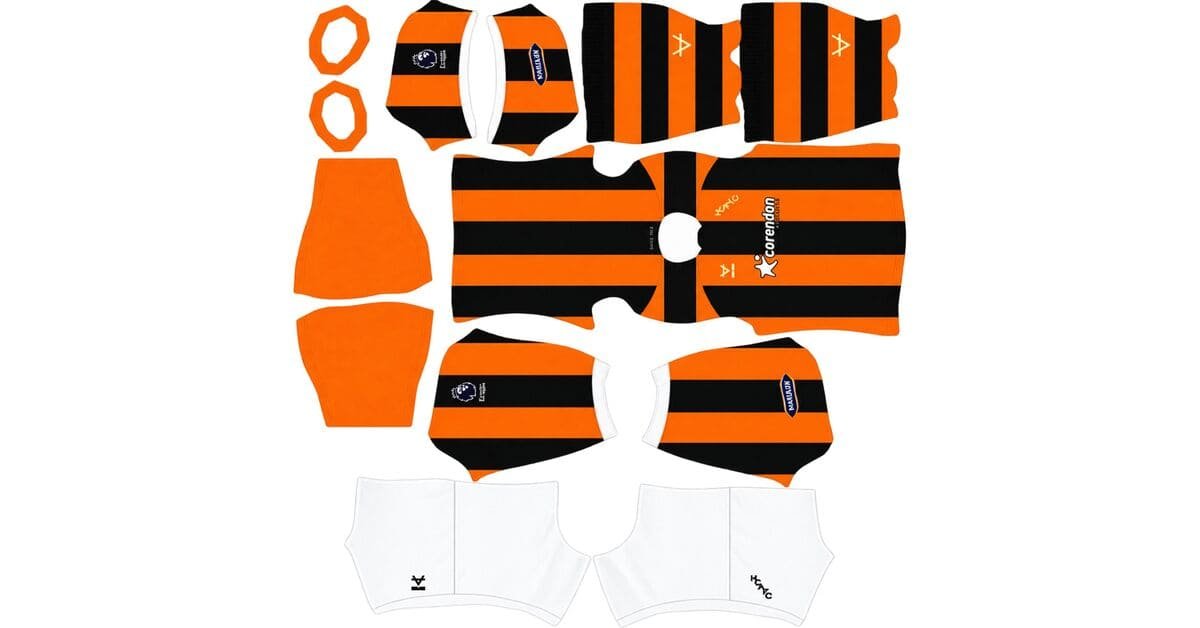
A Hull City DLS kits URL is a direct link to a 512×512 PNG kit that you can import into Dream League Soccer. Choose your favourite Tigers shirt below, copy its URL, and paste it into the game’s custom kit menu.
Hull City Logo
Official Logo 512×512 (2026/27)
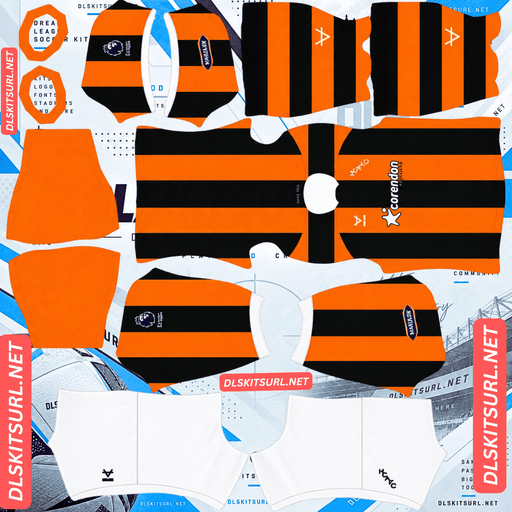
Hull City Home Kit
Home Kit 512×512 (2026/27)
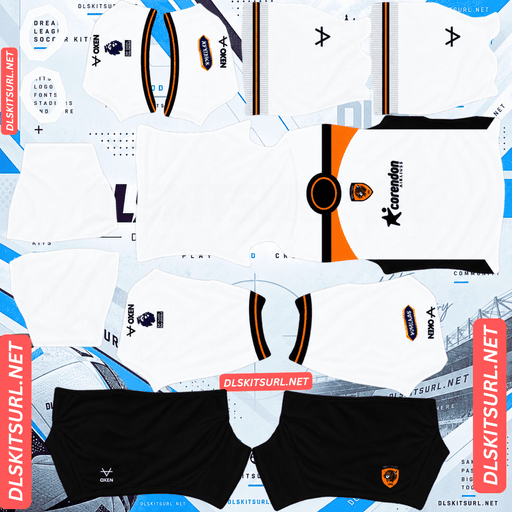
Hull City Away Kit
Away Kit 512×512 (2026/27)
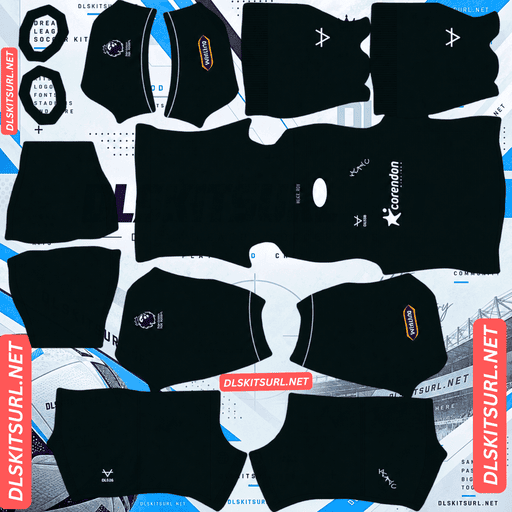
Hull City GK Home Kit
GK Kit 512×512 (2026/27)
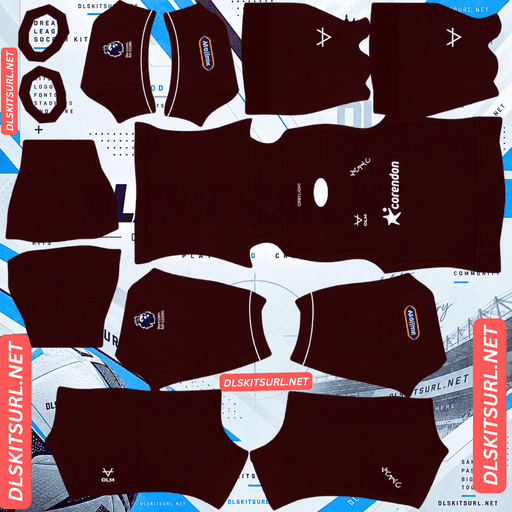
Hull City GK Away Kit
Away Kit 512×512 (2026/27)
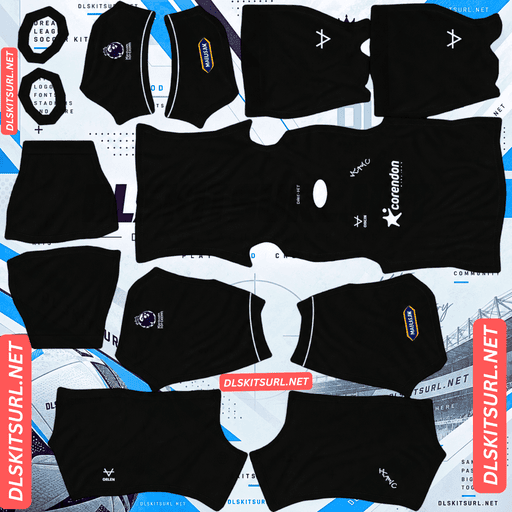
Hull City GK Third Kit
GK Third Kit 512×512 (2026/27)
Hull City’s return to the Premier League brings a collection with a distinctive feature: each of the three outfield shirts uses a different emblem. The home shirt features the returning HCAFC monogram, the away shirt carries the current tiger crest, and the third shirt displays the three gold crowns of Kingston upon Hull.
Three kits, three different emblems
Before importing your Hull City kits, it’s worth understanding the badge designs. Dream League Soccer gives you one custom badge slot, so choosing the right emblem matters if you want your team to match its preferred shirt.
Home kit: The HCAFC lettered monogram, returning for the first time in 47 years.
Away kit: The current tiger crest, the only one of the three shirts to feature it.
Third kit: The three gold crowns from Kingston upon Hull’s civic arms, positioned at the centre of the chest rather than used as a conventional club badge.
Which Hull City badge should you import?
Choose the HCAFC monogram if you mainly use the home kit. Its bold lettering and simple shape should remain clear at Dream League Soccer’s small badge size.
Choose the tiger crest if the away shirt is your preferred strip.
Choose the city’s three gold crowns if you want to match the third kit and can find a suitable image file. It’s the most unusual option of the collection and may be harder to source.
Remember that Dream League Soccer doesn’t automatically change your badge when you switch kits. You’ll need to select one emblem for your team.
The third kit’s crowns sit in the centre
There’s an important detail to consider when importing the third shirt.
The three gold crowns are positioned in the centre of the shirt, while Dream League Soccer places your imported club badge at a fixed chest position. These positions don’t necessarily line up.
If your third-kit image includes the central crowns and you also import a separate badge, the shirt may display both emblems. That can make the design look different from the original.
Inspect the chest area before importing the kit. Similar placement conflicts can occur with other shirts featuring centrally positioned graphics, including certain Algeria and Fulham designs.
Hull City DLS kits for 2026/27
Hull City returned to the Premier League after a nine-year absence, beating Middlesbrough 1–0 in the Championship play-off final at Wembley on 23 May 2026. The 2026/27 collection celebrates the club’s return with traditional Tigers stripes, a contrasting white away shirt, and a third kit inspired by Hull’s civic identity.
Home kit: thick amber and black stripes
Released on 10 June 2026, with sales beginning on 12 June, the home shirt revisits the distinctive striping associated with Hull City’s 1978–79 season.
The design combines traditional amber and black stripes with a white polo collar and matching white cuffs. A subtle tonal pattern runs through the stripes, while jacquard detailing adds texture to the fabric. White shorts and black-and-amber hooped socks complete the outfit.
The launch also placed the city at the heart of the campaign. It included a poem by local writer Shane Rhodes, a film by a BAFTA-winning Hull filmmaker, and appearances by Hull-born actors and players at recognisable locations around the city.
For a DLS version, the defining features are the thick amber-and-black stripes, white collar, and HCAFC monogram. The stripe widths matter: if the image is poorly prepared, the narrower details can disappear and make the shirt look less authentic.
Away kit: white with amber and black shoulders
The away shirt uses a predominantly white base, contrasting with amber and black shoulder panels. Matching details run around the crew collar and cuffs.
Unlike the home shirt, the away carries the current tiger crest, alongside Corendon Airlines branding across the front.
When choosing a DLS image, look for clean boundaries between the white body and the coloured shoulder panels. These are among the most noticeable details in the design.
Third kit: the Three Coronets
Released in early September 2026, the third kit was produced in collaboration with Hull City Council.
The shirt is primarily royal blue, referencing the 1935/36 season, when Hull City first adopted blue and white to reflect the civic colours of Kingston upon Hull. Three gold crowns sit at the centre of the chest, accompanied by a gold Oxen Sports logo.
White collar and sleeve details feature fine blue-and-gold trim, while two blue buttons distinguish the shirt from the home and away designs. White shorts and blue-and-white hooped socks complete the look, with a gold Oxen logo on the front of the socks.
The kit made its debut away at Sunderland in the EFL Cup.
For a DLS import, focus on the royal-blue base, gold crowns, and white detailing. The central placement of the crowns is especially important if you’re trying to recreate the original shirt.
Hull City and Oxen Sports: a local kit supplier
Hull City’s switch from Kappa to Oxen Sports, a brand with roots in Hull, is an important detail when looking for current kit files.
Many Premier League clubs work with internationally recognised manufacturers such as Nike, Adidas, Puma, Castore, or Hummel. Their kits often receive extensive international coverage, with high-resolution photographs and community-made DLS templates appearing soon after launch.
A regional supplier operates within a different media environment. Oxen’s releases may receive more coverage from Hull-based and national outlets than from international kit databases. As a result, fewer high-resolution images or ready-made 512×512 templates may be available.
You can still find Hull City DLS kits, but the number of options and the quality of individual files may vary.
Check the actual image dimensions instead of trusting the filename. On a computer, open the image in a new browser tab or inspect its properties to confirm whether it is genuinely 512×512 pixels.
Which Hull City kit looks best in Dream League Soccer?
Home kit: strong stripes, subtle texture
The home shirt is a good match for DLS because its main design uses bold colours and broad vertical stripes.
Amber and black provide strong contrast, and vertical stripes need to align mainly along the centre of the body template. This is generally easier to reproduce than patterns that must connect across several separate template sections.
The subtle tonal pattern is much harder to preserve. Because it uses shades close to the surrounding stripe colours and remains within the stripes themselves, it can disappear when the image is compressed or resized.
A lower-quality file may therefore show clean amber-and-black stripes without the extra texture. The shirt will still be recognisably Hull City, but some of the original detail will be missing.
Use the white polo collar as a quick quality check. Its edges should look clean against the darker stripes.
Away kit: inspect the shoulder panels
The away shirt’s white body and amber-and-black shoulder panels create clear boundaries between different colour zones.
Check where the coloured shoulders meet the white body. A good template should reproduce these boundaries cleanly and place them correctly. Jagged edges, misplaced panels, or uneven colour transitions can indicate that the image was poorly prepared.
Because the colours contrast strongly, even small errors are easy to spot.
Third kit: check the gold details
The third shirt’s royal-blue base is relatively straightforward to reproduce. The gold detailing requires more care.
Gold often relies on highlights, mid-tones, and shadows to create a metallic appearance. If a small image is heavily compressed, those variations can disappear, leaving the crowns and Oxen logo looking like flat brown shapes.
Inspect the crowns and logo before importing. The fine blue-and-gold collar trim is also vulnerable to losing detail.
The two blue buttons are very small features and may be difficult to distinguish at normal match distance, even when the original image is clear.
Best number colours for Hull City DLS kits
Dream League Soccer doesn’t automatically select squad-number colours based on the artwork in your kit image. Instead, the kit template uses separate colour swatches for shirt numbers and shorts numbers.
Choose both swatches carefully to keep the numbers visible.
Home kit: White numbers are a strong choice for the shirt because they contrast with both amber and black stripes and match the collar and cuffs. For the white shorts, use amber or black.
Away kit: Use black or amber numbers on the white shirt and white shorts. White numbers would disappear against the kit’s white background.
Third kit: White or gold numbers work on the royal-blue shirt. White offers strong readability, while gold matches the crowns. Use blue numbers on the white shorts.
Set the shirt and shorts number colours separately. A good shirt-number colour may not be visible on the shorts.
Why Hull City’s colours work well at match distance
Dream League Soccer displays players relatively small during matches, so a kit’s main colours affect how easily you can follow your team across the pitch.
Amber stands out clearly against green grass. That gives Hull City’s home kit a strong visual identity during gameplay, similar to the visibility offered by Australia’s gold, Tigres’ amber, and Ivory Coast’s orange.
The white away shirt also remains easy to identify, with the amber shoulder panels adding a distinctive outline.
The royal-blue third kit provides another clear colour option. Each shirt has a recognisable base colour, making the collection useful for switching between kits without losing visual distinction.
How to identify a current Hull City DLS kit
Before copying a URL, check these four features to avoid importing an outdated design.
Look for Oxen Sports branding. Hull City’s switch from Kappa means a Kappa-branded shirt belongs to an earlier kit period, rather than the described 2026/27 collection.
Check the home shirt’s crest and stripes. It should feature the HCAFC monogram, not the tiger crest, alongside noticeably thick amber-and-black stripes.
Inspect the away shirt. The current design has a white base with amber and black shoulder panels.
Check the third shirt. It should be royal blue, with three gold crowns positioned centrally on the chest.
If a file doesn’t match these features, verify its season before using it.
How to use a Hull City DLS kits URL
Follow these steps to import your chosen Tigers kit.
Copy the kit URL using the Copy URL button on the relevant kit card.
Open Dream League Soccer and go to My Club.
Select Customise, then open Kit — not Logo.
Choose the kit slot you want to replace.
Tap Custom Kit, press and hold the URL field, and select Paste.
Tap Confirm or Download, depending on the version of the game.
Make sure you select the correct slot before importing. The chosen URL replaces the kit currently assigned to that slot.
The three outfield shirts can fill the home, away, and third slots, leaving the goalkeeper kit in the remaining position. Check all four kits on the team screen to ensure your lineup looks the way you want.
Depending on your game version and account, the first custom kit may require a one-time gem unlock. Once the feature is unlocked, changing kit images generally doesn’t require another unlock.
Test your Hull City kit URL before importing
Open the URL in your browser first. A direct image link should display the PNG itself, rather than a webpage containing navigation, buttons, or other content.
Ideally, the image should be 512×512 pixels, and the URL should end in .png.
A page that displays a shirt preview is not necessarily a direct image URL. Dream League Soccer needs to access the image file itself, so make sure you’re copying the actual image link.
Why Hull City DLS kit URLs sometimes stop working
A URL can fail even if it worked when you first found it. Common causes include the following.
Free image hosts remove old uploads. Some services delete files after a period of inactivity or when their storage policies change. The old URL may remain visible on a webpage even after the image is gone.
Hotlink protection blocks external requests. A hosting service may allow the image to load when you open it directly in a browser but refuse requests made by another application. This can cause an import to fail inside the game.
The preview and download links point to different files. Some webpages display an image hosted on one server while providing a separate download URL. If that external file is removed or becomes unavailable, the preview may continue to appear even though the download link no longer works.
For the most reliable import, test the exact URL you intend to paste into the game. Don’t assume a working preview guarantees a working kit link.
Choosing and importing the Hull City badge
To import a badge, return to My Club → Customise, but select Logo rather than Kit.
Hull City’s current crest centres on the tiger, a distinctive design that can remain recognisable at the small size used beside the score during matches.
Dream League Soccer crops imported badges into a circular shape. Choose an image with enough clear space around the artwork so that important parts of the crest aren’t cut off.
For the 2026/27 collection, you can choose between three visual options:
The tiger crest: Best suited to the current away shirt.
The HCAFC monogram: Matches the home shirt and has a simple shape that should remain clear at small sizes.
The three gold crowns: Matches the third shirt’s civic-inspired design.
The monogram may be the easiest of the three to reproduce clearly because its bold lettering doesn’t depend on as much fine detail. Whichever badge you choose, preview the circular crop before confirming it.
Save your Hull City kit links
Custom kit images and badges may be stored locally on your device rather than synchronised with your game account. An update may leave them untouched, but reinstalling the game or switching phones can mean setting them up again.
It’s worth saving your kit URLs before importing anything. Keep the home, away, third, goalkeeper, and badge links together in a notes app so you can find them easily later.
This is especially useful when you’re working with a collection that has fewer ready-made templates available. Once you’ve found a suitable file, keeping a copy of its URL can save you time.
FAQ
What is a Hull City DLS kits URL?
A Hull City DLS kits URL is a direct link to a PNG shirt image that you can import into Dream League Soccer. A 512×512 image is the preferred size for this collection, and the URL should point directly to the image file.
Why doesn’t the Hull City home kit have the tiger crest?
The home shirt features the HCAFC lettered monogram, which returns for the first time in 47 years as part of a design inspired by the 1978–79 season. The current tiger crest appears on the away shirt.
What is on the Hull City third kit?
The third kit features the three gold crowns of Kingston upon Hull, the city’s civic arms, positioned at the centre of the chest. Produced in collaboration with Hull City Council, the shirt references the 1935/36 season.
Which Hull City badge should I use in DLS?
Dream League Soccer allows one custom badge at a time. You can choose the tiger crest, the HCAFC monogram, or the city’s three gold crowns, depending on which kit you use most often.
Who makes Hull City’s 2026/27 kits?
The described 2026/27 collection is made by Oxen Sports, a brand with roots in Hull, following the club’s move away from Kappa. A Kappa-branded file is from an earlier kit period.
Why does my Hull City home kit look like plain stripes?
The original home shirt has a subtle tonal pattern within the amber-and-black stripes. This low-contrast texture can disappear when a kit image is resized or compressed, leaving only the main stripes visible.
Why does the gold on my Hull City third kit look brown?
Gold depends on highlights, mid-tones, and shadows to create a metallic appearance. If the image is low quality or heavily compressed, these variations can disappear, making the crowns and logo look brown.
What number colour works best on the Hull City home kit?
White is a strong option for the shirt because it contrasts with the amber-and-black stripes and matches the white collar and cuffs. Use amber or black for numbers on the white shorts, and adjust the two colour swatches separately.