
An Aldosivi DLS kits URL is a direct link to a 512×512 PNG shirt that you can paste into Dream League Soccer. All four kit slots are listed below, and each file has been imported into the game before being added to this page.
Ca Aldosivi Logo
Official Logo 512×512 (2026/27)
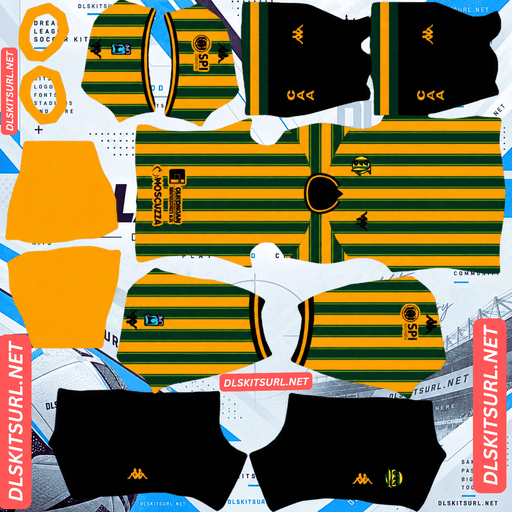
Ca Aldosivi Home Kit
Home Kit 512×512 (2026/27)

Ca Aldosivi Away Kit
Away Kit 512×512 (2026/27)
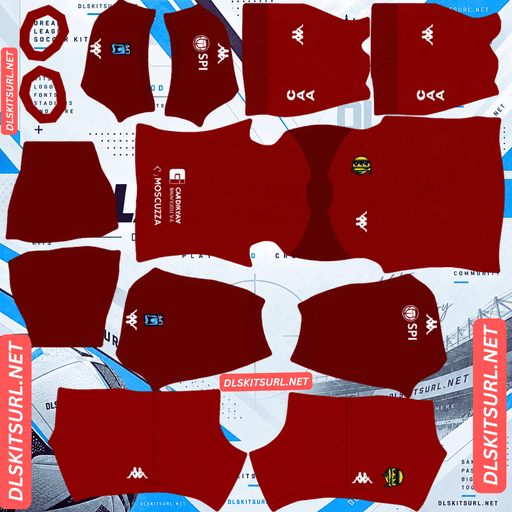
Ca Aldosivi GK Home Kit
GK Home Kit 512×512 (2026/27)

Ca Aldosivi GK Away Kit
GK Away Kit 512×512 (2026/27)
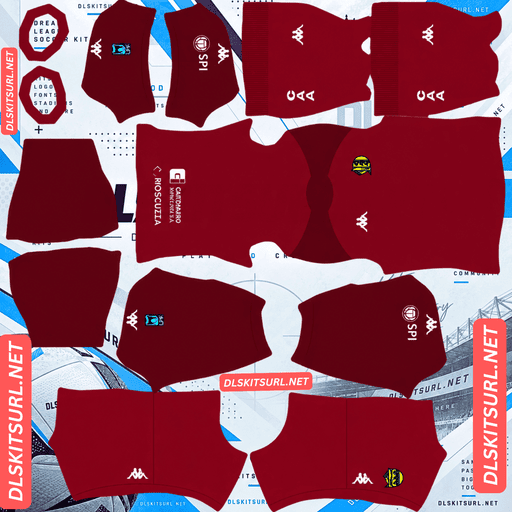
Ca Aldosivi GK Third Kit
GK Third Kit 512×512 (2026/27)
Kappa has given Aldosivi two very different designs for Dream League Soccer. The home shirt is almost ideal for the game, while the third presents some of the biggest visibility problems you can get from a kit. Knowing the difference will help you choose the right slots.
The third kit is one of the hardest designs to reproduce
Aldosivi’s third shirt uses vertical stripes in two shades of green, with white details and Rapicuotas as the sponsor.
Two problems work against it
The first issue is the stripes themselves. They use two shades from the same colour family rather than clearly different colours. At 512×512, that small difference in shade may not survive. The stripes are likely to merge into a mostly plain green surface.
The second problem is the base colour. Green is particularly difficult to use in Dream League Soccer because it blends into the pitch. At match distance, a green shirt can become harder to distinguish from the background.
That means this kit faces two problems at once: its main design may disappear, and the colour left behind is one of the least visible options.
Most kits discussed on this site struggle with one of these issues. The Aldosivi third has both.
What the imported shirt will look like
Expect something close to a plain green shirt that is difficult to follow during a match.
The white details are its main advantage. Any white around the collar, cuffs or other trim provides contrast against both the green shades and the grass.
Before choosing this kit, check exactly where those white details appear. They may make a noticeable difference to how readable the shirt is.
If you decide to use it
Choose white numbers. On this shirt, the squad number is especially important because there are so few other bright details to help the player stand out.
It is also worth keeping the green third in a slot you rarely use. Since the game regularly selects the home kit, leaving this design as your actual third option means you will not have to follow it as often.
Atlético Nacional, Deportivo Cali, Banfield and Juventude all face visibility problems because of their green kits. Elche’s third has a similar issue, but those designs do not also lose their main pattern to tonal colours.
The home kit is almost the opposite
Aldosivi’s home shirt keeps the club’s traditional green and yellow vertical stripes, known as a bastones.
Why this design works so well in DLS
Vertical stripes are among the easiest patterns to reproduce on a kit template. They mainly need to line up along the centre of the body, making them more forgiving than diagonal designs or patterns that cross several panels.
The colours are another advantage. Yellow stands out strongly against the green pitch, helping the player remain visible during matches.
For a club whose traditional colour is green, yellow is an especially useful partner. Around half the shirt carries a colour that actively separates the player from the background.
The amount of contrast depends on which colour is paired with green:
Yellow — Aldosivi and Bucaramanga: The strongest combination, with clear separation from the pitch.
White — Deportivo Cali, Banfield and Juventude: Breaks up the green shape and improves visibility.
Blue — Rizespor: Provides separation from the grass.
Black — Kocaelispor: Offers little brightness, making it one of the weakest combinations.
A forgiving design is not a good file-quality test
The home shirt’s wide stripes and strong colour contrast make it look good even when the image is not especially sharp. That means the pattern itself does not tell you much about the file’s quality.
Instead, inspect the smaller details:
The collar and cuffs
The club crest
Kappa branding
The image dimensions reported by your browser
These details have more defined edges and give you a better idea of whether the file is properly prepared.
Choose a number colour outside the club’s two main colours
Dream League Soccer gets number colours from two small swatches in the kit template, not from the imported image. One controls the shirt numbers and the other controls the shorts.
With green and yellow stripes, choosing either club colour creates a problem: the numbers will disappear against whichever stripe uses the same colour.
Use black or white instead. Both provide a third colour that remains distinct from the two main shirt colours.
Aldosivi’s kits changed during the 2026 season
Kappa released new home and away shirts ahead of the second half of the 2026 season.
Two different collections can both be labelled 2026
Argentine football has two tournaments within a calendar year, and Aldosivi’s kit range changed between them.
As a result, a file labelled simply “2026” could belong to either collection. The year alone is not enough to identify the correct design.
Compare the shirt against the kit cards above instead of relying on the filename or season label.
Independiente Medellín faced a similar issue this season after changing suppliers mid-season. MLS clubs create the opposite situation, with some designs remaining in use across different calendar years.
There are more kits than DLS can hold
Aldosivi have had home, away, third and fourth designs in circulation during 2026. Kappa Argentina also released a 26-27 third shirt named “LOS PRINCIPIOS”.
Dream League Soccer only provides three outfield kit slots. With so many designs available, the main challenge is identifying which file belongs to which shirt and deciding which three to keep.
The alternate kits are black and white
Alongside the traditional striped home shirt, Aldosivi’s change kits include one predominantly black design and one predominantly white design. Both retain yellow and green details that connect them to the club’s colours.
Both are easier to follow than the green third
The white alternate separates clearly from the green pitch. Its yellow and green trim also helps define the shirt, without creating the same blending problem as the third kit.
The black alternate is also reasonably visible, although a mostly black shirt can appear as one dark shape from a distance. Its yellow and green details help break up that dark area.
Both alternatives are more practical match-day choices than the tonal green third.
The black kit’s gradient details may flatten
One detail worth checking on the black shirt is its gradient logos and other gradient elements.
A gradient is made up of many slightly different colour shades. Reproducing it smoothly requires enough pixels to show those small changes.
Logos occupy relatively small areas of a 512×512 image, leaving fewer pixels available for the effect. Expect some gradients to appear as flatter blocks of colour rather than showing every shade from the original shirt.
This is a minor loss, but it does mean the imported design may look simpler than the real kit.
Use white numbers on the black alternate. For the white shirt, choose black or green.
The San Jorge special is difficult to find
There is another Aldosivi shirt worth knowing about if you collect unusual kits.
The club released a limited-edition San Jorge shirt featuring green stripes and subtle historical imagery woven into the design. It has a white collar with red detailing, is available only in a long-sleeve version, and was restricted to club members in good standing.
The historical imagery is unlikely to survive
The imagery is described as subtle and woven through the fabric. That makes it closer to a texture than a clearly printed graphic.
A flat 512×512 PNG cannot reproduce the physical surface of the original material, so the historical details are unlikely to appear in the imported version.
Expect the shirt to look like plain green stripes instead.
Finding a working file may be difficult
The San Jorge edition was a limited release for eligible club members rather than a widely available retail shirt.
Fewer people are likely to have photographed it or created 512×512 versions. That makes working files much harder to find than those for the regular home and away kits.
If you find a good version, save it somewhere safe. It may be one of very few copies available.
Which Aldosivi kit survives best in DLS?
Here is how the four main designs compare:
Home: Green and yellow stripes reproduce well and offer the best visibility in the collection.
White alternate: The white base and coloured trim remain clear, making it a good match option.
Black alternate: The dark base remains visible, although gradient logos may lose their shading. Overall visibility is adequate.
Third: The two green shades are likely to merge, leaving a plain green shirt that is difficult to follow during matches.
How to identify a current Aldosivi kit
Four details can help you identify the correct design:
Kappa branding: The current collection uses Kappa throughout.
Shirt sponsor: Rapicuotas and Hotel Uthgra Sasso appear on different kits, making the sponsor a useful identification detail.
Main colours: The home shirt should have green and yellow stripes, while the third uses two shades of green.
Compare the design: Since the collection changed during the year, use the kit cards above rather than trusting a 2026 label.
The sponsor is particularly useful when sorting through Aldosivi files. With several designs carrying the same year, it can be the quickest way to identify which shirt you are looking at.
How to use an Aldosivi DLS kits URL
Use the copy button on the kit card rather than copying your browser’s address bar. The address bar usually gives you the webpage URL instead of the direct image link.
Open Dream League Soccer and follow these steps:
Go to My Club.
Select Customise.
Open Kit, not Logo. These are separate customisation options.
Choose the outfield slot you want to replace.
Press and hold the URL field, then tap Paste.
Select Confirm. Older versions may show a Download button instead.
Make sure you select the correct slot before pasting, because the selected slot is the one that gets replaced.
You can use three of Aldosivi’s available designs in the outfield slots. Think about which shirt belongs in each position: the green third is the hardest to follow, so it makes sense to leave it in the slot you use least.
The first custom kit requires a one-time gem unlock. After that, changing your imported shirts is free.
Test the Aldosivi kit URL before importing
Open the copied link in your browser before using it in the game. A working direct image link should display the shirt by itself, with the address ending in .png.
If the image appears inside a webpage with headers, buttons or other controls, it is a viewer page rather than a direct image URL. Dream League Soccer cannot import that type of link.
For Aldosivi’s third kit, looking at the image is not enough to judge its quality. The two tonal green shades may merge even in a correctly sized file.
Check the dimensions reported by your browser instead, then inspect the white details and Kappa branding for sharper edges.
Why Aldosivi DLS kit URLs stop working
There are three common reasons a kit link can fail. Only one is usually obvious to the person trying to import it.
Free image hosts delete older uploads
Some free image hosts remove files after months or years of inactivity. The URL may remain on a webpage even though the original image is no longer available.
Smaller Argentine clubs generally attract fewer kit uploads than the country’s biggest Buenos Aires clubs, so there may be fewer replacement files available.
The San Jorge special is particularly vulnerable because it was a members-only release with a much smaller audience.
Hotlink protection blocks requests from the game
Image hosts can enable hotlink protection to stop other websites or apps from loading their files directly.
This can create a confusing situation: the link opens in your browser, but Dream League Soccer cannot retrieve the image. The browser request is allowed, while the game’s request is refused.
The preview and the copied link are different files
Some websites display a thumbnail hosted on their own server but provide a separate URL pointing to an image elsewhere.
The preview can continue to work even after the actual image link has stopped responding.
On this page, the shirt shown in the kit card and the URL copied from it point to the same file on the same server.
Choosing the Aldosivi badge
Import the crest separately from your shirts. Open the same customisation area, but choose Logo instead of Kit.
Aldosivi’s badge is circular and carries the club’s initials in green and yellow.
The circular shape works well with DLS cropping
Dream League Soccer crops imported badges into a circle. Since Aldosivi’s crest is already circular, it does not lose important details around the edges in the way that a shield or rectangular badge might.
The green-and-yellow colour combination also creates strong visual separation, helping the crest remain recognisable at the small size used in matches.
Even so, choose a file with a little clear space around the artwork rather than one cropped tightly against its edges.
Save your Aldosivi kits for later
Custom kits are stored on your device rather than permanently linked to your game account. Updating the game will usually leave them in place, but reinstalling it or switching to a new phone can mean losing your imported shirts and badge.
Aldosivi’s mid-season kit changes make it especially easy to confuse files. Several designs can carry the same year label, and some may be harder to replace than others.
Before importing anything, save all four kit URLs in a notes app. Write down the sponsor shown on each shirt as well, so you can identify the correct design later.
FAQ FOR RANK MATH
What is an Aldosivi DLS kits URL?
It is a direct link to a 512×512 PNG image of an Aldosivi shirt. You paste it into Dream League Soccer’s kit screen to import the design. A working direct image URL ends in .png.
Why does the Aldosivi third kit look like a plain green shirt?
Its stripes use two similar shades of green, which can merge when the image is reduced to 512×512. Green also blends into the pitch, making the shirt harder to see during matches.
Should I use the Aldosivi third kit in Dream League Soccer?
You can, but it is better suited to a slot you rarely use. Choose white numbers to improve visibility, since the green shirt has very little contrast against the pitch.
Why does the Aldosivi home kit work so well in DLS?
Its green and yellow vertical stripes combine an easy-to-reproduce pattern with strong colour contrast. Yellow stands out clearly against the pitch, helping the player remain visible during matches.
What number colour should I use on the Aldosivi home kit?
Use black or white. Green and yellow numbers can disappear against matching stripes on the back of the shirt, so a third colour is the safer choice.
Why do different Aldosivi kits both have a 2026 label?
Kappa released new home and away kits ahead of the second half of the 2026 season. Since Argentine football has two tournaments within a calendar year, different kit collections can both be labelled 2026. Compare the actual design rather than relying on the year.
Will the San Jorge special’s historical imagery appear in DLS?
It is unlikely. The imagery is woven subtly into the fabric rather than printed as a clear graphic. A flat 512×512 PNG cannot reproduce that fabric texture, so the imported version may look like a plain green striped shirt.
Who makes Aldosivi’s kits?
Kappa, through Kappa Argentina. The sponsors vary between designs, with Rapicuotas and Hotel Uthgra Sasso appearing on different shirts. Checking the sponsor can help identify which kit a file represents.