
An Emelec DLS kits URL is a direct link to a 512×512 PNG Emelec shirt that you can import into Dream League Soccer. All four kit slots are listed below, and each file was loaded into the game before being added to this page.

Emelec Logo
Official Logo 512×512 (2026/27)

Emelec Home Kit
Home Kit 512×512 (2026/27)
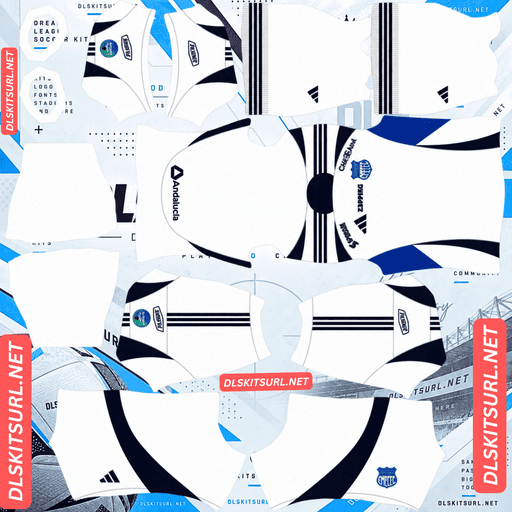
Emelec Away Kit
Away Kit 512×512 (2026/27)
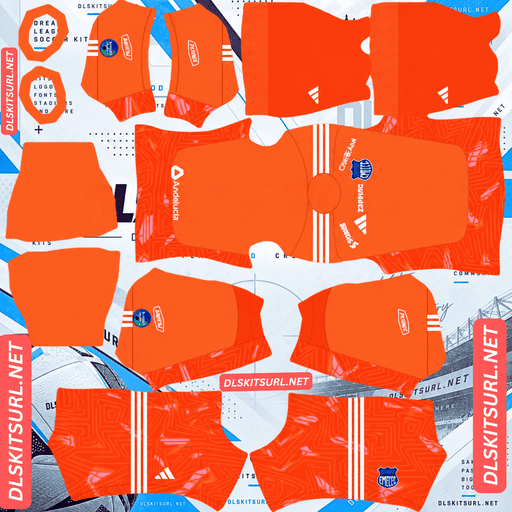
Emelec GK Home Kit
GK Home Kit 512×512 (2026/27)
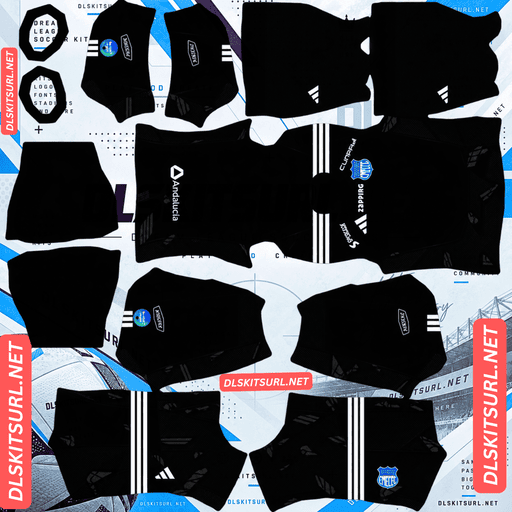
Emelec GK Away Kit
GK Away Kit 512×512 (2026/27)
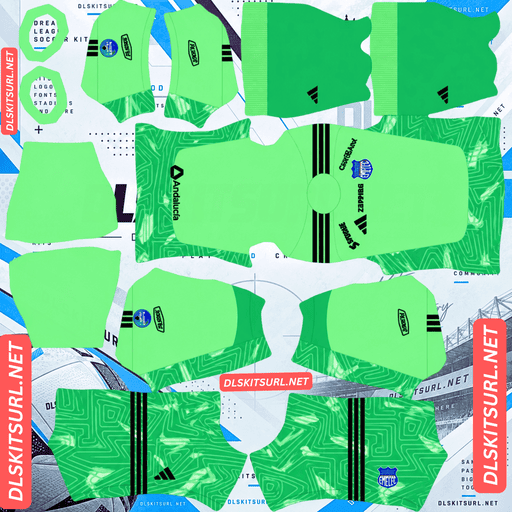
Emelec GK Third Kit
GK Third Kit 512×512 (2026/27)
The club’s famous diagonal sash has returned, but this time it comes in two parallel bands. That makes the home shirt the most demanding kit to check for correct alignment.
The banda ploma returns as a double diagonal
Released on 24 April 2026 and first worn against LDU Quito at the Estadio George Capwell, the new home shirt brings back Emelec’s historic banda ploma — the diagonal sash across the chest.
The shirt has an electric blue base, with the sash presented in two colours: ploma grey and white. White details finish the sleeves and edges.
Why diagonal designs are difficult to align
A vertical stripe has a relatively simple job on a kit template: its position needs to match along the centre of the body.
A diagonal sash is much harder. It must maintain both its position and its angle wherever two sections of the shirt meet. That includes the front and sides, the sides and back, and the points where the body connects to the sleeves.
Correcting the position at one seam can make the angle look worse at another. Emelec’s design adds another challenge because the sash has two parallel bands.
Here is how different patterns compare in terms of alignment:
Half-and-half split: One alignment point.
Vertical stripe: Two edges meeting in one place.
Three horizontal stripes: Six edges across three positions.
Single diagonal sash: Position and angle must match at every seam.
Double diagonal sash: Four edges must align in both position and angle at every seam, while the two bands remain parallel.
Saltire: Two opposing diagonals must cross correctly.
With two parallel bands, the template has four separate edges to carry around the shirt. Each one needs to continue properly, and neither band should drift away from the other.
How to check the double sash
Do not rely on the flat PNG alone. Import the home shirt and inspect the player from the side and back.
Look for three things:
Do both bands continue at the same angle where the front panel meets the side?
Do the two bands remain parallel, or does one begin to drift?
Do they meet correctly across the back, or does either band stop abruptly at a seam?
A sash can look perfectly straight in the original image but break apart once the game wraps it around the player model.
That is why this is the Emelec kit most worth importing and checking before you settle on it.
Rayo Vallecano’s three sashes, Torino’s gradient sash and Deportivo’s saltire face similar alignment challenges.
The colours are not the problem
There is some good news: the sash uses colours that should reproduce clearly.
Ploma grey and white both stand apart from the electric blue background. The bands are also reasonably wide, so they are less likely to disappear during compression.
The main risk is where the bands sit, not whether their colours will render.
Their two different shades also make it easier to judge the image. If the grey and white remain clearly separate instead of merging together, the file is retaining enough detail.
Your imported badge will sit over the sash
Dream League Soccer places your imported crest on the chest, covering whatever is underneath it in the kit image.
Since the banda ploma crosses the chest, your badge will sit directly over part of the design.
The loss is not as severe as it would be with a centred graphic. The sash continues beyond the badge in both directions, so most of its diagonal shape remains visible.
Use the standard full-colour Emelec crest, matching the version the club uses on its own shirts.
Electric blue makes the home easy to spot
Players appear relatively small during a Dream League Soccer match, so a shirt needs enough contrast to stand out against the pitch.
Emelec’s electric blue is bright and highly saturated. It separates clearly from the green grass and is easier to recognise than a darker navy shirt, which can look like one solid shape from a distance.
The grey and white sash adds another layer of definition by cutting across the blue body.
That combination makes the home the most readable kit in the range.
Use white numbers to keep them visible against the electric blue.
The new kit arrived during the season
The release date matters because Emelec did not begin 2026 wearing the new designs.
The club played its first ten matches of the year in the previous season’s kit. The new home and alternate shirts did not arrive until 24 April 2026.
As a result, a file labelled simply “2026” could show either the older design or the new release.
Check the shirt itself rather than relying on the year in the filename. The returning double banda ploma is the clearest sign that you have the April 2026 home kit.
Independiente Medellín and Aldosivi faced a similar mid-season kit change in 2026, while some MLS clubs create the opposite problem by carrying designs across different seasons.
The third kit brings in petrol green
Released on 29 July 2026 and debuted against Aucas, the third shirt uses verde petróleo, or petrol green, as its main colour.
It combines that dark green base with celeste and white details. The shorts and socks follow the same dark green colour scheme.
The Emelec crest appears in full colour on the front, alongside a white Adidas logo.
Petrol green needs extra attention for visibility
Green is the most difficult base colour to use in Dream League Soccer because the playing surface is green too.
Petrol green has an advantage over brighter shades. It is darker and leans towards blue rather than matching the colour of the grass, giving it some separation from the pitch.
Even so, it sits closer to the background than the other colours in Emelec’s range.
The celeste and white details provide the contrast that makes this shirt usable. Its visibility depends partly on how much of those lighter colours appears across the design.
Use white numbers on the third kit without exception.
Different green combinations produce different results:
Yellow with green: The strongest combination, as seen with Aldosivi and Bucaramanga.
White with green: Helps break up the overall shape, as seen with Cali and Banfield.
Celeste and white with green: Adequate, but the result depends on how much of the lighter colours the shirt uses. This is Emelec’s combination.
Black with green: The weakest option, as seen with Kocaelispor.
The colours should reproduce cleanly
Unlike a design built around metallic finishes or subtle textures, the petrol green third uses straightforward colours: petrol green, celeste and white.
These are flat pigments, so they should come through correctly in a suitable 512×512 file.
Inspect the boundaries where the lighter details meet the green base. The edges should look clean rather than blurred. Also check the Adidas Three Stripes, which are clearly defined shapes and provide another useful quality test.
Emelec keeps the crest in full colour
This is worth checking because some clubs use monochrome or recoloured badges on their alternate shirts.
Emelec keeps its crest in full colour on the third kit. That means the standard badge remains the correct choice across the entire range.
The alternate kit combines grey and blue
The Emelec alternate pairs grey tones with blue detailing. It has a grey base, with darker blue elements adding contrast.
Grey needs help from the blue details
Grey is not as difficult to use as green because it separates reasonably well from the playing surface. However, it does not have the brightness of white or the depth of navy.
At match distance, a grey shirt can look like a fairly plain mid-tone shape without much internal definition.
The blue details therefore do most of the visual work. The more prominently they appear across the shirt, the easier it is to distinguish the design.
Of the three regular kits, this is the weakest option for match visibility.
Use navy or white numbers, choosing whichever colour appears less prominently on the shirt itself.
Which Emelec kit performs best in Dream League Soccer?
The three designs each have a different advantage. The home offers the strongest visibility, the alternate reproduces without much difficulty, and the third provides a distinctive colour combination with some risk of blending into the pitch.
Home: Electric blue with a double diagonal sash. The colours reproduce well, but you need to check the sash alignment around the player model. It is the most readable kit.
Alternate: Grey with blue details. The design reproduces well, although its mid-tone base gives it the weakest match visibility.
Third: Petrol green with celeste details. The colours should reproduce cleanly, and visibility is adequate as long as the lighter details remain noticeable.
How to identify a current Emelec kit file
Four details will help you distinguish the 2026 designs from older shirts:
Adidas branding should appear across the range.
The home shirt should have the double banda ploma, using grey and white on an electric blue base. The 2025 home had only a single grey sash.
The third kit should be petrol green, with celeste and white details.
Compare the image with the kit cards above. The new shirts arrived in April, so older 2025 designs were still being worn during the opening part of 2026.
The double sash is the most reliable identification detail. Its return in two contrasting tones is specific to the new release.
How to use an Emelec DLS kits URL
Use the copy button on the kit card rather than copying the address from your browser. The browser address usually points to the webpage, not directly to the PNG image.
To import the shirt, open Dream League Soccer and follow these steps:
Go to My Club.
Select Customise.
Open Kit, not Logo. The two options handle different things.
Select the slot you want to replace before pasting the link.
Press and hold the URL field, then tap Paste.
Select Confirm to import the kit. Older versions may show Download instead.
The three regular Emelec shirts fit into the three outfield slots: home, away and third. The goalkeeper slot remains available.
You can also consider Emelec’s 90th anniversary kit as a rotation option. Dream League Soccer accepts any working 512×512 image URL, regardless of how old the shirt design is.
Your first custom kit requires a one-time gem unlock. After that, changing or replacing kits is free.
Test the URL before importing
Open the copied link in your browser before using it in the game. The image should appear by itself, filling the screen, and the address should end in .png.
If the picture appears inside a webpage with headers, buttons or other elements around it, you have a viewer page rather than a direct image link. Dream League Soccer cannot import that type of URL.
For Emelec’s home kit, however, a successful browser test is only the first step. The double sash may look perfect in a flat image but break at the seams once it is wrapped around the player model.
Import the shirt and inspect the sides and back. Check that both bands continue at the correct angle and remain parallel.
Why do Emelec kit URLs stop working?
There are three common reasons a kit link can stop working, and only one is immediately obvious.
Free image hosts delete old files. Some hosting services remove uploads that have not been accessed for months or years. The link may still look correct, but the image behind it has disappeared.
Emelec is one of Ecuador’s two biggest clubs, so its kits are generally easier to find than those of many smaller teams in the league. However, Ecuador attracts less upload activity overall than Brazil or Argentina, which can still make older files harder to replace.
Hotlink protection can block the game. Some hosts only allow images to load when the request comes from their own website. Your browser may display the picture normally, while Dream League Soccer gets refused when it tries to access the same link.
This is why a URL can work when you open it manually but fail after pasting it into the game.
The preview and copied link may point to different files. Some pages display a thumbnail saved on their own server but provide a URL hosted somewhere else. The webpage can continue showing its preview even after the actual image link has stopped working.
On this page, the shirt you see and the link you copy are the same file on the same server.
Choosing the Emelec badge
You can import the crest during the same customisation session. Open the same menu, but choose Logo instead of Kit.
Emelec’s badge features the club’s initials in blue and white, along with the lightning motif behind the nickname Los Eléctricos.
The full-colour crest is the correct version for all three kits. Emelec keeps the badge in its original colours even on the petrol green third shirt, rather than switching to a monochrome version.
Dream League Soccer crops imported badges into a circle. Choose an image with enough clear space around the entire design instead of one trimmed tightly to the artwork.
The blue-and-white sections of the crest should remain easy to recognise at the small size used beside the score.
Keep your Emelec kit links safe
Custom kits are saved on your device rather than being connected to your account. Updating Dream League Soccer usually leaves them in place, but reinstalling the game or moving to a new phone can remove your imported shirts and badge.
The home kit deserves particular attention. Finding a file where both diagonal bands align correctly around the player model can take some searching. Once you have a good version, keep its URL somewhere safe.
Copy all four kit links into a notes app before importing them. That way, you will still have the original addresses if you need to set up your Emelec kits again.
FAQ FOR RANK MATH
What is an Emelec DLS kits URL?
An Emelec DLS kits URL is a direct link to a 512×512 PNG Emelec shirt that you can paste into Dream League Soccer’s kit customisation screen. A working direct image link ends in .png.
What is the banda ploma?
The banda ploma is Emelec’s historic diagonal sash across the chest. It returns in the 2026 home design as two parallel bands in ploma grey and white, set against an electric blue shirt.
Why is the Emelec home sash difficult to reproduce?
A diagonal sash must match both its position and angle at every seam. Emelec’s design has two parallel bands, meaning four edges must continue correctly around the shirt while staying parallel to each other.
How can I check whether the double sash is aligned correctly?
Import the home kit and inspect the player from the side and back. Both bands should continue at the same angle across the seams, remain parallel and meet correctly on the back without stopping abruptly.
Do the banda ploma colours survive in Dream League Soccer?
Yes. The ploma grey and white bands have enough contrast against the electric blue base, and their width helps them survive image compression. The main challenge is getting their alignment right on the player model.
Is the petrol green third kit difficult to see during matches?
It can be. Green is the most difficult base colour because it can blend with the pitch. Petrol green is darker and more blue-leaning than grass green, while the celeste and white details help separate the shirt from the background. White numbers are the best choice.
Why do some Emelec kits labelled 2026 show an older design?
Emelec played its first ten matches of 2026 in the previous season’s shirts. The new home and alternate kits arrived on 24 April, so some files labelled 2026 may still show the older designs. Look for the returning double banda ploma to identify the new home.
Which badge should I use for the Emelec kits?
Use the standard full-colour Emelec crest across all three kits. The club keeps the badge in full colour even on the petrol green third shirt, so there is no need to use a separate monochrome version.