
A Universidad de Chile DLS kits URL is a direct link to a 512×512 PNG La U shirt that you can paste into Dream League Soccer. All four slots are listed below, and each file was loaded into the game before being added to this page.
Universidad de Chile Logo
Official Logo 512×512 (2026/27)

Universidad de Chile Home Kit
Home Kit 512×512 (2026/27)
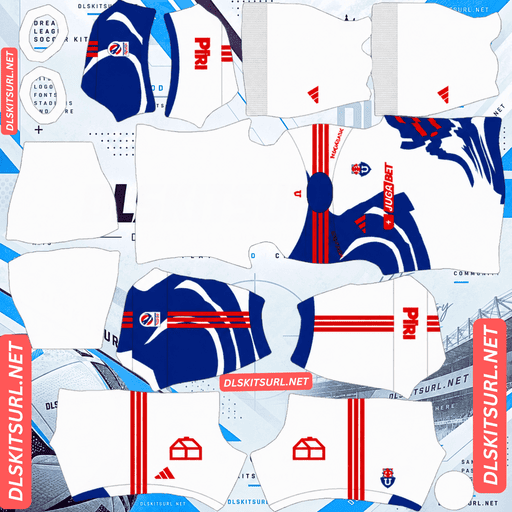
Universidad de Chile Away Kit
Away Kit 512×512 (2026/27)
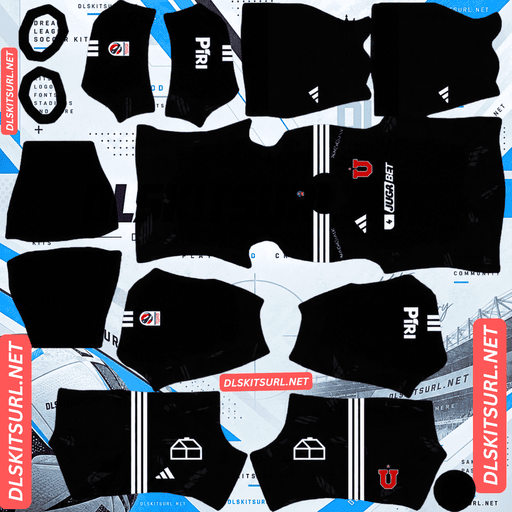
Universidad de Chile GK Home Kit
GK Home Kit 512×512 (2026/27)

Universidad de Chile GK Away Kit
GK Away Kit 512×512 (2026/27)

Universidad de Chile GK Third Kit
GK Third Kit 512×512 (2026/27)
The away shirt has an unusual feature: its left and right sides use different colours. That creates a potential file error that’s easy to miss once the kit is imported. It’s worth checking the orientation before you use it.
The Away Kit Is Different on Each Side
Released on 14 January 2026, the away shirt has a clean white base with red and blue detailing split between the two sides. The right side is blue, while the left side is red.
It also features a collar inspired by Adidas’ 2006 design, drawing on the flags supporters wave during matchdays.
Check That the File Hasn’t Been Mirrored
The Dream League Soccer kit template maps the left and right sides separately, so an asymmetric design like this can work correctly.
The problem is that a poorly prepared image can reverse the two sides. The shirt may still look perfectly believable, even though the colours are on the wrong sides.
Before importing it, check the orientation carefully:
Right side: Blue
Left side: Red
This is only the second kit covered on this site where the left and right sides differ. The other example is Vélez Sarsfield’s third kit, which has mismatched green and red cuffs.
Asymmetric designs create a particular problem: a file can be incorrect while still looking completely convincing. You need to compare it with the real shirt to spot the mistake.
The Split Is Actually Very Easy to Reproduce
Although the orientation needs checking, the basic design is simple for the 512×512 template to handle.
The white, red and blue sections meet along the centre line of the body. That gives the design just one main alignment point, making it one of the most forgiving layouts possible.
For comparison, different kit patterns require different levels of alignment:
Half-and-half split: One alignment point — the easiest arrangement.
Vertical stripes: Two alignment points.
Horizontal band: Six alignment points.
Three horizontal stripes: Eighteen alignment points.
Diagonal sash: Requires the position and angle to remain consistent across every seam.
So the away shirt should reproduce without much difficulty. The main thing to get right is which colour belongs on which side.
Cerro Porteño’s half-and-half home shirt follows the same straightforward approach.
The Club Crest Fits the Design
There’s another unusual detail that makes this away shirt particularly suitable for Dream League Soccer.
The shirt drops the large U traditionally associated with La U’s chest design and gives that space to the club crest instead.
Dream League Soccer places your imported badge over the chest area of the kit. In this case, the game does exactly what the real shirt is designed to do.
That’s a welcome change from the usual badge-placement problem. On many other kits, an imported crest can cover a sash, monogram or chevron detail. Here, the shirt and the game’s badge placement work together.
Use the standard Universidad de Chile crest, and the away shirt should look as intended.
The Away Is the Most Visible Kit in a Match
Players appear relatively small during Dream League Soccer matches, so the shirt colour needs to stand out against the pitch.
White separates clearly from green grass, while the red and blue sections give the player an easily recognisable shape.
That makes the away shirt comfortably the most readable of the three designs.
Use blue or red numbers. White numbers would disappear against the shirt’s white background.
The Third Kit Features a Giant Chuncho
The third shirt was released under the slogan “Un mismo aliento” as a tribute to the club’s supporters.
It uses a red base, one of Universidad de Chile’s traditional alternative colours, with a large graphic of a gigantic mythical creature covering the entire front. White lightning bolts surround the creature, giving the design a bold and dramatic appearance.
Coverage described the result as aggressive, with an almost video-game-inspired style.
The Large Graphic Should Reproduce Well
A large graphic is generally good news for a 512×512 kit image.
The creature covers most of the front of the shirt, so it uses a substantial portion of the available image area. That gives the design more room to survive the reduction.
The white lightning bolts also provide strong contrast against the red background. Their angular shapes and clearly defined edges are exactly the sort of details that remain visible after compression.
Expect the creature and lightning to come through reasonably clearly. Unlike subtle textures or tonal patterns, this design relies on large shapes and strong colour differences.
Nashville’s Reverb graphic, Sporting Kansas City’s neon diamonds and San Diego’s wavy lines survive for similar reasons.
Your Imported Badge Will Cover the Creature’s Centre
There is one detail to account for when importing the third kit.
Because the creature spans the entire front, its focal point sits around the centre of the chest. That’s also where Dream League Soccer places your club badge.
The result is that the badge will cover part of the creature’s middle, while the rest of the graphic remains visible around it.
The white lightning bolts should be unaffected because they surround the central design rather than relying on that exact area.
This is a partial loss, not a complete problem with the shirt. The main graphic still has plenty of space to remain recognisable.
Parma, Ghana, Vélez and Deportivo’s saltire designs face more serious versions of the same badge-placement issue.
Red Is a Strong Matchday Colour
Red works particularly well against the green pitch. It provides strong separation, making players easier to follow during a match.
The white lightning adds even more contrast within the shirt itself.
Use white numbers on the third kit to match the lightning bolts and keep the squad numbers visible.
The Home Kit Revisits the 1990s
Also released on 14 January 2026, the home shirt looks back to Universidad de Chile’s classic 1990s identity. The design honours the Chuncho and takes inspiration from the club’s historic shirts.
A Period-Inspired Design Works Well in DLS
Older football shirts were generally built around flat colours and bold shapes. They didn’t rely on the complex sublimated textures, tonal weaves and gradients that often cause problems in a 512×512 image.
That makes a faithful 1990s revival a very good match for Dream League Soccer.
Cerro Porteño’s 1990s remake, Inter’s throwback third, Lanús’ retro away and Lyon’s 1996–97 home shirt all benefit from the same straightforward design approach.
What to Check on the Home File
Blue separates clearly from the green pitch, although it creates a deeper visual shape than the white away shirt.
When checking the image, look at the boundaries where blue meets any contrasting section. Those edges should be clean rather than blurred.
The Adidas Three Stripes are another useful quality check. They are defined shapes rather than complicated textures, so they should remain clear in a properly prepared image.
Use white numbers on the home shirt for good contrast.
Which Universidad de Chile Kit Survives Best?
Each of La U’s three designs has a different advantage when imported into Dream League Soccer:
Home: The 1990s-inspired blue design uses straightforward shapes and flat colours, so it reproduces well.
Away: The white shirt with red and blue halves has the easiest geometry. Just make sure the file hasn’t been mirrored.
Third: The red shirt’s large Chuncho graphic and white lightning should survive well, although the imported badge will cover the centre of the creature.
The away is the easiest to follow during matches, while the home is a particularly reliable design for image reproduction. The third offers the most dramatic graphic.
How to Tell If a Universidad de Chile File Is Current
Four details will help you identify the 2026 kits:
Adidas branding: All three designs should carry Adidas branding.
Away shirt orientation: It should have a white base, with blue on the right and red on the left. It should also be missing the large U traditionally used on the chest.
Third kit design: Look for the red base, large creature graphic and white lightning bolts.
Compare the kit cards: The 2024–25 third shirt was purple with pink Three Stripes, making it very different from the current red design.
The away shirt is the most reliable identification check. Its asymmetric colour arrangement and missing chest U are specific features of the 2026 design.
How to Use a Universidad de Chile DLS Kits URL
Copy the direct image link using the button on the kit card. Avoid copying the address from your browser’s address bar, as that usually gives you the webpage rather than the actual image.
Then open Dream League Soccer and follow these steps:
Go to My Club.
Tap Customise.
Open the Kit section, not Logo. These are separate customisation options.
Select the slot you want to replace before pasting the link.
Press and hold the URL field, then tap Paste.
Press Confirm to import the shirt. Older versions of the game may label this button Download.
Always select the correct slot first. The design currently selected is the one that will be replaced.
The three outfield shirts fill the game’s three available outfield slots, leaving the goalkeeper kit separate.
Your first custom kit requires a one-time gem unlock. After that, changing or importing kits does not cost anything.
Test the Link Before Importing It
Open the copied URL in your browser before going into the game.
The image should appear by itself, filling the screen without webpage headers, buttons or other surrounding content. The address should end in .png.
If the shirt appears inside a webpage with extra controls, you’re probably looking at an image viewer rather than a direct PNG link. Dream League Soccer cannot import that type of URL.
For the away shirt, pay particular attention to the sides. The blue section must be on the right and the red section on the left.
A mirrored file can look completely normal at first glance. Once imported, you may not notice the reversal unless you compare it with the original design.
Why Do Universidad de Chile Kit URLs Stop Working?
There are three common reasons a DLS kit link can stop working, and only one is immediately obvious.
Free image hosts delete files. Some services remove uploads that have not been accessed for months or years. The URL may still look correct, but the image behind it is gone.
Universidad de Chile is one of the better-covered clubs in Chilean football, so its kit files are generally more plentiful than those of many South American sides outside the biggest clubs.
Hotlink protection can block the game. Some image hosts prevent external websites or applications from loading their pictures. Your browser might display the shirt correctly, while Dream League Soccer’s request gets rejected. That’s why a link can work when opened directly but fail when pasted into the game.
The preview and the copied link may point to different files. Some websites show a thumbnail hosted on their own server but provide a URL that points somewhere else. The webpage can continue displaying the shirt even after the actual image link has stopped working.
For the kits on this page, the image you see and the URL you copy refer to the same file on the same server.
The Universidad de Chile Badge
You can import the crest during the same customisation session. Open the same menu as before, but select Logo instead of Kit.
Universidad de Chile’s crest is circular, featuring the club’s U in blue and white.
That shape is particularly convenient for Dream League Soccer. The game crops imported badges into a circle, so a round crest avoids losing important parts of the design around the edges.
The single bold letter also works well at the small size used beside the match score. It doesn’t depend on fine details or small lettering to remain recognisable.
The crest is an especially good match for the away shirt because the real design places it in exactly the same chest position where the game displays your imported badge.
Choose a file with some clear space around the artwork rather than one cropped tightly against the edges.
Keeping Your Universidad de Chile Kits
Dream League Soccer stores custom kits on your device rather than saving them permanently to your account.
Normal game updates usually leave imported designs in place, but reinstalling the game or changing phones can remove them. Your custom badge can disappear too.
Keep a copy of every working URL, especially the away shirt. A file with the correct left-and-right orientation is worth saving because a mirrored version can be difficult to identify once it has been imported.
Before starting, paste all four links into a notes app so you can restore the kits later if necessary.
FAQ FOR RANK MATH
What is a Universidad de Chile DLS kits URL?
It is a direct link to a 512×512 PNG La U shirt that you can paste into Dream League Soccer’s kit customisation screen. A working direct image link ends in .png.
What should I check on the Universidad de Chile away kit?
Check the colour orientation. The right side should be blue, while the left side should be red. The white shirt also drops the large U from the chest and uses the club crest instead. A mirrored file can look correct until you compare it with the real design.
Is the Universidad de Chile away kit difficult to reproduce?
No. Its half-and-half layout follows the centre line of the shirt, giving it just one main alignment point. This makes it one of the easiest designs to reproduce. The important thing is making sure the red and blue sections are on the correct sides.
Why does the away kit have no large U on the chest?
The club gave that space to the crest instead, moving away from its long-standing chest design. This works particularly well in Dream League Soccer because the game places your imported badge in the same position.
Does the third kit’s Chuncho graphic survive in DLS?
Most of it should. The creature covers the front of the shirt, giving the graphic plenty of space in the 512×512 image. The white lightning bolts also have strong contrast against the red background. However, your imported club badge will cover the creature’s centre.
Which Universidad de Chile kit is easiest to follow during a match?
The away kit is the most readable. Its white base stands out clearly against the green pitch, while the red and blue sections give the player a distinctive appearance.
What number colour should I use on Universidad de Chile kits?
Use white numbers on the blue home and red third kits. For the white away shirt, choose blue or red numbers because white would blend into the background.
How can I identify an outdated Universidad de Chile third kit?
Check its colour and Adidas detailing. The 2024–25 third kit was purple with pink Three Stripes, while the 2026 design has a red base with a large creature graphic and white lightning bolts.