
A Grasshoppers DLS kits URL is a direct link to a 512×512 PNG shirt that you can import into Dream League Soccer. All four kit slots are covered below, and each image has been tested in the game before being added to this page.

Grasshopper Club Logo
Official Logo 512×512 (2026/27)
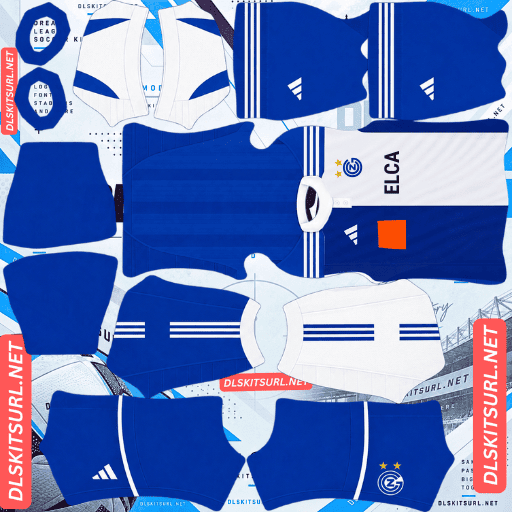
Grasshopper Club Home Kit
Home Kit 512×512 (2026/27)
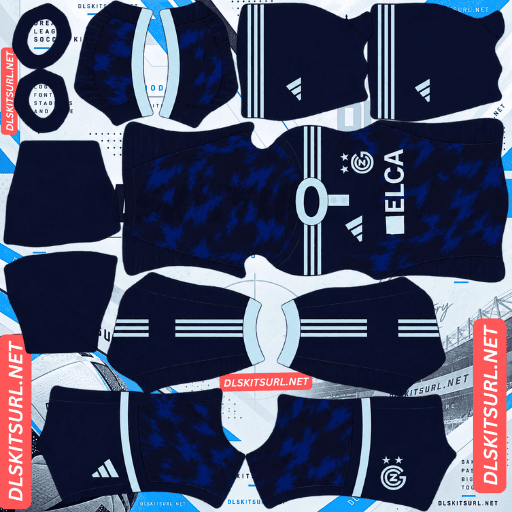
Grasshopper Club Away Kit
Away Kit 512×512 (2026/27)
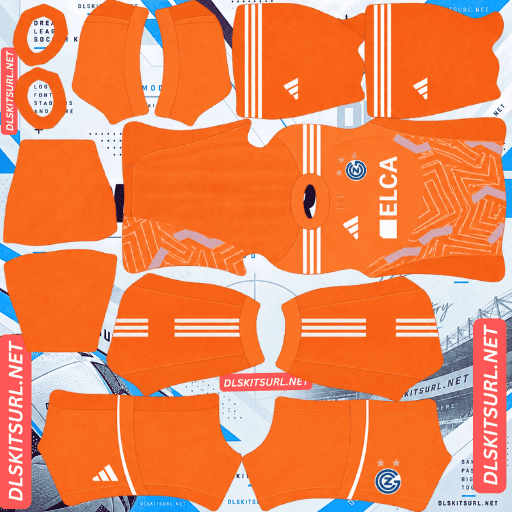
Grasshopper Club GK Home Kit
GK Home Kit 512×512 (2026/27)
There is one important change for the 2026-27 season: Adidas has returned as Grasshoppers’ kit supplier after two seasons with Capelli. The traditional blue-and-white home shirt also needs a little more attention than a standard split design, because its sleeves use the opposite colours to the body panels.
The half-and-half home has two details to get right
Grasshoppers’ traditional home shirt is built around a simple but distinctive idea: one half of the body is blue, the other is white, and the sleeves use the opposite colours to the panels beneath them.
That arrangement looks straightforward, but it creates two separate checks when choosing a DLS file.
Check the body colours and sleeve arrangement separately
First, look at which side of the shirt is blue. The blue panel can appear on either side in a mirrored image, so do not assume that a file has the correct orientation just because it uses the familiar colours.
Next, check the sleeves. Each sleeve should contrast with the body half directly beneath it. A shirt with matching sleeve and body colours might still look convincing at first glance, but it misses an important part of the Grasshoppers design.
Most other asymmetric shirts only need one orientation check. Vélez’s cuffs, Universidad de Chile’s split, Monaco’s diagonal, Cagliari’s panels, Atlas’s halves and Basel’s shoulder design each have their own details to verify. Grasshoppers adds a second check because the sleeves cross the body arrangement.
Compare both details with the kit card
Before copying the URL, look closely at the front of the shirt shown on the card. Confirm which side is blue and which sleeve belongs on each side.
This is worth doing before importing. Once the shirt is inside Dream League Soccer, the game simply displays the image you supplied. It will not tell you whether the colours have been mirrored or whether the sleeves follow the correct arrangement.
The template handles the construction well
Fortunately, the design itself is not difficult for a 512×512 image to reproduce.
The colour change between the sleeves and body occurs at the armhole, where the kit template already has a natural seam. The split between the blue and white body panels follows the centre line, so there is only one main alignment point to preserve.
That means the important edges should remain clean. The challenge is not getting the design to render; it is choosing a file with the correct orientation in the first place.
Austria, Lorient, Cagliari, Alavés, Basel and Young Boys also use contrasting sleeves. Grasshoppers stand apart because their sleeves are arranged opposite to the body halves.
Blue and white remain easy to see in matches
The home shirt has another advantage: its two main colours have a strong difference in brightness. White stands out clearly, while blue remains distinct from the green pitch.
Players appear relatively small during matches, so strong colour separation helps a shirt remain recognisable. The Grasshoppers home design does this naturally, with the split creating contrast across the body.
For squad numbers, navy or red are suitable choices. The split continues across the back, so white numbers could disappear against the white panel, while blue numbers would be difficult to read on the blue side.
Check the actual Adidas design, not just the club colours
The blue-and-white split is part of Grasshoppers’ long-standing identity, but that does not mean every season uses precisely the same construction.
Adidas may introduce changes to the traditional layout in its 2026-27 collection. Use the kit card as your reference and check both the body orientation and sleeve arrangement before importing.
The away kit’s tonal graphic will be difficult to see
Released on 18 July 2026, the away shirt marks the beginning of Grasshoppers’ latest Adidas partnership. It has a dark navy base with an abstract tonal graphic across the front.
The colours may look different in a large product photograph, but the subtle pattern faces a familiar limitation when reduced to the game’s 512×512 format.
Tonal patterns lose their definition on dark colours
A tonal design uses different shades of the same colour rather than clearly contrasting colours. That makes it difficult for a small image to preserve the pattern’s finer details.
The dark navy background makes the problem even more noticeable. There is little brightness difference for the file to retain, so the graphic is likely to blend into the shirt after import.
Expect the away kit to look mostly like a plain navy shirt in Dream League Soccer. This is a limitation of the design’s contrast, not necessarily a sign of a poor-quality image.
The same issue affects Sassuolo’s smoke-inspired pattern, Fiorentina’s tonal design, Cagliari’s tone-on-tone graphic, Vélez’s navy away shirt and Barracas Central’s third kit.
Check the Adidas details and image dimensions
With most of the graphic unlikely to survive, the visible branding becomes the best way to judge the file.
Pay attention to the Adidas Three Stripes, Grasshoppers crest and sponsor. These are the clearly defined elements that should remain recognisable at the game’s resolution.
It is also worth checking the image dimensions before importing. On a computer, right-click the image and open it in a new tab. Your browser should show the actual image size, which should be 512×512 pixels.
White numbers are the best choice for the away
Navy separates well from the green pitch, so the shirt should remain visible during matches. However, once the tonal graphic fades, the design has very little contrast within the shirt itself.
Use white squad numbers to make the player numbers stand out. On a dark navy background, white provides the clearest separation.
The third kit celebrates the 1989-90 Double
Released on 10 September 2026, Adidas’s special-edition shirt also serves as Grasshoppers’ third kit. It looks back to the 1989-90 season, when the club won both the Swiss championship and the Swiss Cup.
Its retro inspiration is good news for anyone importing the shirt into Dream League Soccer.
The period design suits the 512×512 format
Football shirts from around 1990 generally relied on solid colours, strong shapes and straightforward construction. They did not depend on the complex woven textures, subtle gradients or tonal finishes found on many modern designs.
Those simpler elements tend to survive the reduction to 512×512 much better. The third kit should therefore retain most of its intended appearance after import.
Other retro designs, including Cerro Porteño’s 1990s remake, Inter’s throwback third, Lanús’ retro away, Lyon’s 1996-97 home, Schalke’s 1980s Trefoil away, Atalanta’s away and Auxerre’s double-winning tribute, benefit from the same straightforward construction.
Do not leave the special edition until later
Special-edition shirts can be harder to find once the initial release period has passed. Regular league kits usually remain in circulation for longer, while limited releases may receive less coverage and fewer image uploads.
If you find a working 512×512 version of the Grasshoppers third, save its URL rather than assuming it will still be available next season.
Basel’s Carnival shirt and Alianza Lima’s Morada are other examples of special designs worth keeping a copy of.
Which Grasshoppers kit works best in DLS?
The home kit is the strongest choice if you want the traditional Grasshoppers look. Its blue-and-white panels reproduce clearly, but check the body orientation and crossed sleeves before importing.
The away kit is the least distinctive option in the game. Its dark navy base remains visible, but the tonal graphic is unlikely to retain much definition. White numbers help make it more readable.
The third kit is a good choice if you prefer retro designs. Its tribute to the 1989-90 Double uses the kind of bold shapes and flat colours that generally work well in a 512×512 image.
How to identify a current Grasshoppers kit
Adidas is back as Grasshoppers’ supplier for 2026-27, replacing Capelli after two seasons. That gives you a useful starting point when checking older kit files, but the supplier logo alone is not enough to confirm the season.
There is an important detail: Adidas also supplied Grasshoppers before Capelli, beginning in 2021-22. As a result, older Adidas files may still appear in image searches.
Use these details together:
Check the manufacturer. A Capelli logo usually points to the 2024-25 or 2025-26 period, while the 2026-27 collection returns to Adidas.
Do not rely on Adidas branding alone. The club wore Adidas before its Capelli period, so an Adidas logo does not automatically mean the shirt is current.
Compare the away design. The 2026-27 away is dark navy with an abstract tonal graphic.
Use the kit cards as your reference. Grasshoppers have kept their blue-and-white identity for generations, so the colours alone cannot establish the season.
The main thing to remember is that Adidas is a returning supplier, not a completely new one. The actual shirt design is a more reliable way to identify the current collection.
Grasshoppers have several limited-edition shirts
Grasshoppers have released more than just their regular home, away and third kits over recent seasons. Supporters may also come across special shirts made for particular occasions.
These include FC Zürich derby kits, produced for matches against the club’s city rivals, as well as cup-specific and pre-season designs. One particularly limited release was a white-and-gold shirt reportedly produced in a run of only 200 copies.
Dream League Soccer does not restrict custom kits to the current season. Any working 512×512 image URL can be imported, regardless of whether the shirt is a regular league design, an older release or a limited-edition version.
The difficulty is finding suitable images. Rare shirts receive less coverage, and a release made in such a small quantity is unlikely to have many photographs or ready-made DLS versions. If you come across a working file, keep a copy of its URL.
The club reaches its 140th year in 2026
Grasshopper Club was founded on 1 September 1886, making 2026 its 140th year.
That milestone makes commemorative designs worth watching for. Anniversary releases do not always arrive at the beginning of a season, so additional shirts may appear during the year.
How to use a Grasshoppers DLS kits URL
Start by copying the direct image link using the button on the kit card. Avoid copying the address from the browser bar, because that may lead to the webpage displaying the shirt rather than the PNG itself.
Open Dream League Soccer and go to My Club, then select Customise. Choose Kit, not Logo, because the badge has its own separate import option.
Select the slot you want to replace before pasting the URL. Press and hold inside the link field, choose Paste, and then tap Confirm. Some older versions of the game use the label Download instead.
Grasshoppers have three outfield designs here, so you can use the home, away and third shirts in the three outfield slots and keep the goalkeeper kit separate. You can also replace one of them with a derby shirt or the limited white-and-gold design if you prefer.
The first custom kit requires a one-time gem unlock. After that, changing your imported kits does not cost additional gems.
Test the kit URL before importing
Open the copied link in your browser first. A working direct image link should display the shirt by itself, and its address should end in .png.
If the image appears inside a webpage with menus, buttons or other content around it, you have probably opened a viewer page rather than the direct image. Dream League Soccer needs the image file itself.
For the home kit, check both details before importing: the position of the blue and white body halves, and the sleeve colours on each side. These are easy to overlook in a small preview.
For the away kit, do not use the missing tonal graphic as your only quality test. Its low contrast means the pattern may be difficult to see even in a correctly sized image. Check the Adidas branding, crest, sponsor and dimensions instead.
Why do Grasshoppers kit URLs stop working?
A kit link can fail even if it worked when the page was first published. Three common problems account for most of these failures.
The image host deletes the file. Some free hosting services remove uploads after a long period of inactivity. The URL may remain on a webpage even after the actual PNG has been deleted. Older derby and limited-edition shirts are particularly vulnerable because fewer people upload or revisit them.
Hotlink protection blocks the game. Some image hosts allow a picture to open in a browser but prevent other apps from loading it directly. Dream League Soccer may therefore reject a link that appears to work when you click it on a webpage.
The preview and the downloadable image are separate files. A website might display a thumbnail hosted on its own server while its copy button points to an image stored somewhere else. If that second file disappears, the preview can remain visible even though the URL no longer works.
For the kits listed here, the image displayed on the card and the URL copied from it refer to the same file on the same server. That makes it easier to check what you are importing.
The Grasshoppers badge
The club badge is imported separately from the shirts. Go back to My Club → Customise, but choose Logo instead of Kit.
Grasshoppers’ crest uses the club’s familiar blue and white, with the GC monogram as its central feature. Its bold lettering is well suited to Dream League Soccer because it does not depend on tiny details to remain recognisable.
The contrast between blue and white also helps the badge stand out at the small size used beside the score.
Pay particular attention to the home shirt. The badge sits on or near the boundary between the two body colours, so a crest with a clear outline and enough surrounding space is easier to distinguish from the shirt underneath.
Dream League Soccer crops imported badges into a circle. Choose an image with some clear padding around the artwork rather than one trimmed tightly to the edges. This helps prevent parts of the monogram or crest from being cut off.
Cerro Porteño, Cagliari and Atlas face a similar issue when their badges sit against contrasting parts of a shirt design.
Keep a copy of your Grasshoppers kit links
Custom kits are saved on your device rather than being permanently attached to your Dream League Soccer account. A normal game update will usually leave them in place, but reinstalling the game or moving to a new phone can mean losing your imported shirts and badge.
It is worth saving all four URLs somewhere outside the game before you start. Keep a note of which link belongs to each slot, too.
For Grasshoppers, record the home file’s orientation carefully. Both the body halves and the crossed sleeves need to be correct, and neither detail is easy to verify once the kit has been imported.
FAQ FOR RANK MATH
What is a Grasshoppers DLS kits URL?
A Grasshoppers DLS kits URL is a direct link to a 512×512 PNG shirt that you can paste into Dream League Soccer’s kit import screen. A working link should open the image directly and end in .png.
What should I check on the Grasshoppers home kit?
Check two things before importing: which side of the shirt is blue and which side is white, and which sleeve colour belongs on each side. The traditional design uses sleeves in the opposite colours to the body panels beneath them.
Why should I check the home kit before importing?
Dream League Soccer displays the image you provide without correcting its orientation. A mirrored shirt or an incorrect sleeve arrangement can still look like a convincing football kit, but it will not match the Grasshoppers design.
Does the Grasshoppers home design reproduce well in DLS?
Yes. The blue-and-white split follows the centre of the shirt, while the sleeve colour change sits along the armhole seam already present in the kit template. The design itself should remain sharp at 512×512.
Will the Grasshoppers away kit’s tonal graphic appear?
Probably not clearly. The graphic uses different shades of dark navy, so the contrast is too subtle to survive the reduction to 512×512. Expect the shirt to look mostly plain navy after importing.
Is the Grasshoppers third kit suitable for Dream League Soccer?
Yes. The third kit celebrates the 1989-90 season, when Grasshoppers won the Swiss championship and cup. Its retro use of solid colours and bold shapes makes it well suited to the game’s 512×512 format.
Who makes Grasshoppers’ kits in 2026-27?
Adidas supplies Grasshoppers for 2026-27, returning after two seasons with Capelli. Adidas also supplied the club before that period, so its logo alone is not enough to confirm that a file belongs to the current season.
What number colour should I use on Grasshoppers kits?
Use navy or red numbers on the blue-and-white home shirt. White numbers could disappear against the white half, while blue numbers would be difficult to read on the blue side. For the dark navy away kit, white numbers provide the strongest contrast.