
A Platense DLS kits URL is a direct link to a 512×512 PNG Platense shirt that you can import into Dream League Soccer. All four kit slots are listed below, and each file was loaded into the game before being added to this page.

Ca Platense Logo
Official Logo 512×512 (2026/27)

Ca Platense Home Kit
Home Kit 512×512 (2026/27)
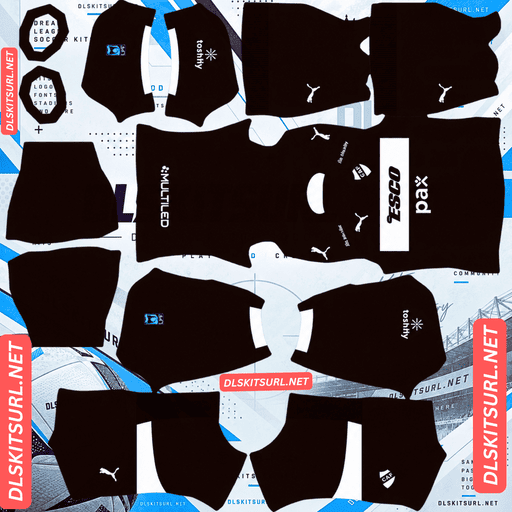
Ca Platense Away Kit
Away Kit 512×512 (2026/27)
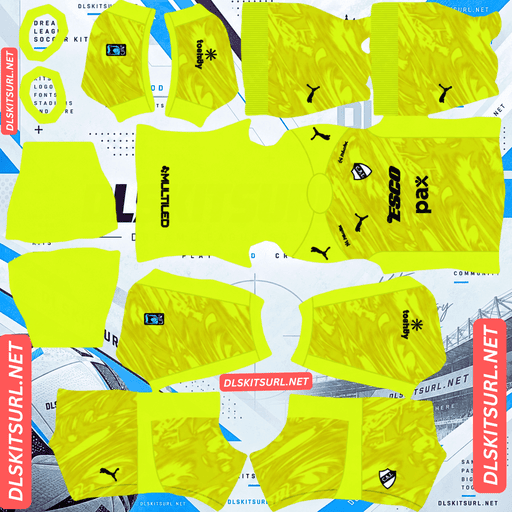
Ca Platense GK Home Kit
GK Home Kit 512×512 (2026/27)
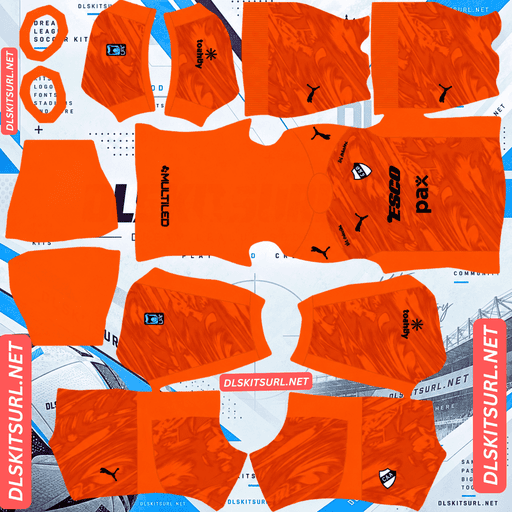
Ca Platense GK Away Kit
GK Away Kit 512×512 (2026/27)
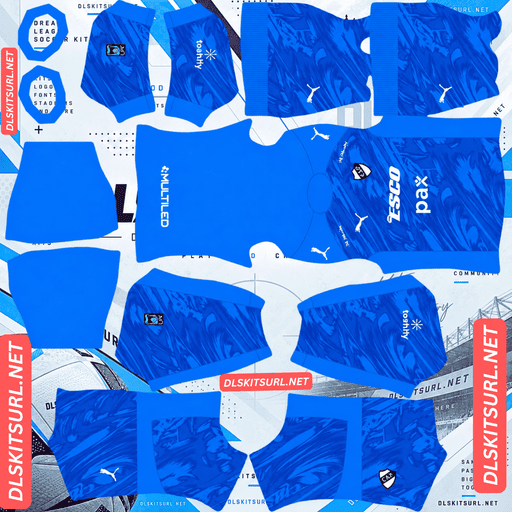
Ca Platense GK Third Kit
GK Third Kit 512×512 (2026/27)
There is one detail to sort out before choosing a shirt: Platense had kits from two different manufacturers during 2026. That means a file labelled with the same year could belong to either collection.
Two manufacturers, one calendar year
Platense’s 2026 kit records include shirts from two brands.
The first is a Hummel home kit, released on 18 December 2025 for the start of the following season. It features a white base with brown pinstripes and Esco as the shirt sponsor.
Later in 2026, a Puma range appeared, covering the home, away and third shirts. Esco remained on the chest.
Check the manufacturer logo first
A file named “Platense 2026” could show either collection. The easiest way to identify it is to look at the manufacturer’s mark on the chest:
Puma: The later 2026 collection.
Hummel: The range released in December 2025 for the beginning of the year.
The sponsor will not help you distinguish between them because Esco appears on both sets.
Neither collection is incorrect. Both were worn during 2026, so choose the one that matches the period you want to recreate and keep track of which version you imported.
Independiente Medellín faced a similar situation this season with its Adidas-to-Reebok change between tournament halves. Aldosivi and Emelec also introduced new kits during the season.
Why the 2026 label is not enough
Argentine football has two tournaments within the same calendar year. As a result, a season label such as “2026” can cover a wider period than it usually would in a European league.
Platense’s manufacturer change makes things even less straightforward because two complete kit ranges share the same year and sponsor.
Check the shirt design and manufacturer logo rather than trusting the filename.
Brown and white pinstripes define Platense
Platense’s traditional colours are brown and white, or marrón y blanco. That combination makes the club unusual, as relatively few teams use brown as one of their main football colours.
The home design features brown pinstripes running across a white base.
Why the pinstripes should survive
Pinstripes are among the thinnest stripe patterns used on football shirts. However, their thickness is not the only factor that determines whether they remain visible in a 512×512 image. The contrast between the stripe and the background is just as important.
Here is how similar designs perform:
Argentinos Juniors: Red on white — survives.
Platense: Brown on white — survives.
LDU Quito: Light blue on navy — survives.
Cerro Porteño: Red and navy on white — survives.
Inter Milan: Dense navy on white — survives.
Bayern Munich: Tonal red on red — lost.
Sevilla: Tonal pinstripes — lost.
Udinese: Metallic pinstripes — lost.
Brown stands out clearly against white. It is a genuine dark-versus-light colour difference, which gives image compression enough information to retain the individual lines.
A decent file should preserve the pinstripes. With a weaker image, the lines can merge into a soft beige-looking area.
Use the pinstripes to test image resolution
Open the home kit at full size and inspect the shirt body.
Check whether you can follow individual brown lines or whether they have blended into one soft patch. Also look at their width: the lines should remain reasonably even rather than becoming thicker or thinner across the shirt.
For this design, confirming the actual image dimensions is especially important. On a computer, right-click the image and open it in a new tab. Your browser should show the image’s real size.
Pinstripes can disappear at the edge of what a small image can reproduce. That makes this one of the most resolution-sensitive designs on the site.
Brown is an unusual colour in Dream League Soccer
Players appear small during matches, so a kit’s visibility depends on how clearly its colours stand apart from the grass.
Brown is a muted earth tone. It differs from green, so it does not blend into the pitch completely, but it is also darker and less saturated than brighter colours such as red or yellow.
A solid brown shirt would therefore look like a dark shape, behaving more like navy than a bright kit colour.
Platense’s home design avoids that problem because it is striped rather than completely brown. The white sections account for roughly half the shirt, giving the overall silhouette much more brightness.
The amount of white in the design makes a real difference to its visibility. The same principle applies to clubs that use green as their main colour.
Use brown or black numbers on the home shirt. White numbers would disappear against the white parts of the design.
The third kit is a black Libertadores design
Platense presented its black alternative shirt on 7 April 2026, using the slogan “Del barrio al continente” — from the neighbourhood to the continent.
The release marked a season the club described as a before-and-after moment. Puma produced the alternative strip, which has a black base and includes text on the back.
The back slogan may overlap with squad numbers
Dream League Soccer places squad numbers on the upper back of the player model.
A slogan printed across that same area can create a clash once the shirt is imported.
Depending on where the text appears, one of two things may happen: the squad number could be drawn over the slogan, or the number could cover part of the printed wording.
Neither result looks particularly intentional. If the slogan sits high on the back, consider this before making the shirt your main choice.
Black creates a visibility challenge
An almost completely black shirt can look like one dark shape when viewed from match distance. Without enough contrasting details, there is very little to break up the silhouette.
Any brown or white elements on the design provide its main visual separation.
Use white numbers on the third kit. They will stand out clearly against the dark background and provide one of the few bright elements you can add.
Sport Recife’s All Black third, Kocaelispor, the Red Bulls, Inter Miami’s away, Al-Ittihad’s third, Vélez’s third and LDU’s third face a similar visibility issue.
A plain black design is easy to reproduce
Black is a straightforward colour for a 512×512 kit image. There is no complicated gradient, tonal pattern or fabric texture that needs to survive compression.
The shirt should arrive looking much like the original, even if the source file is not particularly strong.
That creates another problem: a weak file can look almost as convincing as a good one. Since the design itself offers few useful quality checks, inspect the logo edges and confirm the actual image dimensions.
Which Platense kit performs best in Dream League Soccer?
The home, away and third shirts offer different results once imported.
Home: White with brown pinstripes. It needs a genuine 512×512 file to keep the individual lines sharp, but the white sections make it the most readable option.
Away: Brown and white. Compare the imported design with the kit card to check that the colours and layout match.
Third: Black Libertadores design. The plain dark base reproduces easily, but it offers the weakest match visibility.
How to identify a current Platense kit
Use these four details to check which version you have:
Manufacturer logo: Puma or Hummel identifies which of the two 2026 collections the shirt belongs to.
Esco sponsorship: The sponsor appears on both ranges, so it confirms the design but does not distinguish between manufacturers.
Home design: Look for a white shirt with brown pinstripes.
Third design: The black Libertadores shirt belongs to the Puma range.
The manufacturer mark is the most important detail. Since both collections share the 2026 label and Esco sponsorship, the logo is the most reliable way to tell them apart.
How to use a Platense DLS kits URL
Use the copy button on the kit card rather than copying the address from your browser. The browser address usually points to the webpage, not directly to the PNG image.
To import a shirt into Dream League Soccer:
Open the game and go to My Club.
Select Customise.
Open the Kit section, not Logo. These are separate systems.
Choose the slot you want to replace before pasting the link.
Press and hold the URL field, then tap Paste.
Select Confirm to import the shirt. Older versions may display Download instead.
The three regular shirts fill the three outfield slots: home, away and third. The goalkeeper slot remains available.
You can also mix the two manufacturer collections. For example, you could use the Hummel home with a Puma third shirt if you prefer those particular designs. Dream League Soccer does not require all your imported kits to come from the same collection.
Your first custom kit requires a one-time gem unlock. After that, changing or replacing kits is free.
Test the link before importing it
Open the copied URL in your browser before using it in the game. The image should appear by itself, filling the screen, and the address should end in .png.
If the shirt appears inside a webpage with headers, buttons or other elements around it, you have a viewer page rather than a direct image link. Dream League Soccer cannot import that type of URL.
For the home shirt, checking the dimensions is essential. Brown pinstripes on white depend on fine detail, and an enlarged or upscaled image can blur the lines until they look beige.
The black third kit is different. Its plain base gives you very little visual evidence of image quality, so checking the actual dimensions and logo edges matters more than judging the overall appearance.
Why do Platense kit URLs stop working?
There are three common reasons a kit link can stop working. Only one is immediately obvious.
Free image hosts delete old uploads. Some hosting services remove files that have not been accessed for months or years. The link may still look valid, but the image behind it no longer exists.
Platense is a smaller Argentine club, so there may be fewer replacement files available than for the country’s biggest teams. However, the club’s Copa Libertadores campaign will have raised its profile and encouraged more kit uploads.
Hotlink protection can block the game. Some image hosts only allow files to load when requests come from their own websites. Your browser may display the image normally, while Dream League Soccer’s request gets rejected.
This is why a link can work when you open it manually but fail after pasting it into the game.
The preview and copied link may point to different files. Some websites display a thumbnail stored on their own server but provide a separate URL hosted elsewhere. The webpage can continue showing its preview even after the actual image link has stopped working.
On this page, the shirt you see and the link you copy are the same file on the same server.
Choosing the Platense badge
You can import the club crest during the same customisation session. Open the same menu, but select Logo instead of Kit.
Platense’s badge features the club’s initials in brown and white.
It is a quieter colour combination than many other football crests when displayed at the small size Dream League Soccer uses beside the score. Brown and white provide genuine contrast, but they do not have the same visual impact as red on white or yellow on navy.
Use a genuine 512×512 badge file rather than an enlarged image. Choose one with enough clear space around the entire design instead of a version cropped tightly to the artwork.
Dream League Soccer crops every imported badge into a circle. Anything positioned close to the outer edge is at risk of being cut off by that crop.
Keep your Platense kit links safe
Custom kits are stored on your device rather than being connected to your account. Updating the game usually keeps them in place, but reinstalling Dream League Soccer or changing phones can remove both the shirts and the badge.
Because Platense has two different manufacturer collections labelled 2026, make a note of which supplier range you imported. Otherwise, it can be difficult to remember which version you used later.
Copy all four kit links into a notes app before you start. That gives you a backup if you need to import the designs again.
FAQ FOR RANK MATH
What is a Platense DLS kits URL?
A Platense DLS kits URL is a direct link to a 512×512 PNG Platense shirt that you can paste into Dream League Soccer’s kit customisation screen. A working direct image link ends in .png.
Why are there two sets of Platense kits labelled 2026?
Platense had shirts from two manufacturers during 2026. The Hummel home kit was released in December 2025 for the start of the year, while a later Puma collection also appeared during 2026. Both ranges carry Esco as sponsor, so the manufacturer logo is the most reliable way to distinguish them.
Which Platense kit collection should I use?
Either collection is suitable. Both were worn during 2026. Choose the Hummel or Puma designs that match the period you want to recreate, and keep a note of which version you imported.
Do Platense’s brown pinstripes survive in Dream League Soccer?
Yes, provided you use a genuine 512×512 file. Brown against white has enough contrast for the individual lines to remain visible. An enlarged or low-resolution image can blur the pinstripes into a soft beige area.
Is brown a difficult colour to use in DLS?
Brown is a muted earth tone. It separates from the green pitch by colour, but it looks darker and less vibrant than red or yellow. Platense’s home remains readable because it uses white pinstripes and a large amount of white across the shirt.
What number colour should I use on the Platense home kit?
Use brown or black numbers. White numbers would blend into the predominantly white shirt and become difficult to see during matches.
Will the third kit’s back slogan overlap with player numbers?
It may. Dream League Soccer places squad numbers on the upper back, which can be the same area used by the printed slogan. Depending on its position, the number may appear over the text or cover part of the wording.
How can I check the quality of Platense’s black third kit?
Check the actual image dimensions and inspect the logo edges. A plain black design has no complicated gradients or textures to reproduce, so even a weaker file can look convincing at first glance.