
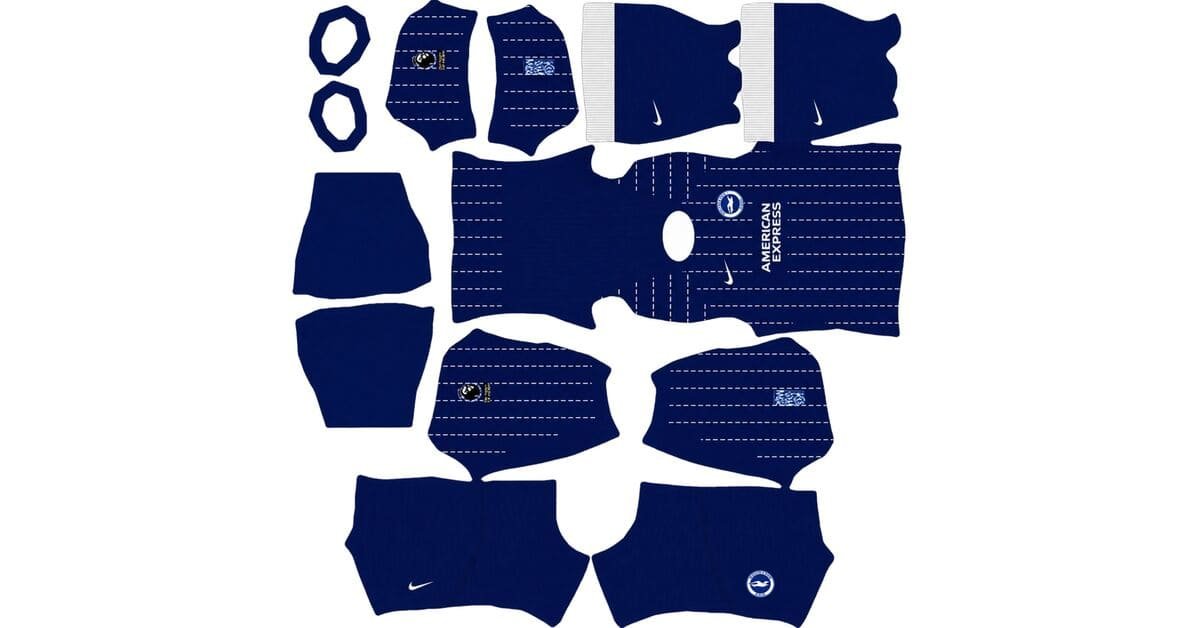
A Brighton DLS kits URL is a direct link to a 512×512 PNG Brighton & Hove Albion shirt that you can import into Dream League Soccer. This collection includes the home, away, third, and goalkeeper kits for the 2026/27 season.
Brighton & Hove Albion Logo
Official Logo 512×512 (2026/27)
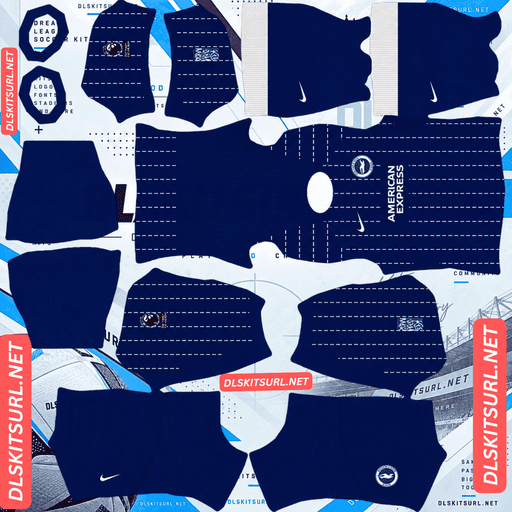
Brighton & Hove Albion Home Kit
Home Kit 512×512 (2026/27)
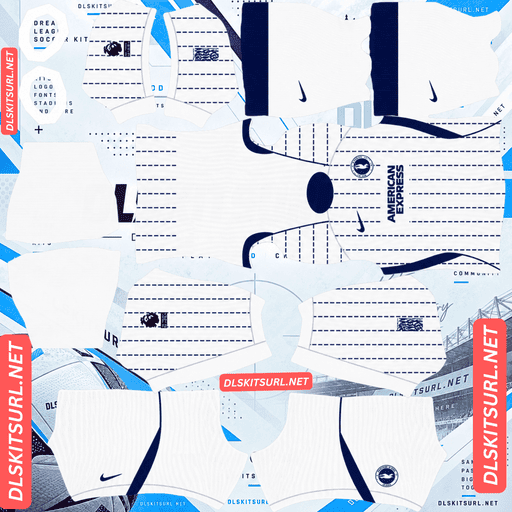
Brighton & Hove Albion Away Kit
Away Kit 512×512 (2026/27)
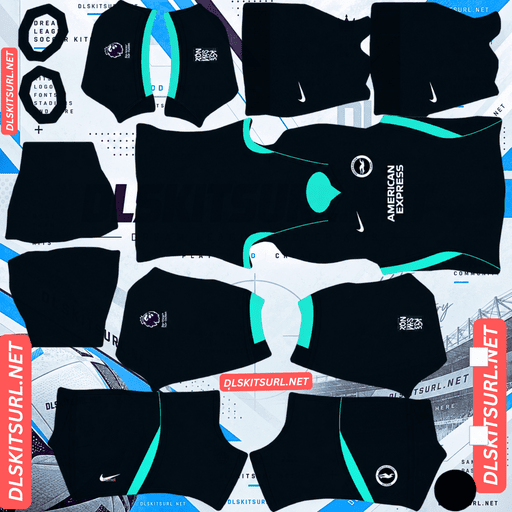
Brighton & Hove Albion Third Kit
Third Kit 512×512 (2026/27)
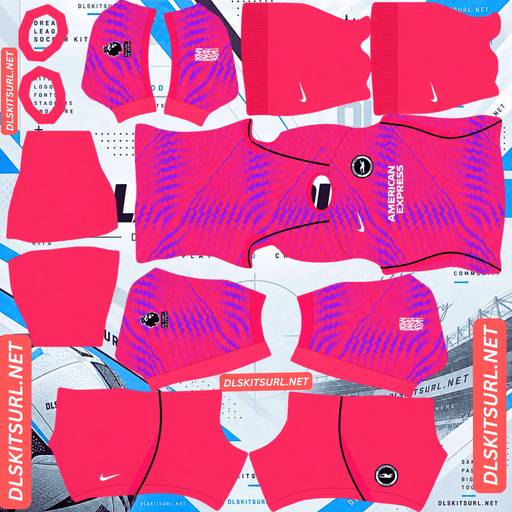
Brighton & Hove Albion GK Home Kit
GK Kit 512×512 (2026/27)
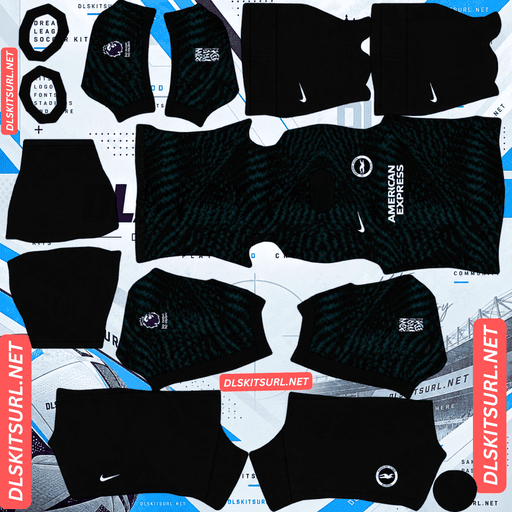
Brighton & Hove Albion GK Away Kit
GK Away Kit 512×512 (2026/27)
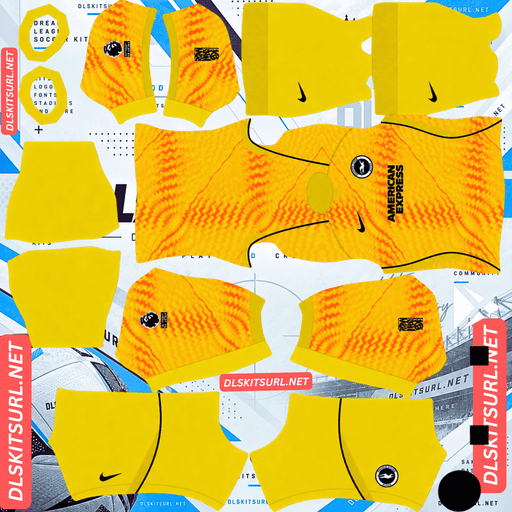
Brighton & Hove Albion GK Third Kit
GK Third Kit 512×512 (2026/27)
There is one important detail to know before downloading Brighton’s third kit. After a decade of carrying over previous-season away shirts, Brighton released a completely new third design for 2026/27. As a result, two different shirts may appear online under the same season label.
Brighton Has Two Kits Listed as the 2026/27 Third
For ten years, Brighton did not introduce a new third kit each season. Instead, the club carried over its previous away shirt and used it as the third kit for the following campaign.
This explains why a light purple shirt with a darker purple central stripe appears in some kit databases as Brighton’s 2026/27 third kit, with a release date in July 2025. That shirt was originally the 2025/26 away kit, later carried forward into the third-kit slot.
On 5 August 2026, Brighton and Nike broke with that tradition by releasing an entirely new deep teal third kit — the first genuinely new third shirt in a decade, according to the supplied information.
Which Brighton Third Kit Should You Download?
The deep teal design is the current 2026/27 third kit described in this collection.
The purple shirt is the previous season’s away design, which was carried forward and may still appear under the 2026/27 third-kit label on older websites.
Both designs can appear in search results, so check the colours before copying a URL. If you want Brighton’s newly released third shirt, look for the deep teal base with hyper turquoise collar and cuff details.
Brighton DLS Kits 2026/27: The 125th Anniversary Collection
Brighton’s 2026/27 season marks the club’s 125th anniversary, and the three outfield shirts reflect different aspects of its history and identity.
The home design looks back to the 1983 FA Cup final, the away shirt reverses the home colours, and the third kit takes inspiration from the sea, downs, and promenade around Brighton and Hove.
Brighton Home Kit: Royal Blue with Broken Pinstripes
Released on 8 July 2026, the home shirt draws inspiration from Brighton’s appearance in the 1983 FA Cup final.
It features a royal blue base with narrow, broken white pinstripes. A V-neck collar with a contrasting neckline adds definition, while the Nike swoosh, club crest, and American Express sponsor appear in white.
The shirt also features mesh side panels, shoulder piping, and an embroidered Nike swoosh. The collar carries the anniversary wording:
“We are Brighton 1901 – 2026”
This combination gives the home kit a classic striped appearance while introducing details associated with the anniversary season.
Brighton Away Kit: The Home Design Reversed
The away shirt was released on the same day as the home kit and was described by the club as the home design turned inside out.
Instead of a royal blue base, it uses crisp white fabric with narrow blue pinstripes. Blue collar and sleeve details, along with matching blue branding, complete the reversed colour scheme.
The overall pattern mirrors the home shirt, making the two kits closely related while giving each a distinct appearance on the pitch.
Brighton Third Kit: Inspired by the Sea and the Downs
The third kit uses a deep teal base, a shade described as inspired by the sea and downs around Brighton and Hove.
Hyper turquoise accents appear on the V-neck collar and cuffs, drawing inspiration from the railings along the city’s promenade. White Nike and sponsor marks provide contrast, while the shirt features a monochrome white Brighton badge.
Teal shorts and socks complete the design.
Nike also produced a hyper pink goalkeeper shirt with tonal graphics. If you want a complete four-kit setup in Dream League Soccer, remember to configure the goalkeeper slot rather than leaving it on the default design.
Why Brighton’s Broken Pinstripes Need the Right Resolution
Both the home and away shirts use broken pinstripes. These stripes are made of short dashes rather than uninterrupted lines, which changes how the design behaves when reproduced in Dream League Soccer.
Broken Pinstripes Are More Forgiving When Aligning Panels
Traditional continuous stripes need to line up correctly wherever the kit template joins different panels. If a stripe shifts across a seam, the mismatch can be obvious.
Brighton’s broken pinstripes are more forgiving because each dash is a separate mark. Even if two dashes do not line up perfectly across a panel boundary, the pattern can still look intentional.
This makes the design easier to reproduce than a shirt covered in long, uninterrupted stripes.
Small Dashes Can Disappear in Low-Quality Images
The main challenge is resolution.
Each dash is a small, isolated detail. When an image is resized or heavily compressed, individual dashes may disappear or merge into a blurry pattern. Continuous lines often remain visible because they extend across a larger area, but short marks do not have the same advantage.
For that reason, pay close attention to the actual image quality when selecting a Brighton DLS kit.
Open the shirt at full size and inspect the body. On a clear file, individual white or blue dashes should remain distinguishable. If the pinstripes look like a soft wash of colour, the image may lack the detail needed for a clean in-game result.
The Home and Away Shirts Are Equally Useful Quality Checks
The home kit combines royal blue with white pinstripes, while the away kit reverses those colours. Both designs have strong contrast between the base fabric and the dashes.
That makes either shirt useful for checking image quality. If the pattern remains crisp on one, the same design approach should also work well on the other, provided both files are prepared at an appropriate resolution.
Which Brighton Kit Is Easiest to See During a Match?
Dream League Soccer displays players at a relatively small size, so the relationship between kit colours and the green pitch can affect how clearly your team stands out.
The royal blue home kit contrasts well with the pitch, and the white pinstripes add further definition.
The white away kit offers an even lighter appearance, making it easy to distinguish from the grass.
The deep teal third kit is the least distinct of the three outfield designs in terms of base colour. Teal contains both blue and green, placing it closer to the pitch’s colour range than royal blue or white.
The hyper turquoise collar and cuffs help the third kit stand out by introducing brighter contrast points. When choosing a DLS file, make sure those details remain clear rather than blending into the teal base.
Will the Anniversary Text Appear in Dream League Soccer?
The home shirt’s anniversary wording — “We are Brighton 1901 – 2026” — is one of the collection’s most distinctive details.
However, the text sits on the collar, a small area of the kit template. Once the shirt is mapped onto the in-game player model, the lettering becomes extremely small.
A high-quality file might reveal traces of the wording in a kit preview, but it is unlikely to remain readable during a match.
The embroidered Nike swoosh faces a similar limitation. Embroidery relies on fine texture, and those thread details are difficult to preserve in a small PNG. The swoosh itself should remain visible, but the embroidered finish may appear as a simpler, flatter mark.
Best Number Colours for Brighton DLS Kits
Dream League Soccer uses its own colour settings for squad numbers rather than automatically copying the official number colours from your imported kit.
The game provides separate colour swatches for shirt numbers and shorts numbers, so configure them individually for each kit.
Home Kit Number Colours
The home shirt has a royal blue base with white pinstripes and white branding.
Shirt numbers: White, matching the pinstripes, crest, and sponsor.
Shorts numbers: Choose a colour that contrasts clearly with the shorts in your selected template.
Away Kit Number Colours
The away shirt has a white base with blue pinstripes and blue trim.
Shirt numbers: Blue, matching the pinstripes and other details.
Shorts numbers: Select a contrasting colour that remains readable against the shorts.
White numbers on a white shirt are a common mistake because they become difficult to see. Blue is the more practical choice for this design.
Third Kit Number Colours
The third shirt uses a deep teal base with hyper turquoise trim and white branding.
Shirt numbers: White, matching the badge and sponsor details.
Shorts numbers: Choose a colour that contrasts with the teal shorts.
Hyper turquoise may match the collar more closely, but it can be less distinct at small number sizes against a teal base.
Always set the shirt and shorts number colours separately, then check them in the game before settling on your final configuration.
Choosing the Correct Brighton Badge
The deep teal third shirt uses a monochrome white club badge rather than the standard full-colour crest.
Dream League Soccer generally displays one imported badge across your team, regardless of which kit you wear. If the teal third kit is your main strip, a monochrome white badge creates a closer match to its minimal design.
For the home and away kits, the standard crest is the more suitable pairing according to the supplied design descriptions.
If you switch frequently between all three outfield shirts, choose the badge that best fits your preferred overall look.
How to Identify the Current Brighton DLS Kits
Before importing a Brighton kit, check these four details.
Home: Royal blue base with narrow, broken white pinstripes and a V-neck collar.
Away: White base with blue pinstripes and matching blue trim.
Third: Deep teal base with hyper turquoise collar and cuffs. A purple shirt belongs to the carried-over 2025/26 away design.
Sponsor: American Express branding on the front of all three outfield shirts.
The goalkeeper shirt is a separate design, described in the supplied information as hyper pink with tonal graphics.
These checks help distinguish the current collection from older kits and files labelled incorrectly by season.
How to Use a Brighton DLS Kits URL
Once you have selected your preferred kit, follow these steps to import it into Dream League Soccer.
Use the Copy URL button on the relevant kit card.
Open Dream League Soccer and go to My Club.
Select Customise.
Open Kit, not Logo.
Choose the slot you want to replace.
Tap Custom Kit.
Press and hold the URL field, then select Paste.
Tap Confirm or Download, depending on your game version.
Always check which slot is selected before importing. The kit you download will replace the design assigned to that slot.
Use the home, away, and third slots for Brighton’s outfield shirts, and the fourth slot for the hyper pink goalkeeper kit.
The first custom-kit import may require a one-time gem unlock, depending on your game version and account progress. After the feature has been unlocked, later kit changes generally do not require another unlock.
Test the Brighton Kit URL Before Importing
Before pasting a link into the game, open it in your browser.
A direct image link should display the PNG itself, without a surrounding webpage containing navigation, buttons, or other elements. The URL commonly ends in .png, but check that it actually opens the intended image.
On a computer, you can open the image in a new tab and inspect its dimensions if your browser provides that information. These kits are intended for a 512×512 pixel format.
If the link opens a gallery or preview page instead of the image, it may not be a direct URL suitable for importing into DLS.
Why Brighton DLS Kit URLs May Stop Working
A kit link can fail even if it worked when you first found it. Common reasons include the following.
The Image Host Has Deleted the File
Some free image hosts remove files after periods of inactivity or according to their storage policies. A saved URL may continue to look normal even when the image is no longer available.
If a link no longer opens the shirt, look for an updated image URL.
Hotlink Protection Blocks External Requests
Some image hosts prevent other applications or websites from retrieving their files directly.
This can lead to a confusing situation: the link opens in your browser, but Dream League Soccer cannot download it. The host may allow direct browsing while refusing requests from external applications.
If that happens, try a direct image link from a host that permits external access.
The Preview Image Is Different from the Download File
Some pages display a thumbnail hosted on their own website while the Copy URL button points to an image stored elsewhere.
The preview may continue to appear even if the actual download link has expired or become inaccessible.
Always test the exact URL you plan to paste into the game rather than relying only on the image shown on the page.
Brighton Badge for Dream League Soccer
To import the Brighton badge, follow the same general process as the kit import, but choose Logo instead of Kit.
Brighton’s crest is circular and features the seagull associated with the club’s nickname. This shape works well with Dream League Soccer’s circular badge display because the main design fits naturally inside the crop.
The seagull is a strong, recognisable shape that can remain clear at the small size used in match displays. Fine lettering around the outer edge may become less readable when reduced, even if the original image is sharp.
Choose a badge file with clean edges and sufficient space around the design. If the deep teal third kit is your main strip, consider the monochrome white crest for a closer visual match.
How to Keep Your Brighton DLS Kits
Custom kits and badges may be stored on your device rather than linked permanently to your account. Updating the game may preserve them, but reinstalling it or changing phones can cause you to lose your imported designs.
Before making changes, save all four kit URLs and your badge link in a notes app or another safe location. Label each link clearly:
Brighton home kit
Brighton away kit
Brighton third kit
Brighton goalkeeper kit
Brighton badge
Keeping these links together makes it easier to restore your collection if you need to reinstall the game or move to a new device.
Brighton DLS Kits FAQ
What is a Brighton DLS kits URL?
A Brighton DLS kits URL is a direct link to a Brighton & Hove Albion shirt image that you can import into Dream League Soccer. The kits in this collection are intended for 512×512 PNG images.
Why are there two Brighton 2026/27 third kits?
Brighton previously carried over its previous-season away shirt for use as the third kit. This is why the purple 2025/26 away shirt may appear online under the 2026/27 third-kit label. The supplied information says Brighton released a new deep teal third kit on 5 August 2026.
What does the Brighton 2026/27 home kit look like?
The home kit has a royal blue base, narrow broken white pinstripes, a V-neck collar, and white Nike, crest, and American Express branding. Its design takes inspiration from the 1983 FA Cup final.
What inspired the Brighton third kit?
The third kit uses deep teal, inspired by the sea and downs around Brighton and Hove. Hyper turquoise collar and cuff details reference the city’s promenade railings.
Why do the pinstripes on my Brighton kit look blurry?
The pinstripes are made of short dashes rather than continuous lines. These small details can disappear or merge when an image is compressed or displayed at low resolution. A good file should preserve the individual dashes.
Are Brighton’s broken pinstripes difficult to align?
They are more forgiving than continuous stripes because each dash is a separate mark. The main challenge is preserving the small details at the correct image resolution.
Which Brighton kit is hardest to distinguish during a match?
The deep teal third kit may be less distinct against the green pitch because its blue-green colour is closer to the grass than royal blue or white. The hyper turquoise collar and cuffs add brighter contrast.
Will the 125th anniversary collar text appear in DLS?
The wording “We are Brighton 1901 – 2026” is printed on the collar, a relatively small area of the kit. It is unlikely to remain readable at match size, although traces may be visible in a high-quality kit preview.
Which Brighton badge should I use with the third kit?
The third shirt features a monochrome white badge. If you mainly use the deep teal kit, a white version of the crest best matches its design. The standard crest is a suitable general option if you switch between kits.
What resolution should a Brighton DLS kit use?
The kit images in this collection are intended for 512×512 PNG format. Check the image dimensions and test the direct URL before importing it into the game.