
A Sporting CP DLS kits URL is a direct link to a 512×512 PNG Sporting shirt that you paste into Dream League Soccer. All four slots are covered below, and each file has been loaded into the game before being added to this page.
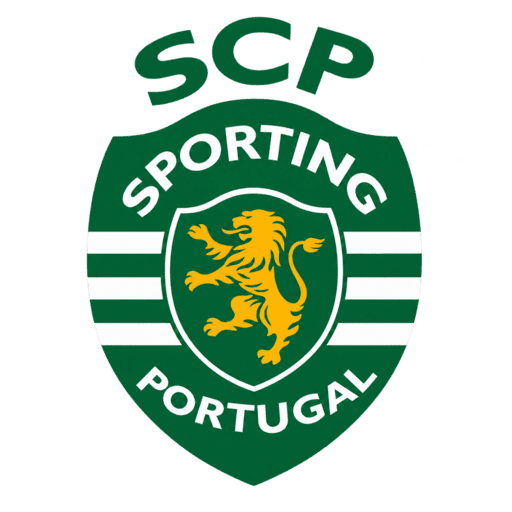
Sporting Lisboa Logo
Official Logo 512×512 (2026/27)

Sporting Lisboa Home Kit
Home Kit 512×512 (2026/27)
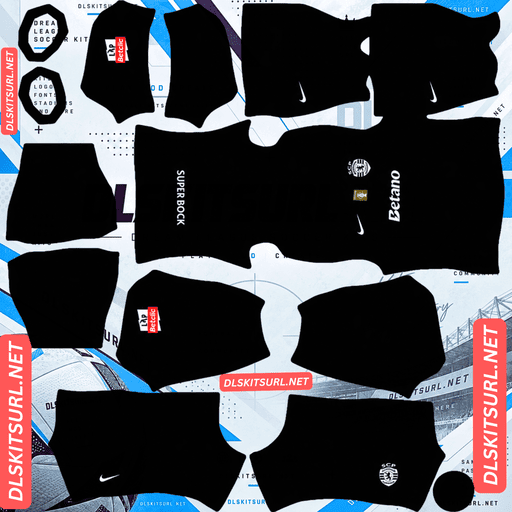
Sporting Lisboa Away Kit
Away Kit 512×512 (2026/27)

Sporting Lisboa Third Kit
Third Kit 512×512 (2026/27)
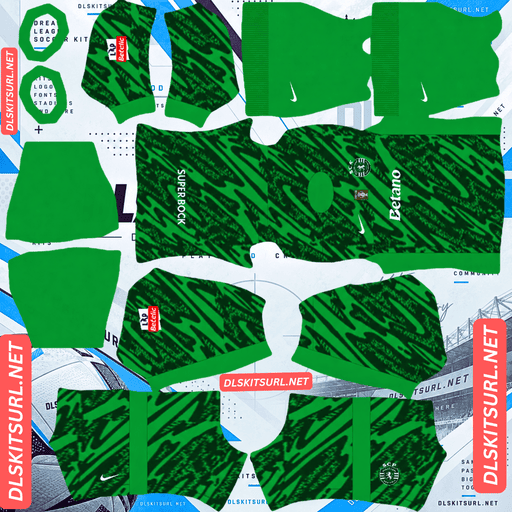
Sporting Lisboa GK Home Kit
GK Home Kit 512×512 (2026/27)
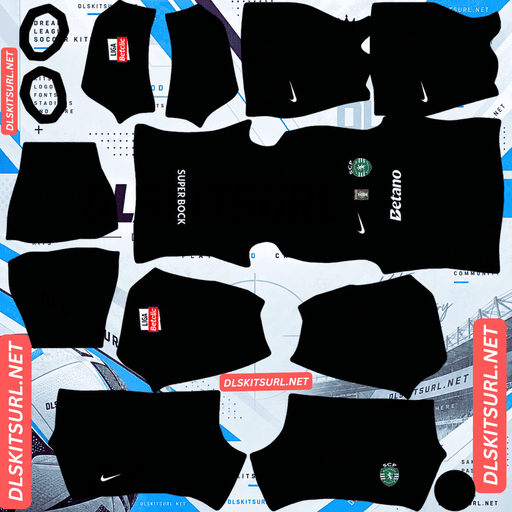
Sporting Lisboa GK Away Kit
GK Away Kit 512×512 (2026/27)
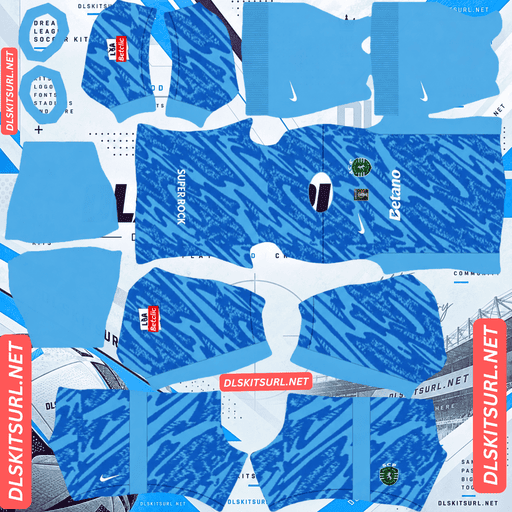
Sporting Lisboa GK Third Kit
GK Third Kit 512×512 (2026/27)
Sporting changed their crest this season, while the traditional green-and-white hoops create one of the most demanding mapping jobs of any common shirt design.
Hoops are the hardest common geometry
Released on 13 July 2026 under the campaign theme “Evolution from the Essence”, the home kit keeps Sporting’s famous green and white hoops and introduces the club’s new crest. The design is completed by black shorts and hooped socks.
Every band has to line up at multiple joins
A vertical stripe has one main alignment point: the centre line of the body.
A horizontal hoop is different. Its height has to remain consistent as it crosses the body, reaches both side seams and connects with the sleeves. With the top and bottom edges of each band also needing to remain consistent, that creates multiple alignment points for every single hoop.
A shirt with a dozen or more bands therefore has a lot more opportunities for a small mapping error to become visible.
That is why Sporting is much more demanding than a simple half-and-half shirt or vertical stripe. A single chest band already needs careful positioning; a full set of hoops repeats that problem across the entire shirt.
Import it before you commit to a file
The flat PNG tells you less than usual. A hoop can look perfectly straight while the image is laid out flat but jump vertically when the shirt is wrapped around the game’s model.
After importing, view the player from the side and back. Check whether the bands continue at the same height across both side seams, whether they meet the sleeves without stepping, and whether each band remains roughly the same thickness around the shirt.
This is one of the Sporting files that is genuinely worth testing in-game before deciding which URL you want to keep.
Young Boys’ away, Boca Juniors’ chest band, Atlanta United, Vancouver and Real Salt Lake all use horizontal banding, but Sporting’s full-hoop construction is considerably more demanding because the pattern repeats so many times.
The colours themselves are not the problem
White and green have enough brightness difference for the hoops to remain clearly visible at 512×512.
So the risk is not whether the stripes survive compression. The real question is where they appear.
The same distinction applies to Croatia’s checkerboard, Monaco’s diagonal and Emelec’s sash. Strong contrast determines whether you can see the design, while the geometry determines whether the design is correctly positioned.
Do not expect the socks to preserve every hoop
Socks occupy a much smaller area of the kit template than the shirt.
Trying to reproduce several narrow horizontal bands inside that small space leaves very little room for each individual stripe. Expect the sock pattern to simplify or read almost like a single colour.
That is not a major problem because the shirt carries the defining part of Sporting’s identity.
The hoops also solve the green-shirt visibility problem
Green is one of the most difficult shirt colours for Dream League Soccer because it sits close to the colour of the pitch.
Sporting’s white hoops prevent the shirt from becoming one large green shape. The bright bands constantly interrupt the green surface, making the player easier to distinguish during a match.
For the home shirt, black numbers are the safest choice. The hoops continue across the back, so white numbers would disappear into the white bands while green numbers would disappear into the green ones.
Sporting changed the crest in July 2026
Sporting introduced a new club logo on 1 July 2026, describing it as an “old new crest” — a modernised return to an earlier design. The change was launched alongside the same “Evolution from the Essence” campaign used for the new kit collection.
Badge files now split by season
Dream League Soccer only displays one crest at a time, regardless of which shirt you are wearing.
That means an older badge file from 2025 or earlier will show the previous crest, while a badge from the 2026-27 cycle should show the new version.
Do not rely entirely on the filename. Look at the actual artwork before importing it.
Sporting is one of the clubs where a one-season difference genuinely gives you a different badge. Marseille and Atalanta also changed their branding during this cycle, while Tigres, TSV 1860 and Dinamo București have gone through recent crest changes as well.
The simplified design should read well in DLS
Modernised crests generally benefit from fewer internal details, cleaner outlines and stronger shapes.
Those are exactly the characteristics that work best when a badge is displayed at a small size beside the score.
Use the new Sporting crest if you want the current look. It should be easier to read than a more detailed older version.
The gold away is a good use of a metallic colour
Released in late 2026, the away shirt pays tribute to Nike’s Total 90 designs from the early 2000s.
It uses a metallic gold base with black details around the V-neck collar and cuffs, along with black Nike and Betano branding.
A full gold base loses the effect but keeps the colour
Metallic fabric depends on gradients and changes in light to create the appearance of metal. A flat 512×512 PNG cannot reproduce that physical effect.
The good news is that the gold covers the entire shirt.
When a metallic effect is spread across a large surface, losing the shine mainly changes the finish rather than the underlying colour. The result should look more like flat yellow-gold, but it will still clearly read as a gold shirt.
That is very different from metallic gold used only for a thin line or small piece of trim, where the visual effect can disappear almost completely.
Boca Juniors’ third, Bologna’s third, Young Boys’ gold elements and Rayo Vallecano’s third benefit from the same principle.
The black trim should remain visible
Thin details only become especially vulnerable when they also have weak contrast.
Black against gold provides a strong colour difference, so the V-neck, cuffs and Swoosh should remain visible. They may be slightly thinner than on the real shirt, but they should not disappear from a good file.
Those narrow black edges are therefore a useful quality test. Compression damage will show up there much sooner than it will on the large gold body.
Lugano’s black piping on white and Pachuca’s white lines on navy provide similar tests.
The Total 90 inspiration suits a flat file
Early-2000s football designs relied heavily on strong colours and clear graphic shapes.
They did not depend on the complex tonal weaves, subtle gradients and technical surface textures found on many modern shirts.
That makes this Sporting away particularly suitable for the 512×512 format. Apart from the lost metallic finish, most of the visual construction should survive well.
Gold also gives the best match visibility
The yellow-gold base sits well away from pitch green, so it remains highly visible during gameplay.
This should make the gold away the most readable of Sporting’s main kits.
Use black numbers to maintain the same strong contrast.
Which Sporting kit works best in DLS?
The home kit preserves Sporting’s most recognisable identity, and the green-and-white colours themselves reproduce easily. The difficult part is the mapping. Every hoop needs to meet the surrounding panels at the correct height, so this is the kit that benefits most from an actual in-game check.
The gold away is easier from a file-quality perspective. The metallic finish will flatten into yellow-gold, but the colour remains strong, while the black trim provides excellent contrast. It is also the most visible option during matches.
The 120th anniversary shirt is another option to watch, celebrating Sporting’s 1906-2026 history and using a Vapor V template. Because it is a separate commemorative design, compare the actual image against the kit card rather than assuming it is the standard third.
Sporting release a large number of shirts
Sporting are unusual when it comes to the number of different shirts and collections circulating during a season.
The club had seven kits in circulation during 2025-26 with two additional designs announced, already putting it ahead of many clubs covered on this site.
For 2026-27, the range includes the home, away and 120th anniversary shirt, alongside pre-match and training collections.
Three DLS slots are not enough for everything
Dream League Soccer gives you three outfield kit slots, so a club with this many releases inevitably leaves some designs out.
That also makes filenames less reliable. A search result labelled “Sporting third” or “Sporting alternate” could refer to several different shirts depending on when it was uploaded.
Use the kit cards as your visual reference rather than trusting the filename.
Be cautious with the pink shirt
A bright pink Sporting shirt with white collar and cuff details circulated in April 2026 and was described at the time as a possible away or third design. Its authenticity was not confirmed.
The eventual away was gold, leaving the pink shirt’s status uncertain. It could have represented another later release, a third kit or an unofficial design.
If you find a pink Sporting DLS file, treat it cautiously and compare it against reliable images before using it. If the shirt is eventually confirmed, the colour itself would work very well in DLS because bright pink has strong separation from the green pitch.
How to identify a current Sporting file
Four checks make the current collection easier to identify.
First, look for the new crest introduced on 1 July 2026. This is the strongest seasonal marker.
Second, check the Nike branding and Betano sponsor.
Third, the current away should be the distinctive gold design with black details.
Finally, compare the entire shirt against the kit cards. Sporting’s green-and-white hoops are a permanent part of the club’s identity, so the home alone is not enough to establish the season.
The crest does most of the dating work. The hoops have remained familiar; the badge has not.
How to use a Sporting CP DLS kits URL
Copy the direct image URL using the button on the kit card rather than taking the address from your browser bar. The browser address usually leads to the page containing the image instead of the PNG itself.
In Dream League Soccer, open My Club → Customise → Kit. Choose Kit rather than Logo because the badge has its own import system.
Select the slot before pasting the URL. Press and hold inside the field, choose Paste, then tap Confirm. Older versions of the game may display Download instead.
Sporting’s home, away and third or anniversary design can occupy the three outfield slots. Because the club releases so many variations, make a note of which designs you have chosen.
The first custom kit requires a one-time gem unlock. Once unlocked, changing the imported kits is free.
Test the link before importing
Open the URL in your browser first. The shirt should appear by itself, and the address should end in .png.
If the image is surrounded by website navigation, buttons or other page content, it is probably a viewer page rather than the direct image file.
The browser test is especially useful for checking dimensions and file quality, but it is not enough for the Sporting home.
A flat image can make every hoop look perfectly aligned while the pattern steps at the side seams or sleeve joins when wrapped around the in-game model.
Import the home and inspect the player from the side and back. Check the height, continuity and thickness of the hoops before deciding that the file is correct.
Why do Sporting kit URLs stop working?
Three common problems account for most broken kit links.
Free image hosts can delete files. Old uploads may be removed after a long period of inactivity even though a webpage still contains the original link. Sporting are a heavily supported club, so current files should be relatively plentiful, but the sheer number of different shirts means there are also many outdated and duplicate versions circulating.
Hotlink protection can block Dream League Soccer. A host may allow an image to load when you open it in your browser while refusing requests from another application. That creates the familiar situation where a link works when clicked but fails when pasted into the game.
The preview and direct file can be different. A webpage might display a thumbnail stored on its own server while the copy button points to a separate image host. The preview can remain visible even after the actual PNG disappears.
For the shirts listed here, the image displayed on the card and the copied URL refer to the same file on the same server.
The Sporting CP badge
Import the badge from My Club → Customise → Logo, using the same session as your kit import.
First make sure you have the correct crest version. Sporting changed the badge in July 2026, so older and current files can look noticeably different.
The crest contains the club’s lion and its green-and-white colours within a shield.
A lion is a strong shape for Dream League Soccer because its overall silhouette remains recognisable even when displayed at a small size. Some of the finer details in the mane will soften, but that is normal at the game’s display size.
Green and white also provide strong contrast, helping the crest remain readable beside the score.
Dream League Soccer crops imported badges into a circle. Because Sporting’s crest is shield-shaped and narrows toward the bottom, choose an image with clear space around the complete design rather than one cropped tightly to the artwork.
Keep your Sporting kit links
Custom kits are stored on your device rather than permanently on your account. Updating the game will generally leave them in place, but reinstalling the game or changing phones can remove the imported kits and badge.
Keep all four URLs in a notes app before starting.
For Sporting, also record which crest version you used and which shirt occupies each outfield slot.
Most importantly, keep the URL for any home file whose hoops have been confirmed in-game. Correct hoop alignment is the hardest part of this collection, and it is worth having a tested version ready to restore.
FAQ FOR RANK MATH
What is a Sporting CP DLS kits URL?
A Sporting CP DLS kits URL is a direct link to a 512×512 PNG Sporting shirt that you paste into Dream League Soccer’s kit screen. A working direct image URL ends in .png.
Why do Sporting’s hoops need to be checked?
Horizontal hoops have to maintain the same height as they cross the body, side seams and sleeves. With many bands across the shirt, even a small mapping error can make the stripes visibly step where the panels meet.
How do I check the Sporting home kit?
Import the shirt and view the player from the side and back. The hoops should continue at the same height across the seams, meet the sleeves cleanly and remain consistent in thickness around the shirt.
Will Sporting’s green-and-white hoops survive at 512×512?
Yes. White against green provides strong contrast, so the colours themselves remain clear. The main risk is incorrect placement rather than the hoops disappearing.
Did Sporting change their crest for 2026-27?
Yes. Sporting introduced a new club logo on 1 July 2026 as part of the “Evolution from the Essence” campaign. Older badge files can therefore show the previous crest.
Does the Sporting gold away work well in DLS?
Yes. The metallic finish will flatten into yellow-gold because a PNG cannot reproduce the physical reflective effect, but the large gold base remains highly visible. The black collar, cuffs and branding should also survive because they contrast strongly with the gold.
Why is Sporting’s green home easier to see than a normal green shirt?
The white hoops constantly break up the green surface. Since green is close to the pitch colour, a solid green shirt can blend into the background, while Sporting’s white bands make the player’s silhouette much easier to distinguish.
What number colour should I use on Sporting kits?
Use black numbers on both the green-and-white home and the gold away. On the hooped home, white and green numbers would each disappear into parts of the back, while black provides a stronger contrast across both colours.
How many Sporting kits are there?
Sporting release an unusually large number of shirts and collections. They had seven kits in circulation during 2025-26 with two more announced, while the 2026-27 range already includes the home, away and 120th anniversary shirt alongside other collections. Dream League Soccer’s three outfield slots cannot accommodate every design, so use the kit cards to decide which versions you want.