
A Club Nacional DLS kits URL is a direct link to a 512×512 PNG Nacional shirt that you paste into Dream League Soccer. All four slots are below, and each file was loaded into the game before it was listed here.
Club Nacional Logo
Official Logo 512×512 (2026/27)
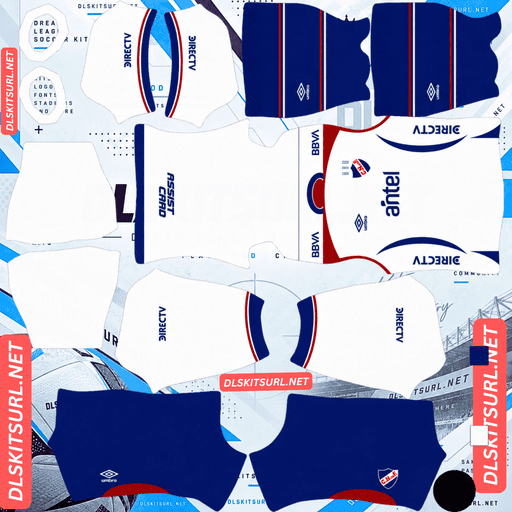
Club Nacional Home Kit
Home Kit 512×512 (2026/27)
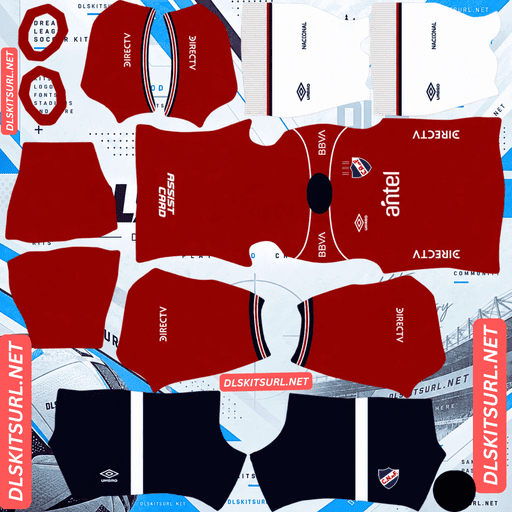
Club Nacional Away Kit
Away Kit 512×512 (2026/27)
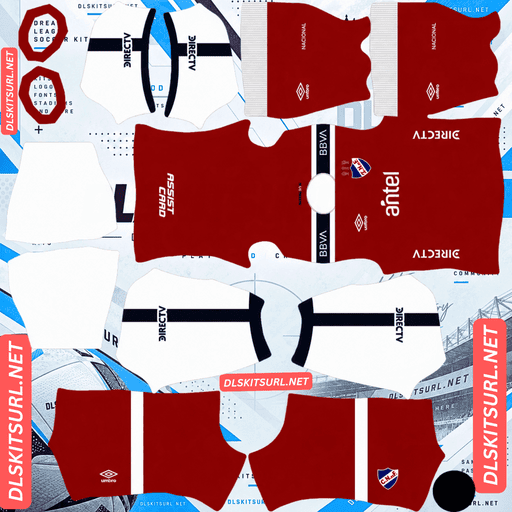
Club Nacional Third Kit
Third Kit 512×512 (2026/27)
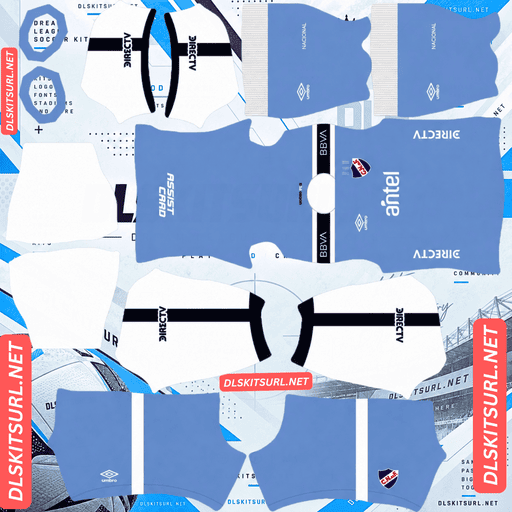
Club Nacional GK Home Kit
GK Home Kit 512×512 (2026/27)

Club Nacional GK Away Kit
GK Away Kit 512×512 (2026/27)
Nacional design their shirts around physical effects more than most clubs covered here. That creates an unusual DLS problem: the files can reproduce cleanly while losing the very feature that makes the real shirt interesting.
The Celeste kit’s map is woven, and both halves fail
Released in 2026 under the “Nacional es Uruguay” concept, the Celeste shirt celebrates the club’s historical connection with the national team. It is predominantly celeste, with an intricate jacquard pattern woven into the fabric showing the contours of Uruguay’s nineteen departments, plus an inscription inside the neck. Umbro produces the shirt.
A jacquard weave is construction, not print
The effect exists in the way the threads are arranged.
A flat 512×512 PNG has no threads and no physical surface. There is therefore nothing for the image to preserve. The weave is not compressed badly; it simply has no equivalent in the file.
Marseille’s woven chassis, Croatia’s woven away, Venezia’s jacquard third, Bahía’s exclusive weave, Juárez’s woven cross and Atlas’s woven anniversary print all run into the same limitation.
And a map is near the top of the density scale
Even if the weave could somehow survive, the map itself could not.
The departmental boundaries are made from fine, continuous lines spread across the entire shirt. At 512×512, the whole garment is effectively being represented at thumbnail-like detail.
This season has already produced several map-based examples. Lugano and Fluminense use street-map graphics that reduce to texture. FC Zürich’s topographic contours are even denser and largely disappear. Houston’s satellite view mainly reduces to colour and texture.
Nacional combines that high information density with a woven effect.
That is about as hostile to a flat kit image as the format gets.
So expect a plain celeste shirt
The map is woven, tonal and extremely detailed. Any one of those characteristics would make it difficult. Together, they make the result predictable.
No file quality can change this.
Judge the Celeste file by the Umbro branding, crest and collar trim instead, and confirm the dimensions. On a computer, right-click the image and open it in a new tab so the browser reports the actual size.
If the map is missing, that is not evidence of a bad URL.
But celeste plays well
The loss of the concept does have one advantage.
DLS players are small on the pitch, so the base colour matters much more than a fine surface pattern.
Celeste is bright and clearly separated from pitch green. It reads as a distinct light-blue shape rather than a dark mass.
So you lose the map and keep a highly visible shirt.
Hoffenheim’s lilac third and Houston’s away create the same general effect: the visual idea is complicated or subtle, but the base colour remains excellent in play.
Use navy or white numbers on the Celeste.
And it has a fixed season
This is important when searching because Nacional’s Celeste shirt is not unique to 2026.
Nacional have worn a celeste shirt in their September matches since 2011, commemorating 13 September 1903, when the Uruguayan national team was represented entirely by Nacional players.
That means a file simply labelled “Nacional celeste” could belong to several different seasons.
Do not identify this kit by colour alone.
Compare the design with the card above. The 2026 version is the one carrying the departmental map woven into the fabric.
The home’s inscription is inside the collar
The 2026 home was presented in March 2026 and debuted in a clásico at the Gran Parque Central. Its concept centres on Nacional’s record of official titles.
Inside the collar is the phrase “Gloria del Fútbol Uruguayo”, accompanied by silhouettes of trophies.
Which is the one position that is absolutely unreachable
The DLS kit template does not map the inside of a collar.
That is not a resolution problem. It is not a contrast problem. The surface simply does not exist in the template.
Nothing printed inside the collar can import into the game, regardless of the manufacturer or how good the original image is.
So expect the inscription and trophy silhouettes to be absent.
And that is unfortunate here because the shirt’s commemorative concept is partly carried by exactly that hidden area.
Napoli’s Partenopei lettering, LAFC’s collar message, Alianza Lima’s collar slogan, Vélez’s “Designed in Bologna” and Monterrey’s neckline text face the same limitation.
Which leaves a clean white shirt
Once the inaccessible detail is removed, the home becomes very straightforward.
Nacional’s shirt is white with red and blue detailing, reflecting the colours of the poncho patrio adopted when the club was founded in 1899.
White is one of the easiest bases to see against the pitch.
The red and blue trim then gives the otherwise plain shirt its structure. Both colours contrast strongly against white, so collar and cuff details should survive well.
That trim is your quality test.
Do not judge the file by whether you can see the commemorative concept. Judge the edges of the details that the game can actually render.
And white needs the right number colour
DLS gets number colours from two small swatches on the kit template rather than from the PNG itself. One controls the shirt numbers and another controls the shorts.
White numbers on a white shirt are invisible.
It is one of the easiest mistakes to make with a light kit because the image preview does not show how the numbers will look during a match.
Use red or navy on the home. Both are club colours and both give the numbers a strong contrast against white.
Nacional make a habit of unreproducible effects
This is not just a problem with the 2026 Celeste.
Nacional have repeatedly used shirt features that depend on something a flat image cannot reproduce.
Recent examples include the jacquard woven map on the 2026 Celeste, a hydrochromic home in 2020 that revealed fan banners and flags when wet, a rubberised crest on the 2020-21 home, phrases woven into that same shirt, and a reversible away in 2025.
Every one of these is outside what a flat image can hold
Weaves and rubberised finishes are physical surface effects. They exist in depth and texture, while a PNG is only a flat image.
Hydrochromic material creates an even more obvious problem. The effect depends on the shirt changing state when wet, so there is no single still image that can communicate both conditions.
That puts these features in the same general category as lenticular crests and UV-reactive logos.
Minnesota and Fenerbahçe have used lenticular crest effects, while Al-Hilal’s UV-reactive third creates the same fundamental problem: the real shirt changes in a way the imported image cannot.
Which has a practical consequence
The strange part is that Nacional’s shirts generally reproduce cleanly.
White, celeste and red are all easy colours for a flat PNG. Their simpler trim is also well suited to 512×512.
But the thing each shirt is actually designed around may be gone.
So do not judge a Nacional file by whether you can see the concept.
You probably will not.
Judge the trim, branding and dimensions instead.
The reversible away is two kits
Nacional’s 2025 away honours the club’s original shirt.
The design recalls the red-and-blue colours worn from the club’s foundation in 1899 until Nacional changed to white in 1902. The shirt is reversible, effectively telling that history through its two faces.
Which gives you a choice, and a trick
DLS stores one image per kit slot.
A reversible shirt has two faces, so a single PNG can only show whichever side that file represents.
But you have three outfield slots.
That means you can put each face into its own slot and effectively carry both versions of the reversible design in the game.
It is a rare case where a physical feature translates into something DLS can actually make useful — just not in the way the original designers intended.
Check which face a file shows before downloading.
Both versions may be labelled as the 2025 away.
Which Club Nacional kit survives best?
The home is the strongest overall. Its white base is extremely visible, and the red-and-blue trim survives well. The collar inscription is unreachable, but that does not affect the structure of the shirt.
The Celeste is also highly playable. The departmental map disappears, but the light-blue base remains bright and easy to follow.
The 2025 reversible away is different. Each file can show only one face, but that also gives you the option of using the three outfield slots to keep both versions.
How to tell if a Club Nacional file is current
Four checks will settle most searches.
First, look at the Umbro branding. Umbro have supplied Nacional for years, so this alone does not identify the season.
Second, the 2026 Celeste should show the departmental map in the source image, even though that map will disappear after import.
Third, be careful with Celeste files. Nacional have produced one for September fixtures in many recent seasons, so colour alone is not enough.
Finally, compare the design directly with the kit cards above.
The Celeste is the easiest Nacional shirt to misidentify.
A file can look completely legitimate while belonging to another season.
A note on Uruguayan season labels
Uruguay’s football season runs across a single calendar year.
That is why Nacional’s current kits are labelled 2026 rather than 26-27.
A file labelled 2026 is therefore current in the way a European club’s 26-27 file would be.
Check the design, not just the year in the filename.
How to use a Club Nacional DLS kits URL
Copy the link using the button on the kit card, rather than copying the browser address. The browser address often points to the page containing the image instead of the image itself.
In Dream League Soccer, open My Club → Customise → Kit. Use Kit rather than Logo because the badge is imported separately.
Select your slot before pasting. Whatever slot is selected is the one that will be replaced.
Press and hold the URL field, tap Paste, then choose Confirm. Older versions of DLS may call that button Download.
You have three outfield kit slots.
That gives you a useful decision with Nacional: you can carry the home and Celeste, then use the remaining slot for one face of the reversible away. Alternatively, if you want both faces of the reversible shirt, you can replace one of the current kits with the second face.
The Nacional Umbro centenary special is another possible choice. DLS accepts any working 512×512 kit URL regardless of the design’s age.
The first custom kit requires a one-time gem unlock. After that, changing kits is free.
Test the link first
Open the URL in your browser before importing it into the game.
The image should appear by itself, without headers, buttons or other webpage content around it. The address should normally end in .png.
A page displaying the shirt is not the same thing as a direct image URL. DLS needs the actual image file.
For the Celeste, do not use the map as your quality test. It is going to disappear regardless of how good the file is.
For the home, inspect the red and blue trim, collar, crest and Umbro branding instead.
Those are the details that can actually tell you whether the file is clean.
Why do Club Nacional kit URLs stop working?
There are three common causes.
Free image hosts delete files. Unused uploads can disappear after months or years, leaving a page or old reference pointing toward a file that no longer exists.
Nacional are one of Uruguay’s two biggest clubs, so domestic coverage is strong. But Uruguayan football still generates less upload activity than Brazil or Argentina, and the special or anniversary shirts are naturally the most vulnerable.
Hotlink protection can block DLS. A host may allow the image to load normally in your browser while rejecting requests coming from another application. That is why a URL can work when you open it but fail after you paste it into the game.
The preview and direct file can be different. A webpage may display a thumbnail hosted on its own server while the URL supplied to you points somewhere else. The preview can remain available even after the actual image link has stopped working.
Here, the shirt shown and the URL copied are the same file on the same server.
The Club Nacional badge
Set the crest separately through My Club → Customise → Logo.
Nacional’s badge uses the interlocked CNdeF monogram in blue on white, with red detailing.
That bold monogram is well suited to DLS. It has one dominant shape and remains recognisable at the small size used in-game.
The weak point is the interlocking lettering itself. Overlapping letters can soften when reduced, so use a genuine 512×512 badge file rather than an enlarged version.
Blue against white provides strong contrast, which helps the badge remain readable.
Remember that DLS crops every imported badge into a circle. Leave clear space around the artwork rather than trimming the image tightly against the edges.
Nacional have also used period crests on heritage shirts. The 2020-21 home, for example, carried a rubberised 1980 Intercontinental Cup design.
If you choose a heritage kit, remember that the badge is global. A period crest selected for one shirt will appear across every kit you own.
Houston Dynamo’s Archive Kit and Rosario Central’s retro-crest third create the same problem.
Keeping your Club Nacional kits
Custom kits are stored on your device rather than being tied to your account.
A normal game update may leave them in place, but reinstalling the game or moving to another phone can remove the kits and badge.
Nacional makes this especially easy to confuse because the club has an annual Celeste shirt and a reversible away with two possible faces.
Save all four URLs in a notes app before you start.
Also note which Celeste season you used and which face of the reversible shirt your file represents.
FAQ FOR RANK MATH
What is a Club Nacional DLS kits URL?
A direct link to a 512×512 PNG Nacional shirt that you paste into Dream League Soccer’s kit screen. A working direct image link should end in .png.
Will the map of Uruguay on the Celeste kit appear in DLS?
No. The pattern is woven into the fabric, and the departmental map itself is extremely dense. A flat 512×512 image cannot reproduce either the physical weave or that level of fine map detail.
Is the missing Celeste map a file-quality problem?
No. Expect the imported shirt to look largely like a plain celeste shirt. Judge the file using the Umbro branding, crest, collar trim and dimensions instead.
Will the “Gloria del Fútbol Uruguayo” inscription appear?
No. It is printed inside the collar, and the DLS kit template does not map interior collar surfaces at all.
How should I check a Nacional kit file?
Check the trim, branding, crest and dimensions rather than looking for the physical effect that inspired the shirt.
Can I use both sides of the reversible Nacional away?
Yes. Each PNG shows one face, but DLS gives you three outfield slots. You can place the red original and white successor in separate slots.
Why are there so many Celeste Nacional shirts?
Because Nacional have worn a Celeste shirt for September matches since 2011, commemorating the 13 September 1903 match when the Uruguayan national team was represented entirely by Nacional players. Check the actual design rather than identifying the kit by colour alone.
What number colour should I use on the Nacional home?
Use red or navy. White numbers disappear against the white shirt.
What number colour works on the Celeste?
Use navy or white. Both provide enough contrast against the light-blue base.
Can I use an older Nacional kit in DLS?
Yes. Any working 512×512 direct PNG can be imported. In fact, an older design may reproduce better if its main features are simple printed colours and trim rather than physical effects.