
A Lyngby Boldklub DLS kits URL is a direct link to a 512×512 PNG Lyngby shirt that you paste into Dream League Soccer. All four slots are below, with each file loaded into the game before it was placed on this page.
Lyngby Boldklub Logo
Official Logo 512×512 (2026/27)
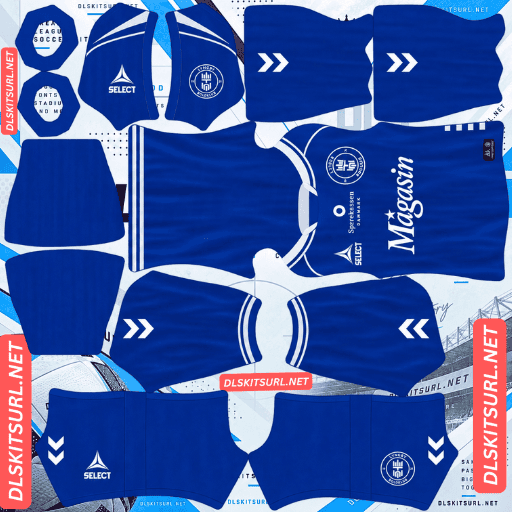
Lyngby Boldklub Home Kit
Home Kit 512×512 (2026/27)

Lyngby Boldklub Away Kit
Away Kit 512×512 (2026/27)
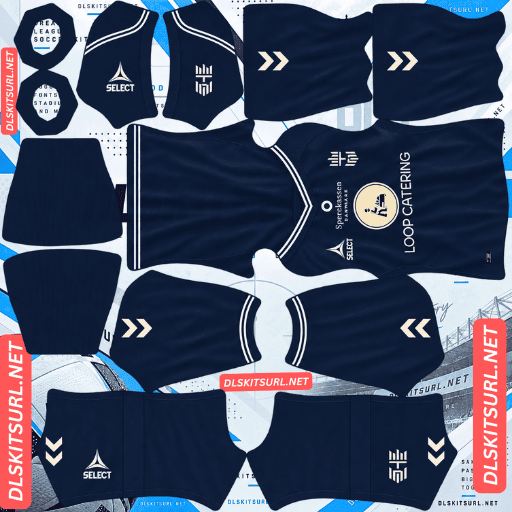
Lyngby Boldklub Third Kit
Third Kit 512×512 (2026/27)

Lyngby Boldklub GK Home Kit
GK Home Kit 512×512 (2026/27)
Lyngby’s 26-27 third kit creates an unusual DLS problem: it looks so close to the home that using both can leave you with only two genuinely different kits.
Don’t fill two slots with the same kit
Lyngby released the home in blue and white and a navy third together on 25 July 2026, both made by Select. The third was noted as offering basically no contrast to the home.
Which matters more here than on a real pitch
On a real pitch, a third kit exists primarily to prevent a clash with an opponent. A third that resembles the home is inconvenient, but it does not necessarily make the kit unusable.
Dream League Soccer is different.
You have three outfield kit slots, and those slots make up the entire visual rotation of your team. If two shirts look almost identical, you effectively have two kits instead of three.
That makes Lyngby’s third more problematic in DLS than it is on paper.
And blue against navy is the lowest pairing there is
Blue and navy are already close in value, and there is not enough hue separation to create a strong visual break.
This site has treated the pairing as its lowest-contrast combination on other kits, including Inter Milan’s away and Minnesota United’s home.
At match distance, a blue shirt and a navy shirt can simply read as the same shirt.
The comparison is straightforward: yellow on navy and white on navy provide maximum contrast, while red on navy remains strong. Blue on navy sits at the weak end of the scale.
So use the third slot for something else
There are three sensible alternatives.
Use the away first, provided it is clearly different from both the home and third. Check the card above. If it is light or otherwise contrasting, it gives you something the navy third does not.
Use a 25-26 or 24-25 Lyngby third. The club had a third in both seasons, and DLS does not require a kit to be from the current season for a working 512×512 URL to function.
Use the 26-27 pre-season home. Lyngby released a separate pre-season design, making it another legitimate option. Expect fewer files, though, because pre-season shirts are photographed and uploaded less often than regular match kits.
If you have a choice, go lighter. A blue home and navy third already push the rotation toward the dark end, so a white or bright kit adds much more variety.
This is worth checking on any club
Slot redundancy is easy to overlook. People often assume that the three official kits automatically make the best three DLS choices.
Put the source images beside each other before importing.
If two kits still look like the same shirt when reduced to thumbnail size, one of them probably belongs outside your main three.
The home is the strong one
Lyngby’s 26-27 home is blue and white, and it rates well among supporters.
Which is a good combination here
DLS players are displayed relatively small, so kit visibility depends heavily on how far the colours separate from the pitch and from each other.
Blue separates cleanly from green grass, while white is one of the brightest colours available. Blue against white also creates maximum internal contrast.
That means the important boundaries in the design should remain clear at match distance, whether they come from stripes, panels or trim.
What to check
Compare the file with the card above and look for four things:
Any blue-to-white boundary should be sharp.
Collar and cuff trim should have clean edges.
Select branding, crest and sponsor should remain crisp.
The image should actually be 512×512.
On a computer, opening the image in a new tab lets you check its actual dimensions rather than relying on how large the preview appears.
Number colour
DLS takes number colours from two small swatches in the kit template, not from the PNG itself. One controls shirt numbers and the other controls shorts numbers.
For the blue shirt, white is the obvious choice. On a white section, navy or red gives you contrast. On the navy third, use white.
Avoid white numbers on a white shirt. They disappear completely, and the kit preview will not necessarily make that problem obvious because the numbers are controlled separately.
The away
Lyngby’s 26-27 away was released with the rest of the range and is also made by Select.
Compare the file with the card above rather than relying on a written description. Apply the same checks to its colour boundaries, collar, cuffs, branding, crest, sponsor and dimensions.
And check it against the other two
The away is the kit that determines whether your three-slot rotation actually works.
If it is light or brightly coloured, use it. It gives you the visual separation that the navy third lacks.
If the away is also dark, the older third or pre-season shirt becomes the better choice.
Which Lyngby kit survives best?
The home has the strongest combination of colour contrast and match visibility. The away needs to be judged against the card because it determines whether the rotation has enough variety. The navy third should reproduce easily because its plain colour does not demand much from a 512×512 file, but that same simplicity makes it a poor choice for your main three because it duplicates the home visually.
Select is an unusual supplier
Lyngby’s kits are made by Select, the Danish brand more widely associated with footballs than shirts.
Which has two consequences
The first is availability. Select supply a relatively small number of clubs, so there are fewer kit files circulating than you might find for a similar-sized club wearing Adidas or Puma.
The second is construction.
Smaller suppliers producing for smaller clubs are less likely to rely on the kind of sublimated textures, woven jacquards and embossed surfaces that make flat 512×512 reproductions difficult.
That generally makes Lyngby’s shirts easier to reproduce faithfully.
It is a similar trade-off to Union Saint-Gilloise with O’Neills and Alianza FC with Adidas teamwear: simpler manufacturing often gives the DLS file fewer ways to lose detail.
And it dates a file cleanly
Lyngby have used Adidas and Nike in earlier periods, so a Select logo places a file in the current supplier era.
It does not identify the exact season by itself, however, because Select have supplied the club for several seasons.
Use the sponsor as the second marker.
Lyngby came straight back up
Lyngby spent 25-26 in the Danish First Division before returning to the Superliga for 26-27.
Which thins that season
Second-tier kits generally receive less coverage than top-flight kits.
That makes 25-26 Lyngby files harder to find, including the third that would otherwise make a useful replacement for the current navy third.
The current kits should be easier to locate now that the club is back in the Superliga.
The 24-25 kits also came from a Superliga season, making the 24-25 third the better-covered older alternative.
SønderjyskE, Odense, AC Horsens and Viborg have faced similar coverage issues, while Vaduz provides the reverse example after moving up.
And watch for a Home V2
Lyngby also ran a second home design in 24-25.
That means a file labelled something like “Lyngby 24-25 home” may not identify a single design. Check the actual shirt rather than trusting the filename.
Randers, Silkeborg and FC Copenhagen create similar problems with multiple versions.
How to tell if a Lyngby file is current
Four checks make the identification much easier:
Select branding — useful for the supplier era, but not precise enough to date the file by itself.
The sponsor — a tighter marker for separating versions.
A navy third — this is the distinctive 26-27 clue.
The source card — compare the actual design instead of relying on a season label.
The navy third is particularly useful because it separates this range from the older Lyngby kits at a glance.
A note on the Danish season
The Danish Superliga season crosses two calendar years, so the current range is labelled 26-27.
A file marked simply “2026” could therefore refer to either the 25-26 or 26-27 set. That distinction matters here because 25-26 was a second-tier season and the two periods will not have the same level of file coverage.
Check the shirt itself rather than trusting the year in the filename.
How to use a Lyngby Boldklub DLS kits URL
Copy the image link using the copy button on the kit card, not the address shown in your browser. The browser address usually points to the page displaying the image rather than the PNG itself.
In Dream League Soccer, open My Club → Customise → Kit. Do not use Logo; the badge has its own import screen.
Select the kit slot before pasting. Press and hold the field, tap Paste, then choose Confirm. Older versions may label that button Download.
Before importing, compare the three source images side by side. If the blue home and navy third look almost identical at thumbnail size, replace the third with a more contrasting option.
The first custom kit requires a one-time gem unlock. Once that is done, later kit changes are free.
Test the link first
Open the URL in your browser before putting it into the game.
A correct link should show the image by itself, with the address ending in .png. If you see a page with headers, buttons or other elements around the picture, you have a viewer page rather than the direct file.
The navy third is a poor visual quality test because a plain dark shirt can look correct even when the source file is not ideal. Check its dimensions and Select branding instead.
The home gives you a better test. Its blue-to-white boundaries should remain sharp because the contrast between the two colours is strong.
Why do Lyngby kit URLs stop working?
Three problems account for most broken kit links.
Free image hosts can delete files. Old uploads may be removed after months or years even though the original page or saved URL still exists. Lyngby has fewer circulating files than many larger Superliga clubs, and the 25-26 second-tier kits and pre-season shirts are particularly worth saving.
Hotlink protection can block DLS. A browser may load an image because the request comes directly from the host, while the game’s request is refused. That is why a link can work when opened manually but fail when pasted into DLS.
The preview and direct file can be different. A page may display a thumbnail hosted on one server while the copied link points somewhere else. The page continues to work even after the actual image URL has died.
For the files listed here, the displayed shirt and copied URL refer to the same file on the same server.
The Lyngby Boldklub badge
Import the crest through the same My Club → Customise area, but choose Logo rather than Kit.
Lyngby’s badge uses the club’s blue-and-white identity and includes the club initials and 1921 founding year.
The four-digit year is the most vulnerable detail. Small numerals soften quickly when DLS renders a badge, so start with a genuine 512×512 badge rather than an enlarged low-resolution image.
Blue and white provide excellent contrast, which helps the main badge shape remain readable.
DLS crops imported badges into a circle, so leave enough clear space around the artwork. A file cropped tightly to the outer edge of the crest can lose part of the design.
The badge is especially important on the navy third. The shirt itself is visually simple, so the crest becomes one of its main defined elements and helps distinguish it from the home.
St. Gallen, Union Saint-Gilloise, Lausanne-Sport, AGF Aarhus and Odense have similar founding-year details in their badges.
Keeping your Lyngby kits
Custom kits are stored on your device rather than attached to your account.
A normal game update may leave them in place, but reinstalling the game or changing phones can remove the saved kits and badge.
For Lyngby, make a note of which shirt you used in the third slot, because the official navy third is not necessarily the best choice for your rotation.
Save all four URLs somewhere outside the game before importing them.
FAQ FOR RANK MATH
What is a Lyngby Boldklub DLS kits URL?
A direct link to a 512×512 PNG Lyngby shirt that you paste into Dream League Soccer’s kit screen. A working direct file normally ends in .png.
Why shouldn’t I use the official third kit?
The 26-27 third is navy while the home is blue, so there is very little visual separation between them. Using both can make two of your three outfield slots look almost identical.
What should I put in that slot instead?
Use the away if it provides enough contrast. Otherwise, consider the 24-25 or 25-26 third, or the 26-27 pre-season home. A light kit is preferable because the home and official third already occupy the blue-to-navy range.
How do I spot this problem on other clubs?
Put all three source images beside each other before importing. If two shirts still look nearly identical when reduced to thumbnail size, replacing one will give you a more useful DLS rotation.
Does the home reproduce well?
Yes. Blue and white provide strong internal contrast, so the main colour boundaries should remain clear at 512×512.
Who is Select?
Select is a Danish brand better known for footballs and supplies a smaller group of clubs. That can make files harder to find, but simpler shirt construction is generally easier to reproduce in a flat PNG.
What number colour should I use?
White works on blue and navy. Navy or red can work on white. Avoid white numbers on a white shirt because they disappear.
Why are 25-26 Lyngby kits harder to find?
Lyngby spent that season in the Danish First Division, which generally receives less kit-file coverage than the Superliga. The 25-26 third is therefore a useful option but can also be harder to locate.