

An FC St. Gallen DLS kits URL is a direct link to a 512×512 PNG St. Gallen shirt that you paste into Dream League Soccer. All four slots are below, with each file loaded into the game before it was added to this page.

FC St. Gallen Logo
Official Logo 512×512 (2026/27)
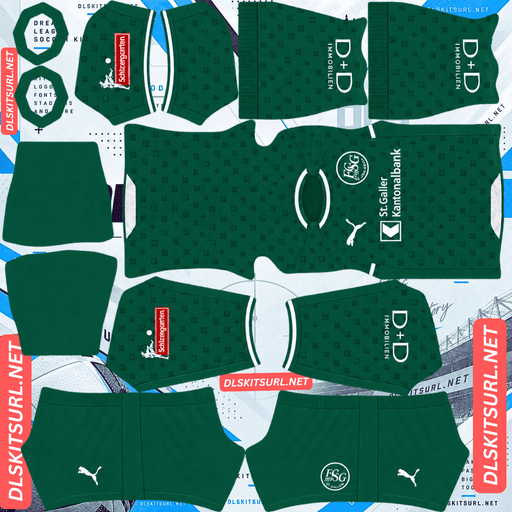
FC St. Gallen Home Kit
Home Kit 512×512 (2026/27)
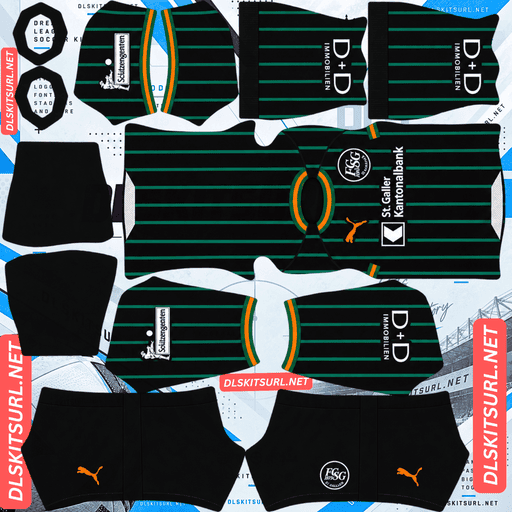
FC St. Gallen Away Kit
Away Kit 512×512 (2026/27)
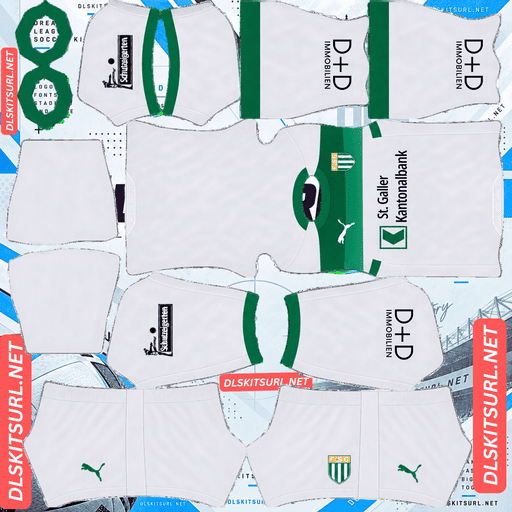
FC St. Gallen Third Kit
Third Kit 512×512 (2026/27)

FC St. Gallen GK Home Kit
GK Home Kit 512×512 (2026/27)
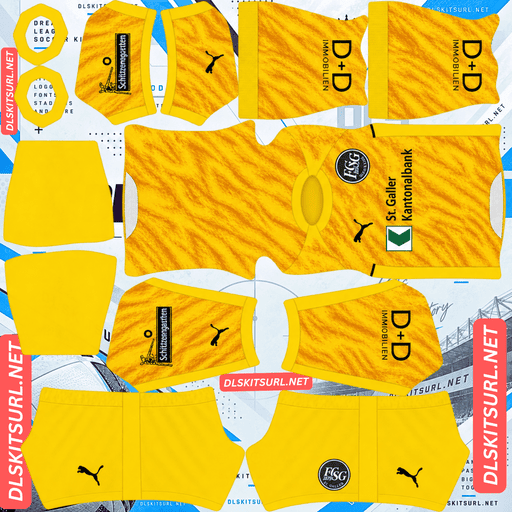
FC St. Gallen GK Away Kit
GK Away Kit 512×512 (2026/27)
St. Gallen play in green, and that creates a problem DLS cannot really solve: green is also the colour of the pitch. That changes which kit is actually worth putting in your main slot.
The white third is more useful than the green home
Dream League Soccer renders players relatively small, so kit visibility depends heavily on how far the shirt colour separates from the grass.
Traditional football green is one of the worst base colours for that reason. St. Gallen’s green sits in the mid-to-deep range rather than being a bright, almost fluorescent shade that clearly reads as a separate colour. At match distance, a predominantly green shirt can therefore merge into the pitch.
The third kit takes the opposite approach. Released on 26 May 2026, it is predominantly white with a wide green element running across the shirt.
White gives you maximum separation from the grass. The green band then adds a strong horizontal break, so the player does not simply become one pale shape.
That makes the third the practical choice for the home slot.
Normally, the home shirt is the kit you build your setup around. Here, it makes more sense to put the white third in that slot and keep the green home available for rotation.
The same principle applies to other green clubs such as Sassuolo, Nacional and Palmeiras. The closer the main colour is to the pitch, the more important brightness and internal contrast become.
The wide green band survives — the seams are the real test
Green against white has enough contrast to survive 512×512 resolution and normal compression. The band is also wide, so there is no fine texture for the file to lose.
Its weakness is geometry.
A horizontal band creates a very obvious expectation that the line will continue around the shirt. It needs to meet at both side seams and both sleeve junctions. Add the upper and lower edges of the band and you have six alignment points to check.
A mismatch of only a few pixels can become obvious once the shirt is wrapped around the DLS player model. The band may look perfectly straight in the flat PNG and then step upward or downward where the sleeve meets the body.
That is why this kit needs an in-game check rather than just a browser preview.
Look at the shoulders and side areas after importing. Does the band remain at the same height? Is its thickness consistent around the shirt?
The flat file cannot answer those questions.
Dream League Soccer also places your imported crest over the chest area, where the band runs. That will interrupt part of the line, but it is only a partial loss: the band remains visible on both sides of the badge.
Boca Juniors’ yellow chest band and Olimpia’s black franja have the same basic issue.
Choose the number colour separately
DLS does not take your number colour from the PNG. It uses two small swatches in the kit template: one for shirt numbers and another for shorts.
That creates an easy mistake on light shirts.
White numbers on the white third disappear almost completely. The kit preview will not warn you because it is showing the shirt image rather than the final player numbers.
Use green or black numbers on the white third. If the band reaches the back, black is the safer option because green can disappear into the band.
For the green home, use white numbers. White gives the strongest contrast against the darker shirt.
The 26-27 home and away are straightforward files
St. Gallen’s 26-27 home and away were released together in summer 2026, produced by Puma with St. Galler Kantonalbank as sponsor.
Compare the files against the kit cards rather than relying on descriptions from elsewhere. The usual structural checks matter most:
Colour boundaries should be sharp rather than smeared.
Collar and cuff trim should have clean edges.
Puma branding, crest and sponsor should remain crisp.
The image should actually be 512×512.
St. Gallen’s recent shirts are generally straightforward, which is both an advantage and a trap.
The 25-26 home and away were also relatively plain: green and white for the home, and black with white and claret for the away.
A simple shirt has little for 512×512 to destroy. There is no complicated texture, gradient or fine pattern to test. A weak file can therefore look perfectly convincing.
On these designs, judge the file by its dimensions and defined elements such as the Puma logo, crest and sponsor rather than by how impressive the shirt looks in a browser.
Bologna’s away, Monza’s home, Columbus Crew’s home and Servette’s cream away fall into the same category.
Black is the other visibility problem
St. Gallen’s 25-26 away was black with white and claret.
If the 26-27 away keeps that kind of palette, it carries a different visibility penalty. A dark shirt can become one large mass at match distance, with only its brighter details separating it from the background.
White accents help considerably.
Claret does much less because it is itself a deep colour and has limited separation from black. That is the difference between an accent surviving in the file and an accent actually helping you track the player.
Zamalek’s fluorescent away and Alavés’ pastel pink show the useful side of strong contrast. Inter Miami’s anthracite stripes and Dortmund’s tonal lightning show the opposite: technically present, but visually weak once the player is moving.
Puma is the clean supplier marker
St. Gallen moved to Puma in 2023, ending the Jako partnership.
That gives you a useful first filter when checking older files:
Puma = 2023 onward
Jako = 2022-23 or earlier
Puma alone cannot identify the exact season because the supplier has now been with the club for several years. It does, however, separate the current era from everything before it immediately.
Basel, Grasshoppers, Fiorentina, Alavés and FC Zürich have all had recent supplier changes as well, so manufacturer logos can be useful when kit filenames are unreliable.
The yellow shirts are worth hunting down
St. Gallen have produced several distinctive specials that are legitimate options in DLS as long as you have a working 512×512 file.
The archive includes an all-black special from 21-22, a mashup special-edition shirt from 22-23 that was worn for a single home fixture, and a predominantly yellow third from 22-23 with black sponsor logos.
The yellow shirt is the interesting one for DLS.
Yellow sits much farther from pitch green than St. Gallen’s traditional green. It is bright, saturated and immediately readable, while the black logos provide maximum contrast.
For a club whose main colour creates one of the game’s biggest visibility problems, that yellow shirt may be the most useful design in the archive.
Columbus Crew, Young Boys, Union Saint-Gilloise and Boca Juniors benefit from the same colour advantage.
The problem is availability. One-off shirts receive a burst of attention and then become much harder to find, while the Swiss Super League produces less upload volume than the major European leagues.
A single-fixture special such as the 22-23 mashup is therefore one of the least reliable files to locate.
Basel’s Carnival kit, Grasshoppers’ limited edition and Lausanne-Sport’s anniversary shirt fall into the same category.
Four checks identify the current files
Before importing anything, make four quick checks:
Look for Puma, not Jako. Puma took over in 2023.
Check for St. Galler Kantonalbank as the sponsor.
The 26-27 third should be predominantly white with a wide green band.
Compare the actual file against the kit cards above.
The third point is the most useful because the wide band is a structural feature rather than just another shade of green.
How to import an FC St. Gallen DLS kit URL
Copy the direct image URL using the button on the kit card, not the address from your browser. The browser address usually points to the page containing the image rather than the PNG itself.
In Dream League Soccer, open My Club → Customise → Kit. Do not open Logo; badges are handled separately.
Select the kit slot before pasting the URL. Whatever slot is open is the one that gets replaced.
Press and hold the URL field, choose Paste, then tap Confirm. Older versions may label the final button Download.
Three outfield kits fill the three regular slots, leaving the goalkeeper slot separate.
Because the white third is easier to follow than the green home, it is worth thinking about the slot arrangement before importing. The first custom kit also requires a one-time gem unlock. Once that is done, changing the kits is free.
Test the direct PNG before importing
Open the copied URL in your browser first.
The image should appear by itself, and the address should end in .png. If you see a page with headers, buttons or other surrounding content, you have a viewer page rather than the direct image file.
For the white third, the browser test is not enough to verify the most important feature. The green band will look fine even when the file is technically weak.
Import it and inspect the sides and shoulders, where the band crosses the panel seams.
For the home and away, the designs are simpler, so check the 512×512 dimensions and make sure the Puma branding, crest and sponsor are sharp.
Why a DLS kit URL can stop working
Three problems account for most broken kit links.
Free image hosts can delete files. Old or unused uploads may be removed after months or years while the original link continues to look legitimate. St. Gallen is reasonably well supported among Swiss clubs, but Swiss Super League uploads are still much thinner than those from the biggest leagues. One-off specials carry the greatest risk.
Hotlink protection can block DLS. A host may allow its own website to display an image while refusing requests coming from somewhere else. Your browser can therefore show the shirt normally while Dream League Soccer receives a failed request.
The preview and direct file may be different. Some sites display a thumbnail hosted locally while the copied URL points to another file or service. The page can remain intact even after the actual image link stops working.
Here, the shirt shown and the copied URL are the same file on the same server.
Add the St. Gallen badge separately
Set the crest in the same session by opening My Club → Customise → Logo rather than Kit.
St. Gallen’s crest uses green and white and carries the 1879 founding year. The four-digit date is the weakest part at DLS size because small numerals soften before the main shapes do.
Use a genuine 512×512 badge rather than an enlarged file.
Green and white provide strong contrast, which helps the crest remain readable beside the score and on the player model.
Remember that DLS crops imported badges into a circle. Leave clear space around the artwork instead of using a file that is tightly trimmed to the crest.
The badge matters especially on the green home because the shirt itself is relatively plain. Once the colour blends with the pitch, the crest becomes one of the few strongly defined elements on the player.
Union Saint-Gilloise and Lausanne-Sport have the same general issue with founding years inside their crests.
Save the URLs before you change anything
Custom kits are stored on your device rather than in your account.
An update will normally leave them in place, but reinstalling the game or changing phones can remove the custom kits and badge.
St. Gallen also has an unusually sensible reason to keep the links organised: the white third is the better main-slot choice even though it is not the official home shirt.
Save all four URLs in a notes app and label which one is the home, away, third and goalkeeper file before you start changing slots.
FAQ FOR RANK MATH
What is an FC St. Gallen DLS kits URL?
It is a direct link to a 512×512 PNG St. Gallen shirt that you paste into Dream League Soccer’s kit screen. A working direct image link should end in .png.
Which St. Gallen kit should I use as my home?
The white third if readability is your priority. Green is one of the hardest base colours in DLS because it sits close to the pitch, while the white shirt separates immediately from the background.
Why is green such a problem in Dream League Soccer?
Traditional football green is close to pitch green in both hue and tone. Because DLS renders players relatively small, the shirt can blend into the grass instead of standing out clearly.
What should I check on the white third?
Check the wide green band after importing. It needs to remain at the same height where the body meets the sleeves and around the side seams.
Will the green band survive at 512×512?
Yes. The band is wide and green against white provides strong contrast. The main risk is not the band’s visibility but its placement after the flat image is wrapped onto the player model.
What number colour should I use?
Use green or black on the white third, with black being safer if the band reaches the back. Use white numbers on the green home.
Who makes St. Gallen’s kits?
Puma has supplied St. Gallen since 2023. A Jako logo indicates a 2022-23 or earlier shirt.
Is there an older St. Gallen kit worth using?
The 22-23 yellow third is particularly useful in DLS. Yellow is far easier to distinguish from pitch green than St. Gallen’s traditional green, while the black logos provide strong contrast.