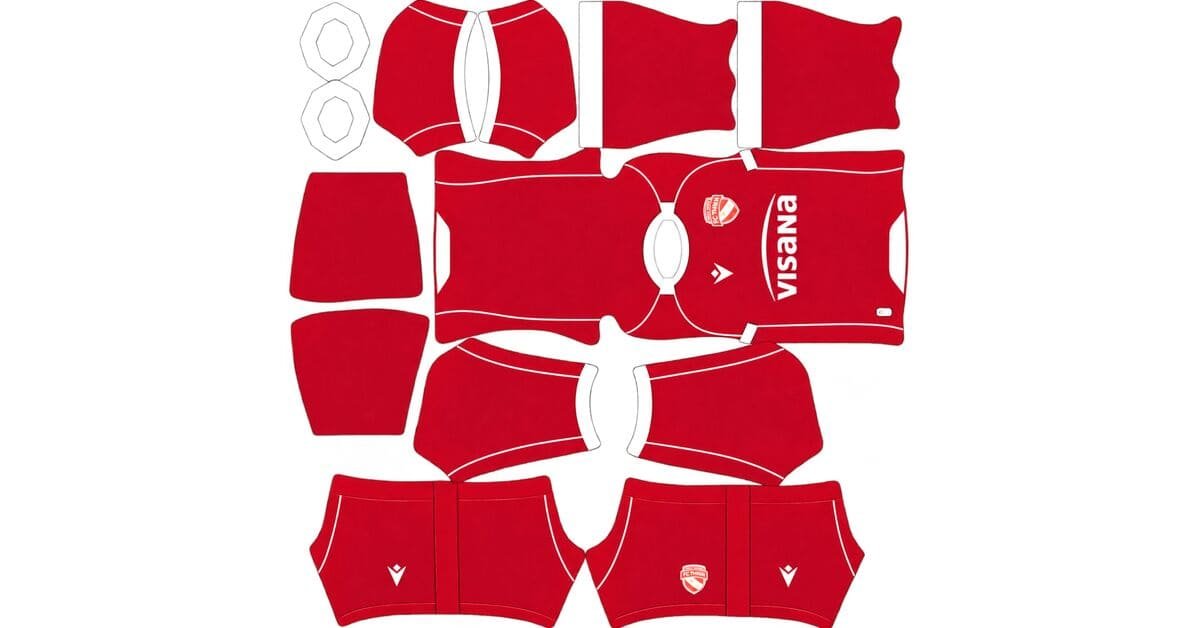
An FC Thun DLS kits URL is a direct link to a 512×512 PNG Thun shirt that you paste into Dream League Soccer. All four slots are below, with each file loaded into the game before it was added to this page.

FC Thun Logo
Official Logo 512×512 (2026/27)
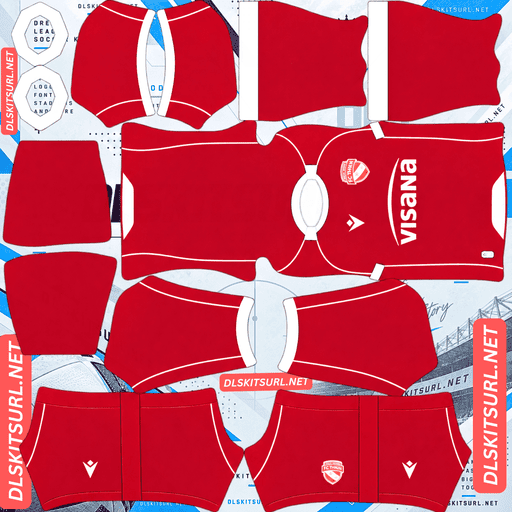
FC Thun Home Kit
Home Kit 512×512 (2026/27)

FC Thun Away Kit
Away Kit 512×512 (2026/27)

FC Thun Third Kit
Third Kit 512×512 (2026/27)
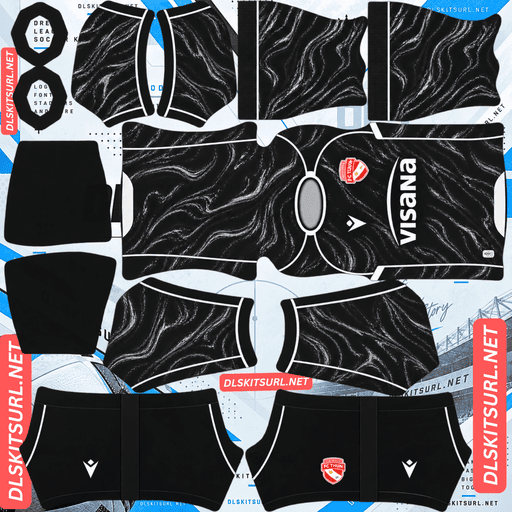
FC Thun GK Home Kit
GK Home Kit 512×512 (2026/27)

FC Thun GK Away Kit
GK Away Kit 512×512 (2026/27)
Thun have a separate European kit set this season, but that does not automatically make the European file worth finding. In DLS, most of what makes it different simply disappears.
Don’t bother hunting for the Conference League version
Thun’s 26-27 European kits use the same split graphic architecture as the domestic shirts. The differences are mainly a monochrome club crest, white branding and official UEFA competition sleeve badges.
Two of those three differences are effectively irrelevant in DLS.
The crest gets overwritten
Dream League Soccer places your imported badge on the chest, over the shirt’s own crest.
So whether the source shirt has a full-colour Thun crest or the monochrome European version, you will not actually see that original badge once your custom kit is loaded.
The UEFA patches are too small to matter
Competition badges sit on the upper sleeve, which is already one of the smallest mapped areas on the kit.
UEFA roundels contain enough fine detail to become extremely small at DLS scale. Expect them to disappear or reduce to an indistinct mark.
The white branding survives, but that is a minor difference.
The two versions are therefore almost the same file
Same base. Same split. Same colours.
The major distinguishing features are a crest DLS overwrites and sleeve patches the game cannot reproduce properly.
So if the domestic version is easier to find, use it.
You lose nothing important.
This applies to European variants more generally. Clubs often change the badge treatment, add competition patches or alter sponsor presentation for UEFA matches, but DLS removes, shrinks or overwrites much of that.
Basel’s Europa League variant, Lausanne-Sport’s Conference League home and Union Saint-Gilloise’s separate European shirts fall into the same category.
The exception is a European shirt that actually changes the colour or layout. That is worth finding.
A badge-and-patch variation is not.
The split graphic needs one check before importing
Thun’s 26-27 shirts are built around what Macron describes as a split graphic architecture.
The direction of that split matters more than it might seem.
Vertical, horizontal and diagonal splits behave differently
A vertical half-and-half split has a relatively simple alignment requirement, but it introduces a major risk: the file can be mirrored.
A diagonal split has the same problem, with the added difficulty of keeping the angle correct through every panel and seam.
A horizontal split has no real mirror problem, but it creates a much larger alignment check because the boundary has to remain at the same height around the shirt.
Atlas, Cagliari, Grasshoppers and Universidad de Chile have all used half-and-half constructions. Monaco and Minnesota provide diagonal examples, while Olimpia and St. Gallen show the horizontal-band version.
For Thun, identify which side carries which colour before importing.
A mirrored vertical or diagonal shirt can look completely believable in the flat image while being wrong once it is on the player. After import, there is no easy way to work out whether the original file was reversed.
Open the file at full size
The split boundary is the design.
If it looks soft, blurred or smeared in the PNG, there is very little else on the shirt that can compensate for it.
Confirm the actual dimensions too. On a computer, right-click the image and open it in a new tab so the browser can report its real size.
For a horizontal split, import the kit and inspect it from the side. The boundary should remain at the same height where the body meets the sleeves and around the side seams.
Macron’s new fabric will not appear
This is important for every Macron 26-27 kit.
Macron built its 26-27 range around 3D knit jacquard fabrics, combining a woven pattern with physical surface relief.
There are two surface effects, and neither exists in a PNG
Jacquard is created through the arrangement of the threads themselves.
A 3D knit adds raised and recessed sections on top of that construction.
A 512×512 PNG has neither threads nor physical depth.
There is therefore nothing to compress badly. There is simply nothing in the file format capable of carrying the effect.
If a Thun shirt looks much flatter in DLS than it does in launch photography, that is the fabric disappearing rather than necessarily a bad kit file.
Basel, Lausanne-Sport, Servette, Sion, Alavés, Bologna, Udinese and Hoffenheim face the same limitation with their Macron 26-27 shirts.
The split is actually the good part
With the fabric gone, the split graphic becomes the main feature left on the shirt.
That is good news because colour blocking is exactly what a flat 512×512 image handles well.
Large areas with a hard boundary survive.
You lose the surface treatment but keep the structure.
Marseille’s woven chassis, Croatia’s woven away, Venezia’s jacquard third and Nacional’s jacquard map all run into the same problem: the construction disappears even when the underlying shirt file is perfectly good.
Red and white are doing most of the work
Thun’s red-and-white identity is extremely friendly to DLS.
Dream League Soccer renders players small, so the distance between the shirt and the pitch matters.
Red separates strongly from green grass, while white is the brightest practical shirt colour.
Then red against white creates maximum internal contrast.
That gives the split graphic everything it needs: a bright base, a clearly different second colour and a hard boundary between them.
A good 512×512 file should therefore reproduce the red-and-white split very cleanly.
Use a third number colour
Number colours come from two small swatches in the DLS kit template, not from the PNG itself.
One controls shirt numbers and the other controls shorts numbers.
On a split red-and-white shirt, navy or black is the safest choice.
Red would disappear into the red half.
White would disappear into the white half.
Because both club colours appear on the back, a third dark colour is the only reliable option across the whole shirt.
White numbers on a white section are the classic mistake on pale kits, and the normal preview will not warn you because it does not show the final player numbers.
The 25-26 third is a caution
Thun’s 25-26 third was a plain navy-and-white design and received a poor response from supporters, ranking among the lowest-rated kits in the club’s recorded history.
That matters for DLS availability.
A shirt people dislike attracts fewer people making custom 512×512 versions of it.
Luzern’s gold-and-navy third, Vaduz’s teal third and Austria’s away face the same problem.
Navy is also a weaker base than red
Navy separates from pitch green reasonably well, so it does not disappear completely.
But it has very little brightness of its own.
Any white on the shirt has to do most of the visibility work.
If you have a choice between a red Thun kit and the navy third, the red version is the better match-distance option.
Which FC Thun kit survives best?
The home is the clearest current choice: its red-and-white split is simple to reproduce, but the orientation must be checked before import.
The away and third should be matched against their kit cards rather than judged from a generic colour description. The same Macron construction means their fabric texture will disappear, but the underlying colour and split structure should remain.
The European version is effectively the same DLS design as its domestic counterpart. The monochrome crest gets overwritten and the UEFA patches are too small to contribute much, so it is not worth sacrificing a slot or spending extra time hunting for it.
The 2005-06 European kits are worth a look
Thun have one genuinely notable European season in the archive.
The club reached the Champions League group stage in 2005-06, and shirts from that campaign are catalogued.
Older construction is better for a flat image
Mid-2000s football shirts predate the sublimated textures, tonal weaves and 3D knit constructions that create problems for modern DLS files.
Their designs tend to rely on flat colours and defined shapes.
That is exactly what a 512×512 PNG carries best.
A 2005-06 Thun shirt can therefore arrive much closer to its original appearance than a current Macron shirt whose identity depends partly on fabric construction.
The game accepts any working 512×512 URL regardless of the kit’s age.
Schalke’s 1980s Trefoil away, Boca’s 06-07 revival, Tolima’s Racing tribute and Iraq’s 1986 kits benefit from the same basic advantage.
But the badge becomes a separate problem
A 2005-06 shirt uses a period crest.
DLS treats the badge as a global setting, so choosing a period Thun crest applies it across every kit rather than only the retro shirt.
That creates the same compromise seen with Houston Dynamo’s Archive Kit and Rosario Central’s retro-crest third.
If you want the current crest on your current shirts, importing the old badge just for the 2005-06 shirt is usually not worth it.
How to tell if an FC Thun file is current
Four checks should settle it:
Macron branding — useful for identifying the supplier, but not enough to date the shirt because Macron has supplied Thun for multiple seasons.
The split graphic architecture — the key 26-27 design marker.
A monochrome crest with UEFA sleeve badges — this identifies the European variant rather than a completely different design.
The kit cards above — use the actual shirt appearance as the final reference.
Thun are harder to date than clubs with a recent manufacturer change. There is no single supplier switch that cleanly separates one season from the next.
The design comparison is doing most of the work.
Sion, Deportivo Pereira, Deportivo Pasto and Puebla have the same problem with long-term suppliers.
How to use an FC Thun DLS kits URL
Copy the link using the button on the kit card, not from your browser’s address bar. The address bar normally gives you the page containing the image rather than the direct PNG.
Open Dream League Soccer and go to My Club → Customise → Kit.
Do not choose Logo. The badge is handled separately.
Select the slot before pasting because whatever slot is currently open is the one that gets replaced.
Press and hold the field, tap Paste, then Confirm. Older builds may call the final button Download.
Three outfield kits fill the three regular slots, leaving the goalkeeper slot separate.
There is little reason to use a slot on the European version when it is visually the same as the domestic shirt. A working 2005-06 Champions League shirt is a much more interesting use of a rotation slot.
The first custom kit requires a one-time gem unlock. After that, kit changes are free.
Test the link first
Open the copied URL in your browser before importing it.
The shirt should appear on its own, and the address should end in .png.
If the page has headers, buttons or other website elements around the image, you have a viewer page rather than the direct file. DLS cannot use that page as a kit URL.
For a split shirt, inspect the boundary at full size and make a note of which colour is on which side.
That orientation check matters more than almost anything else on this design.
And do not judge a Macron shirt by its fabric texture. The 3D knit and jacquard construction will not survive in DLS, regardless of how good the PNG is.
Why do FC Thun kit URLs stop working?
Three things account for most failed kit links.
Free image hosts delete files. Unused uploads can be cleared after months or years while the URL still looks valid. Thun are one of the smaller Swiss Super League clubs, and the league produces considerably less upload volume than the biggest European competitions. The 2005-06 European shirts carry the highest risk because they are now two decades old.
Hotlink protection gets enabled. A host can allow its own website to display the image while refusing requests from DLS. That is why a link can work perfectly in your browser but fail when pasted into the game.
The preview and direct file can be different. Some websites display a thumbnail from one location while handing out a URL pointing somewhere else. The page continues to work even after the actual file has disappeared.
Here, the shirt shown and the link you copy are the same file on the same server.
The FC Thun badge
Set the crest in the same session by going to My Club → Customise → Logo instead of Kit.
Thun’s crest uses the club’s red and white colours together with its heraldic elements.
DLS crops every imported badge into a circle, so leave clear space around the entire design rather than using a file trimmed tightly around the artwork.
Red against white gives the badge excellent contrast at the small size DLS uses.
Use the full-colour crest, not the monochrome European version. The monochrome treatment belongs to the European shirts, and DLS will overwrite the shirt’s original crest anyway. There is no practical reason to sacrifice the stronger red-and-white contrast.
Fine heraldic details will soften at DLS size. That is a limitation of the game rather than evidence of a bad file.
Use a genuine 512×512 badge rather than enlarging a smaller image.
Keep your FC Thun kit URLs saved
Custom kits are stored on your device rather than in your account.
Updating the game will normally leave them in place, but reinstalling the game or changing phones can remove both the kits and badge.
Thun are particularly easy to mix up between seasons because there is no recent supplier change to use as a simple dating marker.
Save all four URLs in a notes app and label the season and kit before you start importing.
FAQ FOR RANK MATH
What is an FC Thun DLS kits URL?
A direct link to a 512×512 PNG Thun shirt that you paste into Dream League Soccer’s kit screen. A working direct image link ends in .png.
Should I look for the Conference League version?
Not unless you specifically want the European file. It mainly differs through a monochrome crest, white branding and UEFA sleeve badges. DLS overwrites the crest and renders the sleeve patches too small to be useful, so the domestic version is effectively the same in-game.
Does this apply to other clubs’ European kits?
Yes, when the difference is mainly badge treatment, competition patches or sponsor presentation. A European shirt that changes its colour or layout is worth finding; a badge-and-patch variant usually is not.
What should I check on a split-graphic Thun kit?
Check which side is which before importing. A vertical or diagonal split can be mirrored while still looking completely believable in the flat PNG. A horizontal split has less mirror risk but needs careful seam alignment.
Why does the Macron fabric texture disappear?
Macron’s 26-27 range uses 3D knit jacquard, combining woven construction with physical surface relief. A flat 512×512 image has neither threads nor depth, so the fabric effect cannot be reproduced in DLS.
Is the missing fabric a file-quality problem?
No. It affects Macron’s 26-27 shirts generally. Judge the file by its colour boundaries, split placement, collar and cuff trim, branding, crest and dimensions instead.
What number colour should I use on the split kit?
Navy or black. Both red and white appear on the back, so red would disappear into the red half and white would disappear into the white half.
Are the 2005-06 Champions League kits worth finding?
Yes. Their older flat-colour construction is much more suitable for a 512×512 PNG than modern woven and textured shirts. Just remember that the badge is global in DLS, so a period crest will also affect your other kits.