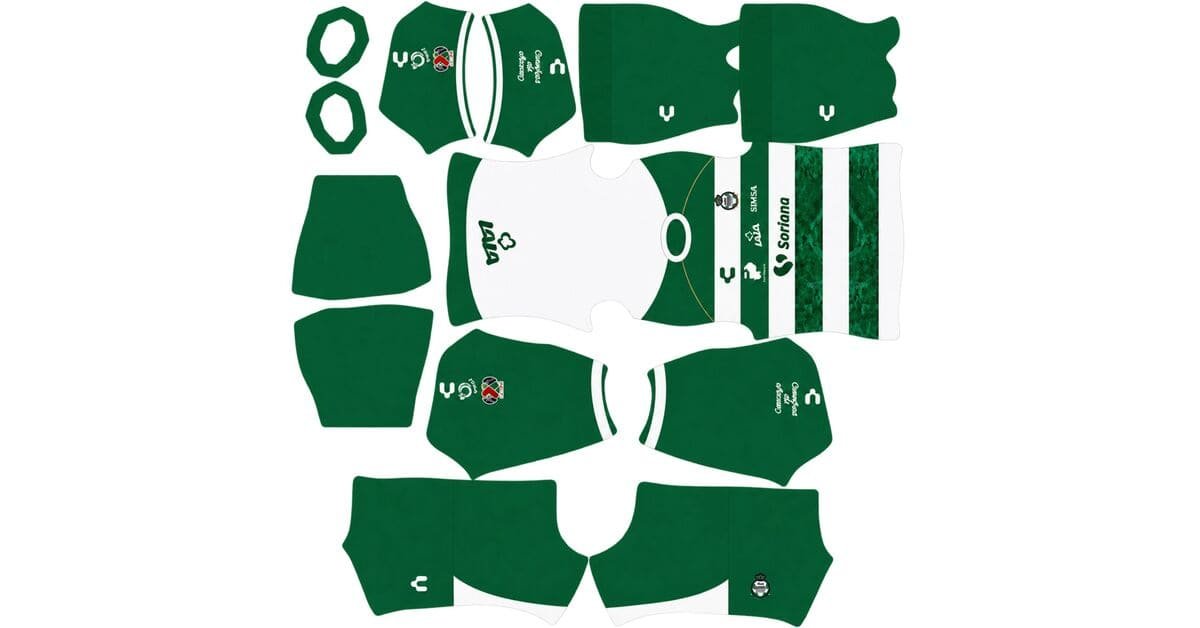
A Santos Laguna DLS kits URL is a direct link to a 512×512 PNG Guerreros shirt that you paste into Dream League Soccer. All four slots are below, and each file was loaded into the game before it was added to this page.

Santos Laguna Logo
Official Logo 512×512 (2026/27)

Santos Laguna Home Kit
Home Kit 512×512 (2026/27)

Santos Laguna Away Kit
Away Kit 512×512 (2026/27)

Santos Laguna Third Kit
Third Kit 512×512 (2026/27)

Santos Laguna GK Home Kit
GK Home Kit 512×512 (2026/27)

Santos Laguna GK Away Kit
GK Away Kit 512×512 (2026/27)
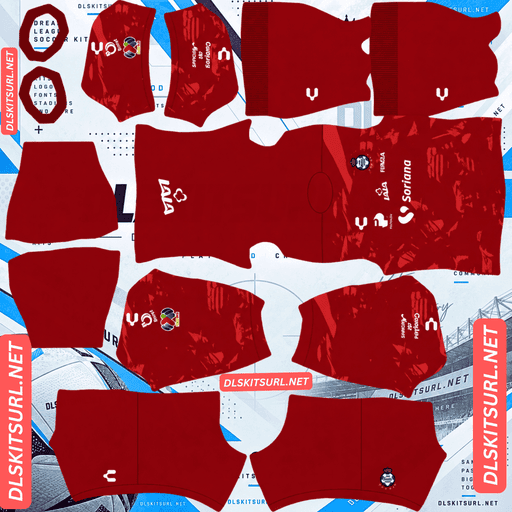
Santos Laguna GK Third Kit
GK Third Kit 512×512 (2026/27)
One of Santos Laguna’s most talked-about designs this season cannot actually be reproduced in DLS — not because the image is too small, but because the special feature is not part of the shirt image at all.
The Día de Muertos tribute is a font, and fonts do not import
Santos Laguna marked Día de Muertos this season with a commemorative typeface used for the names and numbers on their standard Charly home shirts against Club Necaxa.
That distinction matters.
It was not a separate shirt. It was a special font.
Dream League Soccer cannot carry the typeface
Dream League Soccer uses its own fixed font for squad names and numbers. You cannot upload a custom typeface alongside a kit URL.
The shirt image only controls the artwork printed onto the kit. DLS then draws the player’s name and number separately on top of it.
So there is no special Día de Muertos shirt file to download for this season.
The standard home kit is available, but the commemorative lettering cannot be transferred into the game.
This is different from the usual DLS limitations
Most unreproducible shirt features still have a file behind them.
Embossing can be flattened. Woven textures can disappear. Melange effects can merge. Photographic graphics can lose detail.
A font-only special edition is different.
There is no separate image to lose detail from.
If you find a file labelled something like “Santos Día de Muertos 26-27”, it is either the standard home shirt with a different name attached to it or somebody’s own recreation. It is not a separate official shirt image containing the commemorative font.
The 2020 Día de Muertos shirt is a different story
Santos did produce a complete Día de Muertos shirt in 2020, built around papel picado, the traditional cut-paper decoration.
That is a genuine kit and therefore has a genuine image file that can be imported into DLS.
The problem is the detail.
Papel picado uses intricate cut-out patterns and fine lines, exactly the sort of artwork that a 512×512 image tends to merge. How much survives depends on how boldly the original artwork was rendered.
So the 2020 shirt is usable, but do not expect every tiny perforation to remain visible.
The home’s two white hoops are the useful part
Released on 15 July 2026, the home shirt keeps Santos’ traditional green base with two white horizontal stripes, while Soriana appears as the main sponsor.
Horizontal bands are demanding geometry
A vertical stripe only needs to line up in one direction on the kit template.
A horizontal band is more demanding because its height needs to remain consistent across the different panels. You are checking both side seams and both sleeve junctions, with the upper and lower edges of each band creating multiple alignment points.
With two bands, there are twelve important alignment points to watch.
A mismatch of only a few pixels can become obvious once the shirt is wrapped around the player. The line may look perfect when the PNG is viewed flat but suddenly step upward or downward where the sleeve meets the body.
That is why the home needs an in-game check from the side and the back.
Sporting’s hoops, Young Boys’ away, Boca’s chest band, Atlanta United and Real Salt Lake all have versions of the same problem. Santos is simply a milder case because it uses only two bands rather than covering the shirt with a much larger number of them.
The colours are not the problem
White against green gives the image plenty of contrast.
The white bands should therefore remain visible on any decent 512×512 file. You are not testing whether the stripes survive — you are testing whether they are positioned correctly.
If the edges look soft or smeared, the file itself is weak. If the edges are crisp but the band steps at a seam, the problem is the geometry.
The white bands help the green shirt stand out
Green is one of the more difficult shirt colours in DLS because the pitch is green too.
Santos’ two white bands break up that green and give the player some additional separation, but they do not transform the whole shirt into a strongly contrasting design.
A shirt with many white hoops breaks up its green base much more aggressively. Santos leaves most of the body green.
Use white numbers on the home, but remember that the bands continue across the back. If a number lands over one of the white stripes, part of that number will naturally lose contrast.
There is no file adjustment that can prevent that because DLS controls the number placement separately from the imported shirt.
The white stripe edges are your quality test
The boundary between white and green is one of the easiest places to spot compression damage.
A good file should give you clean, decisive edges. A poor one will show softness, jaggedness or smearing around the stripe.
Check the dimensions as well. On a computer, right-click the image and open it in a new tab so the browser can show the actual file rather than a scaled preview.
The away
Santos released the 26-27 away alongside the home on 15 July 2026.
For this shirt, compare the file directly with the kit card rather than relying on a description from another page.
The usual file checks still apply.
Any boundary between two colours should be clean rather than blurred. The collar and cuffs should have defined edges, while the Charly branding, crest and Soriana sponsor should remain sharp enough to identify.
If the away uses horizontal banding similar to the home, perform the same alignment check after importing it. A flat PNG can look completely correct while still wrapping incorrectly around the player’s model.
Watch for Santos’ hooped history
Santos Laguna have used hoops in several forms over the years, so older files can look surprisingly similar at first glance.
The 2020-21 home, for example, used its trademark hoops in multiple colours and carried the design onto the sleeves.
Sleeve-crossing hoops are harder
A band that remains on the main body already needs careful alignment across the shirt panels.
Once the stripe continues across the sleeve, the armhole becomes another important transition. The sleeve is mapped separately, which makes a small mismatch much easier to notice.
If you are using an older Santos kit with hoops that continue onto the sleeves, check the armholes specifically.
Multiple hoop colours create a number problem
Several coloured bands also mean several different backgrounds behind the player’s number.
DLS draws the number in one flat colour. It cannot automatically change the number colour every time it crosses a different stripe.
Choose the number colour that contrasts with the largest portion of the back. Depending on the particular shirt, that will normally mean black or white.
Which Santos Laguna kit survives best?
The current home is reliable in terms of colour reproduction. The two white hoops have enough contrast to survive, but their alignment needs to be checked after import.
The away should be judged against the card because its exact panel arrangement is more useful than a generic description.
The 2020 Día de Muertos shirt is a strong retro option if you want something different, although the fine papel picado artwork is vulnerable to compression.
The current Día de Muertos font cannot be reproduced because it is a game-generated typeface rather than part of the shirt image.
How to tell if a Santos file is current
Four checks make the current collection much easier to identify.
First, look for Charly and Soriana. Charly have supplied Santos for years, so the manufacturer alone will not date the shirt.
Second, check the home carefully. The current home should be green with exactly two white horizontal stripes. Older Santos seasons use different numbers, colours and arrangements of hoops.
Third, compare the artwork with the kit cards above. Santos change their hoop designs regularly, so a green-and-white shirt is not automatically the current home.
Fourth, remember the 25-26 third. It was predominantly white with green and red, making it visually distinct from this season’s range.
The number and colour of the home bands are the quickest identifier. If the stripe count is wrong, you are probably looking at an older shirt.
A note on Liga MX season labels
Liga MX is split into two tournaments each season: Apertura in the latter part of the calendar year and Clausura in the following spring.
That means Santos’ 26-27 collection begins with Apertura 2026 and continues through Clausura 2027.
As a result, a file labelled “Santos 2027” can still be the same current shirt as one labelled “Santos 26-27”.
The design is a better identifier than the year in the filename.
How to use a Santos Laguna DLS kits URL
Copy the direct image link using the button on the kit card, rather than copying the address from your browser’s address bar. The address bar often gives you the webpage containing the image instead of the image itself.
In Dream League Soccer, go to My Club → Customise → Kit. Do not choose Logo; the badge has its own import section.
Select the kit slot before pasting the URL. Press and hold the field, choose Paste, then tap Confirm. Older versions may call the final button Download.
The home and away use two of your outfield slots, leaving the third slot available.
That gives you plenty of room for an older Santos design. The 2020 Día de Muertos shirt, the 40th anniversary kit from 23-24 or the 25-26 third can all work as alternatives if you have a valid 512×512 URL.
DLS does not care how old a shirt is. If the image is a working direct PNG URL, the game can import it.
The first custom kit requires a one-time gem unlock. After that, changing kits is free.
Test the link first
Open the URL in your browser before putting it into the game.
The image should appear by itself, without a surrounding webpage, and the address should end in .png.
If you see headers, buttons, menus or other page elements around the image, you are looking at a viewer page rather than a direct image file.
For the Santos home, though, the browser test is only half the job.
Horizontal bands can look perfect on a flat PNG and still be misaligned once the shirt wraps around the player.
Import the file and inspect the sides and back. That is where the real test happens.
Why do Santos Laguna kit URLs stop working?
Three things commonly break kit links.
Free image hosts can delete old files. Some services remove unused uploads after enough time has passed. The URL can still look legitimate even though the file behind it no longer exists.
Santos do not receive the same worldwide kit coverage as clubs such as América, Chivas or Monterrey, and Charly’s releases are less widely distributed internationally than major global-brand launches. That means replacement files can be harder to find.
Special and older shirts carry the highest risk.
Hotlink protection can also be enabled later. A host may let you open the image directly in your browser while refusing requests from another application. That creates the familiar situation where a URL works when clicked but fails when pasted into DLS.
The preview and the direct link may be different files. A website can continue displaying its own thumbnail while the URL supplied for the original image has expired or moved elsewhere.
For the files listed here, the shirt shown and the URL you copy are the same file on the same server.
The Santos Laguna badge
Import the badge through the same general menu, but choose Logo instead of Kit.
Santos Laguna’s crest uses the club’s green and white colours and the warrior imagery associated with the Guerreros nickname.
The club updated its crest in 2020, so older badge files can show a previous version. As always, compare the artwork rather than trusting the filename.
The warrior silhouette gives the badge a reasonably strong outline for DLS, although finer internal details will soften when the crest is displayed at its small in-game size.
Dream League Soccer also crops imported badges into a circle. Avoid a file that is tightly trimmed around the artwork and leave some clear space around the complete crest.
Keeping your Santos Laguna kits
Custom kits are stored on your device rather than in your account.
A normal game update will generally leave them in place, but reinstalling DLS or moving to another phone can remove the imported kits and badge.
Santos files can also be more difficult to replace than files for the biggest Liga MX clubs, so save the URLs you care about.
The easiest method is to paste all four links into a notes app before you start.
FAQ FOR RANK MATH
What is a Santos Laguna DLS kits URL?
A Santos Laguna DLS kits URL is a direct link to a 512×512 PNG Guerreros shirt that you paste into Dream League Soccer’s kit screen. A working direct image link normally ends in .png.
Can I use the Santos Día de Muertos kit from 26-27?
Not as a separate special shirt. Santos used a commemorative Día de Muertos font on their standard home shirts, and DLS uses its own fixed typeface. The font cannot be imported through a kit URL.
Is there an older Santos Día de Muertos kit that can be imported?
Yes. Santos released a complete Día de Muertos shirt in 2020 featuring papel picado artwork. It is a genuine shirt file, although the intricate cut-paper detail may lose some definition at 512×512.
What should I check on the current Santos home kit?
Check the two white horizontal stripes and, most importantly, their alignment. The colours should survive easily, but the bands can shift where the different shirt panels meet.
Will the white stripes survive in a 512×512 file?
Yes. White against Santos’ green provides strong contrast, so the stripes themselves should remain visible. The main concern is whether they line up correctly once the image is wrapped around the player.
Is the Santos green home difficult to see?
Somewhat. Green is close to the colour of the DLS pitch, and only two white bands break up the shirt. The white stripes help, but they do not separate the entire shirt from the grass.
What number colour should I use on the home?
White is the recommended choice. However, because the horizontal bands continue across the back, a number that lands over a white stripe will partly lose contrast.
Is a file labelled “Santos 2027” out of date?
Not necessarily. The 26-27 kits begin with Apertura 2026 and continue through Clausura 2027, so a file labelled Santos 2027 can refer to the same current collection. Check the shirt design rather than relying on the year.