
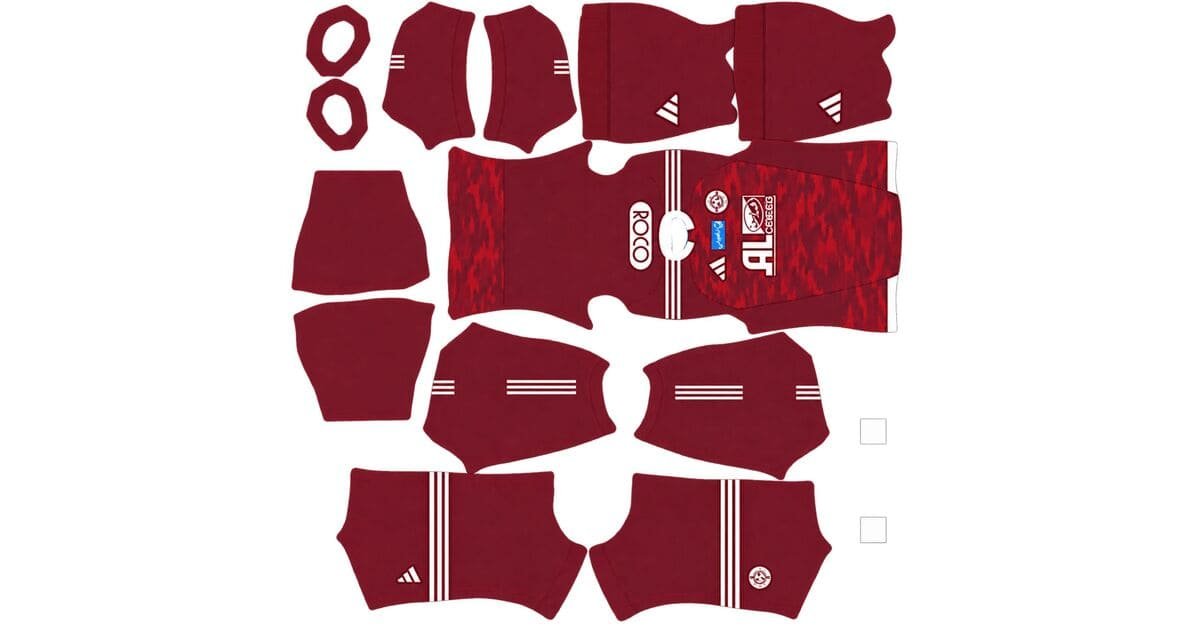
Looking for the Al-Faisaly DLS kits URL for Dream League Soccer 2026/27? Here you can find the home and away kits in 512×512 PNG format, ready to import into the game. Each kit has been tested in-game to make sure the image works as intended.
Al Faisaly Logo
Official Logo 512×512 (2026/27)
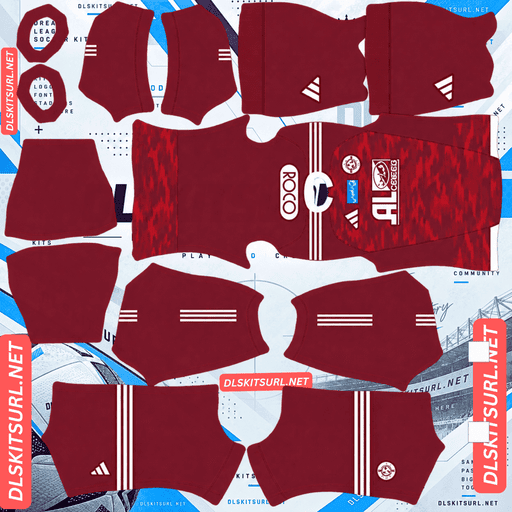
Al Faisaly Home Kit
Home Kit 512×512 (2026/27)
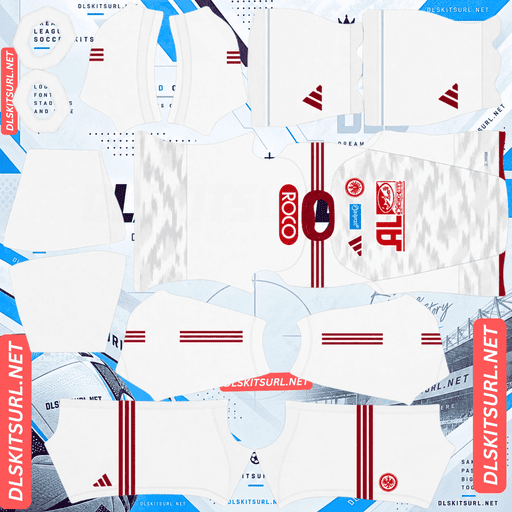
Al Faisaly Away Kit
Away Kit 512×512 (2026/27)
These shirts belong to Al-Faisaly FC, the Saudi Arabian club featured here with Adidas branding and its familiar maroon colours. The 2026/27 home and away designs were released on 10 August 2026.
Although both kits represent the same club, they behave quite differently at DLS resolution. The home shirt has a tonal camouflage-style pattern that remains visible when scaled down, while the away shirt uses a much finer graphic that is harder to reproduce clearly in a small image. Here’s what to expect from each design and how to get the best results in Dream League Soccer.
Which Al-Faisaly Club Are These Kits For?
These kits are for Al-Faisaly FC of Saudi Arabia, identified by its maroon colours, white Adidas shoulder stripes, and matching club badge.
The name can be confusing because more than one football club uses Al-Faisaly or a similar spelling. Kit websites and football databases may list these teams separately under names such as Al-Faisaly FC and Al Faisaly SC. Choosing a kit by name alone can therefore lead to the wrong download.
How to Identify the Correct Al-Faisaly Kit
Check the shirt’s colours and manufacturer before copying its URL. The Saudi club’s design featured in this guide uses a maroon home shirt and a white away shirt, both with Adidas branding.
If the colours, shoulder details, or badge do not match, double-check the club listing before importing the image. The same precaution is useful when searching for teams with similar names, such as Al Shabab and Al-Shabab, which can also refer to different clubs.
Why Is the Al-Faisaly Away Kit Difficult to Reproduce?
The away shirt presents a particular challenge because its design relies on small details rather than bold graphics. It has a white base, maroon collar and shoulder accents, and a subtle dotted pattern that gradually fades from the top towards the bottom.
That combination looks understated on a full-size shirt, but it is difficult to preserve in a 512×512 kit image.
How Dots, Gradients, and White Fabric Affect Image Quality
There are four main reasons the away shirt’s pattern can become difficult to see:
Fine dots: Individual dots occupy very little space in a 512×512 image. When the shirt is resized, nearby dots can merge or disappear.
A gradual fade: The pattern changes in intensity from top to bottom. Compression or resizing can turn this smooth transition into visible bands.
A white background: The dots have little contrast against the shirt, leaving less visual information for the image to preserve.
Low-contrast styling: The graphic is deliberately subtle, so making it more visible would change the appearance of the original design.
The result depends on the quality of the source image and how it has been resized or compressed. Even a correctly sized file cannot always reproduce every fine detail perfectly.
What Should You Expect From the Away Kit?
At normal match distance, the away shirt may look almost completely white, with the maroon collar and Adidas shoulder stripes providing most of its visible detail.
The dotted graphic may be difficult to distinguish, and the gradient may appear less smooth than it does on the original shirt. This does not automatically mean the kit URL is faulty. It can simply be a limitation of displaying a delicate design at a small resolution.
Freiburg’s third kit offers a useful comparison because it also combines a dotted texture with a gradient. However, its darker colours provide more contrast, making some of those details easier to retain. Al-Faisaly’s white design has a much smaller tonal difference between the base and the pattern.
How to Check the Away Kit’s Image Quality
Rather than judging the file by its dots alone, look at the details that should remain sharp.
The maroon collar and Adidas shoulder stripes are the easiest places to check because they stand out clearly against the white fabric. Their edges should look clean, without excessive blurring or jagged outlines.
You should also verify the actual image dimensions. Open the direct image link in your browser and check the image properties or dimensions. A genuine 512×512 file should measure 512 pixels wide and 512 pixels high.
A file enlarged from a smaller image may still measure 512×512, but its edges and fine details can appear noticeably softer.
Why the Al-Faisaly Home Kit Looks Better in DLS
The home shirt handles small-scale rendering more effectively. Its main colour is maroon, with white details on the collar and Adidas shoulder stripes. Across the body, a subtle camouflage-like graphic adds texture without relying on tiny, isolated marks.
This makes the home kit a more practical choice if you want a design that remains recognisable during a match.
Why Camouflage Survives Resizing Better Than Fine Dots
The main difference comes down to the size and arrangement of the shapes.
Camouflage-style graphics use irregular patches that blend into one another. Because the shapes are relatively broad, they can remain visible even after the image is reduced. Small variations in their outlines are also less noticeable than changes to a precise dotted pattern.
Fine dots work differently. Each dot needs enough pixels to remain separate from the surrounding fabric. Once the image is resized, those individual marks can lose their definition.
The maroon base also helps the home shirt. Different shades of maroon can create visible tonal variation without requiring a dramatic colour change. On a white shirt, a slightly off-white pattern has much less room to stand out.
Will the Home Kit’s Pattern Be Clearly Visible?
The camouflage pattern should remain more noticeable than the away shirt’s dotted graphic, although its visibility depends on the quality of the source file and the game’s rendering.
Expect a subtle texture rather than a sharply defined camouflage design. The main advantage is that the home shirt can retain some of its original character without making the pattern artificially darker or more prominent.
For players who want a recognisable Al-Faisaly design on the pitch, the maroon home kit is the stronger option.
Al-Faisaly Home Kit and the Adidas Tiro 26 Competition Template
The home shirt is described as using Adidas’s Custom Tiro 26 Competition template. This is worth understanding when comparing kit designs, especially if you have downloaded shirts from several clubs.
Adidas supplies teamwear templates that clubs can customise with their own colours, badges, and graphics. As a result, shirts from different teams may share a similar cut, collar design, or shoulder-stripe arrangement.
How to Identify the Shirt Correctly
The overall shape of a shirt is not always enough to establish which club it belongs to. Several teams can use similar Adidas templates while having completely different colours and crests.
For this Al-Faisaly design, pay attention to the maroon body, white Adidas shoulder stripes, tonal camouflage-style pattern, and club badge.
Köln’s third kit has also been associated with Adidas’s Locker Room service this season, illustrating how shared design systems can produce similarities between shirts from different clubs.
When choosing a DLS kit, the combination of colours, graphics, and badge is a more reliable guide than the template alone.
Which Al-Faisaly Kit Should You Use in Dream League Soccer?
If you only want to import one shirt, the maroon home kit is the better choice. Its larger graphic shapes and strong colour contrast make it more suitable for the game’s 512×512 kit format.
Feature
Home Kit
Away Kit
Main colour
Maroon
White
Pattern
Tonal camouflage-style graphic
Fine dots with a fading effect
Pattern visibility
Subtle but more likely to survive resizing
Difficult to distinguish
Contrast
Stronger overall
Mainly provided by maroon accents
Best choice
Recommended
Better for players who prefer a white kit
The home shirt is the safer choice for visual clarity, while the away shirt is worth using if you prefer its lighter appearance and simpler look during gameplay.
What Number Colours Work Best on Al-Faisaly Kits?
Choosing the correct number colour is important because the colour settings in Dream League Soccer are separate from the image you import. The game uses its kit customisation settings to determine the colours of player numbers.
Recommended Number Colours for the Home Kit
Use white numbers with the maroon home shirt.
White complements the collar and shoulder stripes while remaining easy to read against the dark body. Avoid choosing a shade too close to maroon, as it can make player numbers harder to distinguish during a match.
Recommended Number Colours for the Away Kit
Use maroon numbers with the white away shirt.
Maroon matches the shirt’s accents and provides clear contrast against the white fabric. White numbers on a white shirt can disappear into the background, so make sure the number colour is set separately from the kit image.
Check the shorts colour settings as well. The shirt and shorts swatches may be configured independently, so changing one does not necessarily update the other.
How Visible Are Al-Faisaly Kits During a Match?
Both kits are usable in Dream League Soccer, but the home shirt has the advantage of a stronger contrast against the green pitch.
Maroon Home Kit
Maroon stands apart from the grass and makes the players easier to identify at a distance. The white collar and shoulder stripes add further contrast, helping the shirt retain its overall appearance even when the camouflage pattern is barely noticeable.
White Away Kit
The white shirt is also easy to see, particularly in well-lit matches. However, its dotted graphic is unlikely to add much visible texture at normal gameplay distance.
The maroon accents provide the strongest definition, which is why the number colour and the clarity of the collar and shoulder stripes matter more than the fine pattern.
How to Check Whether an Al-Faisaly Kit Is From 2026/27
Before importing a shirt, compare its details with the designs described in this guide.
Four Details to Look For
Adidas branding: Check the manufacturer and the white shoulder stripes on the maroon home shirt.
Home shirt colour and pattern: The home kit should have a maroon body with a subtle tonal camouflage-style graphic.
Away shirt details: The away kit should have a white body with maroon collar and shoulder accents.
Release information: The supplied release date for these designs is 10 August 2026. A different date or an older-looking shirt may indicate a previous-season kit.
Release dates and design details should ideally be checked against an official club or manufacturer announcement if you need to verify the shirt’s authenticity.
How to Import an Al-Faisaly DLS Kits URL
Once you have chosen a kit, importing it into Dream League Soccer is straightforward. Make sure you copy the direct PNG image link rather than the address of the webpage containing the kit.
Step 1 — Copy the Kit URL
Use the copy button on the kit card to copy the image URL. This is usually easier than copying the address from the browser bar, which may lead to the article rather than the actual shirt image.
Step 2 — Open the Kit Menu
Launch Dream League Soccer and navigate to My Club → Customise → Kit.
Choose the kit slot you want to update. Do not select Logo, as that menu is used to import the club crest rather than a shirt.
Step 3 — Paste the Image Link
Select the custom-kit import field, press and hold it, and choose Paste. Confirm the URL when prompted.
Depending on the game version, the confirmation button may be labelled Confirm or Download. Wait for the import to finish before checking the shirt in your team selection or match screen.
Step 4 — Choose Your Third Kit
If you are using the home and away shirts in the first two kit slots, you can use the third slot for another design, provided it is available in your game.
An older Al-Faisaly shirt can be a good option if you want a different colour combination. Dream League Soccer’s custom-kit system can accept older designs as long as the image meets the supported format and URL requirements.
The first custom-kit slot may require a one-time gem unlock, depending on your game version and existing unlocks. Check the in-game prompt before spending gems.
Test Your Al-Faisaly Kit URL Before Importing
A quick browser check can save you time if a link is broken.
What a Working Link Should Look Like
Open the copied URL in a new browser tab. A direct image link should display the shirt itself rather than a webpage filled with navigation, buttons, or other content.
The image should measure 512×512 pixels, and a URL ending in .png is a useful indication that you have copied the correct type of file. However, the extension alone does not guarantee that the link works or that the image has the right dimensions.
If the image does not load, check the URL for missing characters and make sure the hosting service has not removed the file.
Why Do Al-Faisaly DLS Kit URLs Stop Working?
A kit image may work perfectly when first uploaded but become unavailable later. This is especially frustrating when you return to an older article and find that a link no longer opens.
The Image Host Removes the File
Some free image-hosting services delete files after a period of inactivity or change their storage policies. When that happens, the URL may stop working even if the original article is still online.
Smaller clubs can be particularly affected because their kit files may receive fewer visits and have fewer alternative uploads available.
Hotlink Protection Blocks the Game
Some image hosts prevent external websites or applications from displaying their files directly. Your browser might open the image successfully, while Dream League Soccer fails to retrieve it.
This happens because opening a URL manually and requesting the same image from inside a game are not always treated the same way by the hosting server.
The Preview and the Download Link Point to Different Files
A website may display a thumbnail stored on its own server while providing a separate URL for the full-size image. If the second file is moved or deleted, the preview can remain visible even though the actual kit link is broken.
For this reason, always test the URL you intend to copy instead of relying only on the picture displayed in the article.
How to Import the Al-Faisaly Club Badge
The club crest is imported separately from the shirt. Open the same customisation menu, but select Logo instead of Kit.
Choose a Badge That Fits the Circular Crop
Dream League Soccer displays the badge inside a circular area. A crest with a little empty space around the edges is therefore easier to position than an image cropped tightly around the artwork.
Arabic lettering and other fine details may become less readable when the game reduces the logo to its on-screen size. This is normal for a small image. The main colours, central symbol, and overall outline are usually more important for recognition during a match.
Because several clubs share similar names, make sure the badge belongs to the Al-Faisaly side you intend to represent before importing it.
How to Keep Your Al-Faisaly DLS Kits Safe
Custom kits and badges may be stored locally on your device, depending on the game’s version and save system. A game update may leave them untouched, but reinstalling the game or moving to another phone can put them at risk.
Save Your Kit Links Before Importing
Keep a copy of the home kit, away kit, and badge URLs in a notes app or another safe location. This makes it easier to restore your team’s appearance if the game loses its custom images.
It is also worth saving the original PNG files when you have permission to keep a local copy. That way, you have another option if a hosting service removes the links.
For less widely shared clubs such as Al-Faisaly, saving working links is particularly useful because finding the exact same design again may take time.
Frequently Asked Questions
What Is an Al-Faisaly DLS Kits URL?
An Al-Faisaly DLS kits URL is a direct link to a kit image that you can import into Dream League Soccer. The image should use the supported format and dimensions, commonly a 512×512 PNG file.
Which Al-Faisaly Club Plays in Saudi Arabia?
This guide covers Al-Faisaly FC of Saudi Arabia. The kits described here use Adidas branding, a maroon home shirt, and a white away shirt with maroon details. Check the club badge before importing because other teams have similar names.
Why Does My Al-Faisaly Away Kit Look Plain White?
The away shirt combines a white base with a fine dotted graphic and a gradual fade. These details have low contrast and can disappear when the image is resized or compressed to 512×512 pixels.
Which Al-Faisaly Kit Looks Better in DLS?
The maroon home kit is the recommended option for players who want better visual definition. Its tonal camouflage-style pattern uses larger shapes that are generally easier to preserve than the away shirt’s fine dots.
What Pattern Does the Al-Faisaly Home Kit Have?
The home shirt features a subtle camouflage-like graphic across its maroon body, with white details on the collar and Adidas shoulder stripes. The pattern is tonal, so it should look understated rather than sharply outlined.
Who Makes the Al-Faisaly 2026/27 Kits?
The designs covered in this guide are attributed to Adidas. The home shirt is described as using the Custom Tiro 26 Competition template, a teamwear design structure that may also appear on shirts from other clubs.
How Can I Check the Quality of an Al-Faisaly Kit Image?
Inspect the collar and shoulder stripes first. Their edges should be reasonably crisp and clearly separated from the shirt’s base colour. You should also confirm that the image measures 512×512 pixels and loads correctly from the direct URL.
What Number Colour Should I Use on the Al-Faisaly Away Kit?
Maroon is the recommended choice because it matches the collar and shoulder accents and stands out against the white shirt. White numbers can be difficult to see on a white background.
Can I Use an Older Al-Faisaly Kit in Dream League Soccer?
Yes, provided the kit image meets the game’s import requirements and the URL is accessible. An older shirt can also be used in another custom-kit slot if that slot is available in your version of the game.
Why Does My Kit URL Work in a Browser but Not in DLS?
The image host may restrict requests from external applications, or the URL may point to a preview rather than a directly accessible image. Test the exact URL and, if the problem continues, use a host that permits direct image access.
Will I Lose My Custom Al-Faisaly Kits if I Reinstall the Game?
Custom kits and badges may not transfer automatically after a reinstall or a device change. Save your URLs and original image files so you can import them again if necessary.