
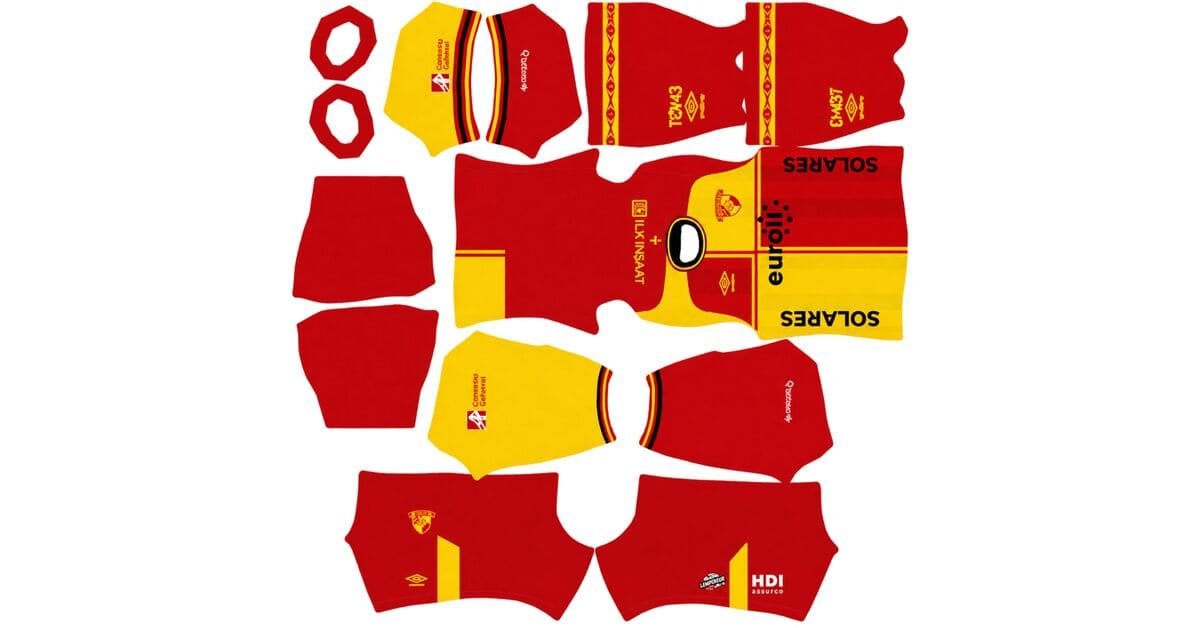
A Göztepe DLS kits URL is a direct link to a 512×512 PNG shirt that you can import into Dream League Soccer. All four kit slots are listed below, and each image has been loaded into the game before being added to this page.
Göztepe Logo
Official Logo 512×512 (2026/27)
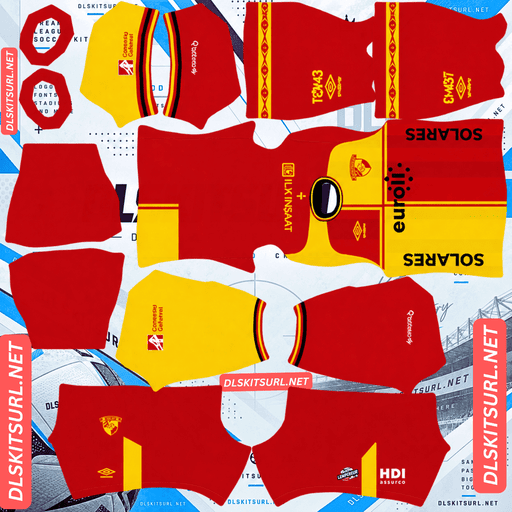
Göztepe Home Kit
Home Kit 512×512 (2026/27)
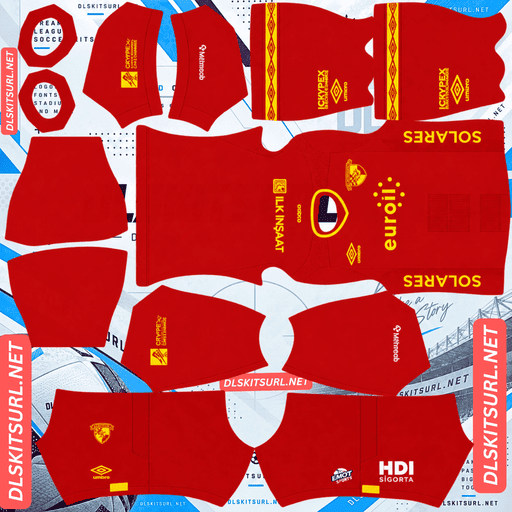
Göztepe Away Kit
Away Kit 512×512 (2026/27)
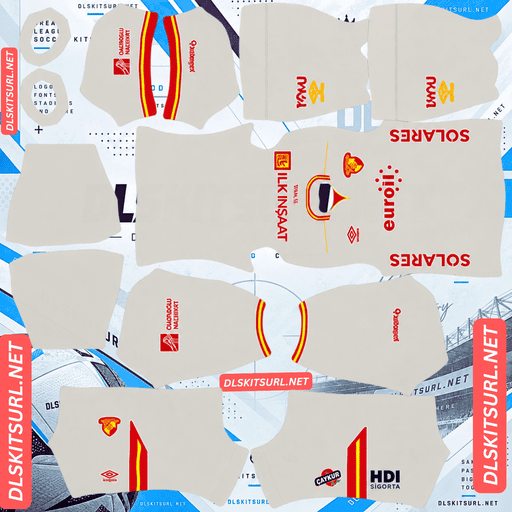
Göztepe Third Kit
Third Kit 512×512 (2026/27)
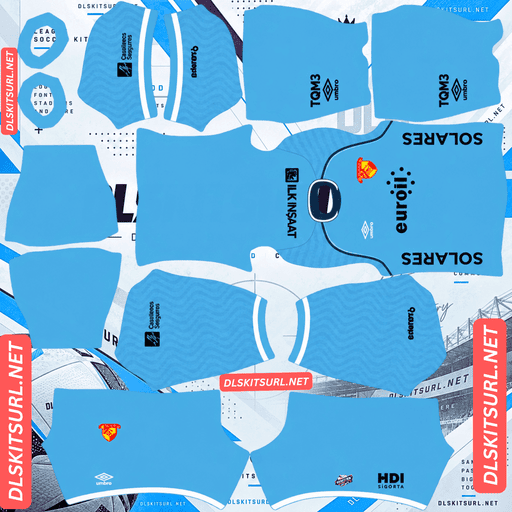
Göztepe GK Home Kit
GK Home Kit 512×512 (2026/27)
Göztepe’s famous red and yellow colours are also an excellent match for the game’s pitch. If you sometimes struggle to follow your players on a small screen, these bright colours make the team easier to pick out during a match.
Why Red and Yellow Work So Well in DLS
Dream League Soccer displays players at a relatively small size, especially when you are watching the match from a distance. How easily you can follow your team depends partly on how strongly its shirt colours stand out against the green pitch.
Göztepe’s combination of red and yellow gives the team excellent visibility.
Red contrasts strongly with green, which is one reason teams such as Vitória, Çorum FK and Bragantino are easy to recognise during gameplay. Yellow also stands out against the grass, as seen with teams such as Hull City, Leeds United and Ivory Coast.
Göztepe combines both colours in the same kit collection. There is no need to rely on a dark shade that might blend into shadows or a green tone that could disappear against the pitch.
The contrast between red and yellow also helps the shirts remain recognisable at a glance. RC Lens and Le Mans, both associated with the nickname Sang et Or, use a similar colour combination and enjoy the same general visibility advantage.
For players who want a team that remains easy to identify during fast gameplay, Göztepe is a strong choice.
The 2026/27 Göztepe Collection Is Inspired by İzmir
Göztepe’s 2026/27 collection was released in July 2026 by Umbro, with Euroil as the shirt sponsor. The launch used the slogan:
“Kordon’dan Efes’e, dağlardan denize!”
This translates as “From Kordon to Ephesus, from the mountains to the sea.”
The collection celebrates the city of İzmir and its surrounding landscape. Its inspiration includes Kordon, the city’s famous waterfront promenade, the ancient city of Ephesus, and the geography stretching from the surrounding hills to the Aegean coast.
The theme gives the collection a strong local identity, but how much of that inspiration remains visible in Dream League Soccer depends on the way each design element is reproduced in the kit image.
Which Design Details Survive the Import?
The most important question when importing a themed shirt is whether its distinctive details use contrasting colours or rely on subtle shades of the base colour.
A large printed graphic in a contrasting colour is usually easier to preserve because its outline remains visible after the image is reduced. A tonal design, on the other hand, uses different shades of the same colour, so its details can blend into the shirt.
Woven patterns and embossed textures are even harder to reproduce because they depend on the appearance of the fabric’s surface rather than clear shapes in a flat image.
Before importing a Göztepe kit, open the image at full size and inspect its landmark-inspired details. If the reference is clearly visible on the flat image, it has a better chance of remaining recognisable in the game. If you have to search for the detail, it may become difficult to see on the player model.
The Third Kit — Light Grey
Released on 17 July 2026, Göztepe’s light grey third kit is the design in the collection for which the most detailed information is available.
The shirt uses a light grey base with red and yellow accents, creating a clean appearance without heavy patterning. Its relatively simple structure is well suited to Dream League Soccer because there are fewer complicated details that compression can weaken.
Grey also provides a neutral background for the club’s brighter colours. Red and yellow remain distinct against it, helping the main design elements stand out.
The third kit should therefore reproduce accurately in a 512×512 image, provided the source file is clear and correctly prepared.
There is one trade-off, however: the grey base does not stand out against the pitch as strongly as the club’s brighter colours might. Its visibility depends more on the red and yellow details than on the main shirt colour.
Göztepe Has Changed Kit Suppliers More Than Most Clubs
Göztepe has a long and varied kit-supplier history. Kit databases record more than thirty supplier periods for the club since the 1970s, which can make older designs difficult to date unless you check the manufacturer’s branding.
The most recent supplier periods include Umbro from 2021 onward, Puma from 2019 to 2021, Lotto from 2016 to 2019, Kappa from 2014 to 2016, an in-house period from 2013 to 2014, Puma again from 2012 to 2013, the club’s own Göz Göz brand from 2011 to 2012, Formia from 2010 to 2011, and Gozza from 2008 to 2010.
Before those periods, the club’s supplier history includes further spells with Umbro, Lotto, Le Coq Sportif, Adidas, Diadora and Fila, as well as additional in-house periods stretching back to 1977.
Two entries are particularly unusual: Göz Göz and Gozza were the club’s own brands, both named after Göztepe’s nickname. Having manufactured under its own name more than once makes the club’s history different from that of many teams that have relied entirely on external sportswear companies.
How Supplier Branding Helps You Identify an Older Kit
The good news is that Umbro has supplied Göztepe since 2021, making the current era relatively straightforward to identify.
A Puma cat on a kit points to the 2019–2021 period, while a Lotto mark points to 2016–2019. Umbro branding is consistent with the current era, beginning in 2021.
With so many supplier changes, the manufacturer’s logo can be a more reliable way to estimate a kit’s age than its design alone. Always check the branding alongside the colours, sponsor and overall appearance before deciding whether a file represents the 2026/27 collection.
What Number Colours Work Best on Göztepe’s Kits?
Dream League Soccer controls number colours through two small swatches on the kit template, rather than automatically taking them from the imported image. One swatch controls the shirt numbers, while the other controls the shorts numbers.
For Göztepe’s collection, these combinations are good starting points:
Red shirts: White or yellow numbers can work, but white is a clear option when the shirt is red.
Yellow shirts: Red or black numbers provide better contrast. White and other pale colours can become difficult to see against a bright yellow background.
Light grey third kit: Red numbers stand out against the neutral base and connect with the club’s colours.
Remember to configure the shirt and shorts swatches separately. This lets you choose number colours that remain readable on both parts of the kit.
How to Check Whether a Göztepe Kit File Is Current
Before importing a shirt, check four details to help determine whether it matches the 2026/27 collection.
Umbro branding: The current supplier has been Umbro since 2021, so a different manufacturer suggests an older design.
Euroil sponsor: Check the chest for the sponsor associated with the collection.
Light grey third kit: The third design should have a light grey base with red and yellow accents.
Göztepe’s red and yellow colours: These should remain central to the collection’s appearance.
The supplier logo is particularly useful because Göztepe has changed manufacturers so frequently. Checking the branding together with the sponsor and kit colours is more reliable than judging the shirt’s overall shape alone.
How to Use a Göztepe DLS Kits URL
Importing a Göztepe shirt is simple once you have the correct direct image link.
First, copy the URL using the button on the relevant kit card. Avoid copying the webpage address from your browser, because that usually links to the page containing the shirt rather than the image file itself.
Open Dream League Soccer and go to My Club → Customise → Kit. Make sure you select Kit rather than Logo, as the Logo section is used to import the club badge.
Choose the slot you want to replace before pasting the link. The game applies the imported design to the currently selected slot, so selecting the wrong one could overwrite a kit you wanted to keep.
Press and hold the URL field, tap Paste, and then select Confirm. Some older versions of the game may display Download instead.
Göztepe has three outfield kit slots—home, away and third—plus a separate goalkeeper slot. The four designs can be used across these slots, but you will need to decide which three outfield shirts to keep active. Make sure you configure the goalkeeper kit as well rather than leaving it on the default design.
The first custom kit requires a one-time gem unlock. After that, changing your imported kits does not cost additional gems.
Test the Göztepe Kit Link Before Importing
Before opening the game, test the URL in your browser to make sure it points directly to the image.
A working link should display the shirt by itself, without webpage headers, navigation menus or buttons surrounding it. The URL should end in .png.
If the link opens a page that contains a preview of the shirt, it may not be a direct image URL. Dream League Soccer needs access to the actual image file rather than a webpage that displays it.
On a computer, right-click the image and open it in a new tab. If your browser provides image dimensions, check them there. A filename claiming that the image is 512×512 does not guarantee that the file itself has those dimensions.
Testing the link first can save time and help you avoid import errors.
Why Do Göztepe Kit URLs Stop Working?
Kit URLs can stop working for several reasons, particularly when the images are hosted on free image-sharing websites.
Free image hosts can delete files. When an uploaded image is removed, its old URL may remain in a webpage even though the file itself is no longer available. This can be especially frustrating when you return to a kit after several months.
Hotlink protection can block imports. Some hosting services allow an image to display on their own website but prevent external applications from requesting the file directly. That means the image might open in your browser but fail when Dream League Soccer tries to import it.
The preview image and the actual file may be stored separately. A webpage might show a thumbnail hosted on its own server while the download link points to another location. The preview can continue working even after the original file becomes unavailable.
On this page, the shirt shown on the kit card and the URL provided for copying refer to the same image file on the same server. However, it is still a good idea to test the link before using it in the game.
How to Add the Göztepe Badge in DLS
You can import the Göztepe crest during the same customisation session, but you need to select Logo rather than Kit.
The badge includes the club’s name and its founding year, 1925, using the familiar red and yellow colours. Adding the correct crest helps complete the appearance of the imported shirts.
Dream League Soccer crops badges into a circle, so choose an image with enough clear space around the entire design. A file cropped too tightly around the artwork may lose parts of the crest when the game applies its circular crop.
The lettering and founding year may become softer or harder to read when displayed at the small size used beside the score. This does not necessarily mean the source file is faulty; small details naturally become less readable when scaled down.
The red and yellow colour blocks are the most important visual elements to preserve. They help make the badge recognisable even when the finer lettering is difficult to distinguish.
How to Keep Your Göztepe Kits Safe
Custom kits are stored on your device rather than being permanently linked to your account. Updating the game will usually leave them in place, but reinstalling Dream League Soccer or moving to a new phone can result in losing your imported shirts and badge.
Göztepe’s long supplier history also makes it worth keeping track of which files belong to the current collection. Older shirts may look plausible but feature a different manufacturer or sponsor.
Before importing the kits, save all four URLs in a notes app. Include the badge link and label each entry clearly so you can identify the home, away, third and goalkeeper designs later.
Keeping these details together makes it much easier to restore your Göztepe setup if you change devices or need to reinstall the game.
FAQ FOR RANK MATH
What is a Göztepe DLS kits URL?
A Göztepe DLS kits URL is a direct link to a 512×512 PNG shirt that you can import into Dream League Soccer. A working direct image URL should open the shirt itself and normally end in .png.
Why are Göztepe’s colours good for DLS?
Göztepe’s red and yellow colours stand out well against the green pitch, making the players easier to follow during a match. The contrast between the two colours also helps the shirts remain recognisable at a small size.
What inspired Göztepe’s 2026/27 kits?
The collection celebrates İzmir and its surrounding landscape. Its slogan, “From Kordon to Ephesus, from the mountains to the sea,” references the city’s waterfront promenade, the ancient city of Ephesus, and the geography between the hills and the Aegean.
What colour is Göztepe’s 2026/27 third kit?
The third kit is light grey with red and yellow accents. Its clean design avoids heavy patterning, making it well suited to reproduction as a 512×512 image for Dream League Soccer.
Who makes Göztepe’s kits?
Umbro has supplied Göztepe since 2021. The club has had more than thirty supplier periods recorded since the 1970s, including two periods using its own brands, Göz Göz and Gozza.
How can I identify an older Göztepe kit file?
Check the manufacturer’s branding. Puma indicates the 2019–2021 period, while Lotto indicates 2016–2019. Umbro branding is consistent with the current supplier era, which began in 2021. The sponsor and kit colours can provide additional clues.
What number colour should I use on a Göztepe kit?
White numbers are a good option on red shirts, while red or black numbers work well on yellow shirts. For the light grey third kit, red numbers provide strong contrast. Set the shirt and shorts number colours separately in Dream League Soccer.
Will the İzmir landmark details appear in Dream League Soccer?
That depends on how the details are designed. Large printed graphics in contrasting colours are more likely to remain visible. Tonal details using similar shades may fade, while woven or embossed textures generally cannot be reproduced fully in a flat kit image.