
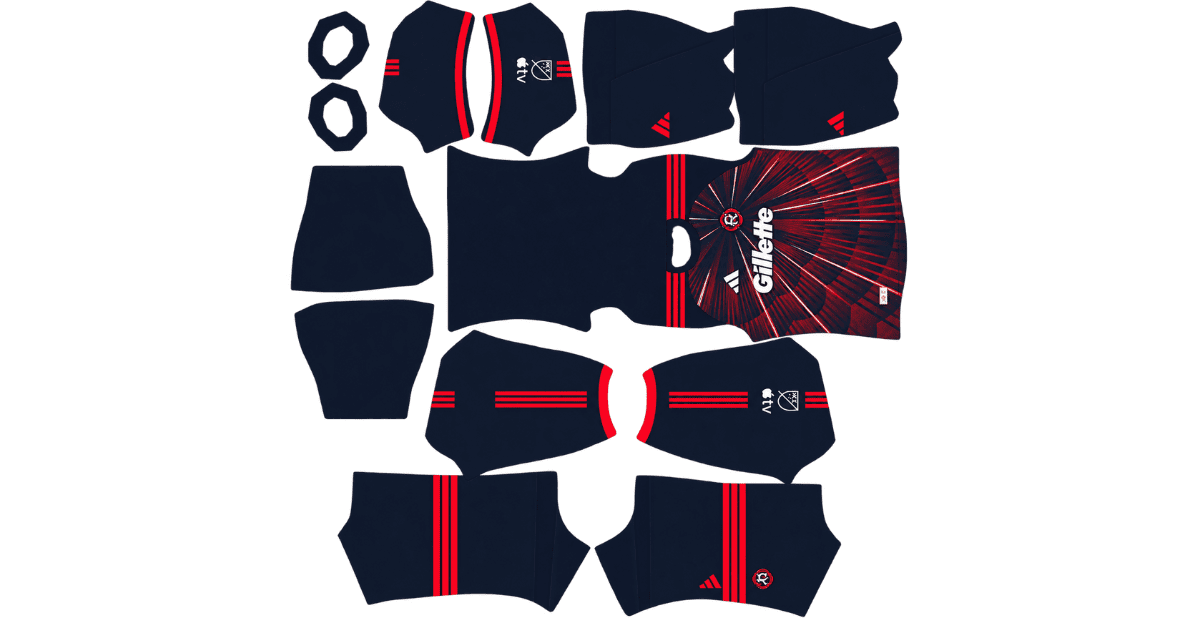
Looking for a New England Revolution DLS kits URL for Dream League Soccer 2026? This page provides direct links to 512×512 PNG kits for the New England Revolution, ready to import into your game. All four kit slots are listed below, and each image has been loaded into the game before being added to this page.
New England Revolution Logo
Official Logo 512×512 (2026/27)
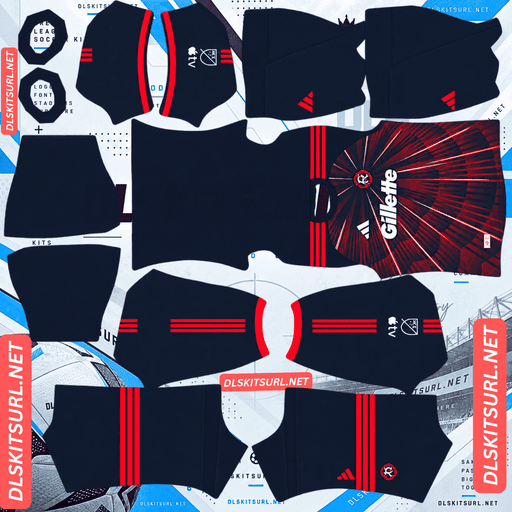
New England Revolution Home Kit
Home Kit 512×512 (2026/27)
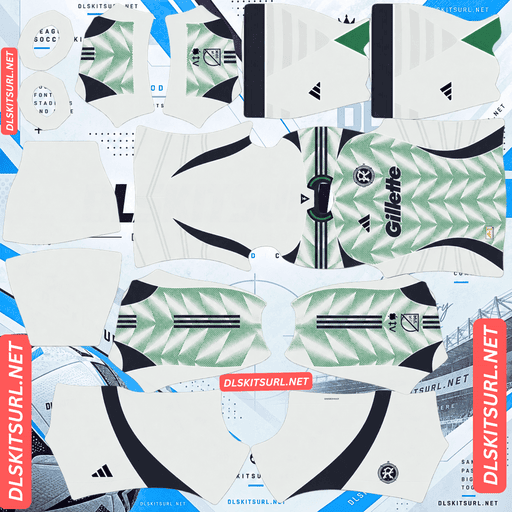
New England Revolution Away Kit
Away Kit 512×512 (2026/27)
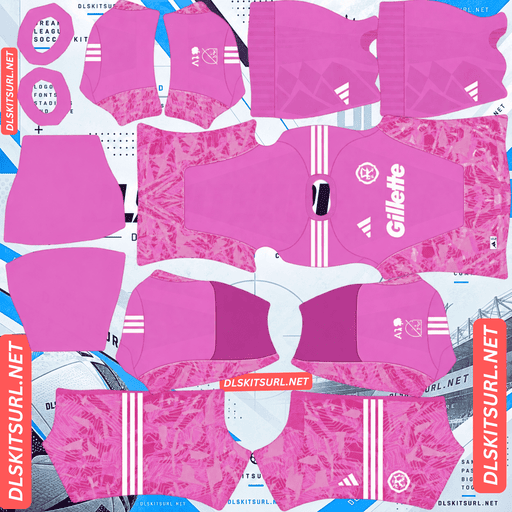
New England Revolution GK Home Kit
GK Home Kit 512×512 (2026/27)
The Revs have introduced a distinctive home shirt for 2026, featuring red lines spreading outward across a navy background. The design pays tribute to the club’s classic 1990s shirts, but its unusual pattern creates two challenges in Dream League Soccer: keeping the lines aligned across the kit and dealing with the badge covering the centre of the design.
New England Revolution 2026 Home Kit — A Bold Sunburst Design
The Revolution’s 2026 home shirt features a navy blue base with angular red lines radiating outward from the centre of the chest. Together, these lines create a sunburst effect inspired by the club’s memorable shirts from the 1990s.
It is a striking design, but it also requires more careful preparation than a shirt built around ordinary stripes or a simple colour block.
Why the Sunburst Pattern Is Difficult to Reproduce in DLS
Most football shirt patterns follow a relatively straightforward direction. Vertical stripes run from top to bottom, horizontal bands cross the body, and diagonal sashes travel across the shirt at a consistent angle.
A sunburst works differently. Its lines spread outward from a central point, meaning each ray follows a different angle as it travels across the shirt.
This creates a challenge when the flat PNG image is wrapped around the three-dimensional player model in Dream League Soccer.
Pattern Type
Main Direction
Main Alignment Challenge
Vertical stripes
Up and down
Keeping the stripes in position
Horizontal bands
Across the shirt
Matching the bands around the body
Diagonal sash
Across the torso
Maintaining the correct angle
Checkerboard
Both directions
Keeping the squares aligned
Sunburst
Multiple directions
Matching each ray across different seams
The Revs’ design crosses several boundaries in the kit template, including the sides of the torso and the sleeve connections. The rays also need to continue naturally towards the back of the shirt.
There is no single adjustment that fixes every line. Each section needs to be positioned correctly so the pattern looks like one continuous design when the shirt is applied to the player model.
Why Broken Sunburst Lines Are Easy to Notice
The strength of a sunburst pattern comes from its central point. Your eyes naturally follow the red lines towards the area where they converge.
If one line suddenly shifts at a seam, the pattern loses its natural flow. Instead of looking like a connected sunburst, it appears broken or incorrectly assembled.
This makes alignment especially important. On designs with irregular brushstrokes or distressed graphics, small inconsistencies may be less noticeable. With the Revolution’s home shirt, even a small interruption can stand out because the lines follow such a clear geometric structure.
How to Check the Sunburst Pattern After Importing
A kit image can look perfect in a browser but still show alignment problems when applied to the player model. The best way to check the Revolution home shirt is to inspect it from several angles in the game.
Look for these details:
Side seams: The red lines should continue naturally around the sides without sudden jumps.
Back of the shirt: The pattern should maintain its outward direction and look consistent with the front.
Sleeves: Check that the lines meet the sleeve sections cleanly and retain a consistent appearance.
Line thickness: The red rays should not suddenly become wider or narrower when they cross between sections.
If the lines appear disconnected, the problem may be with the template used to create the image rather than the original shirt design. A carefully aligned file will give you a much better result.
The Imported Badge Covers the Sunburst’s Centre
The second challenge comes from the position of the club badge in Dream League Soccer.
The sunburst design is organised around the centre of the chest, where the red lines converge. Unfortunately, this is also the area where the game places your imported crest.
That means the badge can cover part of the pattern’s focal point, even when the kit image itself is correctly prepared.
This is not necessarily a problem with the PNG. It is a limitation created by the interaction between the shirt design and the game’s fixed badge placement.
Check the Chest Before Importing the Home Kit
Open the kit image at full size and look carefully at the centre of the shirt. Check where the red rays meet and how much of that area may be covered by the imported badge.
You cannot freely reposition the crest to avoid the sunburst’s centre, so it is worth knowing what the finished shirt will look like before importing it.
Similar conflicts can occur with other designs that place their main graphic in the middle of the chest, including shirts from Japan, Paris Saint-Germain, Panama, Le Mans and Lyon.
The Revolution’s design is particularly sensitive because the central point is essential to the pattern rather than simply being a decorative element.
The Good News — The Sunburst Colours Work Well in DLS
Although alignment requires extra attention, the actual colours and graphics of the Revolution home kit are well suited to a flat PNG image.
The red lines contrast clearly against the navy background. This is a genuine difference in colour rather than a subtle change in fabric tone, helping the pattern remain visible when the image is reduced or compressed.
The rays also have defined angular edges. Because they are printed graphics rather than woven or embossed textures, their basic appearance can be reproduced without needing to simulate the physical structure of the fabric.
In other words, the main challenge is not whether the sunburst can appear clearly in Dream League Soccer. It is whether the kit file has been assembled and aligned correctly.
A well-prepared image should retain the red pattern. A poorly aligned one may show broken lines when the player model turns.
New England Revolution Away Kit — The Previous Season’s Design
The Revolution’s away shirt follows the usual MLS kit-release pattern. Adidas generally introduces one new kit per club each year, allowing the other design to carry over into the following season.
For 2026, the Revs’ new release was the home shirt. Their away kit therefore continued from the previous season.
Is a 2025 Revolution Away Kit Still Current?
Yes, a 2025-labelled away kit can still be the correct choice for the 2026 season if it matches the design the club carried over.
This is worth remembering when searching for custom kits online. A previous-year label does not automatically mean that the image is outdated.
MLS uses a calendar-year season, so kits are generally identified by a single year rather than a season range such as 2026/27.
The same general pattern applies to other MLS clubs, including Austin FC, Charlotte FC, Colorado Rapids, Atlanta United, FC Cincinnati, CF Montréal, New York Red Bulls and NYCFC.
Always compare the actual shirt design before deciding whether a file is suitable.
Best Number Colours for New England Revolution Kits
Dream League Soccer uses colour swatches in the kit template to control shirt and shorts numbers. These settings are separate from the imported PNG, so you will need to choose suitable colours yourself.
Number Colour for the Navy Home Kit
White numbers are the best choice for the 2026 home shirt. They stand out clearly against the navy background and remain easy to read during matches.
Red numbers are less suitable because they may blend into the sunburst graphics, particularly on the back, where the pattern continues across the shirt.
White provides a cleaner contrast without competing with the main design.
Number Colour for the Away Kit
For the away shirt, choose a number colour that contrasts with the dominant colour on the upper back.
The upper-back area matters because that is where the squad numbers appear. If the background is dark, a lighter number colour will usually be easier to read. If the background is light, a darker colour may work better.
Check the actual away-kit image before setting the swatches rather than relying only on the shirt’s front.
Remember to configure the shirt and shorts number colours separately.
How Visible Is the Revolution Home Kit on the Pitch?
The navy home shirt offers reasonable separation from the green pitch, but its darker colour gives it a different appearance from brighter kits.
Navy Provides Clear Separation From the Grass
Because navy and pitch green are different colours, the shirt should remain distinguishable from the playing surface.
However, a dark shirt can look like a deeper, more solid shape when the camera pulls back. That can make individual players slightly harder to recognise than those wearing a pale kit.
The Red Pattern Adds Important Visual Detail
The red sunburst helps break up the navy background and gives the shirt a more distinctive appearance.
This makes the quality of the imported image particularly important. If the red lines remain sharp, they add colour and structure to the kit. If they become blurred or misaligned, the shirt may look much closer to a plain navy strip.
For players who prefer brighter shirts, a lighter away kit may be easier to follow. But if you want the Revs’ 2026 home design, choosing a well-aligned file is the best way to preserve its appearance.
How to Identify a Current New England Revolution DLS Kit
Before importing a kit, check the image against a few basic details.
Adidas branding: New England Revolution’s MLS kits use Adidas branding.
Home-kit design: The 2026 home shirt has a navy base with red lines radiating outward from the chest.
Away-kit release year: A 2025-labelled away file may still be suitable if it matches the design carried over into 2026.
Sleeve patch: MLS and Leagues Cup versions may feature different competition patches.
Pattern alignment: On the home shirt, inspect the seams and sleeve connections to ensure the sunburst continues naturally.
The last check is especially important for this club. A file may have the correct colours and general design but still look wrong once the image is wrapped around the player model.
How to Use a New England Revolution DLS Kits URL
Once you have selected your preferred shirt, follow these steps to import it into Dream League Soccer.
Step 1 — Copy the Direct PNG Link
Use the copy button on the kit card to copy the image URL. Avoid copying the address of the webpage containing the kit, as the game needs to access the actual image.
Step 2 — Open the Kit Customisation Menu
Start Dream League Soccer and navigate to My Club → Customise → Kit.
Make sure you select Kit rather than Logo. The kit menu is used for shirts, while the Logo menu is where you import your club crest.
Step 3 — Select the Correct Slot
Choose the home, away or third-kit slot you want to update before pasting the URL.
The game replaces the kit in the currently selected slot, so check your selection carefully to avoid overwriting another design.
Step 4 — Paste the URL and Confirm
Press and hold the URL field, select Paste, and confirm the import. Depending on your version of the game, the final button may be labelled Download.
Wait for the shirt to load and inspect the result on the player model.
For the Revolution home kit, do not stop after checking the front. Turn the player to the side and back to make sure the sunburst lines remain aligned.
Step 5 — Use the Third Kit Slot for a Classic Design
Since the club has home and away shirts, the third outfield-kit slot is available for another design if your game version supports the standard three-slot setup.
A classic New England Revolution shirt from the 1990s is a natural choice because the 2026 home kit takes inspiration from that era. You can also import an older design if you prefer a different look.
Dream League Soccer accepts compatible custom-kit images regardless of their original release year, provided the URL works and the image meets the game’s requirements.
The first custom-kit import requires a one-time gem unlock. Once the feature has been unlocked, changing kits generally does not require another gem payment.
Test Your Revolution Kit URL Before Importing
Before opening the game, test the copied URL in your browser.
A direct image link should display the shirt by itself, without webpage navigation, buttons or other surrounding content. The address should normally end in .png.
If the URL opens a webpage containing an image preview, look for a direct link to the PNG file instead.
Why the Browser Test Is Not Enough for the Home Kit
The Revolution’s sunburst design needs an additional check. A flat image may look perfectly aligned in a browser but show broken lines when wrapped around the three-dimensional player model.
After importing the home shirt, inspect the side seams, sleeves and back. Check that the red rays continue naturally around the body and do not suddenly shift direction.
Testing both the image link and the in-game appearance gives you a better idea of whether the file is suitable.
Why Do New England Revolution DLS Kit URLs Stop Working?
Even a kit link that once worked can eventually become unavailable. Three common issues are responsible for many broken URLs.
The Image Host Deletes the File
Some free image-hosting services remove files after extended periods of inactivity or when their storage policies change.
The original page may remain online even though the image has been deleted. If the link returns an error or a missing-image message, you may need a replacement URL.
Hotlink Protection Blocks Dream League Soccer
Some image hosts allow their own websites to display images but block requests from external applications.
This can explain why a kit opens in your browser but fails when you paste the URL into Dream League Soccer. The game makes its own request to retrieve the file, and the host may refuse it.
Using a direct PNG link from a host that permits external requests can help avoid this issue.
The Preview and Download Link Point to Different Files
Some websites display a preview image stored on their own server but provide a download link to a file hosted elsewhere.
If that external file disappears, the preview may continue to work even though the actual kit URL is broken.
Always test the exact link you intend to import rather than assuming that a working preview means the download is still available.
The kit cards on this page are intended to link directly to their corresponding PNG files, making it easier to test the image before opening the game.
New England Revolution Badge for Dream League Soccer
To import your club crest, open My Club → Customise → Logo instead of selecting Kit.
The New England Revolution badge is built around a tricorne hat, a symbol associated with the American Revolution. Its navy, red and white design gives it a recognisable shape that works well at the small size used in Dream League Soccer.
Choose a Badge That Fits the Circular Crop
Dream League Soccer crops imported badges into a circle. Choose an image with enough space around the entire crest so that its edges do not get cut off.
A badge trimmed too closely to the artwork may lose part of its outer design when the game applies the circular crop.
The imported crest will also sit over the central area of the Revolution’s sunburst home shirt. Since the game does not let you freely reposition the badge, inspect the chest area before deciding which combination looks best.
How to Keep Your New England Revolution Kits Safe
Custom kits and badges are generally stored on your device rather than permanently attached to your account. Updating the game may leave them intact, but reinstalling it or switching phones can mean importing everything again.
If you find a Revolution home kit with a well-aligned sunburst, save its URL somewhere safe. A properly assembled file is worth keeping because the design can be difficult to align correctly.
Create a note containing all four kit links and label each one clearly. For example, use 2026 Home — Sunburst, Away Kit, Third Kit and Goalkeeper Kit.
Save the badge URL separately or include it in the same note. This makes it easier to restore your full setup if you reinstall Dream League Soccer or change devices.
Frequently Asked Questions About New England Revolution DLS Kits
What Is a New England Revolution DLS Kits URL?
A New England Revolution DLS kits URL is a direct link to a compatible PNG shirt image that you can import into Dream League Soccer. A 512×512 image is a commonly used format for custom kits, and a working direct link normally opens the image itself.
What Does the Revolution 2026 Home Kit Look Like?
The 2026 home shirt has a navy blue base with angular red lines radiating from the centre of the chest. The sunburst design takes inspiration from the club’s famous 1990s shirts.
Why Is the Sunburst Pattern Difficult to Reproduce in DLS?
The pattern spreads outward in several directions, with each ray crossing the kit’s seams at a different angle. Every section must be aligned correctly for the design to look continuous when applied to the player model.
How Can I Check Whether a Revolution Home Kit Is Properly Aligned?
Import the kit and inspect the player from the front, sides and back. The red lines should continue naturally across the seams, maintain a consistent appearance on the sleeves and preserve the sunburst’s overall direction.
Why Does My Badge Cover the Centre of the Sunburst?
Dream League Soccer places the imported club crest on the chest, which is also where the sunburst lines converge. The badge can therefore cover part of the pattern’s focal point because its position is controlled by the game.
Does the Red Sunburst Pattern Survive in a 512×512 PNG?
Yes, the pattern can reproduce well because the red lines contrast clearly against the navy background and have defined edges. The main concern is correct alignment across the kit template, not the ability of the image to preserve the colours.
Is a 2025 New England Revolution Away Kit Still Current?
It may be. The Revolution’s new 2026 release was the home shirt, so the away design carried over from the previous season. Check the actual design to confirm that the file matches the kit used in 2026.
What Number Colour Should I Use on the Revolution Home Kit?
White is the recommended choice because it contrasts clearly against navy. Red numbers are less suitable because they may blend into the sunburst graphics, especially on the back of the shirt.
Can I Use a Classic Revolution Shirt in the Third Kit Slot?
Yes, provided you have an available custom-kit slot and the image is compatible with Dream League Soccer. A classic 1990s design is a natural option because the 2026 home shirt pays tribute to that era.
Why Does My Revolution Kit URL Work in a Browser but Not in DLS?
The image host may block external requests, the link may lead to a webpage instead of a direct PNG, or the image may have been removed. Test the actual URL and use a host that allows Dream League Soccer to retrieve the file.