
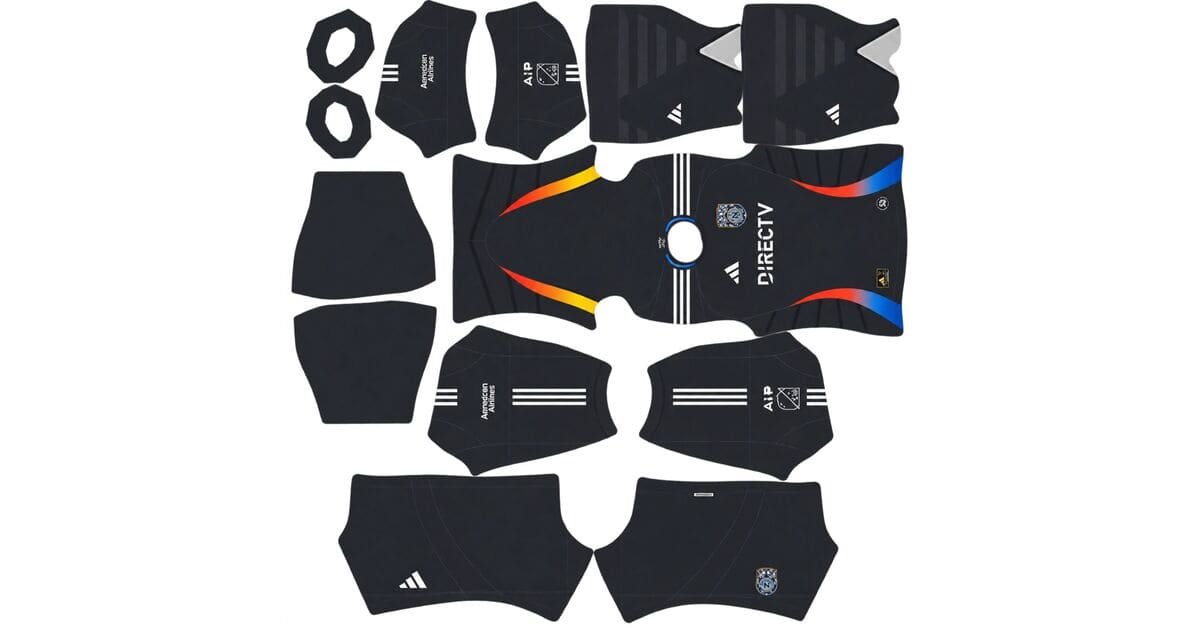
A San Diego FC DLS kits URL is a direct link to a 512×512 PNG SDFC shirt that you can paste into Dream League Soccer. All four slots are below, and each file was loaded into the game before being added to this page.
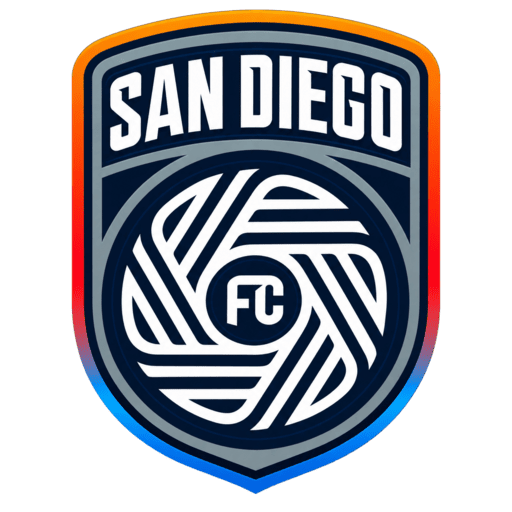
San Diego FC Logo
Official Logo 512×512 (2026/27)
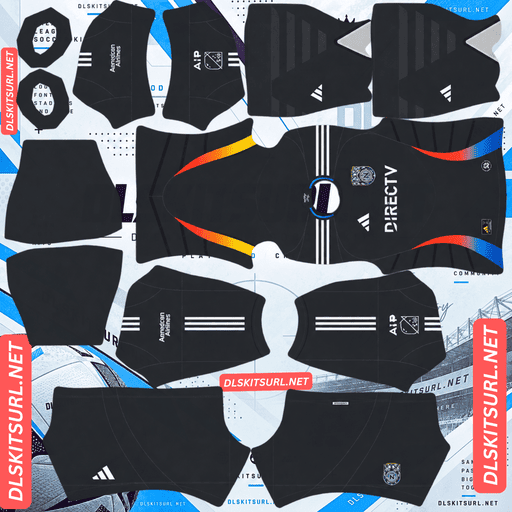
San Diego FC Home Kit
Home Kit 512×512 (2026/27)
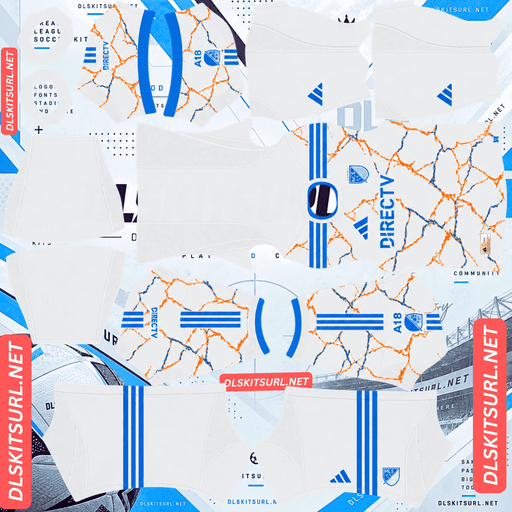
San Diego FC Away Kit
Away Kit 512×512 (2026/27)
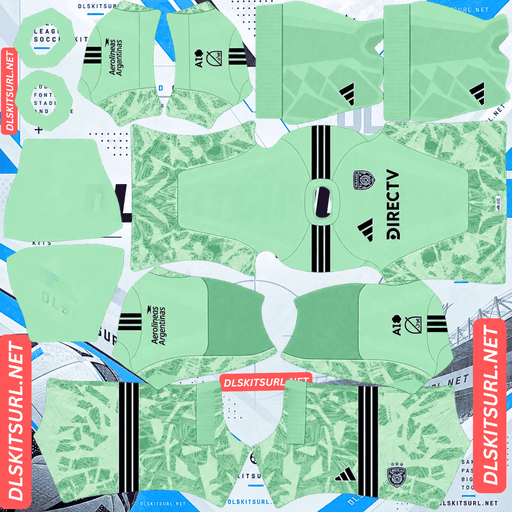
San Diego FC GK Home Kit
GK Home Kit 512×512 (2026/27)
San Diego joined MLS in 2025, making it one of the simplest clubs in the league to set up. There is very little kit history to work through, so there is less chance of confusing an old design with the current one.
The Unprecedented Unity away
Released on 10 February 2026, the Unprecedented Unity kit celebrates the shared culture of San Diego and Tijuana. Its design reflects a cross-border region shaped by connection, creativity and a global spirit.
The shirt has a white base covered in orange and blue wavy lines that run across the entire design, creating an energetic, electric look. Blue Adidas Three Stripes complete the design, along with blue collar and sleeve-cuff trim.
This is one of the better-reproducing kits in MLS
Four features work in this shirt’s favour, and it is unusual to find all four together.
Orange and blue against white create near-maximum contrast. Both accent colours stand out strongly from the white base, giving compression a clear difference in colour to preserve rather than relying on subtle changes in tone.
The lines are bold and flowing, not made up of tiny repeating details. Their width gives them a better chance of surviving at 512×512, while their curved shapes are more forgiving than straight lines that need to meet perfectly at seams.
The pattern is printed rather than woven or embossed. That means it is essentially ink on the shirt, and a flat image can reproduce printed artwork directly.
Finally, the design covers the entire shirt instead of being limited to a collar, cuff or small chest panel. It makes use of the full body of the kit template rather than relying on its smallest areas.
Expect this file to arrive almost completely intact. The main thing to check is whether the individual wavy lines remain distinct or merge into a blurred band of colour.
Portland’s Civic Stadium away kit from the same season makes an interesting comparison. Its pale colours, limited contrast and delicate line work make it difficult to reproduce. Both shirts come from the same manufacturer and year, but their results are very different because of contrast and pattern placement.
One thing to check at the sleeve
The pattern runs across the entire shirt, which means it also crosses from the body onto the sleeves. The kit template treats these as separate areas, so the transition needs to be handled correctly.
Follow the wavy lines from the body towards the sleeve. If they continue smoothly across the seam, the file was built properly. If they suddenly jump or restart, the template alignment is incorrect.
The blue Three Stripes are another useful check. They are clearly defined geometric shapes against a white background. Their edges should look crisp rather than blurred if the file has enough resolution.
The home is Azul
San Diego’s official colours are chrome and azul, with azul referring to a dark navy.
Adidas gives each MLS club one new kit per year, not two. The other shirt carries over into the following season. San Diego’s new release for 2026 was the away kit, meaning the home shirt continued from the club’s inaugural 2025 season.
Which inverts the usual advice
On most club pages, a file from the previous season is usually outdated. In MLS, that assumption can be wrong.
A 2025-labelled San Diego home file can be the same shirt the club wore throughout 2026.
Check the design, not the year. MLS follows a calendar-year season, so its kits are labelled 2026 rather than 2026/27.
San Diego is not alone in carrying shirts across seasons. Austin FC, Charlotte FC, Colorado Rapids, Atlanta United, FC Cincinnati, CF Montréal, the Red Bulls, NYCFC, New England, Nashville, Seattle, Toronto, Vancouver, St. Louis, Sporting KC and Portland follow the same arrangement.
And chrome will not read as chrome
Chrome is a metallic finish, and metallic surfaces look like metal because of their gradients. Highlights, mid-tones and darker shadows work together in a small area, changing as light moves across the surface.
A flat 512×512 image cannot properly reproduce that effect. Chrome details will therefore appear as flat silver-grey rather than reflective metal.
That is not a fault in your file. NYCFC’s metallic logos, Seattle’s lenticular crest and Leverkusen’s silver European kit lose the same kind of finish when converted into a flat image.
The navy base itself reproduces accurately because it is a pigment colour rather than a metallic finish.
A new club means fewer traps
San Diego’s short history works in your favour when choosing a kit.
The club has played only two MLS seasons. There is no decade of kit history to navigate, no long list of supplier changes, no retired crests and no collection of alternate badges to confuse with the current design.
Unlike established clubs, San Diego does not have a historic crest to worry about, and there is no Archive Collection badge swap to look out for. Adidas has supplied the club from the beginning, so there is no earlier supplier whose branding might make a file outdated.
The main thing to get right is which of the two seasons the file represents. The away kit makes that distinction easy: the 2025 away was plain white with navy details, while the 2026 version features orange and blue waves across the shirt.
The trade-off is the number of available files. A club with only two seasons of history has fewer 512×512 kit images in circulation than an established MLS side. You may find fewer alternatives, although San Diego’s MLS status and Adidas branding give it better coverage than many clubs outside the major leagues.
Which San Diego kit survives best?
The Unprecedented Unity away is the stronger option for image quality. Its orange and blue waves stand out clearly against white, and the bold printed pattern uses the full shirt area. It should arrive in the game almost completely intact.
The Azul home also reproduces well in its main colour. The dark navy base should remain accurate, but its chrome detailing will lose its metallic appearance and become flat silver-grey.
How visible are the kits on the pitch?
The away is one of the most readable shirts in MLS.
Dream League Soccer renders players at a relatively small size, so visibility depends on how far the shirt colours stand apart from the grass.
White separates clearly from pitch green, while orange sits further from grass than almost any colour. Together, they give the away kit both strong internal contrast and clear separation from the background.
Navy also stands out from green, but it is a much darker colour, so the home appears as a deeper shape on the pitch. Chrome details would normally add brightness to the design, but they lose their metallic effect in the flat image. As a result, the home kit loses some of the definition it has in real life.
What number colours work on San Diego’s kits?
Dream League Soccer reads the number colour from two small swatches on the kit template, not from your image. One controls the shirt numbers, while the other controls the shorts.
For the away kit, blue is the best option because it matches the Adidas Three Stripes and the collar and cuff trim. Avoid white numbers on the white shirt, as they will be almost invisible. Orange is also not ideal because it would compete with the wavy pattern across the back.
For the home kit, use white. It provides the clearest contrast against the dark navy base. Avoid trying to use a chrome or silver-looking swatch because the game displays numbers in a single flat colour rather than a metallic finish.
Set the shirt and shorts swatches separately.
How to tell if a San Diego file is current
Four checks will help you identify the correct versions.
First, look for Adidas branding, since all thirty MLS clubs wear Adidas. The 2026 away should be white with orange and blue wavy lines. If you find a plain white away with navy details, you are looking at the club’s inaugural 2025 design instead.
A 2025-labelled home file can still be correct if its design matches the current shirt, because MLS clubs carry kits over between seasons.
Finally, check the sleeve patch. MLS and Leagues Cup versions both exist, so the patch may differ depending on the competition.
How to use a San Diego FC DLS kits URL
Copy the link using the button on the card, not from your browser’s address bar. The address bar usually gives you the webpage rather than the direct image URL.
Open Dream League Soccer and tap My Club, followed by Customise. Go into the Kit section, not Logo, because badges and shirts use separate systems.
Choose the slot you want to replace before pasting the URL. Whatever slot is currently open is the one that gets replaced. Press and hold the field, select Paste, then tap Confirm. Older versions of the game may label that button Download.
Adidas released San Diego’s home and away kits, leaving the third-kit slot free. The 2025 inaugural away shirt is a natural choice for that space. It was plain white with navy details and a monochrome crest, making it the club’s first-ever change shirt. Dream League Soccer accepts any working 512×512 kit URL, regardless of the design’s age.
The first custom kit requires a one-time gem unlock. After that, changing kits costs nothing.
Test the link first
Open the URL in your browser before importing it into the game. The image should appear on its own and fill the screen, while the address should end in .png.
If the link opens a webpage with buttons, headers or other elements around the picture, it is a viewer page rather than a direct image link. Dream League Soccer cannot read that type of URL.
Why do San Diego FC kit URLs stop working?
Three common problems can break kit links, and only one is immediately obvious.
The first is that free image hosts delete files. Unused uploads may be removed after months or years, leaving a URL that still looks valid but no longer displays the image.
San Diego’s shorter history makes this problem more noticeable. There are already fewer kit files in circulation than there are for established MLS clubs, so replacing a dead link can be more difficult.
The second issue is hotlink protection. An image host can enable this feature to block requests that do not come from its own website. Your browser might load the image normally, while Dream League Soccer’s request gets refused. This explains why a URL can work when you click it but fail when you paste it into the game.
The third problem is that the preview and the actual image link may point to different files. Some websites display a thumbnail hosted on their own server but provide a URL that leads somewhere else. The preview can continue working even after the actual image link has stopped functioning.
Here, the shirt you see and the link you copy are the same file on the same server.
The San Diego FC badge
Set the crest during the same session, using the same menu but choosing Logo instead of Kit.
There is only one version of the badge, which is simpler than the situation at many established clubs. There is no historic crest, alternate mark or Archive Collection badge swap to worry about.
Dream League Soccer crops every imported badge into a circle, so choose an image with enough clear space around the entire design rather than one cropped tightly to the artwork.
If the crest file uses chrome, it will appear as flat silver-grey for the same reason the kit’s chrome details lose their metallic appearance.
A monochrome version is also worth having if you plan to use the 2025 inaugural away shirt, which carried a monochrome crest on the real kit.
Keeping your San Diego kits
Custom kits are stored on your device rather than in your account. Updating the game usually keeps them, but reinstalling it or switching to a new phone can remove your imported shirts and badge.
Because fewer San Diego kit files are available compared with most established MLS clubs, a working link is worth saving. Copy all four URLs into a notes app before you start importing them.
FAQ FOR RANK MATH
What is a San Diego FC DLS kits URL?
A direct link to a 512×512 PNG SDFC shirt that you paste into Dream League Soccer’s kit screen. A working direct image link ends in .png.
What is the Unprecedented Unity kit?
San Diego’s 2026 away shirt, featuring a white base with orange and blue wavy lines across the entire design. It reflects the shared culture and connection between San Diego and Tijuana.
Does the wavy pattern survive in DLS?
Yes, unusually well. The pattern is printed rather than woven, uses bold flowing lines instead of tiny details, has strong contrast against white and covers the entire shirt rather than being restricted to a small area.
Why doesn’t the chrome look metallic?
Chrome gets its metallic appearance from gradients, highlights and shadows, which a flat 512×512 image cannot properly reproduce. It therefore appears as flat silver-grey. The navy base remains accurate because it is a pigment colour rather than a metallic finish.
Is a 2025 San Diego home file still current?
Yes. Adidas gives each MLS club one new kit per year, and San Diego’s 2026 release was the away shirt. The home therefore carried over from the club’s inaugural 2025 season.
How do I tell the 2025 and 2026 away kits apart?
The 2025 inaugural away was plain white with navy details and a monochrome crest. The 2026 Unprecedented Unity away features orange and blue wavy lines across the shirt.
Are San Diego files easy to find?
San Diego has better coverage than many clubs outside the major leagues because it plays in MLS and wears Adidas. However, fewer kit files are available than for established clubs because only two seasons of designs exist.
What number colour should I use on the away?
Blue is the best choice because it matches the Adidas Three Stripes and trim. White numbers will disappear against the white shirt, while orange will compete with the wavy pattern.