
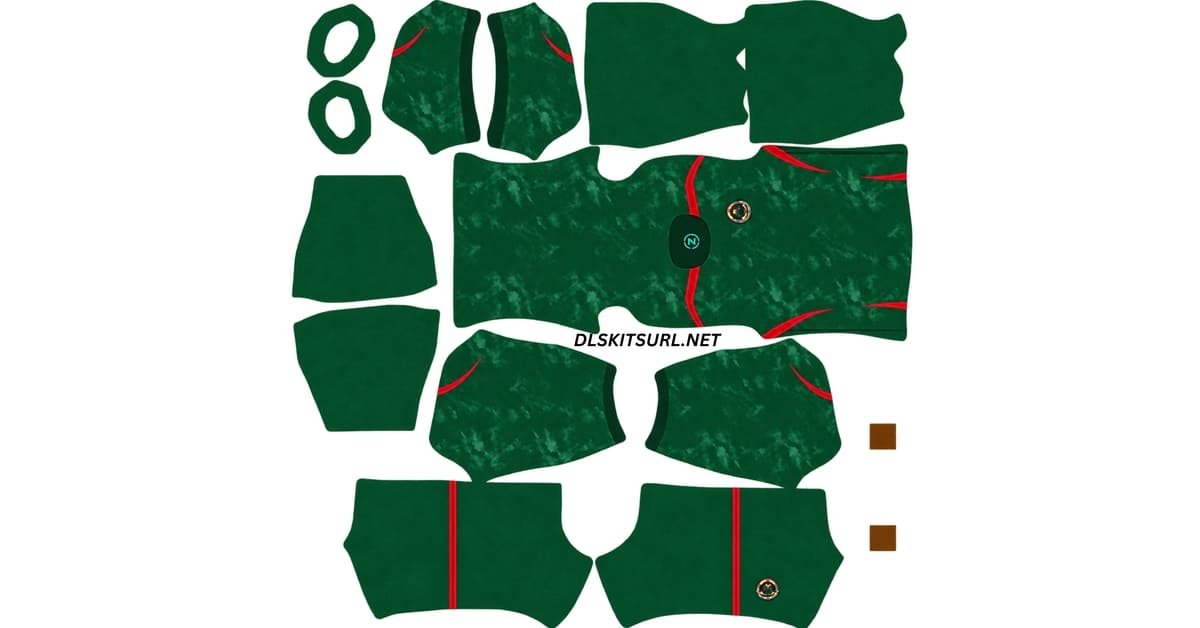
Looking for a working Bangladesh DLS kit URL for Dream League Soccer? Here you can find Bangladesh’s current outfield kits in the standard 512×512 PNG format, along with the goalkeeper slot and the details you should check before importing them.
Bangladesh kits are not as easy to find as shirts from major European clubs or national teams.
Barcelona Official Logo
Official Logo 512×512
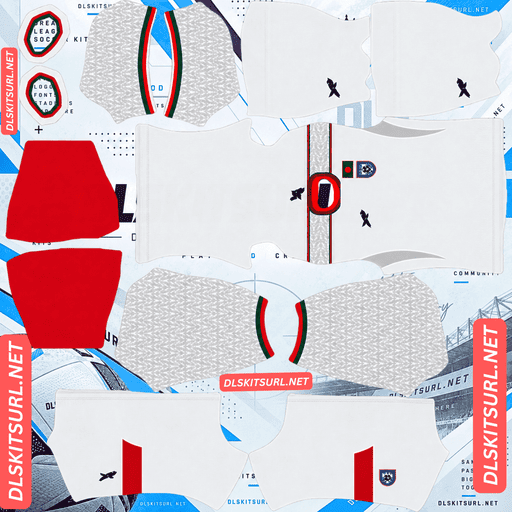
Bangladesh Home Kit
Home Kit 512×512
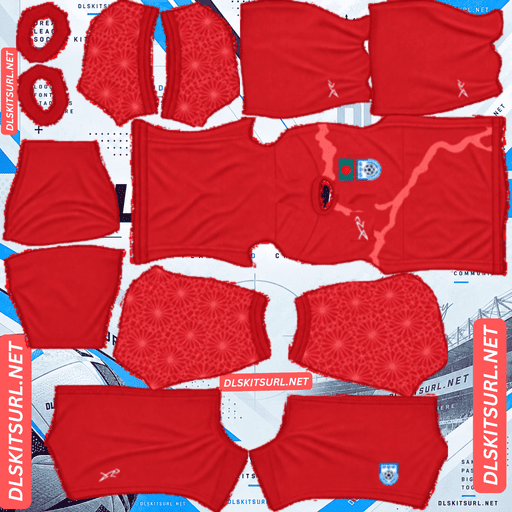
Bangladesh Away Kit
Away Kit 512×512 (2026/27)
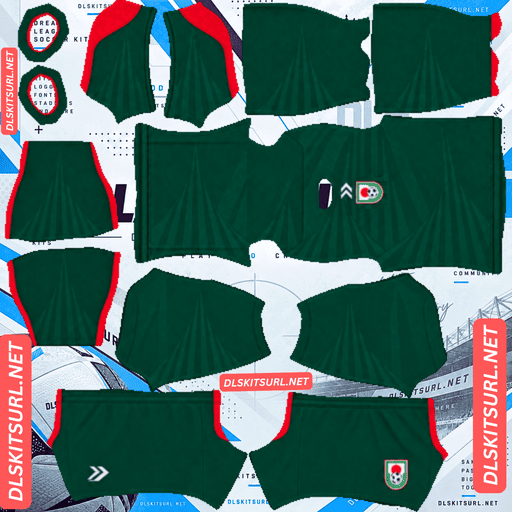
Bangladesh Third Kit
Third Kit 512×512 (2026/27)
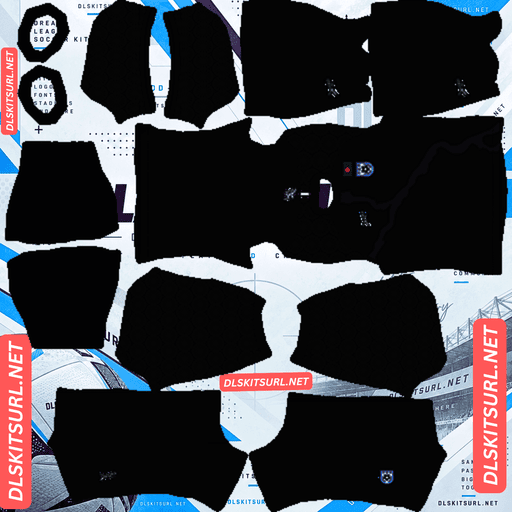
Bangladesh Home GK Kit
GK Kit 512×512 (2026/27)
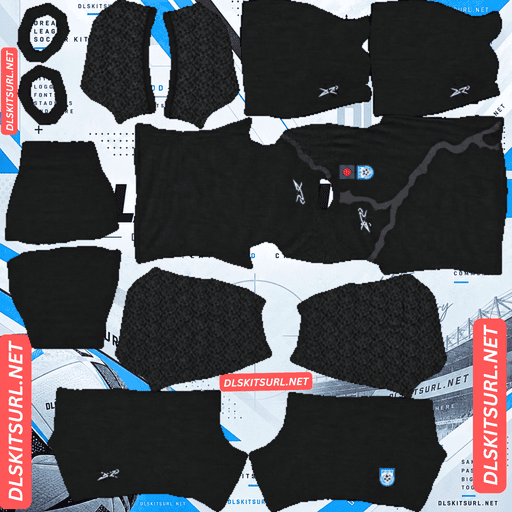
Bangladesh Away GK Kit
GK Kit 512×512 (2026/27)
There is a good reason for that.
The Bangladesh national team uses a local kit manufacturer rather than one of the global brands that dominate international football. That means fewer official high-resolution images circulate online, and fewer creators turn those images into accurate Dream League Soccer templates.
If you have already spent time searching for a clean Bangladesh kit, you have probably noticed the difference.
Why Good Bangladesh DLS Kit Files Are Hard to Find
Most major national teams wear kits produced by companies such as Adidas, Nike or Puma.
Bangladesh are different.
Since February 2025, the Bengal Tigers have worn kits made by Dour, a Bangladeshi sportswear brand.
The agreement covers the men’s and women’s senior national teams as well as Bangladesh’s age-group sides.
That change matters when you are searching for a Bangladesh DLS kit URL.
Large football kit databases are heavily focused on the biggest international manufacturers. When a new Adidas, Nike or Puma shirt is released, high-resolution photographs normally appear across multiple football websites almost immediately.
Those images are then used by designers who create Dream League Soccer templates.
A smaller local manufacturer does not always receive the same international coverage.
Dour’s Bangladesh kits are more likely to appear through Bangladeshi media and local football channels than through the major global kit databases.
As a result, fewer high-quality source images are available.
That is why Bangladesh DLS players often come across old shirts, low-resolution designs or generic templates that do not match the real national team kit.
The shortage of good files has little to do with the quality of the actual shirt. It is mainly a question of how widely the original images are distributed online.
Bangladesh Home Kit – White, Green and Red
One of the first things that can surprise people about the current Bangladesh home kit is its colour.
The main shirt is white.
Because Bangladesh’s national colours are red and green, many people naturally expect the home jersey to use one of those colours as its base.
Instead, the current design starts with a clean white body.
Green patterning appears across the sleeves, while red detailing around the collar and sleeve edges brings in the colours of the Bangladesh flag.
The result is a shirt that still feels strongly connected to the national identity without using green or red as the main base colour.
Bangladesh Home Kit Details
The chest contains several details worth checking when you are choosing a Bangladesh DLS kit 512×512.
The Bangladesh Football Federation crest appears on the left side of the chest alongside an embroidered Bangladesh flag.
The federation badge includes a football and Bengali script.
On the opposite side is the Dour logo, shown in green.
These small details are useful because they help separate the current official design from older Bangladesh kits and unofficial fan-made versions.
Bangladesh Map Detail on the Back
One of the most distinctive features of the current Bangladesh home shirt is found at the back of the neck.
There is a subtle outline of the geographical shape of Bangladesh, with BANGLADESH incorporated into the graphic.
It is a small element, but it is also one of the most useful details to check when comparing kit files.
A good Dream League Soccer recreation should include that neck design.
If the shirt has a completely plain back around the collar, you may be looking at an older kit or a simplified template.
Because the map is small, it is also one of the first details to disappear when someone uses a poor-quality source image.
Bangladesh Away Kit – Red
The Bangladesh away kit uses a very different look from the white home shirt.
Red is the main colour.
Together with green detailing, it produces the colour combination most people immediately associate with Bangladesh’s national flag.
That is also why some websites mistakenly label the red shirt as the home kit.
According to the current kit setup, however, the white jersey is the home shirt and the red design is the away shirt.
The inspiration behind the away kit is also different.
While the home design contains details connected with Bangladesh’s landscape and national identity, the away shirt draws inspiration from Bangladesh as a riverine country.
Bangladesh’s large network of rivers has played an important role in shaping the land and everyday life across the country, and that idea is reflected in the design.
How to Identify a Genuine Bangladesh DLS Kit
You do not need to be a kit expert to identify the current Bangladesh shirt.
A few simple checks can tell you whether the file is based on the real kit or a generic design.
Check the Home Shirt Colour
The current Bangladesh home shirt should be white with green sleeve detailing and red trim.
The away shirt is red.
If a website labels the red version as the home kit, the kit itself may still be correct, but the description is probably wrong.
Look for the Dour Logo
The Dour logo should appear on the right side of the chest.
On the home shirt, it is shown in green.
If a supposedly current Bangladesh kit has an Adidas logo, Nike swoosh or another global manufacturer’s branding, it is either an older shirt or an unofficial design.
Dour has supplied Bangladesh’s national teams since February 2025.
Check the Back of the Neck
The home shirt includes the outline of Bangladesh at the back of the neck.
The word BANGLADESH is worked into the design.
This is one of the easiest details to miss when somebody creates a low-quality DLS template.
If the entire neck area is plain, check the rest of the file carefully.
Look at the Green Sleeve Pattern
The home shirt should not have completely plain white sleeves.
Green patterning across the sleeves is one of the main visual features of the design.
If that pattern is missing, the file may be based on a different Bangladesh shirt or created from an image that did not contain enough detail.
Why File Quality Matters for Bangladesh DLS Kits
Image quality matters with every Dream League Soccer kit, but it is especially important with Bangladesh.
There are two main reasons.
The first is the limited number of high-resolution source images.
Because Bangladesh’s kits receive less coverage from major international kit websites, some DLS files are created using relatively small photographs.
A designer can enlarge one of those images until the finished PNG measures 512×512, but changing the dimensions does not create new detail.
The game will accept the file, but the shirt may still look soft or blurry on the player model.
The second problem is the design itself.
Bangladesh’s current home shirt includes fine sleeve patterning and the small map graphic near the back of the collar.
Those are exactly the kinds of details that disappear first when an image is heavily compressed or enlarged.
How to Check Bangladesh Kit Image Quality
Before importing a kit, zoom in on a sharp area such as the point where the red collar trim meets the white body.
The edge should appear reasonably clean.
If it looks heavily blurred across several pixels, the original image may have been much smaller than 512×512.
The sleeve pattern is another useful test.
You should be able to see the design rather than just a flat patch of green.
The back-neck map is even more useful. If the source image contains enough detail to preserve that small graphic, the rest of the shirt will usually hold up better as well.
File size can provide another clue.
A detailed 512×512 PNG often contains more image data than a very basic or heavily compressed file.
However, file size alone does not guarantee quality, so it is better to inspect the actual design as well.
How to Use a Bangladesh DLS Kit URL
Importing a Bangladesh DLS kit URL into Dream League Soccer only takes a few steps.
First, copy the direct image link from the kit card.
Use the Copy URL or similar button provided with the kit rather than simply copying the address from your browser bar.
Then open Dream League Soccer.
Go to My Club and choose Customise.
Some versions of the game may display this option as Customise Team.
Open the Kit section.
Make sure you choose Kit rather than Logo, because the badge uses a separate import option.
Select the slot you want to replace.
This could be the home, away, third or goalkeeper kit.
Tap Custom Kit.
Older versions of Dream League Soccer may display the option as Download.
Paste your Bangladesh kit URL into the field and confirm the import.
Repeat the process for every kit slot you want to change.
Unlocking Custom Kits in Dream League Soccer
If you have never imported a custom kit before, Dream League Soccer may require you to unlock the custom kit feature first.
This uses an in-game gem payment.
It is a one-time unlock rather than a separate payment every time you change your shirt.
Once the feature is available, you can continue importing different Bangladesh kits whenever you want.
Check the Bangladesh Kit URL in Your Browser First
Before opening Dream League Soccer, test the kit URL in your normal browser.
When you open the link, the image should appear by itself.
You should not see a normal webpage containing menus, adverts, buttons or other content around the shirt.
Dream League Soccer needs access to the actual image file rather than the webpage where the image is displayed.
A direct link commonly points to a .png image.
On desktop, you can usually right-click the picture and choose Open image in new tab.
This gives you a chance to inspect the kit and check its dimensions before trying to import it.
A standard Dream League Soccer kit should use a 512×512 layout.
Checking the file first can save you from repeatedly pasting a URL that the game cannot read.
Why Bangladesh DLS Kit URLs Stop Working
A kit link can stop working even when the actual PNG was created correctly.
The hosting service is often the problem.
Free Image Hosts Can Delete Files
Many Dream League Soccer kit files are stored on free image-hosting websites.
Those services may eventually remove old or inactive uploads.
When that happens, the original URL can remain visible on a website even though the image itself has disappeared.
This can be a bigger problem for less widely followed teams because fewer people are maintaining alternative copies of the same kit.
Hotlink Protection Can Block Dream League Soccer
Another common problem is hotlink protection.
Some image hosts allow a file to load when somebody visits it directly in a browser but block requests coming from outside applications.
That creates a confusing situation.
You open the Bangladesh kit URL and the image loads normally.
You paste exactly the same URL into Dream League Soccer and it fails.
In that case, the game itself may not be the problem. The image server is simply refusing the external request.
The Preview and Download URL May Be Different
Some kit websites display a preview image from one server but provide a download link hosted somewhere else.
That works until the external image disappears.
The preview may still look perfect on the webpage, giving the impression that everything is working, while the actual URL used by Dream League Soccer is already dead.
For reliable imports, it is better when the image you see and the URL you copy refer to the same hosted file.
Which Bangladesh Badge Should You Use in DLS?
You can set the Bangladesh Football Federation badge separately from the kit.
Go to the same Dream League Soccer customisation menu, but choose Logo instead of Kit.
The BFF crest contains a football and Bengali script.
That means it has more small details than a very simple club badge.
Dream League Soccer displays team logos at a relatively small size during matches, so some of the finest lettering may become difficult to see.
That is normal.
A high-quality 512×512 Bangladesh logo gives the game the best possible source image, but very fine text can still become less visible once the badge is reduced on screen.
When choosing a logo file, make sure there is enough empty space around the crest so important details are not cut off when the game crops or resizes it.
Save Your Bangladesh DLS Kit URLs
Once you find Bangladesh kits that work properly, save the links somewhere outside Dream League Soccer.
A simple notes app is enough.
This is particularly useful with Bangladesh because finding good-quality files can take longer than finding kits for major clubs and national teams.
If you reinstall the game or change phones, you may need to import your custom kits again.
Your custom badge may also need to be restored.
Saving the Bangladesh DLS kit URL links now means you will not have to search for the same files again later.
Bangladesh DLS Kit URL FAQ
What Is a Bangladesh DLS Kit URL?
A Bangladesh DLS kit URL is a direct link to a Bangladesh kit image that can be pasted into Dream League Soccer’s custom kit screen.
The standard custom kit format uses a 512×512 PNG created for the Dream League Soccer template.
What Colour Is the Bangladesh Home Kit?
The current Bangladesh home shirt is white.
It includes green patterning across the sleeves and red detailing around the collar and sleeve edges.
The Bangladesh away shirt uses red as its main colour.
Who Makes the Bangladesh National Team Kit?
Bangladesh’s national team kits are produced by Dour, a Bangladeshi sportswear company.
The agreement with the Bangladesh Football Federation began in February 2025 and covers the men’s and women’s senior teams as well as Bangladesh’s age-group national sides.
Why Are Bangladesh DLS Kit Files Hard to Find?
Bangladesh use a local sportswear manufacturer rather than one of the major global brands.
As a result, their kit releases receive less coverage from large international kit databases.
Fewer high-resolution source photographs are available, which means fewer creators produce accurate Bangladesh DLS kit 512×512 templates.
How Do I Know If a Bangladesh Kit File Is Genuine?
Start by checking the colours and branding.
The current home shirt should be white with green sleeve patterning and red trim.
The Dour logo should appear on the right side of the chest.
You should also look for the Bangladesh map outline at the back of the neck.
Those details make it easier to identify a file based on the current official kit.
Why Is My Bangladesh DLS Kit Blurry?
The source image may have been smaller than 512×512 and then enlarged.
This can happen more often with teams for which fewer high-resolution kit photographs are available.
Fine details such as the sleeve pattern, collar edges and back-neck map tend to lose sharpness first.
A properly prepared 512×512 PNG should preserve those details much better.
What Is on the Back of the Bangladesh Home Shirt?
The shirt includes an outline of the geographical shape of Bangladesh near the back of the neck.
The word BANGLADESH is incorporated into the graphic.
It is one of the more distinctive details of the current home kit.
Why Does a Bangladesh Kit URL Work in My Browser but Not in DLS?
The image host may be using hotlink protection.
This can allow you to view the image normally in your browser while preventing Dream League Soccer from loading the same file through an external request.
If that happens, you will need another direct image URL hosted somewhere that allows external access.
Do Bangladesh Custom Kits Survive a Reinstall?
You may need to import your custom Bangladesh kits again after reinstalling Dream League Soccer or changing devices.
For that reason, save your Bangladesh DLS kit URL links somewhere outside the game.
Keeping the home, away, goalkeeper and logo URLs in a notes app makes it much easier to restore your team later.