
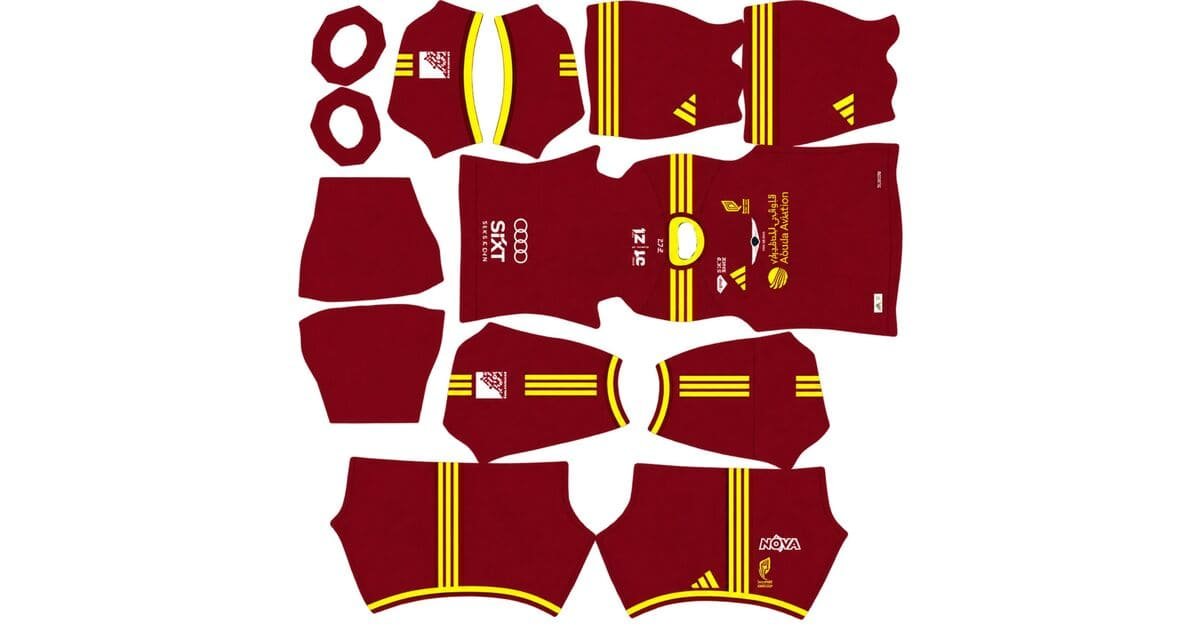
An Al Qadsiah DLS kits URL is a direct link to a 512×512 PNG shirt that you can import into Dream League Soccer. All four kit slots are covered below, with each image loaded into the game before publication.
Al Qadsiah Logo
Official Logo 512×512 (2026/27)
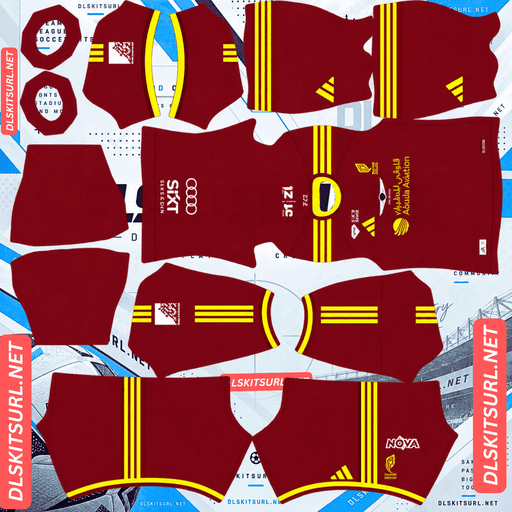
Al Qadsiah Home kit url
Home Kit 512×512 (2026/27)
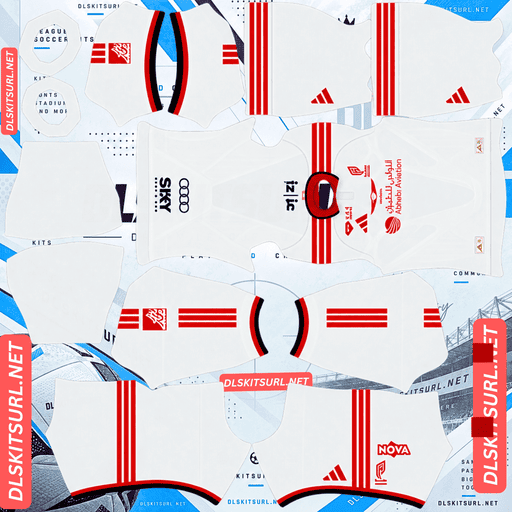
Al Qadsiah Away kit
Away Kit 512×512 (2026/27)
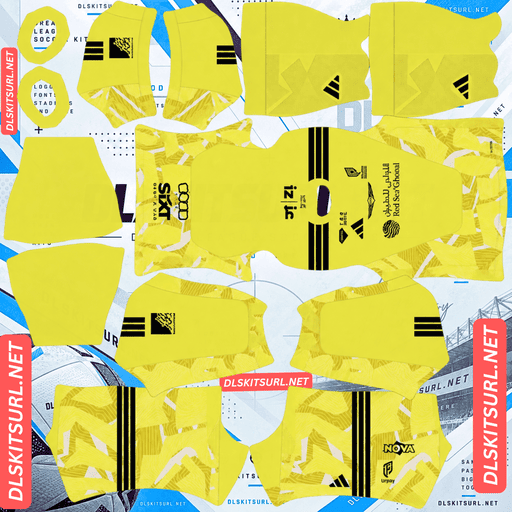
Al Qadsiah GK Home Kit
GK Home Kit 512×512 (2026/27)
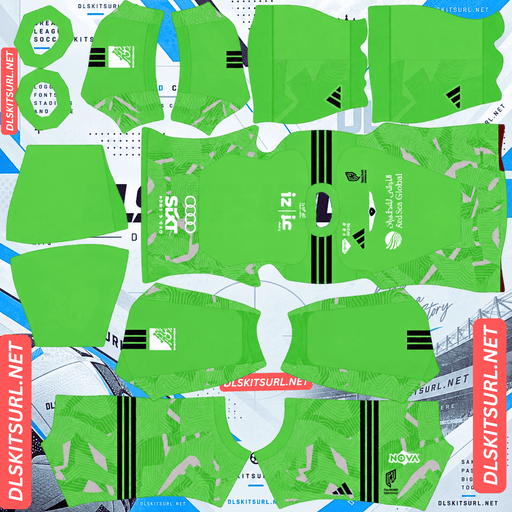
Al Qadsiah GK Away Kit
GK Away Kit 512×512 (2026/27)
Al Qadsiah’s 2026/27 kits are among the simpler designs to reproduce in DLS, thanks to their straightforward colour schemes. However, finding the correct season can be more difficult because the club has changed kit manufacturers several times in recent years.
Why Are Al Qadsiah Kits So Easy to Reproduce in DLS?
The main reason is their simple design. The home and away shirts use standard Adidas styling without elaborate club-specific patterns or textures.
The home shirt features a red base with yellow Adidas shoulder stripes, collar trim and sleeve cuffs. The away shirt combines white and red for a clean, understated appearance.
Kit databases describe the home design as “Plain,” which reflects how little additional detailing it contains.
Why Simple Designs Work Well at 512×512
A straightforward kit design is usually easier to reproduce at a small resolution. There are no complicated tonal patterns to lose, embossed textures to flatten, gradients to distort or horizontal stripes that need precise alignment.
The main design relies on colour blocking, which works particularly well in a 512×512 image.
As long as the colours are accurate and the edges are sharp, most decent-quality files should produce a convincing Al Qadsiah kit in Dream League Soccer.
Why the Crest and Sponsor Matter More Than the Shirt Shape
The downside of a standard template is that the shirt itself does not immediately identify the club.
A red Adidas shirt with yellow trim could belong to several teams. The collar, shoulder stripes and general cut are not unique to Al Qadsiah.
For this reason, check the club crest and Aloula Aviation sponsor when identifying the correct shirt. These details help distinguish Al Qadsiah’s kit from other clubs using similar Adidas designs.
Why Are Al Qadsiah Kits Difficult to Date Correctly?
Al Qadsiah has changed kit suppliers several times, making it easy to find older designs incorrectly labelled as current.
The supplied kit history lists the following manufacturers:
Period
Kit manufacturer
2026 onward
Adidas
2024–2026
Nike
2023–2024
Macron
2022–2023
Skillano
2020–2022
Puma
2019–2020
Skillano
2017–2019
Offside
2015–2017
Lotto
With so many changes, older Al Qadsiah kit images may remain online for years after their original season.
The easiest way to narrow down the season is to inspect the manufacturer logo. An Adidas logo indicates the current collection described here, while Nike, Puma or another supplier may point to an older design.
Is It Al Qadsiah, Al-Qadsiah or Al Qadisiyah?
The club’s name appears in several spellings, including Al Qadsiah, Al-Qadsiah and Al Qadisiyah.
All three names are used to refer to the same Saudi football club, known as the Eastern Knights and based in Khobar.
The club is owned by Saudi Aramco and, according to the supplied information, finished fourth in 2025/26 to qualify for the AFC Champions League Elite.
If your search does not return the kit you want, try another spelling before assuming the file is unavailable.
Al Qadsiah Kits for the 2026/27 Season
Home Kit — Red and Yellow
The home kit was released on 23 June 2026.
It features a predominantly red shirt, with yellow Adidas shoulder stripes, collar trim and sleeve cuffs. The Aloula Aviation sponsor appears across the chest.
The colour combination reflects the club’s established identity, while the standard Adidas styling keeps the overall design simple.
Away Kit — White and Red
The away shirt was released on the same date and uses a white base with red detailing.
Its clean design makes it easy to reproduce in DLS. Like the home shirt, it avoids complicated textures and intricate patterns, so the main challenge is finding a file with the correct colours, sponsor and crest.
Third Kit — Navy with Red Pinstripes
The third kit was released on 19 October 2026, completing the collection.
It features a dark navy base with thin red vertical pinstripes running down the front. The club markings, Adidas logo and commercial prints use gold and yellow tones.
Of the three outfield designs, this is the most distinctive. It is also the only one that relies on a visible pattern, which makes image quality more important.
Will the Third Kit’s Pinstripes Survive in DLS?
The vertical pinstripes should reproduce reasonably well if the source image is a genuine, high-quality 512×512 file.
Two factors influence whether fine stripes remain visible: their orientation and their contrast against the background.
Vertical stripes are generally easier to align than horizontal stripes because they run down the body in a consistent direction. Horizontal patterns can be more noticeable when they fail to line up across different sections of the kit template.
The red pinstripes against navy also provide a useful contrast, although the lines may still become less distinct if the source image is blurred or heavily compressed.
How to check: open the third-kit image at full size and inspect the chest. If you can distinguish individual red lines, the file is likely suitable. If the front looks like a blurred wash of navy and red, look for a sharper version.
Why the Gold and Yellow Branding May Look Flat
The third kit uses gold and yellow tones for its logos and commercial markings.
Flat yellow is straightforward to reproduce because it is a single colour. Metallic gold is more complicated: its appearance depends on highlights, middle tones and shadows that create the impression of reflected light.
At 512×512 resolution, small logos may not have enough pixels to preserve all those details.
Therefore, branding that looks like flat yellow in DLS is not necessarily a sign of a poor file. Check the crest and other larger elements first, as they have more room to retain tonal detail.
What Number Colours Work Best on Al Qadsiah Kits?
Dream League Soccer uses separate colour swatches for shirt numbers and shorts numbers. These settings are controlled through the kit template rather than automatically copied from the imported image.
Recommended combinations:
Home kit: yellow numbers to match the Adidas stripes and trim. White is another clear option against the red shirt.
Away kit: red numbers to match the detailing. Avoid white numbers on the white shirt because they will be difficult to see.
Third kit: gold, yellow or white numbers against navy. White generally provides the clearest contrast at small sizes.
Remember to adjust the shirt and shorts number colours separately. After setting them, check the result in a match to make sure the numbers remain readable.
How Visible Are Al Qadsiah Kits on the Pitch?
All three outfield kits should be easy to distinguish from the pitch, with the red home kit offering particularly strong contrast.
Dream League Soccer renders players at relatively small sizes, so visibility depends partly on how different the shirt colour is from the green grass.
The red home shirt contrasts strongly with the pitch, while its yellow trim provides an additional bright detail.
The white away shirt also stands out clearly. The navy third kit is distinct from the grass as well, and its red pinstripes add extra definition if the image preserves them.
This makes the collection practical for players who want kits that remain recognisable when the camera is zoomed out.
How to Identify a Current Al Qadsiah Kit
Use these four checks to identify the described 2026/27 designs:
Adidas branding: look for the Adidas three stripes rather than a Nike swoosh.
Home kit: confirm the red base with yellow shoulder stripes, collar and cuffs.
Away kit: look for the white shirt with red detailing.
Third kit: confirm the navy base, thin red vertical pinstripes and gold or yellow branding.
Manufacturer logos are particularly useful for Al Qadsiah because several older supplier designs remain in circulation.
How to Use an Al Qadsiah DLS Kits URL
Follow these steps to import a kit into Dream League Soccer:
Copy the direct image URL using the button on the kit card. Copying the browser address bar may give you a webpage link instead of the PNG.
Open Dream League Soccer and go to My Club.
Select Customise, then open Kit rather than Logo.
Choose the slot you want to replace before pasting the URL.
Press and hold the URL field and select Paste.
Tap Confirm to import the kit. Depending on the game version, the button may be labelled Download.
Choose the correct slot before importing because the selected kit will be replaced.
The three outfield kits occupy the home, away and third slots, leaving the goalkeeper slot available. Remember to set the goalkeeper kit as well instead of leaving the default design unchanged.
The first custom-kit import may require a one-time gem unlock. After the feature is unlocked, changing the imported designs generally does not require another unlock.
Test the Kit URL Before Importing
Open the copied link in your browser before using it in the game.
A working direct image URL should display the PNG on its own, without webpage headers, buttons or other surrounding content. The address may end in .png, but that alone does not guarantee the file is accessible or has the correct dimensions.
On a computer, right-click the image and open it in a new tab. Check the actual image dimensions if your browser provides that information.
A filename claiming to be 512×512 is not proof that the image has the correct resolution.
Why Do Al Qadsiah Kit URLs Stop Working?
There are three common reasons a kit URL can stop working.
The Image Host Deletes the File
Free image hosts may delete older or unused uploads. When that happens, the link can remain on the original webpage even though the image itself is no longer available.
If the link returns an error or displays a blank page, look for another copy of the same kit.
Hotlink Protection Blocks the Game
Some hosting services allow an image to open in a browser but prevent other applications from loading it directly.
This can cause a URL to work when clicked but fail when Dream League Soccer tries to retrieve it. If this happens, try another direct PNG link from a compatible host.
The Preview and the Download Link Are Different
Some webpages show a preview image stored on one server but provide a link to a separate file hosted elsewhere.
The preview can remain visible even after the linked file stops working. Always test the exact URL you intend to paste into DLS rather than relying on the webpage preview alone.
For this collection, the intended setup is for the displayed shirt and copied URL to refer to the same image file.
How to Add the Al Qadsiah Badge
To import the club crest, open My Club → Customise → Logo instead of the Kit section.
Dream League Soccer crops badges into a circular display area, so choose a file with enough space around the crest to avoid cutting off the artwork.
Arabic lettering around the badge may become less readable when displayed at a small size beside the score. This is often a limitation of the display scale rather than a problem with the original image.
The crest is especially important for Al Qadsiah. Because the home and away shirts use standard Adidas designs, the badge is one of the clearest ways to identify the club.
Choose a clean, correctly coloured crest with a recognisable central shape. For the third kit, check that its colours work well with the navy and red shirt.
How to Keep Your Al Qadsiah Kits
Custom kits and badges may be stored on your device rather than permanently linked to your game account. Updating the game may leave them intact, but reinstalling it or switching devices can mean you need to import them again.
Al Qadsiah’s multiple supplier changes and alternative spellings can also make it harder to find the same designs later.
Before importing the collection, save the home, away, third-kit and goalkeeper URLs, along with the badge link, in a notes app or another safe place. This will make it easier to restore your custom setup if a file disappears or you change devices.
Frequently Asked Questions
What Is an Al Qadsiah DLS Kits URL?
An Al Qadsiah DLS kits URL is a direct link to a 512×512 PNG shirt that you can import into Dream League Soccer. A working direct link should open the image itself rather than a webpage.
Who Makes Al Qadsiah’s 2026/27 Kits?
Adidas makes Al Qadsiah’s 2026/27 kits, replacing Nike according to the supplied kit history. The club has used several manufacturers since 2015, so checking the logo is a useful way to identify the season.
What Is the Al Qadsiah Third Kit for 2026/27?
The third kit has a dark navy base with thin red vertical pinstripes. Its club markings, Adidas logo and commercial prints use gold and yellow tones. The supplied information lists its release date as 19 October 2026.
Are Al Qadsiah Kits Good for DLS?
Yes. The home and away shirts use simple colour blocking without elaborate patterns or textures, making them straightforward to reproduce at 512×512 resolution. The third kit needs a sharper image to preserve its thin red pinstripes.
Why Does the Al Qadsiah Kit Design Not Immediately Identify the Club?
The home and away shirts use standard Adidas styling with the club’s colours applied. Their general shape and trim are not unique to Al Qadsiah, so check the club crest and Aloula Aviation sponsor to help identify them.
Is It Spelled Al Qadsiah or Al Qadisiyah?
The club name appears as Al Qadsiah, Al-Qadsiah and Al Qadisiyah. These spellings refer to the same club. Try alternative spellings if your search does not return the kit you want.
Will the Third Kit’s Pinstripes Survive in DLS?
They should remain reasonably visible in a good-quality 512×512 file. The stripes run vertically and have contrast against the navy background, but blurry or heavily compressed images may cause the lines to merge.
What Number Colour Works on the Al Qadsiah Home Kit?
Yellow is a good choice because it matches the Adidas shoulder stripes and trim against the red shirt. White is another option that provides clear contrast