
An Atlanta United DLS kits URL is a direct link to a 512×512 PNG Atlanta United shirt that you can import into Dream League Soccer. All four kit slots are listed below, and every file has been loaded into the game before being added to this page.
Atlanta United Logo
Official Logo 512×512 (2026/27)
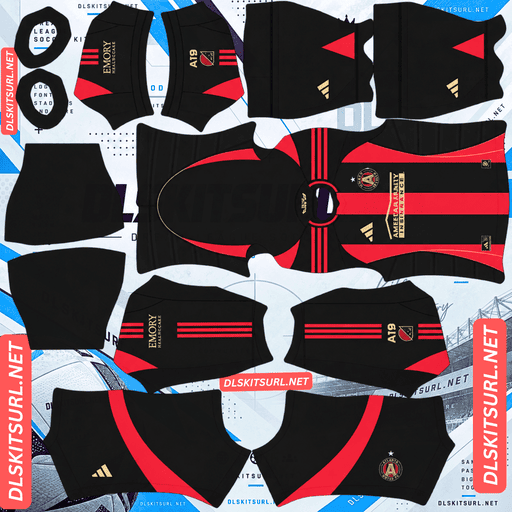
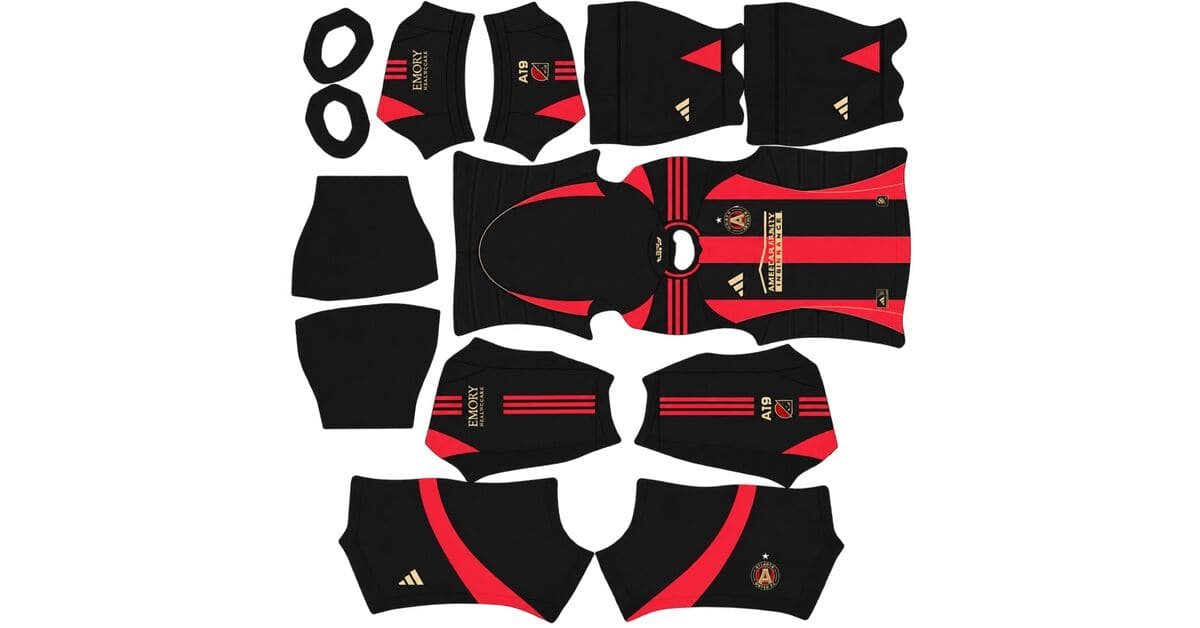
Atlanta United Home Kit
Home Kit 512×512 (2026/27)
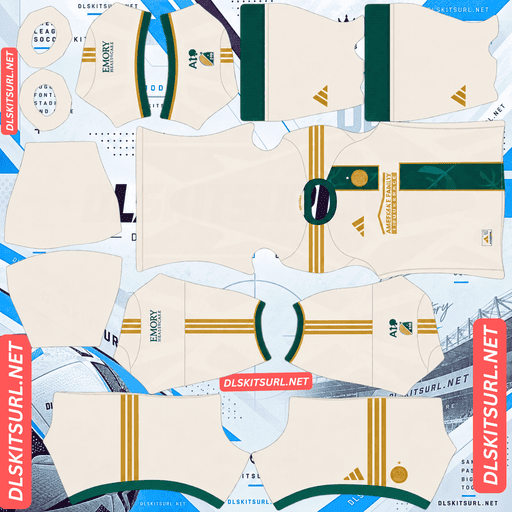
Atlanta United Away Kit
Away Kit 512×512 (2026/27)
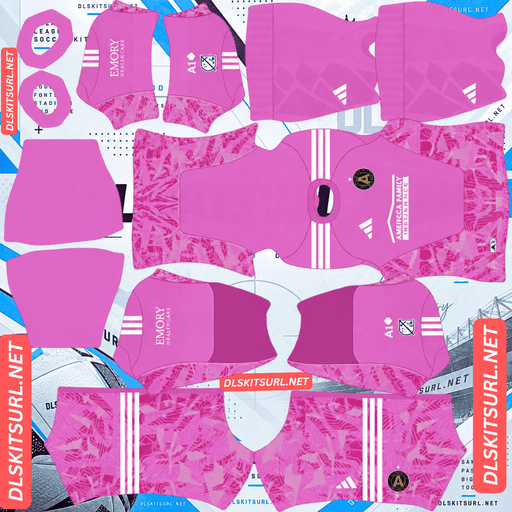
Atlanta United GK Home Kit
GK Home Kit 512×512 (2026/27)
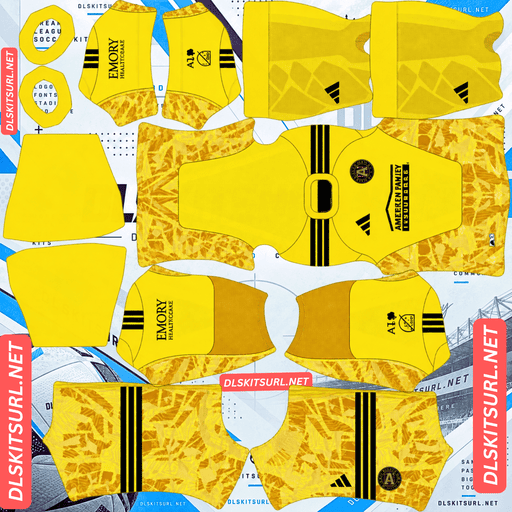
Atlanta United GK Away Kit
GK Away Kit 512×512 (2026/27)
Atlanta United’s vice president described the club’s 2026 away shirt as the most detailed kit they have ever made. That attention to detail is impressive, but it also creates a problem in DLS: several of the design’s most distinctive features sit in areas the game’s kit template cannot reproduce properly.
The Spirit of ’96 Away Kit
Released on 11 February 2026, the Spirit of ’96 celebrates 30 years since Atlanta hosted the 1996 Centennial Olympic Games. Its launch also comes in the summer when Atlanta hosts eight World Cup matches.
The shirt uses a cream base with green and gold accents. Green represents the city’s tree canopy, while gold symbolises victory.
Its standout features include:
Gold Atlanta United crest: Styled to resemble an Olympic medal and positioned over the heart.
Green vertical sash: A stripe decorated with multicoloured leaves, inspired by a medal sash.
Roman numerals MCMXCVI–MMXXVI: Embroidered inside the neckline to connect 1996 with 2026.
Laurel wreaths: Featured on the back neck tag.
The design tells a story through several small details. Unfortunately, not all of them can make the transition into Dream League Soccer.
Three of the Four Special Details Are Difficult or Impossible to Reproduce
The Roman numerals are inside the neckline. Dream League Soccer’s kit template does not map the interior surfaces of a shirt, so details printed inside the collar cannot be imported, regardless of the manufacturer.
The laurel wreaths sit on the back neck tag. This detail is positioned at the very top edge of the shirt panel, tucked beneath the collar. It is one of the least visible areas on the in-game player model.
The gold crest presents two separate problems. First, metallic gold depends on gradients, highlights and shadows to look like metal. A flat 512×512 image cannot reproduce that effect convincingly, so the gold is likely to appear as flat yellow.
Second, Dream League Soccer places your imported club badge over the chest area, covering whatever artwork the kit image contains underneath it. That means the medal-styled crest, one of the away shirt’s central design features, can be hidden by the badge you import.
The Green Sash Is the Detail That Survives
The green vertical sash is the strongest surviving feature of the Spirit of ’96 in DLS.
A vertical stripe follows a consistent position down the centre of the shirt template, making it easier to reproduce than details scattered around the neckline. Green also contrasts clearly with the cream background.
The multicoloured leaf pattern inside the sash is the part that needs closer inspection. It is fine detail inside a narrow band, exactly where a small image begins to lose definition.
Open the PNG at full size and look for individual leaf shapes. If you can distinguish them, the file preserves the pattern well. If the sash looks like a plain green stripe, the detail has been lost.
Expect a cream shirt with a green vertical sash and gold trim. It should still be recognisable as the Spirit of ’96, even if the Roman numerals, laurel wreaths and medal crest cannot be reproduced as intended.
A Gold Badge Is the Better Match for the Away Kit
If the Spirit of ’96 is your main shirt, consider using a gold version of the Atlanta United badge.
The real kit features a gold crest styled as an Olympic medal, so a gold badge is a closer visual match than the standard version. It will appear as flat yellow rather than metallic gold, but it better reflects the away shirt’s design.
The Atlanta United Home Kit Carries Over
Adidas releases one new kit per MLS club each year rather than replacing both the home and away shirts. The other kit carries over into the next season.
For Atlanta United, the new release in 2026 was the away shirt. The home kit continued unchanged from the previous season.
Why a 2025 Home File Can Still Be Correct
On many kit pages, a shirt labelled with last season’s year is outdated. MLS works differently, so an older filename does not automatically mean the design is no longer current.
A 2025-labelled Atlanta United home file can show the same shirt the club wore throughout 2026.
Always check the actual design instead of relying only on the season label. MLS uses a calendar-year season, so kits are labelled 2026 rather than 2026/27.
The Spirit of ’96 away kit was also announced as a two-season design covering 2026 and 2027, meaning it will remain current through the 2027 season.
Austin FC, Charlotte FC and Colorado Rapids follow the same general pattern of carrying kits across seasons.
Atlanta United’s Home Kit Has Five Countable Stripes
Atlanta United are known as the Five Stripes, and the home shirt reflects that identity with exactly five vertical stripes in the club’s red, black and gold colours.
Count the Stripes to Check the File
Striped shirts can be difficult to verify because small differences in stripe width are not always obvious without comparing the image with the real jersey.
Atlanta United’s design offers a much simpler check: count the stripes.
There should be five. If the image shows four or six, it does not match the intended design.
Atlético Mineiro’s four white stripes offer a similar visual check this season. For Atlanta United, counting the stripes is one of the easiest ways to identify a suitable home kit file.
Why the Home Stripes Reproduce Well
Vertical stripes are generally forgiving on a DLS kit template because they align consistently down the shirt. Atlanta’s red and black also create strong contrast, while the bands are wide enough to remain visible at game resolution.
As long as the file has the correct stripe count, most decent PNGs should produce a recognisable Atlanta United home shirt.
The gold trim may appear as flat yellow rather than metallic gold because of the limitations of a flat image. That does not prevent the main striped design from looking correct.
Which Atlanta United Kit Reproduces Best in DLS?
Kit
Main design
DLS reproduction verdict
Home
Five vertical stripes in red, black and gold
Reproduces well; check that the stripe count is correct
Away — Spirit of ’96
Cream base with a green sash and gold trim
The sash survives; the interior numerals, neck-tag wreaths and medal-styled crest are difficult or impossible to reproduce fully
The home kit is the more straightforward option if you want a design that remains recognisable during matches. The away shirt has a distinctive concept, but its finer details depend much more heavily on the quality and limitations of the imported image.
What Number Colours Work on Atlanta United Kits?
Dream League Soccer uses two small colour swatches in the kit template rather than taking the number colours directly from your imported PNG. One controls shirt numbers and the other controls shorts numbers.
Home kit: Choose white or gold. Red and black both disappear against parts of the striped design, while white provides strong contrast. Gold can work too, although it may appear as flat yellow.
Away kit — Spirit of ’96: Choose green to match the sash. Green stands out against the cream background, while white is too similar to the shirt’s base colour to provide equally clear contrast.
Set the shirt and shorts number swatches separately. Check both during a match to make sure the numbers remain readable on the relevant parts of the kit.
How Visible Are Atlanta United Kits on the Pitch?
Both Atlanta United kits can remain visible during gameplay because neither has a base colour that closely resembles the pitch.
Dream League Soccer renders players at a relatively small size, so the contrast between the shirt and the grass matters more than tiny design details.
Home Kit Visibility
The red and black vertical stripes create strong internal contrast, helping players remain recognisable from a distance. The design also separates well from the green pitch.
For that reason, the home shirt is the more identifiable of the two at match distance.
Away Kit Visibility
Cream is a neutral colour that remains reasonably clear against the grass. However, the green sash sits closer to the pitch colour than the red and black stripes do.
Although the sash looks bold on the shirt, its green colour contributes less separation from the playing surface than you might expect. The gold trim provides additional contrast, even if its metallic appearance cannot be reproduced perfectly.
How to Identify a Current Atlanta United DLS Kit File
Use these four checks before importing a shirt:
Check the Adidas branding. All 30 MLS clubs wear Adidas kits.
Count the home stripes. The design should have exactly five vertical stripes.
Inspect the away shirt. It should have a cream base, a green vertical sash and a gold crest.
Do not reject a 2025-labelled home file automatically. If it matches the current home design, it can still be correct because MLS kits carry over between seasons.
These checks help you avoid confusing an older design with the current collection or choosing a file with the wrong striped pattern.
How to Use an Atlanta United DLS Kits URL
Importing an Atlanta United kit is straightforward when you have a working direct image URL.
Copy the link using the button on the kit card. Avoid copying the address from your browser bar, which usually points to the webpage rather than the image itself.
Open Dream League Soccer and tap My Club.
Select Customise, then open Kit. Do not choose Logo, which is a separate system for importing the club badge.
Select the kit slot you want to replace before pasting the URL.
Press and hold the URL field, tap Paste, and then select Confirm. Some older versions label this button Download.
What to Use for the Third Kit Slot
Adidas released the home and away shirts, leaving the third outfield slot available for another design.
Atlanta United’s 2017 inaugural shirt is a good option if you want to bring back an earlier look. Dream League Soccer accepts any working 512×512 image URL, regardless of the age of the kit design.
The first custom kit requires a one-time gem unlock. Once you have unlocked the feature, changing your custom kits does not cost additional gems.
Test the Atlanta United Kit URL Before Importing
Open the copied link in your browser before trying to use it in Dream League Soccer.
A working direct image URL should display the shirt on its own, and the address should end in .png.
If the link opens a webpage with buttons, navigation or other content around the picture, it is probably a viewer page rather than a direct image link. The game needs to access the image itself.
On a computer, right-click the image and select the option to open it in a new tab. You can then inspect the image and check the dimensions reported by your browser.
This check is especially important for the Spirit of ’96 away shirt. The multicoloured leaf pattern sits inside a narrow green sash, so a high-quality image gives the small details the best chance of remaining visible.
Why Do Atlanta United Kit URLs Stop Working?
Three common problems can cause a kit URL to fail, even when it initially appears to work.
1. Free Image Hosts Delete Files
Some free image-hosting services delete uploads after months or years of inactivity. The link may still look valid, but the image has been removed and Dream League Soccer can no longer load it.
2. Hotlink Protection Blocks the Game
Image hosts sometimes enable hotlink protection to stop external websites and apps from loading their files directly.
This can explain why a link works in your browser but fails when pasted into the game. The browser may load the image through the host’s own webpage, while Dream League Soccer’s request is refused.
3. The Preview and the Link Point to Different Files
Some websites show a thumbnail stored on their own server while providing a direct image URL hosted elsewhere. The preview may continue to display even after the actual image link stops working.
For the kits listed on this page, the shirt preview and copied URL point to the same file on the same server. This helps ensure that the image you see is the one you import.
The Atlanta United Badge
You can import the Atlanta United crest separately from the kit. Open the same customisation menu, but select Logo instead of Kit.
The club badge features a shield with five stripes and a gold star, echoing the five-stripe motif that defines the home shirt.
Dream League Soccer crops imported badges into a circle. Because a shield narrows towards its base, choose an image with enough clear space around the complete design rather than one cropped tightly to the artwork. This reduces the risk of losing part of the shield during the circular crop.
Which Badge Should You Use?
For the home kit, the standard Atlanta United crest is a natural choice. If the Spirit of ’96 is your main shirt, a gold version of the badge is the closer match to the real jersey’s Olympic medal-inspired crest.
The imported badge will cover the crest artwork underneath it, so choose the version that best matches the kit you plan to use.
Keeping Your Atlanta United Kits
Custom kits are stored on your device rather than permanently attached to your account. Game updates usually preserve them, but reinstalling Dream League Soccer or switching phones can mean losing your imported kits and badge.
Atlanta United’s collection takes a little more preparation than some MLS clubs because you may want two badge versions, and the quality of the away shirt’s fine details can vary between files.
Save all four kit URLs in a notes app before importing them. Keep both badge options with the links so you can restore your setup without having to search for everything again.
Frequently Asked Questions
What Is an Atlanta United DLS Kits URL?
An Atlanta United DLS kits URL is a direct link to a 512×512 PNG Atlanta United shirt that you paste into Dream League Soccer’s kit screen. A working direct image link ends in .png.
What Is the Spirit of ’96 Kit?
The Spirit of ’96 is Atlanta United’s away shirt for the 2026 and 2027 seasons. It celebrates 30 years since Atlanta hosted the 1996 Centennial Olympic Games and features a cream base, green and gold accents, a medal-styled gold crest, a green sash and Roman numerals inside the neckline.
Why Can’t I See the Olympic Details on the Away Kit?
Three details are difficult or impossible to reproduce fully. The Roman numerals are inside the neckline, which the kit template does not map. The laurel wreaths sit on the back neck tag, while the medal-styled gold crest can be covered by the imported club badge.
What Survives on the Atlanta United Away Kit?
The green vertical sash is the main feature that survives well. It follows a consistent position on the kit template and contrasts with the cream base. Check whether the multicoloured leaf pattern remains visible inside the sash, as this helps distinguish a good-quality file from one that loses the finer details.
How Do I Check an Atlanta United Home Kit File?
Count the stripes. The home shirt should have exactly five vertical stripes, reflecting the club’s Five Stripes nickname. A file showing four or six stripes does not match the intended design.
Is a 2025 Atlanta United Home File Still Current?
Yes, if it matches the current home design. Adidas releases one new kit per MLS club each year, and Atlanta United’s 2026 release was the away shirt. The home kit carried over unchanged.
Which Badge Should I Use for Atlanta United?
The standard crest is a suitable match for the home shirt. For the Spirit of ’96 away kit, a gold version is more accurate because the real shirt’s crest is styled as an Olympic medal.
Why Doesn’t the Gold Look Like Gold in DLS?
Metallic gold relies on gradients, highlights and shadows to create its appearance. A flat 512×512 image has limited room to reproduce those effects in a small trim or badge, so the gold may look like flat yellow instead.