
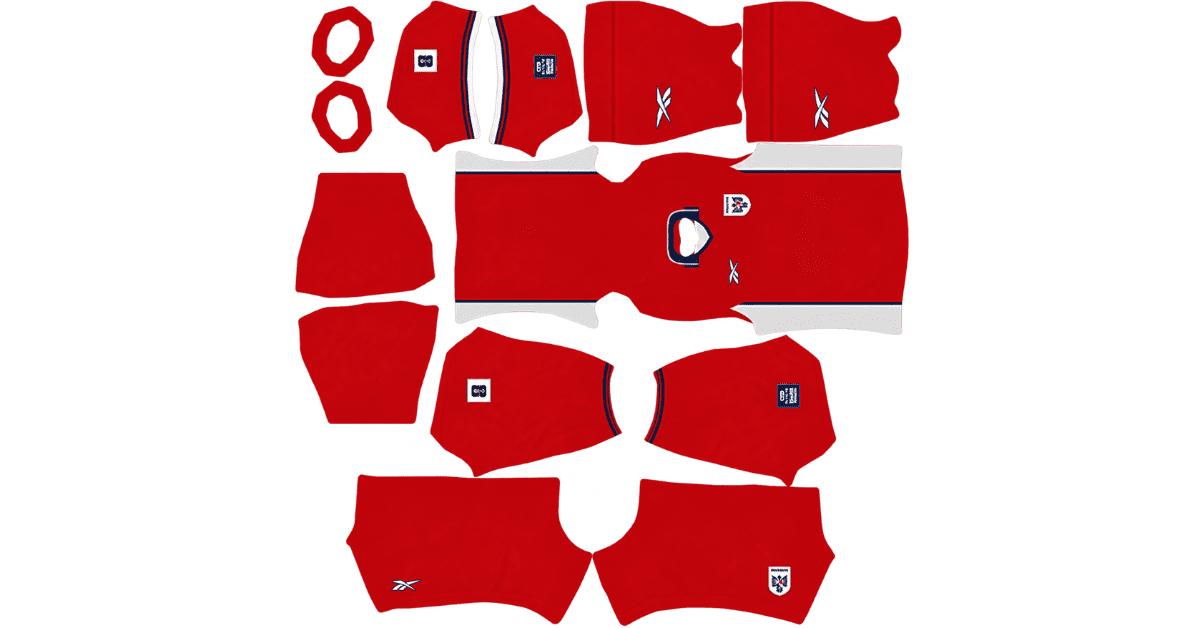
A Panama DLS kits URL is a direct link to a 512×512 PNG shirt that you can import into Dream League Soccer. All four kit slots are covered below, and each image has been loaded into the game before being added to this page.
Panama Logo
Official Logo 512×512 (2026/27)
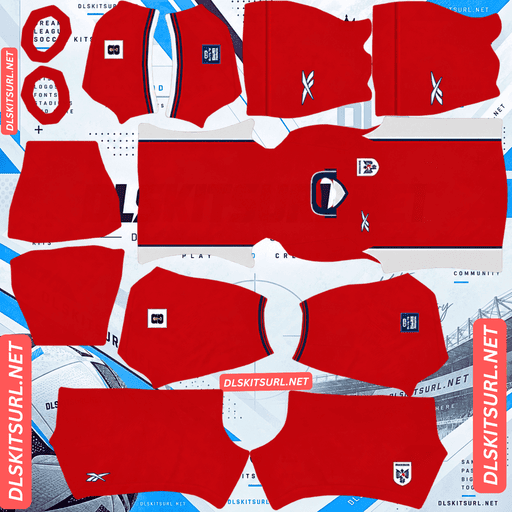
Panama Home Kit
Home Kit 512×512 (2026/27)
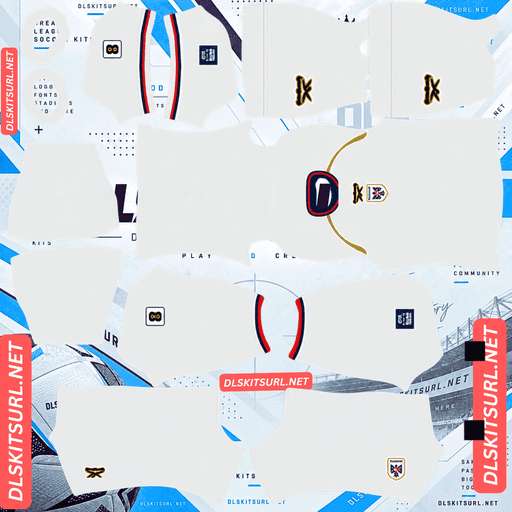
Panama Away Kit
Away Kit 512×512 (2026/27)
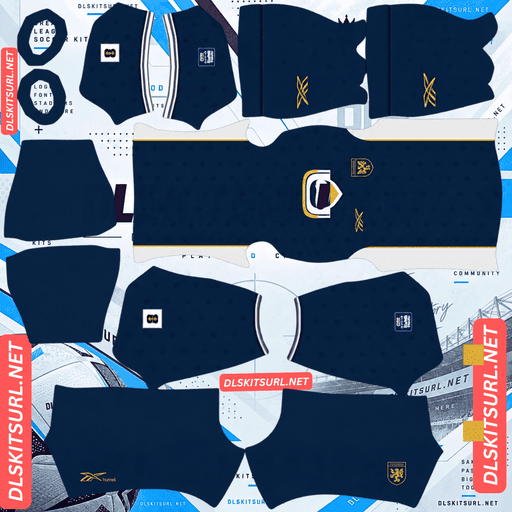
Panama Third Kit
Third Kit 512×512 (2026/27)
These shirts mark Reebok’s return to the World Cup. The collection uses bold colours and clear panel designs that generally translate well into DLS. There is, however, one important detail to check before importing the away or third kit: both feature centrally positioned branding that can clash with your in-game badge.
Panama’s Third Kit Has a Centre-Chest Badge Problem
Reebok took an unusual approach with Panama’s white third shirt by placing both the Reebok wordmark and the national crest directly in the centre of the chest.
Dream League Soccer positions an imported team badge at a fixed point on the player’s chest. That position does not move to accommodate a crest already printed on the shirt.
The result is two badges in different locations: Panama’s original crest sits in the middle, while the badge imported into the game appears off to the side. Because they do not overlap, both remain visible, making the shirt look cluttered.
Before importing the third kit, open the image at full size and inspect the chest area.
Japan, PSG, India and Le Mans face a similar issue with their kits this season. Panama’s design makes the conflict especially noticeable because the central branding is a defining feature of the shirt.
The Away Kit Has the Same Problem
The away shirt also places the national crest in the centre of the chest, with the Reebok logo above it in gold.
The home shirt uses a more conventional layout. Its crest sits in the standard chest position alongside the Reebok branding, leaving room for the badge that DLS adds.
If clean badge placement is important to you, the home kit is the easiest option.
Panama’s 2026 World Cup Kits
Made by Reebok and released on 14 April 2026, the collection was unveiled at a presentation in Panama City’s Old Quarter. The designs take inspiration from the national team’s late-1990s era, combining a retro look with distinct colour schemes.
Home Kit — Red With White Side Panels
The home shirt features a vibrant red base, reflecting Panama’s nickname, La Marea Roja, or the Red Tide.
Broad white panels run vertically down the sides, creating a strong contrast with the red body. A navy fold-over polo collar with white trim completes the neckline, while the sleeve cuffs follow the same coordinated style. Red shorts and red socks finish the kit.
The fabric also includes a tonal design made up of vertical stripes and repeated eagle motifs inspired by the national crest.
Away Kit — Navy With Gold Branding
The away shirt uses a navy base with white side panels, giving it a clean, understated appearance.
A white polo collar with dark stripes adds contrast around the neckline, while gold branding and the national crest provide the main highlights. A subtle repeated tonal graphic runs through the fabric.
Among supporters, this has been the best-received kit in the collection.
Third Kit — White With Centred Branding
The third shirt has a white base with subtle tonal detailing. Its repeated vertical pattern includes geometric elements across the body and sleeves.
A navy V-shaped collar with red trim gives the neckline a distinctive finish. Matching cuffs and gold piping along the shoulder seams mark the transition between the front and back panels.
The most noticeable feature is the placement of the Reebok wordmark and national crest in the centre of the chest. This is the detail to check carefully if you plan to add a separate DLS badge.
Which Panama Kit Survives Best in DLS?
All three shirts are relatively reliable imports because their main designs depend on colour blocking rather than intricate textures. The broad panels should remain visible, even when some of the smaller tonal details become difficult to see.
Kit
Main structure
Tonal pattern
Expected result in DLS
Home
Red with white side panels
Eagles and vertical stripes
Panels survive; pattern may fade
Away
Navy with white side panels
Subtle repeated graphic
Panels survive
Third
White with gold shoulder piping
Geometric pattern
Piping remains visible; pattern may fade
The Side Panels Make the Biggest Difference
All three kits use strong contrasting colours, particularly the broad white panels on the home and away shirts.
This works well in Dream League Soccer. The panels are wide enough to remain visible on the kit template, and the contrast between red and white or navy and white makes the shirt’s shape easy to recognise.
Because these are large design elements rather than tiny details, almost any decent-quality image should reproduce the overall silhouette correctly.
Expect the Tonal Patterns to Become Less Visible
Each shirt includes a pattern rendered in shades close to its main colour: eagles and vertical stripes on the home, a subtle repeat on the away, and geometric details on the third.
A tonal pattern relies on small differences between neighbouring shades rather than strong colour contrast. At 512×512 resolution, these details are among the first elements to lose definition.
Expect the main colours and panels to remain clear, while the patterns inside them become less noticeable. The home kit’s eagle motifs are a particularly significant loss because they echo the national crest.
The Third Kit’s Gold Piping Is Especially Delicate
Gold often looks metallic because it combines bright highlights, mid-tones and darker shadows. A narrow line does not provide much room for all those shades to appear clearly.
When the image is compressed or displayed at a small size, the gold shoulder piping can flatten into a thin yellowish line rather than looking convincingly metallic.
The gold branding on the away shirt has a better chance of surviving because it occupies a larger area. When checking that file, look closely at the Reebok logo.
Udinese, India and Sevilla face similar limitations with fine details in their kits this season.
What to Check in a Panama DLS Kit File
Since the tonal patterns may not remain visible, focus on the clearest structural details when judging image quality.
Home: Check the boundary between the white side panels and red body, along with the navy polo collar.
Away: Inspect the white panels against the navy shirt and the dark stripes on the white collar.
Third: Look at the navy V-shaped collar and its red trim.
If these boundaries appear crisp rather than blurred or smeared, the image is more likely to have sufficient resolution.
You should also confirm the actual dimensions. On a computer, right-click the image and open it in a new tab to check its size. A filename that says 512×512 does not prove that the file really has those dimensions.
Panama’s 2026 World Cup Campaign
Panama entered the tournament for its second World Cup appearance, following its debut in 2018.
The team was drawn into a group with England, Croatia and Ghana but was eliminated during the group stage.
If you want to recreate the full group in Dream League Soccer, the England, Croatia and Ghana kits are also covered on this site.
What Number Colours Work Best on Panama’s Kits?
Dream League Soccer controls shirt and shorts number colours through two small swatches in the kit template. These settings are separate from the colours in your imported PNG.
Home kit: White numbers work well against the red shirt and match the side panels. Navy is another option that complements the collar.
Away kit: White is the clearest choice against navy, although gold also matches the branding. White generally remains easier to read at the small size used for player numbers.
Third kit: Navy or red works well with the collar and trim. White numbers against the white shirt will be difficult to see.
Set the shirt and shorts number colours separately so that each remains visible against its background.
How Visible Are Panama’s Kits on the Pitch?
All three kits should stand out clearly because their main colours differ substantially from the green playing surface.
Dream League Soccer displays players at relatively small sizes, so colour contrast is important when following the action.
The red home kit has strong contrast against green grass. Its white side panels add another layer of contrast, making the player’s shape easier to pick out.
The navy away kit also stands apart from the pitch, while the white third kit is clearly distinguishable from the grass.
The broad white panels on the home and away shirts are worth noting. They break up the main colour and give the player a more defined silhouette than a solid shirt of the same base colour.
How to Identify the Current Panama DLS Kits
Use these four details to make sure you have the correct 2026 collection:
Reebok branding should appear on the kits, marking the brand’s return to the World Cup.
Home kit: Red body, broad white side panels and a navy polo collar.
Away kit: Navy body, white side panels and a striped white collar.
Third kit: The national crest and Reebok wordmark should be centred on the chest.
The central branding on the away and third shirts is particularly useful for identifying the designs, but remember that it can also create a badge-placement issue after importing them into DLS.
How to Use a Panama DLS Kits URL
Importing your Panama kit is straightforward as long as you use a direct image link.
Click the Copy URL button on the kit card. Copying the address from your browser’s address bar may give you the webpage link instead of the PNG.
Open Dream League Soccer and select My Club.
Tap Customise, then open Kit. The Logo section is separate and is used for the team badge.
Choose the kit slot you want to replace before pasting the link.
Press and hold the URL field, tap Paste, and then select Confirm. Older versions may use the label Download.
Reebok released three outfield kits, so you can use the home, away and third slots for Panama’s collection. That leaves the goalkeeper slot available. Make sure to configure it rather than leaving the default kit in place.
The first custom kit requires a one-time gem unlock. After that, changing your kits does not cost additional gems.
Test the Panama Kit URL Before Importing
Open the link in your browser before pasting it into the game.
A working direct image URL should display the shirt on its own, and the address should end in .png. If the link opens a webpage with navigation, buttons or other elements surrounding the image, it is a viewer page rather than a direct image file.
Dream League Soccer needs the PNG itself to load the kit, not the webpage that contains it.
Why Do Panama DLS Kit URLs Stop Working?
There are three common reasons a kit link may stop working, even if it once loaded correctly.
Free Image Hosts Remove Old Uploads
Some free image-hosting services delete files that have not been accessed for a long time. A saved URL may still look normal, but the image behind it has disappeared.
Hotlink Protection Blocks External Requests
Some hosts prevent other apps and websites from loading their images directly. Your browser might still show the image, while Dream League Soccer’s request is rejected.
This is why a link can work when opened manually but fail after you paste it into the game.
The Preview and the Direct Link Point to Different Images
A website may show a preview hosted on its own server but provide a link to an image stored elsewhere. If that external file is moved or deleted, the preview can remain visible even though the import link no longer works.
For the kits presented here, the image shown and the URL provided are intended to point to the same file on the same server.
The Panama Badge
You can import the Panama badge during the same session, but choose Logo instead of Kit in the customisation menu.
The Panamanian Football Federation crest features an eagle, a figure that also appears as a repeated tonal motif on the home shirt.
The eagle’s bold outline makes it suitable for DLS, where badges appear at a small size beside the scoreboard. Fine details can become difficult to distinguish at that scale, but a strong central figure is easier to recognise.
Dream League Soccer crops imported badges into a circle. Choose a logo file with enough clear space around the crest to avoid cutting off the design. The eagle’s wingtips extend close to the edges, so a tightly cropped image may lose part of the artwork.
Also remember that the away and third shirts already feature a centrally positioned crest. Adding your imported badge may create the double-badge effect described earlier.
How to Keep Your Panama Kits
Custom kits are stored on your device rather than directly in your game account. Updating Dream League Soccer will usually preserve them, but reinstalling the game or switching to another phone can remove your imported kits and badge.
Before you begin, save all four kit URLs in a notes app. Keeping the links together makes it much easier to restore your setup if you ever need to reinstall the designs.
Frequently Asked Questions
What is a Panama DLS kits URL?
A Panama DLS kits URL is a direct link to a 512×512 PNG shirt that you can import through Dream League Soccer’s Kit menu. A working direct image link ends in .png.
Why does my Panama kit show two badges?
Reebok placed the crest in the centre of the chest on the away and third shirts, while Dream League Soccer adds your imported badge at its own fixed position. The home shirt uses a standard crest position and avoids this clash.
Who makes Panama’s 2026 World Cup kits?
Reebok makes Panama’s 2026 World Cup kits. The collection was released on 14 April 2026 and draws inspiration from the national team’s late-1990s era, marking Reebok’s return to the World Cup stage.
What does the Panama 2026 home kit look like?
The home kit has a vibrant red base, broad white vertical panels along the sides, a navy fold-over polo collar with white trim, and matching red shorts and socks.
Why can’t I see the eagle pattern on Panama’s home kit?
The eagle design is tonal, meaning it uses shades of red rather than a contrasting colour. Fine tonal details are often the first elements to disappear in a 512×512 kit image, while the white side panels and navy collar remain visible.
Which Panama kit works best in DLS?
All three kits should reproduce their main colours and panels well because their designs rely on broad colour blocking rather than fine texture. The home kit is the best option if you want your imported badge to sit without clashing with a centrally placed crest.
Why doesn’t the gold piping on the third kit look metallic?
Metallic gold relies on highlights, mid-tones and shadows to create its appearance. The third kit’s shoulder piping is extremely thin, leaving too little room for these shades to remain distinct at 512×512 resolution.
Was the 2026 World Cup Panama’s first appearance?
No. The 2026 tournament was Panama’s second World Cup appearance. The national team made its debut in 2018.