
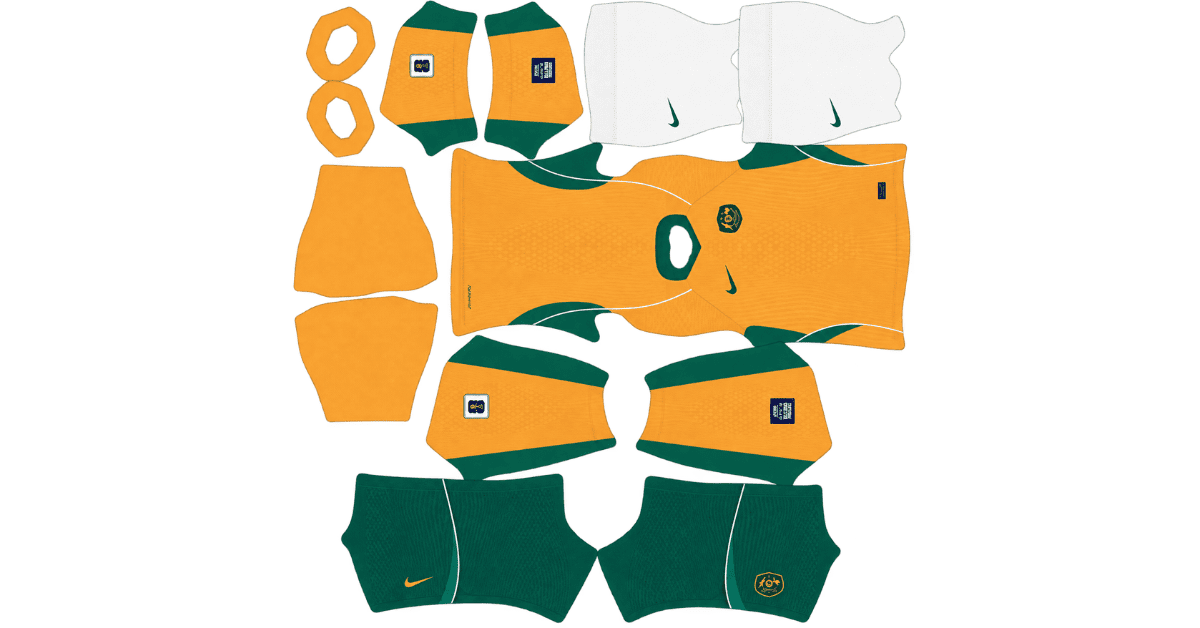
An Australia DLS kits URL is a direct link to a 512×512 PNG Socceroos shirt that you can import into Dream League Soccer. Both kits are listed below, and each image has been loaded into the game before being published here.
Australia Logo
Official Logo 512×512 (2026/27)
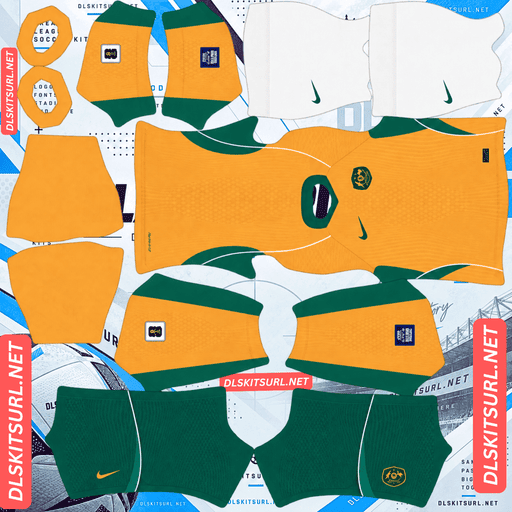
Australia Home Kit
Home Kit 512×512 (2026/27)
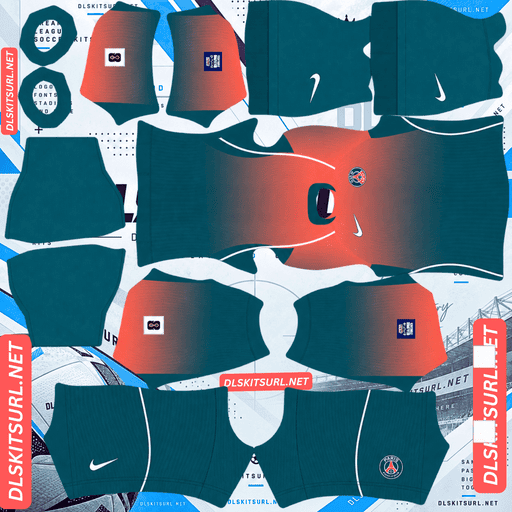
Australia Away Kit
Away Kit 512×512 (2026/27)
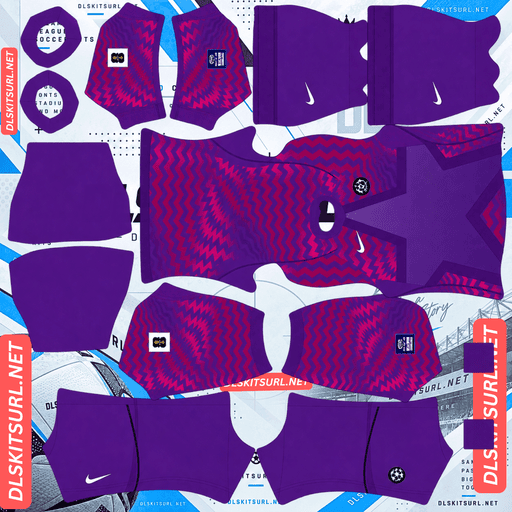
Australia GK Home Kit
GK Home Kit 512×512 (2026/27)
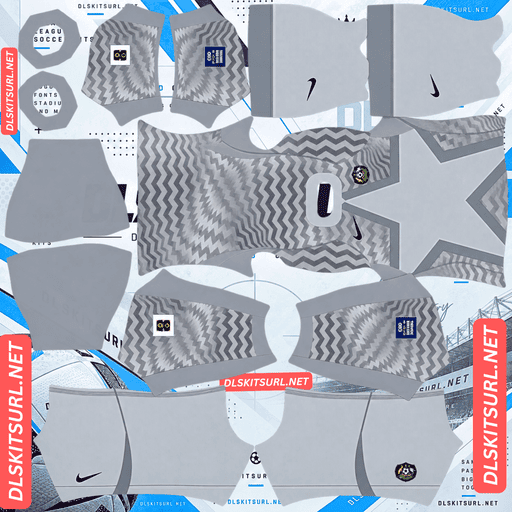
Australia GK Away Kit
GK Away Kit 512×512 (2026/27)
Nike took two very different approaches to the 2026 Australia collection. The home kit looks back to an iconic moment in Australian football history, while the away shirt experiments with two standout features. In DLS, however, one kit is far easier to reproduce accurately than the other.
The Australia Away Kit Loses Its Two Biggest Features
Released on 23 March 2026 under the campaign concept “Mission to Wreck,” the Australia away kit takes inspiration from Australian sunrises. Nike built the design around two distinctive elements:
A coral-to-deep-green gradient that flows across the shirt like a painted horizon.
A lenticular federation crest designed to change its appearance as the wearer moves.
Unfortunately, these features behave very differently when converted into a flat 512×512 kit image. One cannot be reproduced by a static file at all, while the other depends heavily on image quality.
Why the Lenticular Crest Cannot Be Reproduced in DLS
A lenticular finish relies on changes in viewing angle. The material, lighting and movement of the viewer work together to create the shifting appearance.
Dream League Soccer uses a flat image mapped onto a 3D player model. The image itself does not change according to the viewing angle, so the crest can only display one fixed appearance.
The same limitation affects other experimental finishes introduced across football kits this season, including Sweden’s lenticular badge, the Netherlands’ shifting crest, Switzerland’s UV-reactive logos and Saudi Arabia’s pearlescent finish. These effects depend on physical materials and cannot be fully transferred into a standard kit image.
Why the Away Kit’s Gradient Depends on Image Quality
The coral-to-green gradient is a much bigger challenge for the file itself.
A smooth gradient contains many slightly different colour values that blend into one another. To reproduce that transition cleanly, an image needs sufficient resolution and good compression quality.
When a gradient is reduced to a smaller image or compressed too aggressively, neighbouring shades can merge into larger blocks. The smooth fade then breaks into visible bands, an effect known as colour banding.
On Australia’s away shirt, the gradient is the central design feature rather than a small decorative detail. Coral gradually transitioning into deep green defines the entire body of the shirt. If that transition breaks apart, the kit can look like a coral shirt with an abrupt green section instead of a continuous fade.
Before importing the away kit, open the PNG at full size and inspect the body. A smooth, gradual transition is what you want. Clearly separated bands of colour are a warning that the image may not reproduce well in the game.
Why This Is One of the Most Demanding Away Kits to Import
Many difficult kits have one main weakness, such as a fine pattern that disappears or a special finish that cannot be recreated digitally. Australia’s away shirt combines both problems: a full-body gradient that needs a good image file and a lenticular crest that no static file can reproduce.
Espanyol’s lemon-lime third kit and Manchester City’s home kit face similar gradient-related risks, but neither combines that challenge with a lenticular crest.
For this reason, Australia’s away kit is particularly sensitive to image quality.
The Australia Home Kit Is Much More Forgiving
Released on the same day as the away shirt, the home kit takes a simpler and more traditional approach.
Nike drew inspiration from Australia’s iconic 2006 World Cup shirt and the brand’s Total 90 era. That was the period when Australia returned to the World Cup after a 32-year absence and came close to defeating Italy in the Round of 16.
The design returns to Australia’s familiar combination of yellow and green, with gradient green shorts adding extra depth to the overall look.
Why the Home Kit Survives Image Compression
The home shirt relies on strong colour blocking rather than a complicated pattern or special material effect.
Yellow forms the main base, while green provides contrast through the trim and other details. There is no intricate tonal pattern that needs to remain sharp, and no fabric effect that depends on changing light.
The gradient appears on the shorts rather than across the shirt itself. It therefore occupies a smaller area and does not carry the main identity of the design.
Almost any decent-quality file should produce a recognisable Australia home kit in DLS. When checking an import, pay particular attention to the green trim against the yellow base. The contrast should remain clear and clean.
Which Australia DLS Kit Should You Use?
The home kit is the safer choice unless you find a high-quality away file.
Kit
Main risk
Verdict
Home
No major image-quality concerns
Very reliable
Away
Full-body gradient and lenticular crest
Requires a genuine 512×512 file
The away shirt is arguably the more visually interesting design and the standout collectible of the pair. However, its appearance in DLS depends much more heavily on the quality of the imported image.
Before using the away kit, confirm that the file really measures 512×512 pixels. On a computer, right-click the image and open it in a new tab to check its actual dimensions. A filename containing “512×512” does not guarantee that the image has the correct resolution.
For a gradient-heavy shirt like this one, checking the dimensions and inspecting the transition between colours can make a noticeable difference.
Australia’s 2026 World Cup Campaign
Australia entered the tournament for its sixth consecutive World Cup appearance, having qualified only once before 2006. That history helps explain why Nike chose to revisit the 2006 home kit for the new collection.
Australia began its Group D campaign with a 2-0 victory over Türkiye in Vancouver on 13 June. Nestory Irankunda and Connor Metcalfe scored, while goalkeeper Patrick Beach delivered a performance that attracted particular praise. The result was widely regarded as one of Australia’s best World Cup victories.
The Socceroos then suffered a 2-0 defeat to hosts the United States in Seattle on 19 June. Their final group match, a 0-0 draw against Paraguay in Santa Clara on 25 June, secured second place in the group with four points.
Australia’s Round of 32 Match
Australia faced Egypt in Dallas on 3 July in the Round of 32. The match finished 1-1 after extra time.
Emam Ashour gave Egypt the lead in the 13th minute, before a Mohamed Hany own goal brought Australia level in the 55th minute. Neither team found a winner during the remaining time.
Egypt eventually won 4-2 on penalties, ending Australia’s campaign.
It was Australia’s third appearance in the knockout phase and its second consecutive appearance at that stage. The team is still waiting for its first knockout-stage victory.
Other World Cup Kits to Explore
Australia’s Group D opponents included Türkiye, Paraguay and the United States. Türkiye and Paraguay are also covered on this site, while Egypt, Australia’s Round of 32 opponent, has its own kit coverage as well.
What Number Colours Work Best on Australia’s Kits?
Dream League Soccer uses two small colour swatches in the kit template to control the shirt numbers and shorts numbers. These settings are separate from the colours in your imported image.
Home kit: Green is the recommended choice because it matches the trim and shorts while contrasting with the yellow shirt. White and other pale colours can become difficult to read against a bright yellow background.
Away kit: White is the safest option for the shirt numbers. They sit on the upper back, where the coral-to-deep-green gradient changes the background colour.
Set the shirt and shorts number colours separately. Australia’s home kit pairs a yellow shirt with green shorts, so using the same colour for both areas may not produce the clearest result.
How Visible Are Australia’s Kits on the Pitch?
The home kit is one of the easier designs to spot during a match, while the away kit presents a more unusual visibility challenge.
In Dream League Soccer, players often appear quite small on screen. The difference between a shirt and the surrounding grass can therefore affect how clearly the team stands out.
Yellow provides excellent contrast against the pitch. The same advantage applies to teams such as Hull City, Leeds and Ivory Coast. Australia’s green trim and shorts also help define the player’s silhouette without making the overall kit blend into the grass.
The away kit behaves differently because its colour changes across the body. The coral section stands out clearly, but the deep-green section sits closer to the colour of the pitch. Depending on the camera angle and the part of the shirt facing the viewer, the players may be easier or harder to distinguish.
That changing visibility is unusual for a football kit and is worth considering if you prefer to identify your players quickly during matches.
How to Identify the Correct Australia DLS Kit
Use these four details to check whether you have the correct 2026/27 designs:
Home shirt: Yellow and green, inspired by Australia’s 2006 Total 90-era kit rather than the zigzag design from the preceding seasons.
Home shorts: A green gradient should be visible.
Away shirt: The body should transition from coral to deep green.
Manufacturer: Nike branding should appear on both kits.
If the away shirt has a different colour arrangement or the home shirt uses the older zigzag design, you may have found an outdated kit.
How to Use an Australia DLS Kits URL
Importing a custom Australia kit is straightforward once you have the correct direct image link.
Use the Copy URL button on the kit card. Copying the address from your browser’s address bar may give you the webpage URL instead of the image link.
Open Dream League Soccer and go to My Club.
Select Customise, then open Kit. Do not choose Logo, as badges are handled separately.
Select the kit slot you want to replace before pasting the link. The selected slot is the one that will be overwritten.
Press and hold the URL field, tap Paste, and then select Confirm. Some older game versions may display Download instead.
Nike released home and away shirts, leaving the third custom-kit slot available. The 2006 Australia shirt is a natural option for that slot because the current home design directly references it. Dream League Soccer can accept a working 512×512 kit URL regardless of how old the original design is.
The first custom kit requires a one-time gem unlock. Once that initial unlock is complete, changing kits does not cost additional gems.
Test the Kit URL Before Importing
Open the direct link in your browser before entering it into the game.
A valid direct image link should display the image by itself, with the address ending in .png. If you see a webpage containing buttons, menus or other page elements around the shirt, you are probably looking at a viewer page rather than a direct image file.
Dream League Soccer needs the image itself, not the page that displays it.
This check is especially important for Australia’s away kit because the gradient needs a clean, correctly sized image to look right.
Why Do Australia DLS Kit URLs Stop Working?
There are three common reasons why a previously working kit link may fail.
Free Image Hosts Delete Files
Some free image-hosting services remove uploads that have not been accessed for months or years. The original link may remain in an article or saved note, but the image is no longer available.
Hotlink Protection Blocks the Game
Some hosting services prevent external apps from loading images directly. Your browser may display the image successfully while Dream League Soccer receives a blocked request.
This explains why a URL can appear to work when you open it manually but fail when you paste it into the game.
The Preview and the Download Link Point to Different Files
A website may display a thumbnail hosted on its own server while providing a download link to an image stored elsewhere. The preview can continue to work even after the linked file has been removed or moved.
For the kits listed here, the image shown and the URL provided are intended to refer to the same file on the same server.
The Football Australia Badge
You can import the Football Australia badge during the same customisation session, but choose Logo instead of Kit.
The crest features a kangaroo in gold and green. Its bold, self-contained design is well suited to Dream League Soccer’s small in-game display, where intricate details can become difficult to recognise beside the scoreboard.
The game crops imported badges into a circular shape. Choose an image with enough empty space around the crest so the edges of the design are not cut off.
Remember that any imported badge will be a flat image. The shifting appearance of the real away shirt’s lenticular crest depends on its physical material, so a logo file cannot reproduce that effect.
How to Keep Your Australia Kits
Custom kits are saved on your device rather than directly to your game account. Game updates usually leave them intact, but reinstalling Dream League Soccer or switching phones may remove your imported kits and badge.
If you find a high-quality away image with a smooth coral-to-green gradient, save its URL somewhere safe. It is worth keeping a copy of both kit links and the badge link in a notes app so you can restore your setup later.
Frequently Asked Questions
What is an Australia DLS kits URL?
An Australia DLS kits URL is a direct link to a 512×512 PNG image of a Socceroos shirt that you can import through Dream League Soccer’s Kit menu. A working direct image link ends in .png.
What inspired Australia’s 2026 World Cup kits?
The home kit takes inspiration from Australia’s iconic 2006 World Cup shirt and Nike’s Total 90 era, marking two decades since that memorable period. The away kit draws inspiration from Australian sunrises and features a coral-to-deep-green gradient.
Can I reproduce the lenticular crest in Dream League Soccer?
No. A lenticular finish changes its appearance according to the viewing angle, using a physical surface and real light. A flat 512×512 image can display only one fixed version of the crest.
Why does my Australia away kit look striped?
This is usually caused by colour banding. The coral-to-green gradient needs a correctly sized, good-quality image to display smoothly. If the file is too small or heavily compressed, the fade can break into visible bands of flat colour. Because the gradient defines the shirt, this can significantly change its appearance.
Which Australia kit looks better in DLS?
The home kit is the more reliable option. Its yellow-and-green colour blocking does not depend on fine patterns or special material effects, so it generally survives image compression well. The away kit needs a higher-quality file to preserve its gradient.
How did Australia perform at the 2026 World Cup?
Australia defeated Türkiye 2-0, lost 2-0 to the United States and drew 0-0 with Paraguay to finish second in Group D. In the Round of 32, Australia drew 1-1 with Egypt after extra time before losing 4-2 on penalties.
What number colour should I use for the Australia home kit?
Green is the recommended choice because it matches the kit’s trim and shorts while contrasting with the yellow shirt. White and other pale colours may be difficult to see against the bright yellow background.
Who makes Australia’s 2026/27 football kits?
Nike makes Australia’s kits. The 2026 collection was released on 23 March 2026 under the campaign concept “Mission to Wreck.”